How to Turn Website Visitors Into Booked Appointments
The step-by-step system clinics use to turn website visitors into booked appointments — booking flow, instant replies, reminders and recovery messages.
A website visitor becomes a booked appointment when five things happen without friction: they land on a page about the exact treatment they want, they see one clear way to book, the booking form is short enough to finish on a phone, they get a reply within a minute, and they receive reminders that make showing up easy. Miss any one of those and the visit quietly dies — the person closes the tab and books with the clinic down the road.
This article builds that system end to end for any appointment-based clinic — dental, physio, aesthetic, private GP, vet. It is not about getting more traffic. It is about what happens to the traffic you already have, including the parts most clinics never see: the 9pm enquiry, the unanswered call, and the booking somebody abandoned halfway.
That gap is measurable. In October 2026 we audited 225 aesthetic clinics across Pakistan and found 62% could not be booked online and 33% had no website at all — the same missing last step this article builds.
If your site already gets visits but the diary does not fill, it is worth diagnosing before you rebuild anything. We wrote a separate med spa diagnosis for exactly that situation — why a med spa website gets traffic but no bookings walks through ten leaks with a quick test for each one. This article is the fix side of the same problem: the machine that stops the leaks.
The system in one picture
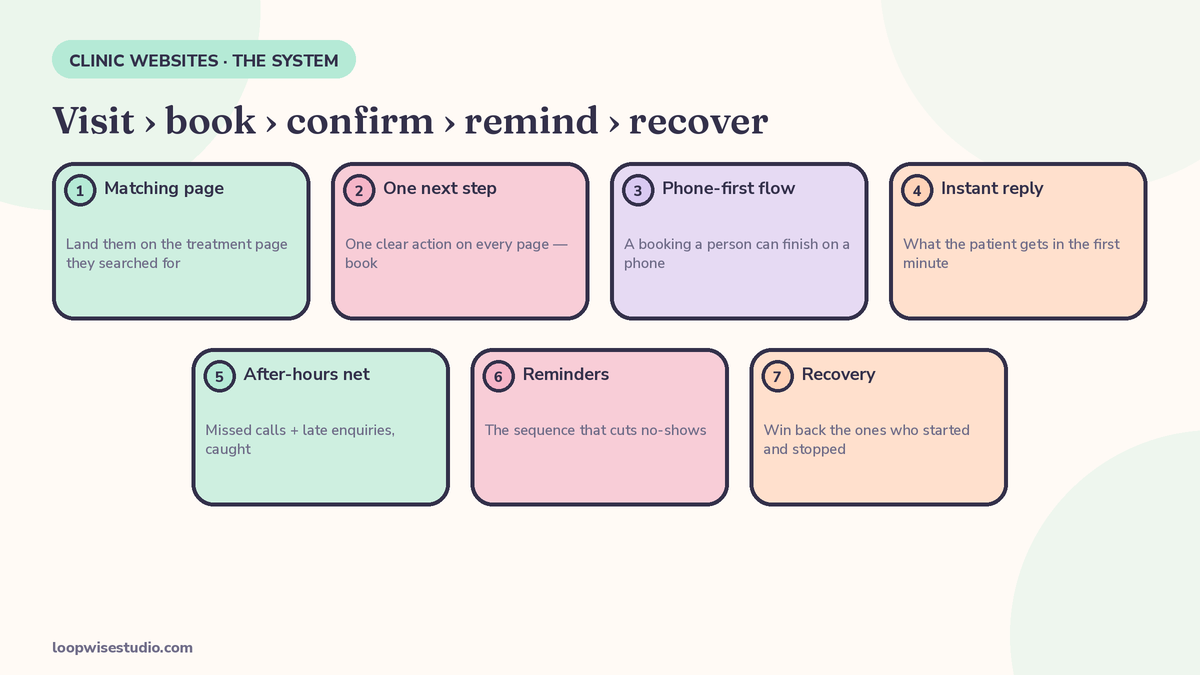
Every booked appointment on a clinic website passes through the same chain:
Visit → treatment page → booking flow → confirmation → reminders → attended appointment
And wrapped around that chain, two safety nets:
- Capture: anything that reaches you outside the chain — a call, a message, a half-finished booking — gets answered fast.
- Recovery: anything that stalls — an unanswered enquiry, an abandoned booking, a no-show — gets a follow-up.
Most clinic websites only build the first half of the chain: pages and a booking button, then nothing — no instant reply, no after-hours answer, no reminders, no recovery. The seven steps below build the whole thing, and most clinics can put steps 1–4 in place with the tools they already have.
Step 1 — Land them on the page that matches what they searched
Nobody searches for “clinic services.” They search for the thing that hurts or bothers them: “physio for lower back pain,” “Invisalign consultation,” “laser hair removal prices.” If that search lands them on your homepage, they have to find the right page themselves — and most will not bother. They will pick the next result, which takes them straight to the treatment.
So the first step is structural: one page per treatment, written for that treatment only.
Each treatment page needs to answer, in order:
- What this treatment is, in plain language (no clinical jargon in the first paragraph)
- Who it is for — and honestly, who it is not for
- What the appointment involves and how long it takes
- What it costs, or at minimum a starting price or a range
- How to book it — a button that opens the booking flow for that treatment, not a generic contact page
That last point matters. A “Book now” button that drops the patient into a general booking screen, where they must find their treatment again in a long list, loses people at the final step. The button on the back-pain page should open the calendar already set to a back-pain assessment.
This is also how these pages get found: a page written around one treatment in one town is what search engines show for that search. The homepage cannot do that job for twenty treatments at once. Physio clinics can see the same structure applied to a specific market in our guide to online booking systems for physio clinics in New Zealand, where treatment pages carry the local search demand.
Step 2 — One clear next step on every page
Open any page of your site on your phone and count how many things it asks the visitor to do. Call us. Fill in the form. Follow us on Instagram. Read the blog. Book online. When a page asks for five things, visitors pick none of them — or the easiest one, which is leaving.
Pick one primary action for patient pages: book an appointment. Everything else is support for that action:
- A booking button that is visible without scrolling, and stays visible (a fixed bar at the bottom of the screen on mobile works well)
- A tappable phone number for people who would rather talk — on mobile, a phone number that cannot be tapped is a dead end
- A message option (WhatsApp or SMS) for people who will not call a clinic they do not know yet, which is a large share of new patients
Keep the other things on the site — blog, social links, newsletter — but demote them to the footer and navigation, not competing with the booking button mid-page.
One page, one job. A treatment page sells that treatment’s appointment; a pricing page explains prices and ends at the booking button. Every page should end with the visitor closer to a booked slot than when they arrived.
Step 3 — A booking flow a person can finish on a phone
This is where the largest number of almost-patients are lost, and it is almost always the form’s fault. Clinics ask for everything up front because the information is useful later — insurance details, medical history, date of birth, emergency contact. The patient, phone in one hand, sees a long form and decides to do it later. Later rarely comes.
The fix is to split the questions into two groups: what you need to hold the appointment, and what you need before the appointment happens. Only the first group belongs in the booking flow. The second goes out afterwards, in a separate intake form sent before the visit, when the patient is already committed.
| Ask during booking (to hold the slot) | Ask later (after booking, before the visit) |
|---|---|
| Name | Date of birth |
| Mobile number | Insurance or payment-plan details |
| Treatment or appointment type | Medical history and medications |
| Preferred day and time | Previous treatments elsewhere |
| One optional notes field (“anything we should know?”) | Emergency contact |
| How they heard about you |
Five fields, one of them optional. That is a form a person finishes in under a minute.
Three more details that decide whether the flow gets finished:
- Show real availability. If the calendar shows live slots, the patient books a specific time and is done. If the flow is really a request form (“tell us when you’d like and we’ll call you back”), say so honestly — but know it converts worse, because the patient leaves without an appointment and the chase becomes your problem.
- Let them book as a guest. Forcing account creation adds a password to invent and an email to verify. Take the booking first; create the account behind it if you need one.
- End on a confirmation screen that says what happens next. “You’re booked. We’ve texted you the details, how to find us, and how to move your appointment.” A blank thank-you page leaves the patient unsure it worked — and unsure patients book somewhere else as insurance.
Step 4 — The instant reply: what the patient gets in the first minute
The moment a booking or enquiry lands, the clock starts. The person has just chosen you — and is often still holding their phone with three other clinic tabs open. A reply that arrives in that moment closes the loop. A reply that arrives tomorrow morning competes with everything in between.
This does not mean a human has to be glued to a screen. The first reply is a job for automation, and it has exactly three jobs of its own: confirm you received it, restate what they booked or asked, and tell them what happens next. Here is what that looks like for a completed booking:
Hi Sarah, you’re booked in — Back Pain Assessment with Dr. Ahmed on Thursday 14 Nov at 10:30am. We’re at 12 Market Street (parking behind the building). Need to move it? Reply here or tap this link: [reschedule link]. See you Thursday.
And for an enquiry that is not yet a booking — the person asked a question instead of picking a slot:
Hi James, thanks for getting in touch about Invisalign. A consultation is £50, which comes off the treatment if you go ahead, and it takes about 30 minutes. You can grab a time here: [booking link]. If you’d rather talk it through first, reply to this message and we’ll come back to you this morning.
Notice what both messages do. They answer the obvious question (cost, duration), give one next step with a link, and leave the door open to a human conversation in the same thread. They do not say “your enquiry is important to us” or “a member of our team will be in touch within 24–48 hours” — the first is filler, the second is a promise to be slow.
Reply on the channel the patient used. If they messaged on WhatsApp, reply on WhatsApp; if they booked on the website, a text reaches them faster than an email they may not check until evening. Email is fine as the formal record — it should not be the only notification. If setting this layer up is the part you keep putting off, get a free audit and we will show you exactly where your replies currently stop.
If you want to know what this layer typically costs, our pricing breakdown covers it: how much a website with online booking costs a clinic sets out the market ranges and what drives them.
Step 5 — After-hours and missed calls: the enquiries your current system never sees
Clinics keep office hours. Patients search in the evening, on weekends, and on lunch breaks. A large share of your enquiries will always arrive when nobody is there to answer — that is not a staffing failure, it is just when people think about their teeth, their back, or their skin.
So the question is not how to staff the phone at 9pm. It is what happens to each of these after hours:
- A website booking — fine, if your booking flow is live around the clock. This is the strongest argument for real online booking over request forms: the diary is open even when the clinic is not.
- A form enquiry or email — gets the instant reply from Step 4, which holds the person until morning, plus a human follow-up first thing.
- A phone call — this is the one that usually vanishes. It rings out, or reaches a voicemail nobody enjoys leaving, and the caller phones the next clinic on the list.
The missed call is the most expensive of the three, because the intent is highest — the person wanted to talk to you, now. The fix is simple: when a call is missed, the caller automatically gets a text within a minute. We wrote a whole article on how this works for med spas, and the mechanics are identical for any clinic: missed call text back for med spas covers the setup and the wording. The short version: the text apologises, offers the booking link, and invites a reply — and a surprising share of callers book themselves from that one message.
Set this up once and it runs every evening, weekend, and holiday without being asked.
Step 6 — Reminders that cut no-shows
A booking made three weeks ahead is an intention, not a commitment. Life fills the gap: shifts change, the pain eases, the appointment is simply forgotten. Reminders protect the booking you already won — and they work best as a short sequence, not a single nudge the day before.
| When | Message job | Example |
|---|---|---|
| At booking | Confirm and anchor | “You’re booked: Thursday 14 Nov, 10:30am. Add it to your calendar: [link]” |
| 24 hours before | Confirm or release | “Still good for tomorrow at 10:30? Reply YES to confirm, or tap here to move it: [link]” |
| 2–3 hours before | Final nudge + logistics | “See you at 10:30 today. We’re at 12 Market Street — parking behind the building.” |
| After a missed appointment | Recover, don’t scold | “Sorry we missed you today — these things happen. Want to grab another slot? [link]” |
Two details make this sequence work instead of annoying people:
Ask for a reply. A reminder the patient can answer (“reply YES”) does two things a one-way notification cannot: it surfaces problems early — the person who replies “actually I can’t make it” at the 24-hour mark gives you a slot you can offer to someone else — and it gives you a truthful attendance picture before the day starts.
Make moving the appointment easier than skipping it. Every reminder should carry its own reschedule link. A patient who has to phone during office hours to move an appointment will often just not show up instead; a patient who can move it in two taps usually does — and a moved appointment is a kept booking, not a no-show.
Keep the tone human throughout. These messages come from your clinic’s number, in your clinic’s voice, and patients reply as if a person sent them — because as far as the relationship is concerned, someone did.
Step 7 — Recover the ones who started and stopped
Even a good system leaks at the edges. Three groups showed real intent and then stalled, and each gets a specific follow-up:
The abandoned booking. They picked a treatment, maybe picked a time, and never finished. You know this happened because your system saw the visit — or because they enquired first and then went quiet. One follow-up, sent within the hour while the intent is still warm, does the work:
Hi Emma, it’s Lakeside Physio — you were booking a sports massage earlier and the page may have glitched. Your slot isn’t held, but there are still times this week: [booking link]. Or reply here and we’ll sort it for you.
The unanswered enquiry. They asked a question, you replied (Step 4), then silence. One more message the next day — not a chase, a useful nudge with the answer repeated and the booking link again — catches people who got distracted mid-conversation. After that, stop. Two follow-ups is persistence; five is harassment.
The no-show. Send the recovery message from Step 6 the same day, while they still feel a bit guilty about it. People who no-show once and are treated decently mostly rebook; people who are fined, scolded, or ignored mostly become someone else’s patients.
None of this needs a marketing platform. It is three short automations attached to events your booking system already knows about: started-but-not-finished, asked-but-not-booked, booked-but-not-attended.
What to measure every week
You cannot tell whether the system is working by looking at website traffic. Five numbers, checked weekly, tell you almost everything:
| Number | Where to find it | What it tells you |
|---|---|---|
| Bookings started vs finished | Booking tool reports | A big gap means the flow (Step 3) is leaking |
| Enquiries answered within 5 minutes | Inbox / automation log | Whether Step 4 is actually firing |
| Calls missed | Phone system / call log | The size of the after-hours problem (Step 5) |
| No-show rate | Diary vs attended appointments | Whether the reminder sequence is doing its job |
| Recovered bookings | Replies to recovery messages | What Steps 5 and 7 are worth in appointments |
Do not aim for perfection on any of them. Aim to know the number and watch it move as you fix each step. If bookings started is high and finished is low, your problem is the form, not your marketing.
A note on cost: the pieces above are mostly configuration. You need a website with treatment pages, a booking tool with live availability, and a messaging setup for the replies and sequences. What it costs depends mainly on whether you are replacing the website or adding the system to the one you have — which is what a proper quote should separate out before you commit. For a single-specialty worked example, our guide to an online booking website for physical therapy clinics builds the same chain around a text reminder sequence.
One short privacy note: keep clinical detail out of text messages and chat threads. Reminders should name the appointment type and time, nothing sensitive; intake and medical history belong in your practice system, collected through proper forms after booking. If you want a second pair of eyes on your current setup before changing anything, get a free audit and we will map your chain, step by step, against the one in this article.
Frequently asked questions
Do I need all seven steps, or can I start with some?
Start with Steps 3 and 4 — a short booking flow and an instant reply. They fix the point where most visitors are lost and make every later step work better. Then add reminders (Step 6): protecting bookings you already have is cheaper than winning new ones. After-hours capture and recovery (Steps 5 and 7) come next.
My clinic already has online booking. Why isn’t it enough?
Because booking is one link in a chain. A live calendar behind a long form still loses people at the form; a completed booking with no reminders still produces no-shows; and a booking system does nothing for the person who phoned at 8pm and got no answer. What surrounds the tool decides how much of your demand it catches.
Will automated messages put patients off?
Badly written ones do. The messages here work because they are short, specific to the person’s own appointment, and easy to reply to — they read like a good receptionist, not a marketing blast. Keep marketing messages separate from appointment messages: patients welcome “your appointment is tomorrow at 10:30” and resent “20% off this week” in the same thread.
What if my patients are older and not comfortable booking online?
Then the system still helps them. The tappable phone number stays on every page, the missed-call text gives them a way back when the line is busy, and text reminders reach patients who would never open an app. Online booking is one door into the diary, not the only one — every door should lead to the same diary and get the same follow-up.
How long does it take to set this up?
Steps 1–4 are typically days of configuration on an existing website, not a rebuild. The longer part is content: one decent page per treatment takes writing time. The messaging sequences are a one-time setup that then runs on its own. If the website needs replacing, that is a bigger job — but you can still switch on the instant reply and missed-call capture first, on the site you have.
Can I do this with the booking software I already have?
Usually, yes. Most established booking tools offer live calendars, automated confirmations, and reminders; the gaps are normally the instant enquiry reply, the missed-call text, and the recovery messages, which sit in a layer around the tool rather than inside it. Before switching software, check whether the tool is actually the problem — the flow, the form, and the follow-up around it fail more often than the tool itself.