Free Clinic Website Audit Checklist: Find Lost Bookings
The full checklist, free on this page: 30 items in 6 sections to score your clinic website, find exactly where your bookings leak out, and fix them in order.
Here is the checklist, in full, on this page — no form, no email gate, no “book a call to receive it.” Most clinic website audits offered online work the other way: you hand over your details first and get a vague report back, or you find a generic website checklist (speed, SEO, mobile) that never asks the only question that matters — where do people who wanted to book with you give up? This one is built for that question only. Thirty items, six sections, about fifteen minutes. Score honestly and you’ll know where your bookings are leaking.
How the scoring works
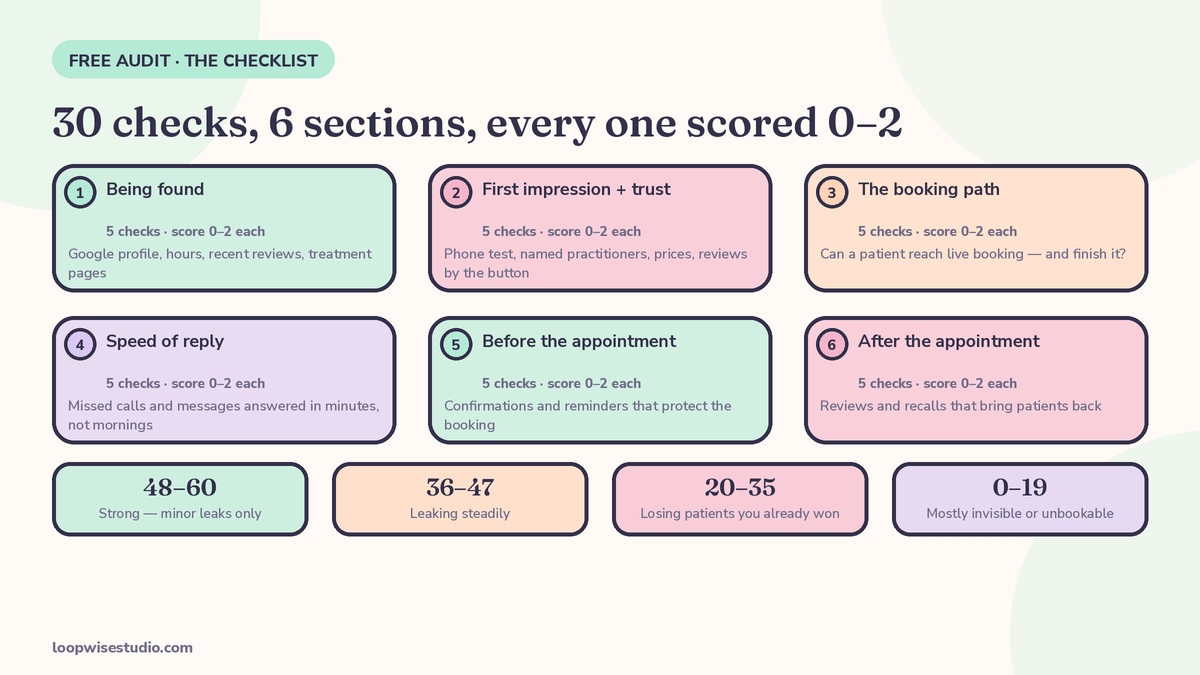
Score every item:
- 0 — not in place at all
- 1 — partly in place, manual, or works sometimes
- 2 — in place and working without anyone having to remember it
Maximum score is 60. Be strict: if a thing only happens when your best receptionist is on shift, that’s a 1, not a 2. The point isn’t a good score — it’s finding the zeros.
How to run this audit properly
Do it as a patient, not as the owner. That means:
- Use your phone, on mobile data — not the office computer on wifi where your site always loads instantly.
- Start from Google, not your bookmarks. Search for your main treatment plus your town, the way a stranger would, and see where you actually appear.
- Try to book a real appointment and time it. If you give up, hesitate, or have to hunt for anything, score the item down — patients are less patient than you.
- Call your own clinic twice: once during your busiest hour, once after closing. You’re testing what a caller experiences, not whether your team is good.
- Send yourself an enquiry through your contact form and your social channels, and note what comes back — and when.
Score as you go. Don’t fix anything mid-audit; you’ll blur the picture. The whole pass takes about fifteen minutes.
Section 1: Being found
Patients can’t book a clinic they never find. Check:
- ☐ Your Google Business Profile lists every treatment you offer as a service — not just your clinic name and category.
- ☐ Your opening hours on Google are correct, including holidays and late evenings.
- ☐ A patient can reach live booking in one tap from your Google profile.
- ☐ You have recent reviews — some from the last 30 days, not only from last year.
- ☐ Each main treatment has its own page on your website, titled the way patients search for it.
Section 2: First impression and trust
A visitor decides in seconds whether this clinic looks like the right one — and “looks like” is doing real work: they’re judging your competence from your website’s care and clarity, because it’s the only evidence they have. Clinics lose patients here quietly, because the visitor never makes contact and never tells you why. Check:
- ☐ Your site loads fast and reads properly on a phone — test it on yours, on mobile data, not office wifi.
- ☐ The practitioners are named and photographed — real people, not stock models.
- ☐ Prices, or honest price ranges, are visible without having to call and ask.
- ☐ Reviews or patient feedback appear on treatment pages, near the booking button — not only on a separate testimonials page.
- ☐ The first screen of your homepage says what you treat, where you are, and how to book.
Section 3: The booking path
This is where most of the money leaks. Check:
- ☐ There is a real booking option with live availability — picking a slot books it, it doesn’t send a request into an inbox.
- ☐ A “book” button is visible on every page, including on mobile without scrolling.
- ☐ Booking takes three steps or fewer: service, time, details.
- ☐ The intake form is sent after the slot is held, not demanded before it.
- ☐ The patient gets an instant confirmation — message on screen plus a text or email — not silence until a human replies.
If items 11–15 scored low, you’ve found the usual suspect. A med spa owner we wrote about in why your med spa website gets traffic but no bookings had visitors, rankings and a contact form — and a diary that stayed empty, because the journey ended at “we’ll get back to you.”
Section 4: Speed of reply
Enquiries decay in minutes, not days. A person messaging three clinics about the same problem books with the one that answers — and evening enquiries are the test, because that’s when people actually sit down and look. Nobody expects the owner to live on their phone; they expect something back. Check:
- ☐ A missed call triggers an automatic text with a booking link — every time, including evenings.
- ☐ Website form submissions get an instant automatic reply, not just a place in tomorrow’s inbox.
- ☐ WhatsApp, Instagram or Facebook enquiries get a first reply within minutes during the day — automatically if no one is free.
- ☐ After closing time, an enquiry still gets a useful response: live slots, prices, a way to book now.
- ☐ Someone owns unread messages each morning — there’s a named check, not a hope.
Section 5: Before the appointment
A booked patient who doesn’t show up is a leak too — and an expensive one, because you’ve already spent the effort winning them. Most no-shows aren’t rude; they’re people who forgot, got nervous, or hit a problem and found rescheduling harder than disappearing. Every item in this section exists to make showing up the easiest option. Check:
- ☐ Every booking gets a reminder before the day — automatically, not when someone remembers.
- ☐ Rescheduling takes one tap from the reminder message — easier than just not turning up.
- ☐ Intake forms, prep instructions and directions arrive before the visit, without phone calls.
- ☐ High-value first appointments are protected — deposit, card details, or a plainly stated policy.
- ☐ A cancellation triggers an attempt to fill the slot — a waitlist message, not just an empty chair.
The order these fixes go in matters; our step-by-step on how to turn website visitors into booked appointments walks the whole chain from click to confirmed seat, including the reminder sequence.
Section 6: After the appointment
The visit ends; the system shouldn’t. This section is the one clinics skip entirely, and it’s the one that compounds: reviews bring new patients, recall brings back old ones, and both cost a fraction of advertising. If your Sections 1–5 are healthy and this one is empty, you’re refilling a bucket every month instead of letting it fill. Check:
- ☐ Patients are asked for a Google review automatically, at the right moment after a good visit.
- ☐ Follow-up and check-in messages go out for treatments that need them.
- ☐ Patients on repeat cycles (check-ups, maintenance, reviews) get a recall message when they’re next due.
- ☐ Lapsed patients — not seen in 9–12 months — get contacted at least once or twice a year.
- ☐ Every follow-up message contains a booking link, not a request to phone the clinic.
What your score means
| Score | What it means | What to do first |
|---|---|---|
| 48–60 | Strong — minor leaks only | Polish the lowest section; protect what’s working |
| 36–47 | Leaking steadily | Fix your lowest section first — it’s costing you bookings weekly |
| 20–35 | Losing patients you already won | Start with Section 3 (booking path) and Section 4 (reply speed) |
| 0–19 | Mostly invisible or unbookable | Basics first: profile, live booking, missed-call reply |
Whatever your total, your lowest section is your answer. Totals flatter; sections don’t. A clinic scoring 2s everywhere except a row of zeros in Section 4 is losing every evening enquiry it gets.
Also write down when you scored each item, and re-run the checklist after you’ve made fixes — ideally once a quarter, because systems drift: a text-back that worked in January quietly breaks when you change phone providers, a new team member stops sending review requests, a treatment page goes stale. The clinics that stay booked are rarely the ones that fixed everything once; they’re the ones whose systems get checked. Fifteen minutes, four times a year, is the whole maintenance cost of knowing.
The five items that score zero most often
When clinic owners run this list, the same items tend to come back zero. None of them are about design taste:
- Item 16 (missed-call text-back). The phone rings out during treatments, and nothing follows up. Owners usually fix this first once they’ve counted a week of missed calls.
- Item 11 (live booking). The site has a form, or a “call to book,” and the diary stays closed outside office hours — exactly when patients are looking.
- Item 8 (visible prices). Everything is “call for pricing,” which mostly generates calls the front desk can’t answer, and quiet exits from people who just wanted a number.
- Item 28 (recall). Patients due back simply aren’t contacted. The list already exists in your records; it just isn’t a system yet.
- Item 26 (review requests). Happy patients leave happy — and say nothing publicly, because nobody asked at the moment it would have been easy.
If your zeros match this list, you’re in normal company. The point of scoring is that normal is fixable, in a known order.
Worked example: find the leak in numbers
Scores are useful, but money is clearer. Here’s the method, with example numbers — yours will differ, and that’s the point: plug in your own.
Say 100 people decide to book with you this month. Watch what happens to them:
- 50 phone you. During treatment blocks your desk misses about a third of calls — count yours, most owners are surprised. That’s roughly 17 people who hear ringing and get no text back. Most don’t try again. 33 booked.
- 50 try online. They find a form instead of live slots. Say 1 in 5 complete it — 10 requests. Your team replies the next day; by then half have booked somewhere else. 5 booked.
Total: 38 of the 100 people who chose you actually land in your diary.
Now fix two items from the checklist. Missed-call text-back (item 16) recovers, say, half of those 17 callers — about 8 more bookings. Live booking instead of a form (item 11): if even 30 of the 50 online visitors complete a real booking, that’s 25 more than the form produced. New total: roughly 71 of 100. Same website traffic, same reputation, same team — the diary nearly doubles because two leaks closed.
You don’t need to believe these exact numbers. Run the method on your own: count last week’s missed calls, form submissions and no-shows, and do the same arithmetic. The leak is almost always bigger than it feels from inside the clinic. Your phone system or call log has the missed-call count; your inbox has the form count; your diary has the no-shows. Twenty minutes with those three numbers tells you more about your website than any analytics dashboard — because they count people, not page views, and people who had already decided to book with you are the most expensive ones to lose.
What to fix first
If everything scored low, don’t try to fix everything. Sequence it — and if you’d rather skip to the answer, get a free audit and we’ll score the 30 items for you and send the same sequence with your numbers in it.
- Reply speed (Section 4) — fastest to switch on, catches demand you’re already getting.
- Booking path (Section 3) — live slots and instant confirmation turn that demand into diary entries.
- Before the appointment (Section 5) — protects the bookings you’ve just started winning.
- Being found and trust (Sections 1–2) — now worth improving, because the extra visitors will actually convert.
- After the appointment (Section 6) — the compounding layer: reviews and recall that make every month easier than the last.
One more honest note before you start rebuilding anything: if the fixes involve a new website, it helps to know the normal price ranges first, so you can spot a padded quote. We laid them out in how much a clinic website with online booking costs — market ranges, clearly labelled, not a sales pitch.
Or have us run it for you
You’ve got the checklist — it’s yours, use it however you like. But if you’d rather not audit your own homework, this is exactly what our free audit is: we walk your patient journey as a patient would, score the same 30 items, count your missed calls and form leaks where the data’s available, and send you the findings with the fixes in order. No charge, no obligation to build anything with us afterwards. Get a free audit and we’ll run it.
FAQs
Is this checklist really the whole thing? Yes — all 30 items are above, free, with nothing held back for an email signup. It’s the same structure we use when we audit a clinic. The paid work, if you ever want it, is building the fixes — not learning what’s broken.
How long does the audit take to do myself? About fifteen minutes with your phone in hand. Test your own site and booking path on mobile as you go — several items can only be scored honestly by trying to book with your own clinic as a patient would.
What if I score well but bookings are still low? Then your leak is probably volume, not conversion — not enough people finding you in the first place. Look at Section 1 again, and at how many people actually visit your treatment pages each month. Conversion fixes multiply traffic; they can’t replace it.
My website is brand new. Should I still run this? Especially then. New sites routinely launch with a request form instead of live booking and no missed-call safety net — items 11 and 16 — because nobody specified them. Catching that in month one is far cheaper than in year two.
Does this apply to salons and med spas, or only clinics? All appointment-based businesses. The wording says clinic, but every item maps directly: treatments become services, patients become clients, and the leak points — forms, missed calls, no reminders, no recall — are identical.
What happens when I request the done-for-you audit? We score your site against this checklist, test the booking path ourselves, and report back what we found with the fixes in priority order. It’s free, and the report is yours to act on with us or anyone else.