Why Your Med Spa Website Gets Traffic but No Bookings
Traffic but no bookings? Run this 10-leak diagnosis on your med spa website: every leak has a 2-minute test, a clear fix, and an order to fix them in.
If your med spa website gets traffic but no bookings, the traffic is almost never the problem. In our experience, the cause is one or more of ten leaks between the visit and the booked appointment: the visitor lands on the wrong page, cannot find a price, cannot book in one tap, or sends an enquiry nobody answers in time. Each leak below comes with a two-minute test you can run on your own phone today, and a fix. Run the tests in order — the leaks are listed roughly in the order visitors hit them.
Why this matters now: Grand View Research put the US medical spa market at roughly $24 billion in 2025, and the American Med Spa Association (AmSpa) counts more than 11,000 med spas in the US. Your visitors are comparing you with several of them in the same ten minutes, on the same phone. The med spa that makes booking easiest wins the appointment — often not the one with the best treatments or the prettiest website.
How to run this diagnosis
You need your phone, mobile data (turn Wi-Fi off — your visitors are not on your office connection), and ten minutes per leak at most. For two of the tests, ask a friend who has never seen your website to do the tapping while you watch. Owners are the worst testers of their own sites — you cannot see the confusion a stranger hits.
Score yourself honestly as you go. Every fail is costing you bookings right now, from traffic you have already paid for. The fix order at the end tells you which fails to repair first — there is no point polishing treatment pages if enquiries die unanswered after they arrive. If you prefer a tick-box version, our free audit checklist for a clinic website that is losing bookings covers the same leaks as a printable list.
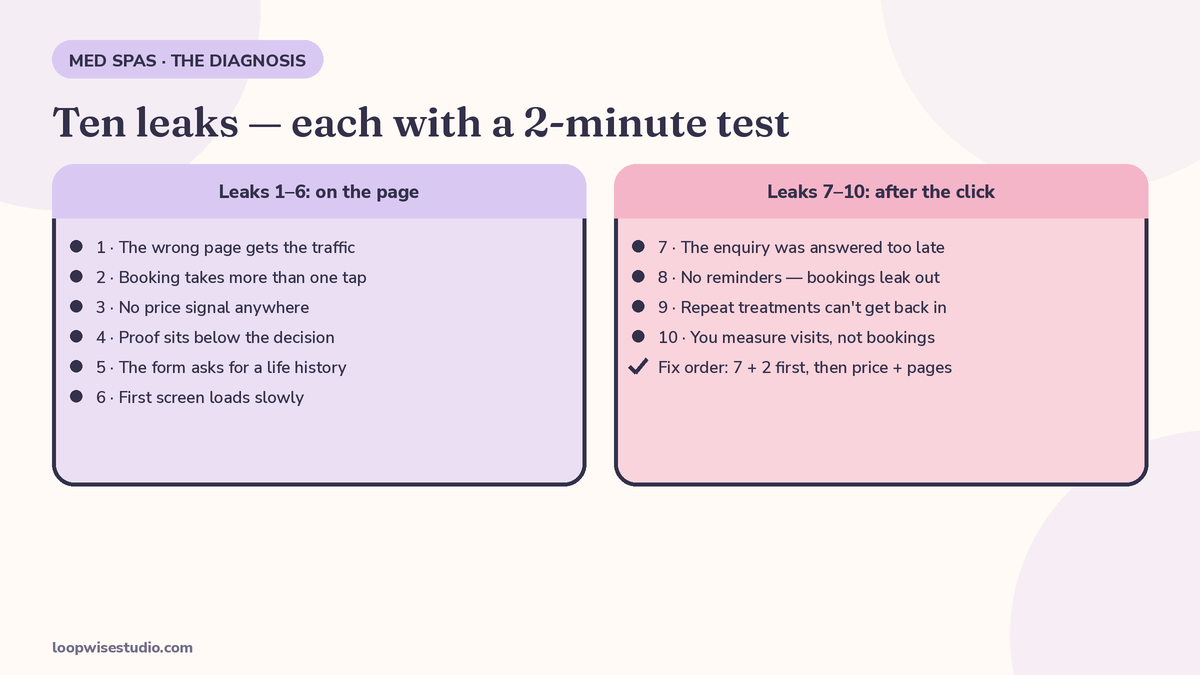
| # | Leak | The test, in short |
|---|---|---|
| 1 | Wrong page gets the traffic | Taps from your bio link to one treatment page |
| 2 | Booking takes more than one tap | A friend books a facial in under 10 seconds |
| 3 | No price signal | Price learnable on the page, no contact needed |
| 4 | Proof below the decision point | Proof appears before the booking button |
| 5 | Form asks for a life history | 5–6 fields or fewer to hold a slot |
| 6 | Slow first screen | Headline + button readable by a count of 3 |
| 7 | Enquiry answered too late | Your own 8pm enquiry gets a real, fast reply |
| 8 | No reminders | Sequence exists, with a 2-tap reschedule |
| 9 | No way back in for repeat treatments | A due-back message exists for one treatment |
| 10 | Measuring visits, not bookings | You can state last week’s website bookings |
Leak 1 — The wrong page gets the traffic
Symptom: Your ads, Instagram bio, and Google listing all point to your homepage. A visitor who clicked because of a Botox post or searched “lip filler near me” lands on a page about your med spa in general — your story, a slider of everything you offer — and has to go hunting for the one treatment they came for.
The 2-minute test: Open the page your Instagram bio links to, on your phone. Count the taps to reach a page about one specific treatment, with its price signal and booking button. More than one tap is a fail.
The fix: Every ad, post, and listing should land on the page for the treatment it mentions. Your homepage’s job is to route people to treatment pages, not to receive campaign traffic. If you have no page per treatment, that is the deeper problem — the full page-by-page breakdown is in our guide to what should be on a med spa website to get more bookings.
Leak 2 — Booking takes more than one obvious tap
Symptom: Somewhere on the page there is a “Contact us” link, a phone number in the footer, and maybe a booking button — below a photo gallery, in a colour that blends into the design. The visitor ready to book right now has to search for how.
The 2-minute test: Give your phone to your friend. Say: “Book a facial.” Start a timer. If they are not inside a booking flow, looking at real times, within one obvious tap and ten seconds, fail.
The fix: One booking button, in one consistent place, on every page: visible at the top, and pinned in a bar at the bottom of the screen on mobile, always under the visitor’s thumb. Beside it, a tappable phone number and a message button. Remove anything competing with those three at the top of the page.
Leak 3 — No price signal, so visitors assume the worst
Symptom: Your treatment pages describe results, technology, and how the treatment works — and never mention money. The visitor’s unanswered question is the one they care about most, so they leave to find a med spa that answers it. Silence on price does not read as “premium.” It reads as “more than I can afford,” or “there will be a hard sell at a consultation.”
The 2-minute test: Open your three most popular treatment pages. For each: can a stranger learn what it costs — exact price, “from” price, range, or at least the consultation cost and whether it comes off the treatment — without contacting you? Any page that fails is leaking.
The fix: You do not have to publish a full price list. A “from $X” figure, a range, or per-session pricing all work — what matters is that the number sits with the treatment description and the booking button, so the visitor can decide on one screen. If prices depend on assessment, say so and price the consultation instead; a known fee converts better than silence.
Leak 4 — Proof exists, but sits below the decision point
Symptom: You have reviews, before-and-after photos, and happy clients — in a gallery page, a testimonials page, and the bottom of the homepage. Meanwhile the treatment page where the visitor decides has none of it, just text. Most visitors never reach your proof pages; they decide on the treatment page or not at all.
The 2-minute test: Open a treatment page and scroll at a real visitor’s speed. Note where the first proof appears — a review quote, a rating, a consented before-and-after. If you pass the booking button before any proof, fail.
The fix: Move proof to where decisions happen. Two or three consented before-and-afters and a short review quote belong on each treatment page, next to the price and the button; your star rating and review count belong near the top of the page, not only in the footer. The proof does not change — its placement does.
Leak 5 — The form asks for a life history
Symptom: Your enquiry or booking form has ten or more fields: date of birth, address, insurance, how they heard about you, a medical questionnaire — before they have even secured a time. On a phone, every extra field costs you a share of the people who started it.
The 2-minute test: Count the fields, including dropdowns. More than five or six to secure an appointment is a fail. Bonus check: does the form work with your thumb, one-handed, with autofill? If you have to pinch and zoom, so do they.
The fix: Booking should ask only for what holds the slot: name, mobile number, treatment, preferred time, one optional notes box. Everything else — history, consent forms, intake questions — gets collected after the booking exists, sent with the confirmation, when the client is committed.
Leak 6 — The first screen loads slowly on a phone
Symptom: Your site looks fine on the office desktop — but on a phone, over mobile data, the first screen takes long enough that visitors leave before it finishes. Big hero videos, uncompressed photos, and heavy themes are the usual causes, and med spa sites are heavy with all three.
The 2-minute test: Wi-Fi off. Clear your browser, open your homepage, and count out loud: one-one-thousand, two-one-thousand, three-one-thousand. If you cannot read the headline and see the booking button by three, fail.
The fix: Compress the images (this alone fixes most cases), remove or poster-frame the hero video on mobile, and strip any plugin the page does not need. If the count is still bad after that, the hosting or theme is the problem and it is worth paying to fix — speed is the front door.
Leak 7 — The enquiry was answered too late
Symptom: This is the leak almost no website audit finds, because it is not on the website. A visitor does everything right: finds the treatment, likes the price, sends an enquiry or a DM at 8pm. The reply comes the next morning — or their lunchtime call rang out while the front desk was with a client. By the time you answer, they have booked with the med spa that answered in five minutes. Your analytics show a healthy visit and an enquiry; your diary shows nothing.
The 2-minute test: Tonight, after you close, submit your own enquiry form and DM your own Instagram from a personal account. Time how long a real reply takes — not an automated “thanks for your message,” but an answer that moves the booking forward. Then check yesterday’s missed calls. Any enquiry that waited hours, or any missed call with no follow-up, is a fail.
The fix: Two layers. First, an instant automatic reply on every channel — form, DM, and missed call — that answers within a minute, acknowledges what they asked, and offers the booking link so keen clients can book themselves. Second, a human follow-up the same day for everyone who did not. Our system guide walks through the full chain: how to turn website visitors into booked appointments covers the instant reply, after-hours capture, and recovery messages with example wording. This leak is usually the most valuable fix on this list, because it rescues demand you have already won.
Leak 8 — No reminders, so won bookings leak back out
Symptom: Clients book — and then do not show. The appointment was made three weeks ago, life happened, and nothing from your med spa landed in between to hold it. Every no-show is a booking your website did convert, leaking out at the last step.
The 2-minute test: Book a test appointment with yourself for next week. Note what you receive between now and then: a confirmation only, or a sequence? Can you move the appointment from the message itself, in two taps, without phoning? Confirmation-only, or reminders with no way to reschedule, is a fail.
The fix: A short sequence — confirmation at booking, a reminder 24 hours before that asks for a reply and carries a reschedule link, and a brief same-day message with directions. Make moving easier than skipping, and clients who cannot come will move instead of vanishing, leaving a slot you can refill.
Leak 9 — Repeat treatments have no way back in
Symptom: Botox wears off. Laser courses have sessions. Facials are monthly. But once a client leaves, nothing invites them back at the right time — you rely on them remembering, or on a newsletter they ignore. Your website books first visits and abandons the cheapest bookings there are: the next visit of someone who already trusts you.
The 2-minute test: Pick a treatment with a natural cycle. What, exactly, reaches that client when their next session is due? If the honest answer is “nothing” or “the monthly newsletter,” fail.
The fix: A timed rebooking message keyed to the treatment, not the calendar — sent when the next session is due, with a booking link for that treatment. Your booking system already knows who had what, and when; this is a settings-and-messages job, not a marketing campaign.
Leak 10 — You are measuring visits, not bookings
Symptom: Your reports show traffic going up, so everyone assumes the website works — while the diary says otherwise. Nobody can tell you which treatment page produces bookings, or how many bookings were started and abandoned.
The 2-minute test: Answer these from your actual data, right now: How many bookings did the website produce last week? Which treatment page produced the most? How many enquiries arrived after hours? If you cannot answer at least the first, fail.
The fix: Track four numbers weekly: bookings, enquiries and time-to-reply, missed calls, and no-shows. Every tool in the chain can report its piece. This is also what makes the other nine fixes safe to spend money on: you can see each leak close.
The fix order for a med spa — and what it is worth
Fix in this order, because it follows the money:
- Leak 7 (answered too late) and Leak 2 (one-tap booking) — whether today’s demand converts at all.
- Leak 3 (price signal) and Leak 1 (right landing page) — whether visitors reach the booking step.
- Leaks 5, 6 and 4 (form, speed, proof placement) — friction and trust on the path.
- Leaks 8, 9 and 10 (reminders, rebooking, measurement) — protecting what the first fixes win.
What is one leak worth? Do this arithmetic with your own numbers — these are stated assumptions, not industry statistics, so replace them with your figures. Say your site gets 1,000 visits a month and 20 become bookings: a 2% visit-to-booking rate. Say the average first treatment is worth $250. If fixing the top leaks doubles the rate to 4% — same traffic, nothing new spent on ads — that is 20 extra bookings and roughly $5,000 a month in additional revenue, before rebooking. Even at a quarter of those numbers, one repaired leak usually pays for the whole repair: conversion fixes multiply traffic you already have.
If you would rather have the tests run for you, that is what our free audit is — get a free audit and we will run all ten leaks against your live site and hand you the fix order in writing, whether you hire us or not.
Frequently asked questions
How do I know it is a leak and not just bad traffic?
Bad traffic gives you few enquiries of any kind and visitors who leave in seconds from every page. Leaks give you the confusing pattern this article is about: decent visits, some enquiries, and a diary that matches neither. The tests above separate them — if your pages pass, look at traffic quality next; if they fail, traffic was never the binding problem.
Which single leak is most common in med spas?
In our audits, the answered-too-late leak (Leak 7) and the missing price signal (Leak 3) show up most often, and they compound: a price-shopper who enquires at 8pm and hears nothing until morning has usually booked elsewhere. Both are also among the cheapest to fix — neither requires a new website.
My website is new and looks great. Can it still leak?
Yes — design quality and booking performance are different things. Several leaks here (form length, proof placement, mobile speed, the after-hours reply) are invisible in a design review and only appear when you run the tests as a stranger, on a phone, at night. A beautiful site with a ten-field form leaks exactly as fast as an ugly one.
Should I fix these myself or hire someone?
Leaks 2, 3 and 4 are mostly edits — button placement, price signals, moving reviews — and a competent owner or freelancer can do them in days. Leaks 5 and 6 may need your developer. Leaks 7, 8 and 9 are systems work: they connect your website, phone, and booking tool so replies, reminders, and rebooking happen automatically. That is the part most med spas hand to a specialist, because it has to keep working when nobody is watching.
How long before I see results after fixing leaks?
The reply-speed and booking-path fixes show up within a week or two, because they act on demand that is already arriving. Rebooking and reminder fixes build over one treatment cycle. If a month passes with no movement in the four numbers from Leak 10, the diagnosis was wrong somewhere — re-run the tests.
What if I run the tests and my site passes all ten?
Then your website is not the bottleneck, and you have saved yourself a pointless rebuild. Look next at traffic quality (are the right people, in your area, reaching the treatment pages?) and at capacity — some med spas “leak” bookings because the diary has no slots worth offering at the times people want. If you want an outside check on your own results, our free audit runs the same ten tests plus the follow-up chain — get a free audit and compare notes.