Online Booking Website for Physical Therapy Clinics, With Text Reminders
A booking website for physical therapy clinics that handles plans of care, referral intake and a full text reminder sequence — on top of the EMR you already run.

A physical therapy booking website with text reminders needs to do three things ordinary schedulers don’t: book a plan of care rather than a single visit, collect referral and insurance details at booking, and run a reminder sequence where the patient can confirm or reschedule by replying to a text. Most PT clinics are sold a whole new platform to get this. You don’t need one — the website and reminder layer can sit on top of the EMR you already run.
Search for this today and you’ll find software product pages: PT-specific EMRs, generalist schedulers with a physical therapy landing page, patient portals. Every one answers a slightly different question (“buy our platform”) than the one you asked (“what should our booking website do, and how should the text reminders work?”). This page answers the question you asked: the website spec, the full reminder sequence with copy, what the big platforms make unnecessarily hard, and how the layer fits over your existing system.
Why PT booking is not normal booking
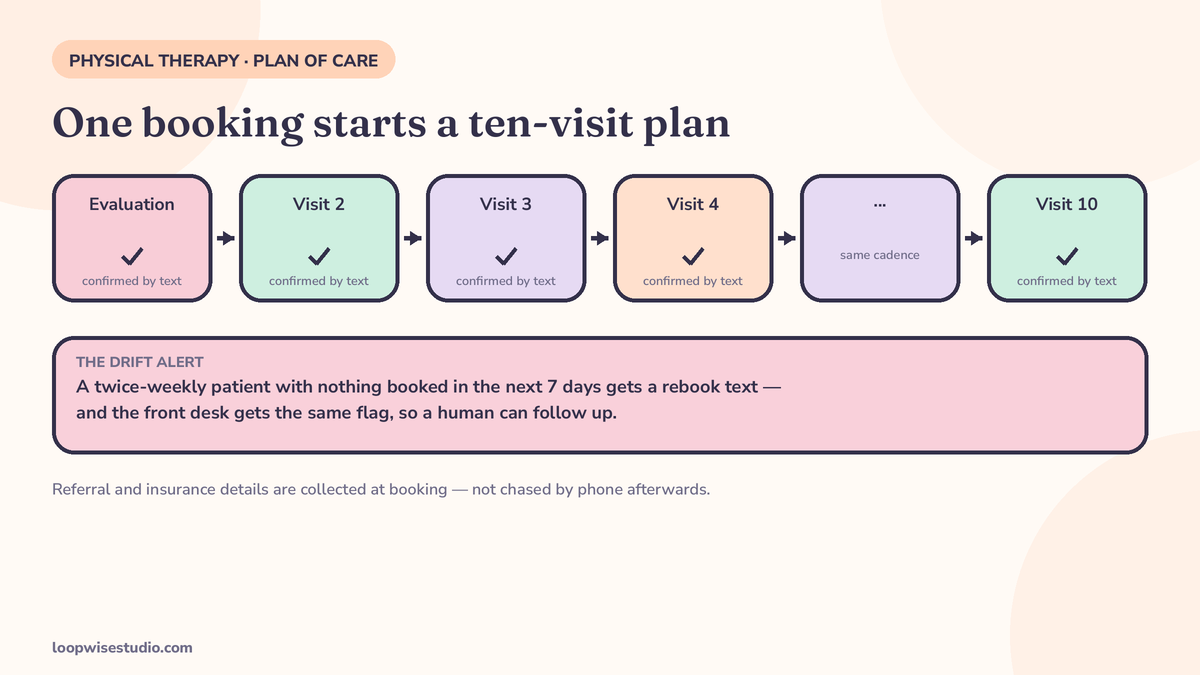
A PT patient is not booking a haircut. They’re booking visit 1 of a plan — an evaluation, then a course of follow-ups at a cadence that matters clinically. That changes what “online booking” has to handle:
- Two different products. An evaluation is long, one-per-patient, and gated by intake. A follow-up is shorter, recurring, and should be nearly frictionless to book and move. A booking page that treats them the same serves neither.
- The plan is the retention. A patient who drifts from twice a week to “I’ll call when it hurts less” is quietly discharging themselves. The booking system’s real job is keeping cadence — and noticing when someone falls off it.
- Admin rides along. Physician referrals, visit authorizations, insurance details — PT has an intake burden most appointment businesses don’t. If booking doesn’t collect it, your front desk collects it by phone tag instead.
This is the same basic truth behind our broader work on booking websites for hands-on clinics — see our guide to online booking websites for chiropractors and physio clinics — with the text-reminder layer built out in full below.
The website spec: what your booking page must do
Visit types with real durations. Evaluation, follow-up, re-evaluation, and any specialty services as separate bookable types, each with its true length and its own rules (evaluations perhaps limited per day; follow-ups more flexible).
Therapist-specific diaries. Patients in a plan are loyal to a therapist, not a clinic. Booking must show their therapist’s availability first, offer a colleague only as a clear alternative, and never silently switch the patient to someone else.
Intake at booking, not after. Name, contact, reason for visit in plain words, referring physician (with an upload or “my doctor is sending it” option), insurance provider, and — where relevant — authorization status. Collecting this during booking is what turns a booking into a workable first visit instead of a front-desk phone call. It also explains why so many patients research you first: according to Setmore’s page, citing a Software Advice survey, 94% of patients read online reviews when evaluating healthcare providers — your website is being judged before the booking page ever opens.
Standing series, not one-off bookings. Most of a PT diary is the same patient at the same time each week. The booking page should let the front desk (or the patient, within rules you set) place the whole series at the evaluation — same therapist, same slot — and then manage exceptions visit by visit. A system that makes a twice-weekly patient rebook every single visit by hand will manufacture drift all by itself. It should also handle the natural variants: a second location, a covering therapist during holidays (flagged clearly to the patient, never a silent switch), and a waitlist for the popular early-morning and after-work slots, so a cancellation texts the waitlisted patient a one-tap claim instead of sitting empty. The drift problem this prevents is the same one orthodontic practices fight across two-year treatment plans — our guide to reducing no-shows at an orthodontic practice works through the in-treatment version of it.
A confirmation that does the paperwork’s job. The instant a visit is booked, the patient gets a text (and email) confirming therapist, time, location, what to wear/bring, and the intake form if it isn’t done — plus a calendar file. Unfinished intake gets one polite nudge, not a surprise phone call the morning of the visit.
The text reminder sequence, in full
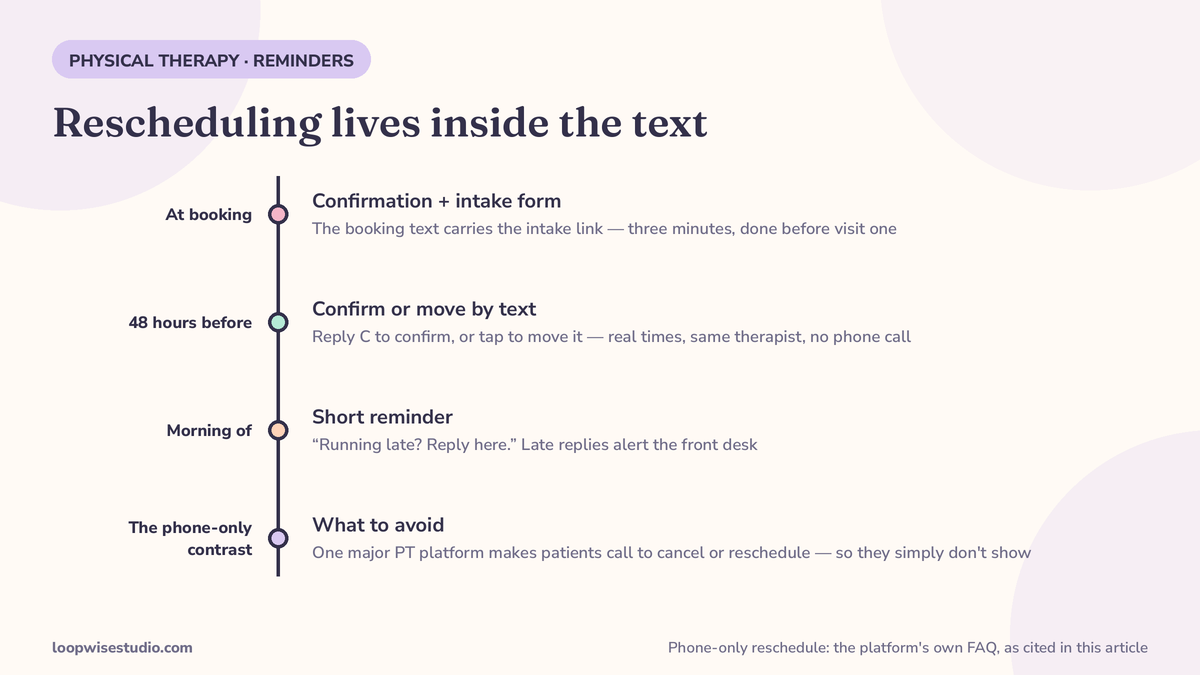
Reminders are where platforms get lazy — on the generalist schedulers ranking for this query, text reminders are a higher-tier feature sold by message credits, and nobody publishes an actual sequence. Here is the sequence, with copy:
| When | Message | What a reply does |
|---|---|---|
| At booking | “Booked: [Name] with [Therapist] at [Clinic] on [day, date], [time]. Add it to your calendar: [link]. Still need your intake form — 3 minutes here: [link].” | Intake link opens the form; replies reach the front desk. |
| 48 hours before | “Reminder: your visit with [Therapist] is [day] at [time]. Reply C to confirm, or tap here to move it: [link].” | C confirms. The link shows real alternative times with the same therapist and confirms the move instantly — no phone call. |
| Morning of | “See you at [time] today, [Name]. Running late? Reply here. Need to move? [link]” | Late replies alert the front desk; moves happen in the thread’s link. |
| After a missed visit | “We missed you today, [Name] — let’s keep your plan on track. Next openings with [Therapist]: [link].” | Rebooks into the plan cadence, flagged to the therapist. |
Two design choices in that table matter more than the wording. First, rescheduling lives inside the text. The biggest PT EMR on this query’s results page states in its own FAQ that patients can book online but must call to cancel or reschedule. Think about what that produces: a patient who can’t face phone tag at work simply doesn’t show. One-tap reschedule converts a chunk of no-shows into moved visits, which cost you nothing.
Second, every reply reaches a person. A reminder system patients can’t answer is a broadcast, and broadcasts get ignored. Two-way texting with the front desk owning the inbox during opening hours is what makes the sequence feel like service rather than spam.
When a patient drifts off the plan
The most valuable message in PT isn’t a reminder — it’s the drift alert. Build the system to watch cadence:
- A patient on a twice-weekly plan with nothing booked in the next 7 days gets a gentle rebook text with their therapist’s openings.
- Your front desk (or the therapist) gets the same flag, so a human can follow up when the drift looks clinical rather than logistical.
- At discharge, book the maintenance/check-in visit before they leave, with the same reminder sequence attached — future-you thanks present-you.
One of the PT platforms in this space does offer an under-scheduled-patient alert with a rebook link, and it’s genuinely the right idea — it’s just locked inside a full EMR you’d have to migrate to. The alert itself is simple logic; it belongs in the layer, not behind a platform switch.
What the big platforms make hard — fairly stated
Balance matters here, because these are decent tools with real users:
- The EMR route (e.g. Prompt) is built for therapy’s multi-visit plans, includes reminders in the plan rather than as an add-on, and is the right call if you’re genuinely replacing your EMR. The trade-offs, from its own pages: patients must call to cancel or reschedule, and reminder messaging “can be customized, though not fully.” You’re also signing up for a migration to get a booking website.
- The generalist schedulers (e.g. Koalendar, Setmore) are cheap, quick, and embed on your existing site. The trade-offs: no plan-of-care logic, no referral/authorization handling — and text reminders sit in the paid tiers, metered by message credits on Koalendar’s pricing page, while Setmore’s headline reminder feature is email. PT is a landing page for them, not the product.
- The portal route (e.g. PtEverywhere) is PT-native — home exercise programmes, outcome tracking, self-scheduling — but portal-first means your patient needs an account and an app habit. A public booking page plus a text asks the patient to adopt nothing.
None of these is a booking website built for your clinic, with your intake, your therapists’ diaries, and a reminder sequence written in your voice. That’s the gap. Side by side:
| PT EMR (e.g. Prompt) | Generalist scheduler | Portal platform | Booking website + text layer | |
|---|---|---|---|---|
| Plan-of-care booking | Yes — its core strength | No | Partially | Yes — series booking built in |
| Text reminder sequence with copy | Included, limited customisation | Paid tier, credit-metered | Push notifications instead | Yes — written for your clinic |
| Reschedule without calling | No — phone only, per its FAQ | Varies | Inside the portal | Yes — one tap from the reminder |
| Referral/insurance intake at booking | Yes | Basic fields only | Yes | Yes — spec’d to your payers |
| Patient needs an account/app | Portal elements | No | Yes | No |
| Migration required | Full EMR migration | None | New platform | None — sits on your EMR |
The last row is the one clinics underestimate. Every platform route asks your team to change where the clinical record lives, or asks your patients to adopt something new, in order to fix what is really a front-door problem. Front doors should be replaceable without rebuilding the house.
If your front desk is drowning in scheduling calls in the meantime, our piece on reducing front desk calls with online booking covers the triage side of the same problem.
Keep your EMR: adding the layer on top
The build we recommend for most 1–5 therapist clinics:
- A booking website (or booking section on your current site) with your visit types, therapist diaries, and referral/insurance intake.
- The reminder sequence above, sent from your clinic’s number, two-way, owned by your front desk.
- Drift alerts and rebook links wired to your plan cadences.
- Bookings written to the diary your team already uses — the layer feeds your EMR’s calendar rather than replacing it.
No clinical-records migration, no retraining the team on a new system of record, no patient app to adopt. If you’d like us to spec this against your current setup — which EMR, which diary, where the calls pile up — get a free audit and we’ll map it before quoting anything.
What it should cost, and how long it takes
Honest answer: it depends on scope in ways a price list would fake. The variables are real — number of locations and therapists, whether your website needs rebuilding or just a booking layer, how much intake logic (referrals, authorizations) needs wiring. What we can promise is the shape: a fixed quote after a short audit, no per-message credit meters for your own reminders, and a timeline measured in weeks, not a platform migration’s months. Any vendor who prices your booking website without asking about your plan-of-care mix is pricing a generic scheduler, not this.
How you’ll know it’s working
Judge the layer on three numbers, monthly. Online share of bookings — if patients still mostly book by phone after three months, the page is failing, not the patients. Moved-versus-missed ratio — track how many appointments get rescheduled from a reminder link versus simply not attended; this is the number the one-tap reschedule exists to move, and it’s the fairest test of the whole reminder sequence. Plan completion — the share of patients finishing their prescribed visit count rather than drifting off mid-plan. If that third number rises, the system is doing clinical good as well as diary good, and it’s the figure your therapists will care about when they judge whether the new system is worth their habits changing. Report all three where the team can see them; a booking system the front desk doesn’t trust quietly gets worked around, and worked-around systems show up in the numbers within a quarter.
FAQs
Do we have to change our EMR to get this? No. The website and reminder layer sits on top — bookings land in the calendar your team already works from. Practices only migrate EMRs when they already wanted to; it’s not a prerequisite for online booking with proper text reminders.
Are the text reminders HIPAA-appropriate? Reminder texts should carry the minimum: name, therapist, date and time, and links — no clinical details. The setup should run through a provider that will sign a BAA, and intake forms belong on secure forms, never in the text thread itself. We spec this during the audit.
Can patients really reschedule by text? Yes — the reminder includes a link showing your real availability with their therapist; they pick a new time and both diaries update, with the front desk notified. This single feature does more against no-shows than any reminder wording, because it removes the phone call standing between the patient and a moved visit.
What about patients without smartphones? The sequence degrades gracefully: email reminders carry the same links, and your front desk still phones the patients who need phoning. Text is the default because it’s what most patients read, not the only channel.
Can it handle insurance and referral intake? Yes — that’s a core part of the spec. Referring physician, how the referral is arriving, insurance provider, and authorization details are collected during booking, so your team isn’t chasing paperwork by phone before visit one.
We already have reminders in our EMR. Is this still useful? Possibly not — check two things first. Can your patients reschedule from the reminder without calling? And does anything alert you when a patient drifts off their plan? If both answers are yes, keep what you have. If either is no, that’s the layer worth adding.
What does the front desk actually do differently day to day? Less phone tag, more inbox. Bookings arrive already carrying intake details, so the morning starts with a short list of exceptions — unfinished forms, drift flags, replies that need a human — instead of a voicemail queue. Most clinics feel the change in the first week as a quieter phone at the two peak moments: opening time, and the hour after lunch when every patient who meant to call “this morning” calls at once. Those peaks don’t disappear, but they stop being the whole job.
Your booking website should sell the plan, not just the first visit — and your reminders should let patients move appointments instead of missing them. If you want that built over the system you already run, get a free audit and we’ll start with your diary, not a demo reel.