Check the inputs first
A result is only as honest as the numbers you put in — especially the after-hours share. Pull it from your phone log, not from memory.

Free clinic tool · No email needed
After-hours enquiry loss calculator for med spas answers a question owners ask in plain language: the diary is closed, the patient is not. By morning they have usually booked elsewhere, and the clinic never knows the enquiry existed. Use your own numbers below — no email, no signup, nothing is sent anywhere. The result runs in your browser.

The phone rings at 9pm. Nobody is there to answer it, and nobody sees it in the morning.
The calculator
This after-hours missed call calculator for a med spa asks for your own split between calls that arrive in hours and out of hours, so the two are never added together by accident.
Reading the number
The total is a starting point, not a verdict. Three checks turn it into something you can act on.
Two losses, two fixes. Keeping them apart is what stops the number becoming a sales pitch.
A result is only as honest as the numbers you put in — especially the after-hours share. Pull it from your phone log, not from memory.
The breakdown shows where the loss actually sits: how many calls arrive out of hours, how many of those callers would have booked, and what that is worth.
After-hours and daytime losses are different problems with different fixes. Read them side by side, but never add them together and call it one number.
A useful sanity check
If the after-hours figure looks too large to believe, halve the would-book share and run it again. If the case for answering those calls still holds, the exact percentage is not doing the persuading — the leak is.
The maths
Every line below is visible in the result panel. Nothing is hidden inside a single impressive number, and the daytime figure never gets folded into the after-hours one.
Formula 1 · After-hours calls
After-hours calls = total calls × after-hours share
The share comes from your phone log: calls that arrived outside the hours your team is there to answer.
Formula 2 · Lost bookings
Lost bookings = after-hours calls × would-book share
There is no after-hours miss rate, because a call that arrives when you are closed has already gone unanswered. The would-book share is where you discount for people who would have booked online or called back.
Formula 3 · Money
Monthly loss = lost bookings × average treatment value
Yearly loss = monthly loss × 12. Money is rounded to whole units in the headline; the exact calculation stays underneath.
Formula 4 · Daytime, kept separate
Daytime loss = daytime calls × your daytime miss rate × would-book share × value
Daytime calls = total calls − after-hours calls. This figure uses the rate you enter and is shown on its own, never added to the after-hours total.
Worked example
800 calls · 40% after hours · 25% would book · 15% daytime miss · $200 per treatment. An example only, not a real clinic's data.
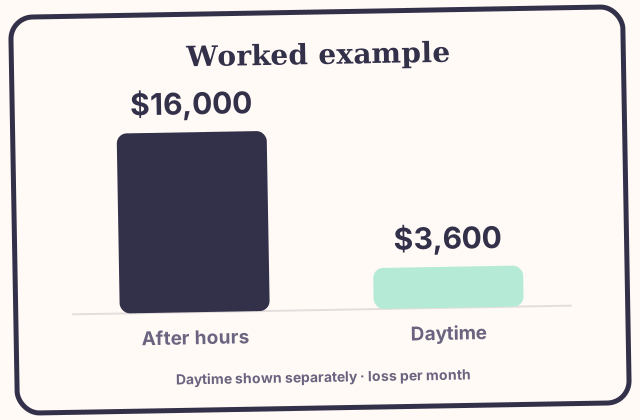
Change any input and the result changes — this example is arithmetic, not a prediction for your clinic.
Context
One published figure is worth knowing before you count your own. It is context, not a target.
41%
of patient calls arrive outside standard business hours
Industry call data cited in recent research. Not your figure.
Industry call data cited in recent research suggests roughly 41% of patient calls fall outside standard business hours.
Note on the evidence
That 41% is an industry figure, not your figure. The tool asks for your after-hours share from your own phone log.
From number to next move
Three steps, in order. None of them require a new tool or a new hire on day one.
Run the tool with last month's real numbers, not a guess.
Pick the single biggest number in the breakdown and fix that first — usually the after-hours share, because it is the one nobody is answering.
Re-run it after one month with the new numbers. If the number did not move, the fix did not work — change the fix, not the tool.
Questions
Plain answers, including the ones this calculator deliberately refuses to invent.
Export a month of call logs and count calls outside your opening hours, divided by total calls. If your phone system cannot do that, count one typical week by hand and use that share as a starting point.
No. An answer that only takes a message still loses patients. The tool measures bookings lost, so judge any fix by bookings recovered, not messages taken.
Then your after-hours phone loss is smaller and your online booking gap matters more. Use the website visitor-to-booking calculator for that side of the leak.
From cost to fix
The demo is a working booking flow, not a slide deck. Book as a patient, then flip to the owner view and watch the confirmation, reminder and waitlist steps happen without anyone making a call.
No prices are quoted on this page — final numbers come after a discovery conversation, as Loopwise always does.
Keep reading
The booking demo, the in-hours version of this leak, the no-show side of it, and the research behind our clinic work.
Book as a patient, then flip to the owner view and watch the confirmation, reminder and review request run automatically.
The same leak during opening hours: calls that ring out while the front desk is busy, priced with your own numbers.
Appointments that were booked and never attended — the other half of the leak, with the same browser-only approach.
606 med spas checked website by website. Most have online booking; very few have an instant way to respond.