Online Booking Websites for Chiro & Physio Clinics
Keep Jane or Cliniko — and fix the layer around it: a booking website with missed-call replies and recall flows built for chiro and physio clinics today.

If you run a chiropractic or physiotherapy clinic, you probably don’t need new booking software. Jane, Cliniko and similar tools already handle your diary well. What loses you patients is the layer around the software: a website that buries the booking link, an unanswered phone after 5pm, and a recall list nobody works. An online booking website built for chiro and physio clinics fixes that layer — your pages, your enquiry capture and your follow-up — and plugs straight into the system you already pay for.
This page covers what that website layer includes, how the chiropractic half differs from the physio half, and the recall automation almost nobody in this space is running.
You probably don’t need new booking software
Search this topic and you’ll mostly find chiropractic EHR roundups — ChiroTouch, ChiroFusion and the rest — comparing billing depth, claims handling and charting. That’s a different purchase. If your current tool books appointments, sends basic confirmations and keeps your notes, ripping it out is the most expensive way to fix a website problem.
Take Jane. In Rankite’s 2026 comparison of cloud-based chiropractic software, Jane is rated best for multi-discipline clinics (chiro plus physio, massage or acupuncture), its online booking experience is called the best in the set, and it has a community of more than 22,000 practitioners. The same roundup is honest about the weakness: Jane doesn’t speak chiropractic billing natively, so insurance-heavy US practices need to test the claims workflow carefully. That’s a software trade-off, and it’s manageable. What no roundup mentions is everything that happens before a patient reaches Jane’s booking page — and after they fall off your books.
The same applies to Cliniko and Halaxy in physio-heavy markets. If the diary works, keep the diary. Fix what’s around it. If Cliniko is the one you are weighing up, our Cliniko alternative comparison sets out what the platform includes and where clinics tend to outgrow it.
Where patients actually leak out
A new patient journey looks like this: they search “physio near me” on their phone, land on your site, look for two things — what you treat and how to book — and decide in under a minute. The leaks happen at predictable points:
- The booking link is a phone number. “Call to book” on a mobile screen, outside your hours, is a dead end. They book the clinic down the road instead.
- The booking page asks too much. A long intake form before they’ve even picked a time kills first visits. Intake belongs after the slot is held.
- Missed calls get no reply. Most small clinics can’t answer every call during treatment blocks. A call that rings out with no text-back is a patient who assumes you’re full or closed.
- Treatment pages don’t match how people search. Patients search by problem — “sciatica treatment”, “ACL rehab”, “frozen shoulder physio” — not by your internal service names.
- Nobody recalls lapsed patients. This is the big one for chiro and physio, covered below.
There’s a quieter leak too: the booking tool and the website telling different stories. Your site says you offer 60-minute initial assessments; the booking calendar offers a generic 30-minute appointment. Your site lists three practitioners; the booking page shows two. Every mismatch makes a patient stop and think — and stopping, on a phone, usually means leaving. Keeping the website layer and the diary in sync is unglamorous work, but it’s the difference between a booking page that converts and one that merely exists.
None of these are fixed by switching EHRs. All of them are fixed by the website and messaging layer.
The chiropractic half: short visits, care plans, recall
Chiro clinics run on volume: high numbers of short, frequent visits, walk-ins alongside booked appointments, and patients on multi-visit care plans. Your booking website has to reflect that rhythm rather than a one-off appointment model.
| Visit type | What the booking page needs |
|---|---|
| New patient consult | Longer slot, intake form sent after booking, clear price and what to expect |
| Standard adjustment | Short slot, fast rebook from the confirmation message itself |
| Report of findings / review | Booked in sequence with the plan, not left to the patient to remember |
| Maintenance visit | Triggered by recall timing (every 4, 6 or 12 weeks, per the patient’s plan) |
Two things matter most. First, rebooking should happen inside the confirmation flow — when a patient on a 12-visit plan books visit one, the page should offer the next slots immediately, while they’re holding their phone. Second, durations per visit type need to be set properly: a 45-minute new consult and a 10-minute adjustment can’t share one generic slot length, or your diary fills with gaps you can’t sell.
Walk-ins, acute slots and diary gaps
Chiro diaries also have two features generic booking pages handle badly. The first is the walk-in and the acute patient — someone whose back went this morning. If your online booking shows the first available slot as Thursday week, that patient books elsewhere today. Holding back a small number of same-day slots, released online in the morning, lets the website capture urgent demand without wrecking the planned diary. The second is the gap problem: short appointments booked at random intervals leave 10- and 15-minute holes nobody can use. A booking page that offers slots in a sensible sequence — filling from the edges of the day or around existing bookings — keeps the diary compact, which matters when your whole model is short visits at volume.
The physiotherapy half: assessments, follow-ups, plan-based rebooking
Physio gets half of this keyword and almost none of the content written for it, which is strange, because the booking journey is more structured than chiro’s — and easier to get right once it’s set up.
A physio patient journey usually runs: initial assessment (longer, 45–60 minutes, history and diagnosis) → treatment plan (a block of follow-ups at set intervals) → review and discharge or maintenance. Each stage needs different booking behaviour:
- Assessment bookings should ask the right pre-visit questions — injury type, how it happened, any scans — but after the time is reserved, not as a gate in front of it.
- Follow-up blocks should be bookable as a set. If the plan is twice a week for three weeks, offer the block. Making a patient book six separate appointments one at a time is how plans quietly fall apart at week two.
- Plan-based rebooking means the system knows where each patient is in their plan. Session 4 of 6 done? The reminder for session 5 should already be scheduled, with a nudge if it isn’t booked within the planned window.
- Class and group rehab sessions, if you run them, need capacity limits and a waitlist — different mechanics from one-to-one slots, and most generic booking pages handle them badly.
Insurer and funded-patient flows sit inside this too. If you see patients through insurers, workplace schemes or funded programmes, the intake step needs to capture the claim or referral details up front and tell the patient exactly what to bring — so your front desk isn’t chasing paperwork by phone before every first visit.
For the New Zealand market specifically, our guide to booking and reminders for physio clinics in New Zealand covers the local version of this layer. The American physical-therapy equivalent, with text reminders, is built out in our guide to an online booking website for physical therapy clinics with text reminders.
The recall system nobody is running
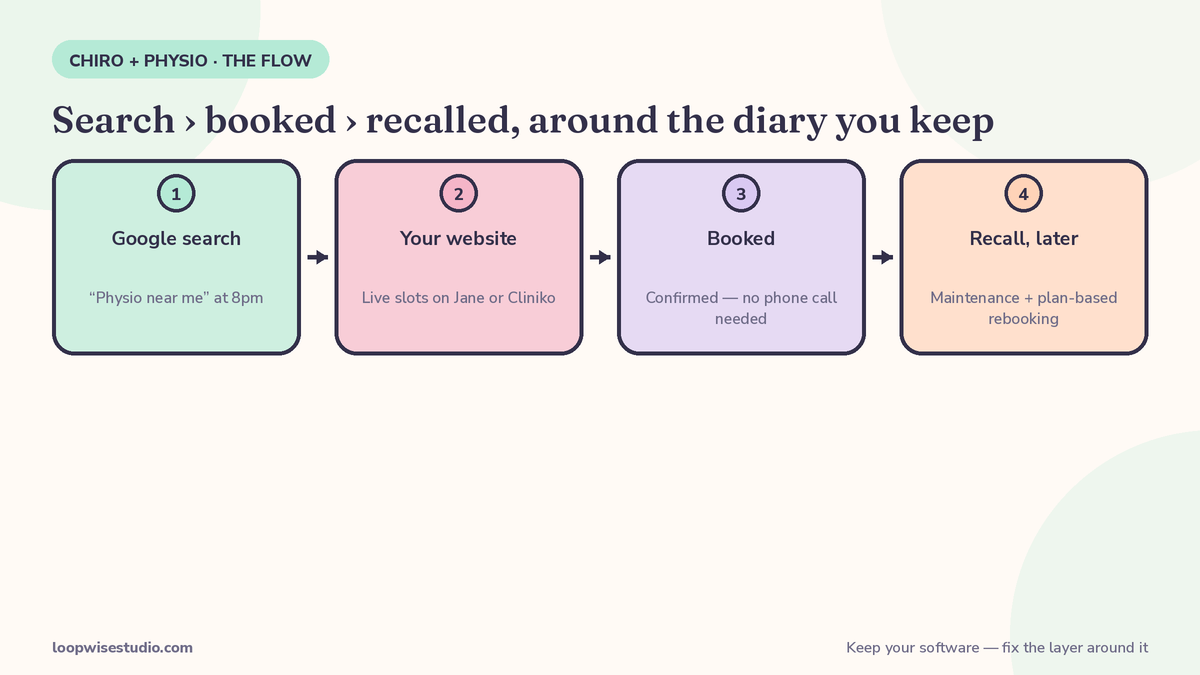
Here’s the gap we found when researching this page: across every roundup, vendor page and directory for chiro and physio booking, patient recall gets exactly one passing mention — in a directory blurb. Nobody treats recall as part of the booking system. For chiro and physio clinics, that’s leaving your cheapest bookings unbooked.
Your patient list is full of people who finished a care plan, felt better, and were told “come back if it flares up.” Most won’t — not because they don’t value you, but because nobody asked at the right moment. A recall system fixes the timing:
- Segment by plan type. Maintenance chiro patients, discharged physio patients, and lapsed mid-plan patients get different messages at different intervals.
- Time it to the plan. A maintenance patient due every 6 weeks gets a message at week 5. A discharged physio patient gets a check-in at the review point their physio set — not a generic blast three months later.
- Make booking one tap. The recall message links straight to live slots for their practitioner. No “call us to book.”
- Two touches, then stop. One reminder a few days later if there’s no reply. No chasing beyond that — you’re a clinic, not a call centre.
- Reactivated patients go back into the normal flow — confirmations, reminders, and the next recall date set at their visit.
| Patient segment | Recall trigger | Message job |
|---|---|---|
| Chiro maintenance plan | 1 week before their usual interval | “You’re due” + live slots with their chiropractor |
| Chiro plan finished, no maintenance set | 6–8 weeks after the last visit | Check-in: how’s it holding up? Offer a review slot |
| Physio discharged after a plan | The review point the physio set at discharge | Progress check + assessment slot if needed |
| Physio dropped off mid-plan | A few days after the missed session | Low-pressure rebook of the next plan session |
The timings above are examples — yours come from your own care plans. The important part is that the trigger exists at all, because at the moment, in most clinics, nothing fires.
If reminders and no-shows are a problem in the diary itself, the mechanics in our guide to reducing no-shows at appointment-based clinics apply to chiro and physio exactly the same way — confirm, remind, make rescheduling easier than not showing up.
What the website layer includes
| Layer | What it does | Who handles it |
|---|---|---|
| Treatment pages | One page per condition/service, written the way patients search | New — built around your existing site |
| Booking connection | Live slots from Jane/Cliniko/your current tool, embedded properly — not a link that drops patients into a bare calendar | Connected, not replaced |
| Missed-call text-back | Automatic text when a call is missed, with a booking link | New automation |
| Reminder sequence | Confirmation, reminder, easy reschedule — by text or WhatsApp | New automation on top of your diary |
| Recall system | Timed reactivation of maintenance and lapsed patients | New automation |
| Review requests | Sent after completed visits, while the result is fresh | New automation |
Clinics in Australia and similar WhatsApp-friendly markets often add WhatsApp as the reminder channel — we break down how that works in our article on online booking systems for Australian clinics with WhatsApp reminders. In the US, the same flow runs on SMS. The channel changes; the system doesn’t.
Five checks to run before you spend anything
You can size up your own leak in about twenty minutes, before talking to anyone:
- Book yourself. On your phone, on mobile data, try to book a first appointment at your own clinic. Count the taps, note where you’re asked to call instead, and see whether you get an instant confirmation. If the journey frustrates you, it frustrates patients who don’t already love you.
- Call yourself after hours. Ring your clinic at 7pm. What does a new patient get — a voicemail they’ll never leave, or a text with a booking link? Most patients who hit voicemail simply dial the next clinic on the list.
- Check your visit types. Open your online booking as a patient. Are new consults, adjustments, assessments and follow-ups all there, at the right lengths? Or is there one generic appointment that fits none of them?
- Count your recall list. How many patients finished a plan in the last year and have had no contact since? That number is your recall backlog — and every one of them already knows and trusts you.
- Ask the front desk. Which calls do they make most often that a message could have handled: reminders, rebooks, “are you due again?” calls? That list is your automation priority, in order.
If checks 1–3 fail, the problem is the booking website layer. If 4–5 fail, it’s the follow-up layer. Both are fixable without touching your clinical software.
How the setup works, step by step
- Audit. We look at your current site, your booking tool and your patient journey, and find where people drop off. You can start this yourself with our free audit checklist for a clinic website that is losing bookings.
- Pages. Treatment pages built around how your patients actually search, each ending in a real booking option.
- Connection. Your existing booking software wired into the site properly — right visit types, right durations, intake after the slot is held.
- Automations. Missed-call text-back, reminder sequence and recall flows switched on and tested with real scenarios from your clinic.
- Launch and check. We watch the first weeks of bookings with you and adjust timings and messages.
Not sure whether your site is actually losing you bookings, or just quiet? Get a free audit and we’ll walk your patient journey and show you exactly where it leaks — no obligation to build anything with us.
FAQs
Do I have to replace Jane or Cliniko to get a better booking website? No. If your diary and notes work, keep them. The website, the enquiry capture and the follow-up messages are a layer around your existing tool — that’s the part that usually leaks, and it’s the part we build.
Is this different from a chiropractic EHR? Yes. An EHR runs your clinical records, billing and diary. This is about what patients see and what happens automatically around the diary: your website pages, booking flow, missed-call replies, reminders and recall messages.
How does recall work for maintenance patients? Each patient’s plan sets their interval — every 4, 6 or 12 weeks, say. The system messages them shortly before they’re due, with a direct link to live slots with their practitioner. One follow-up if there’s no reply, then it stops.
Can physio patients book a whole treatment plan at once? Yes, and they should be able to. The assessment books first; once the plan is set, follow-up sessions can be offered as a block at the right intervals, with reminders tied to where they are in the plan.
What about patients booking through insurers or funded schemes? The intake step after booking captures claim, referral or case details and tells the patient what to bring, so your team isn’t chasing details by phone. The exact fields depend on which schemes you work with.
How long does it take to set up? It depends on how many treatment pages and automations your clinic needs, and how tidy your current booking setup is. We scope it after the audit and give you one fixed quote and timeline before any work starts. If you’d like us to look first, get a free audit and we’ll map it out.