Booking Website for Mobile IV Therapy and Wellness Clinics
A booking website for a mobile IV therapy business needs area checks, travel fees at checkout, screening before dispatch and membership booking. Full spec here.

If you run a mobile IV therapy or wellness business, this page is for you — the owner, not the customer. A booking website for a mobile IV business is not a clinic booking page with a different logo. You sell a visit to the client’s address, not a slot in your room. Your calendar is nurses on the road, not treatment chairs. Screening has to happen before anyone drives anywhere. And a large share of your revenue runs on memberships and groups, which generic booking tools barely understand. A website built like a normal clinic’s will leak bookings at exactly those four points — which is why so many mobile IV operators still end up booking by phone.
Here is the full spec: the four differences, the features that handle each one, and what generic tools leave you doing by hand.
The 4 differences, in one table
| A fixed clinic’s booking page | Your booking website | |
|---|---|---|
| What’s sold | A time slot in a room | A nurse visit to the client’s address |
| First question | “When?” | “Where?” — area and distance decide price and feasibility |
| Before dispatch | Intake can happen at check-in | Screening and consent must clear before the nurse leaves |
| Capacity | Rooms and chairs | Nurses, their locations, and drive time between visits |
| Revenue shape | Single appointments | Memberships, packages, groups and events on top |
Every feature below exists to handle one row of that table.
Difference 1 — you sell a visit to their address
A clinic’s booking flow asks for a treatment and a time. Yours has to ask for a location first, because location decides three things at once: whether you serve the address at all, what the visit costs, and which nurse can realistically take it.
The service-area checker. The first step of booking should be an address or ZIP/postcode field that answers instantly: in area, in area with a travel fee, or out of area. Today, most operators handle this with a suburb list on a page and a human confirming by text or phone. Driip IV in Minneapolis states its arrangement plainly on its own site: a concierge fee of $75–$90 applies depending on distance, confirmed before booking. That confirmation step is a person, a delay, and a leak. Built into the website, the same rule becomes automatic — the client sees the fee before they book, not in a follow-up message they might never answer.
Travel fee at checkout. The fee should appear as a line item while booking, calculated from distance or zone — not negotiated afterwards. Note Driip’s other published rules: groups of 3 or more pay no concierge fee, and groups of 6 or more get the host a free drip on a future visit. Rules like that are easy for software and painful to administer by text message. They’re also good marketing — but only if the booking flow honours them automatically.
Coverage pages. Each suburb or area you serve deserves its own page (“mobile IV therapy in [area]”) that feeds the same booking flow. It’s how clients find you on Google, and it quietly pre-answers the “do you come to me?” question that otherwise becomes a phone call.
Difference 2 — screening happens before anyone drives
For a fixed clinic, a client who books and turns out to be unsuitable is a short conversation at the front desk. For you, it’s a nurse who drove 40 minutes for nothing. Screening is not paperwork for a mobile IV business — it’s dispatch control.
Providers already run this as a compliance step. Premium IV Therapy states on its site that every client completes a Good Faith Exam with a licensed provider before treatment, and again every 364 days. IV ACTIVE, serving Pennsylvania, New Jersey and Delaware, tells first-time clients to complete medical screening as part of booking online. The gap is that most booking websites treat this as a line of text instead of a designed step.
Build it into the flow:
- First-time path. Service and area selected → screening form (history, medications, conditions) → clinician review → only then is the visit confirmed and a nurse dispatched. The client is told honestly that a clinician checks their screening before the visit is final.
- Returning path. Screening on file and Good Faith Exam in date → straight to booking, with a short “anything changed?” check.
- Expiry handling. When a client’s exam approaches its renewal window, the site flags it at booking instead of your team discovering it on the day.
This is the step generic schedulers don’t have, because chair-based clinics don’t need it. For you it’s the difference between a booked diary and a dispatched one.
Difference 3 — your calendar is nurses, not rooms
The most honest sentence on any mobile IV website belongs to DripIV, a multi-location operator, whose booking instruction is still: call the closest location and schedule — recommending clients ring a few hours ahead “due to high demand and nurse availability.” That’s not a business failing. That’s a capacity problem their tools can’t model, so a human does it by phone.
Your website has to model the real constraint:
- Capacity by nurse and area, not just by time. A 10am slot exists only if a nurse is working, is near the client’s address, and can reach the next visit afterwards.
- A clinician confirmation step for same-day requests. Same-day is a real selling point in this niche — clients book because they feel awful now. The flow can take the request instantly, hold it as pending, and confirm once a nurse accepts. The client gets an answer in minutes either way, instead of a phone queue.
- Drive-time buffers between visits, set by distance, so the diary never promises two clients an hour apart in opposite directions.
Get this right and the phone dependency DripIV describes goes away — not because clients are forced online, but because the website finally gives them a truthful answer.
Difference 4 — memberships and packages run the revenue
Memberships aren’t a side offer in mobile IV. Advanced Mobile IV publishes three tiers on its own site: Silver at $189/month for one IV a month, Golden at $350 for two IVs plus a free add-on or injection, Platinum at $650 for four IVs plus a free add-on or injection — shareable within a household, with unused sessions rolling over one month only, and premium drips such as NAD+ excluded. That’s a billing, balance-tracking and rules problem, and a booking website for this niche has to carry it:
- Member booking that knows the balance. A member books, the site applies their included session, shows what remains, and charges only for extras and add-ons outside their tier.
- Rollover and expiry rules applied automatically. One month of rollover, no accumulation beyond it — the AMIV rule set — enforced by the system, not remembered by your admin.
- Exclusions respected at checkout. If NAD+ isn’t in the plan, the site says so before payment, not after.
- Household sharing. Member sessions usable by household members, with screening still required per person — the membership shares credits, never medical clearance.
If your current setup tracks this in a spreadsheet or someone’s memory, that’s a person doing a software job every single day.
Groups and events: a separate flow, not a bigger appointment
Bachelorette weekends, corporate wellness days, retreats, race-weekend recovery — providers like Driip and Premium IV both sell group visits as a headline offer, and the economics are structured: no travel fee at 3+, perks for the host at 6+. An organiser booking for eight people needs a different flow from a solo client:
- Headcount and location up front — this decides nurses required and the fee rules that apply.
- A per-person menu, so each guest picks their drip and add-ons in advance, and completes their own screening.
- One organiser payment or deposit, individual screening per guest, and a single confirmation the organiser can share.
Built once, this turns your highest-value enquiries from a week of back-and-forth messages into one link you send.
Deposits and no-shows, when a no-show means a wasted drive
A fixed clinic that gets stood up loses a slot. You lose a slot, a nurse’s hour, and the fuel and drive time spent getting there. So the booking website has to protect the visit harder than a normal diary does:
- A deposit or card hold at booking for first-time clients and long-distance visits, with the amount and the cancellation window stated before they pay — no surprises in a follow-up text.
- A reminder that asks for a reply, not just a notification: confirm, or reschedule through the link while there’s still time to reroute the nurse’s day.
- A morning-of message with the nurse’s arrival window, which cuts the “I forgot you were coming” doorstep problem that fixed clinics never face.
None of this is exotic. It’s the standard protection a clinic gets from a waiting room, rebuilt for a business where the appointment comes to the client.
The client journey, step by step
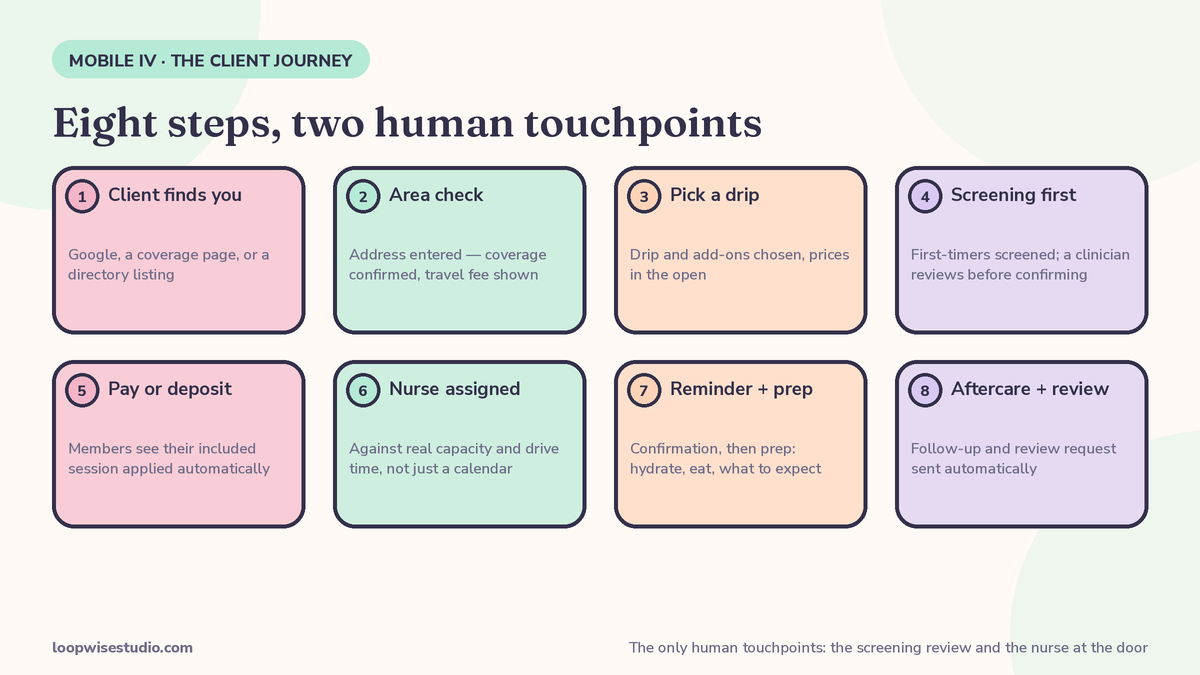
Put it together and a booking looks like this:
- Client finds you (Google, a coverage page, a directory like BookAnIV — which lists 490+ providers across 145+ cities and sends clients to book directly with the provider).
- They enter their address. The site confirms coverage and shows any travel fee.
- They pick a drip and add-ons, with prices in the open.
- First-timers complete screening; a clinician reviews before the visit is confirmed. Returning clients pass a short change-check.
- They pay or leave a deposit. Members see their session applied automatically.
- A nurse is assigned against real capacity and drive time.
- They get a confirmation, then a reminder with prep instructions — hydrate, eat, what to expect.
- Afterwards: aftercare follow-up and a review request, sent automatically.
Eight steps, and the only human touchpoints are the ones that should be human: the clinician’s screening review and the nurse at the door.
If that journey looks nothing like how your bookings happen today, that’s normal — it’s what “call us” was covering for. The gap between the two is measurable, and get a free audit is how we measure it: we’ll trace one booking through your current setup and show you where it depends on a person remembering to do something.
What generic booking tools leave you doing by hand
| Job | Generic scheduler | What you end up doing |
|---|---|---|
| Service-area check | Not a feature | Suburb lists, “message us to check”, fees confirmed manually |
| Travel fee | Flat prices only | Quoting $75–$90 distance fees by text, per booking |
| Screening before dispatch | Intake forms exist, but don’t gate the booking | Chasing forms after confirming, wasted drives |
| Memberships | Rarely modelled (sessions, rollover, exclusions, household) | Spreadsheet balances, arguments about expiries |
| Nurse capacity | Staff calendars, no drive-time logic | Booking by phone, like DripIV, to protect the diary |
| Groups | One appointment, one person | Days of messages per event |
The closest generic fit in the market is instructive: OptiMantra, an EMR built for integrative and wellness practices (listed from $99/month), covers booking, intake forms and messaging well — but it’s clinic-shaped, built around a practice location. The med-spa platforms (Moxie, Pabau, Jane and similar) are the same story: good software, fixed address assumed. None of the tools we found selling to this niche models an address-first booking, because the niche isn’t what they were built for.
This is also where a one-size “wellness website” goes wrong in the same way it does for solo aesthetic clinics — our breakdown of what a website for a one-person aesthetic clinic actually needs makes a similar point: the website has to match how the business really takes bookings, not how software vendors imagine it.
What it should cost — and what done-for-you looks like
Honest answer first: there is no standard price list for a mobile IV booking website, because almost nobody sells one off the shelf — the directory sends you traffic, the generic platforms sell you a clinic tool, and the gap in the middle is the job. What drives the cost is how many of the pieces above you need built: area and fee logic, screening workflow, membership engine, group flow. Our guide to how much a website with online booking costs a clinic sets out the market ranges for comparable work — use it to sanity-check any quote, ours included.
What done-for-you means here, concretely: your service areas and fee rules configured, your screening form and clinician-review step wired into booking, your membership tiers and rollover rules loaded, your nurses’ capacity and areas set up, and the reminder and aftercare messages written. You end up with a link you can put everywhere — and a phone that rings for care questions instead of admin. It’s the same layer that sits around a practice-management system for other hands-on clinics — the booking setup we describe for chiropractors and physio clinics works on the same principle: keep the clinical system, fix the booking around it.
If you run a mobile IV or wellness business and your booking still runs on calls, texts and memory, get a free audit — we’ll map your current flow against the four differences above and show you exactly which pieces are costing you bookings.
FAQs
Can a booking website really handle same-day mobile IV appointments?
Yes, if it’s built for nurse capacity rather than room slots. The workable pattern: the site takes the request instantly, checks which nurses are on, their areas and drive time, and either confirms or holds the request as pending until a nurse accepts — the client hears back in minutes. What it can’t do is promise a nurse who doesn’t exist, which is exactly why phone booking persists where tools pretend capacity is unlimited.
How should the service-area check and travel fee work?
An address or ZIP/postcode field at the start of booking, answered instantly: in area, in area with a fee, or out of area — with the fee shown as a line item before payment. Providers like Driip IV publish distance-based concierge fees of $75–$90 and confirm them manually today; the website’s job is to apply your equivalent rules automatically, including group waivers if you offer them.
Does the Good Faith Exam have to be part of online booking?
The exam itself is a clinical step with a licensed provider — Premium IV Therapy, for example, requires it before treatment and renews it every 364 days. The booking website’s job is to schedule and track it: first-time clients get routed through screening and exam before a visit is confirmed, and the system flags renewals so nobody discovers an expired exam on the day.
Can the website run our memberships?
It should — memberships are core revenue in this niche. A proper build handles session balances, one-month rollover, premium-drip exclusions (NAD+ is commonly excluded, as AMIV’s published tiers show) and household sharing, with members seeing their balance as they book. If a vendor’s demo can’t show you a membership balance at checkout, it can’t run your memberships.
We get clients from directories like BookAnIV. Do we still need our own booking website?
More than ever. BookAnIV lists 490+ providers in 145+ cities and sends the client to book directly with you — it deliberately doesn’t take the booking or a fee. That traffic lands on your website. If the page it lands on ends in “call us,” the directory did its job and the booking still leaked.
What if we already use an EMR or practice platform?
Keep it, if it handles your clinical records well. The booking layer — area check, screening flow, memberships, groups, reminders — can sit on your website and feed the system you already use. Most mobile IV businesses don’t need new clinical software. They need the front door rebuilt for a business that goes to the client.