Online Booking Website for Vet Clinics in Australia
A booking website for Australian vet clinics that shows live PMS availability, holds emergency slots back, and sends the texts that protect the booking.
A real online booking website for an Australian vet clinic shows live availability from your practice software — RXWorks, ezyVet, Ascend and the like — lets owners book routine appointments at any hour, and holds emergency slots back for the cases that can’t wait. A “request an appointment” form that someone reads in the morning is not online booking.
That distinction is the whole game. A request form still ends with your receptionist playing phone tag. A live booking ends with a filled slot, a confirmation text already sent, and nobody’s morning eaten by callbacks.
This page covers what a booking website has to do for an independent Australian clinic: talk to the PMS you already run, protect your day with booking rules, handle the 9pm emergency-versus-routine problem, and send the reminder texts that get the pet through the door.
What “online booking” has to do on a vet clinic website — real availability, not a form
Search this topic and you will mostly find software directories and one vendor writing for corporate groups of 350-plus clinics. Nobody writes for the one-to-three-vet independent clinic. So here is the owner’s version.
Online booking has three jobs:
- Show real slots. The calendar the owner sees is your actual diary, with your actual gaps — not a wish list you reconcile later.
- Book the right appointment type. A vaccination booster, a first consult for a limping dog and a dental assessment are different lengths with different staff. The booking page has to ask enough questions to land each one in the right slot.
- Confirm instantly. The owner gets a text the moment they book, with the date, time and clinic address. No “we’ll be in touch to confirm” — that sentence is where bookings quietly die.
If your current website has a form that emails the front desk, you don’t have online booking. You have a suggestion box. The fix isn’t a new PMS; it’s a booking layer on your own website that reads and writes to the diary you already have. That same principle — a website built to convert visitors, not just describe you — is what our guide to turning website visitors into booked appointments at a clinic walks through in detail.
It has to talk to your PMS — RXWorks, ezyVet, Ascend, Vision VPM, OpenVPMS
A booking website that doesn’t sync with your practice management system creates a second diary, and a second diary creates double-bookings. The sync is not a nice-to-have; it’s the product.
The Australian PMS landscape is well documented. Vetstoria, the booking platform used by the Vets4Pets group, publishes integrations with 30-plus systems, and its ANZ list reads like a who’s who of local practice software: RXWorks, Ascend and Vision VPM (all Covetrus), ezyVet, and OpenVPMS. If your clinic runs one of those — and most Australian clinics run one of those — a booking website can sit on top of it.
What good sync looks like in practice:
- An online booking appears in the PMS diary within moments, in the right column, with the pet and owner matched to their existing record.
- When reception books a phone appointment, that slot disappears from the website at the same time.
- Closures — staff meetings, a vet’s day off, a public holiday — block the website automatically because the PMS already knows.
You keep the system your team knows. The website becomes the front door, not a replacement engine room.
The booking rules that protect your day — emergency slots held back, per-vet exclusions, new-client pauses
This is the part vendors list as features and nobody explains. Booking rules are how you stop online booking from wrecking a clinical day.
Hold emergency slots back. Every clinic knows the 4pm phone call: a dog that’s eaten something it shouldn’t. If online booking has sold every slot by Tuesday, that call becomes a crisis. Vetstoria’s own material describes exactly this control — emergency slots held back from online view, released by staff when they’re needed. Your booking page should keep a protected buffer that only the phone can fill.
Set per-vet and per-service exclusions. Your senior vet does the orthopaedic workups; your new grad is building confidence on routine consults. The booking page should route appointment types to the vets who do them, and keep the rest invisible to the wrong booking.
Pause new clients when you need to. Plenty of Australian clinics are at capacity for new clients but still want existing clients booking online. A proper setup can close online booking to new-client appointment types while keeping it open for your current list — instead of the blunt instrument of turning booking off entirely.
Match length to the job. First visits, multi-pet households and senior-pet checks need longer slots than a booster. Let the owner declare what they’re bringing, and let the diary allocate the time.
Set those four rules once, and online booking stops being a risk you manage and becomes capacity you sell.
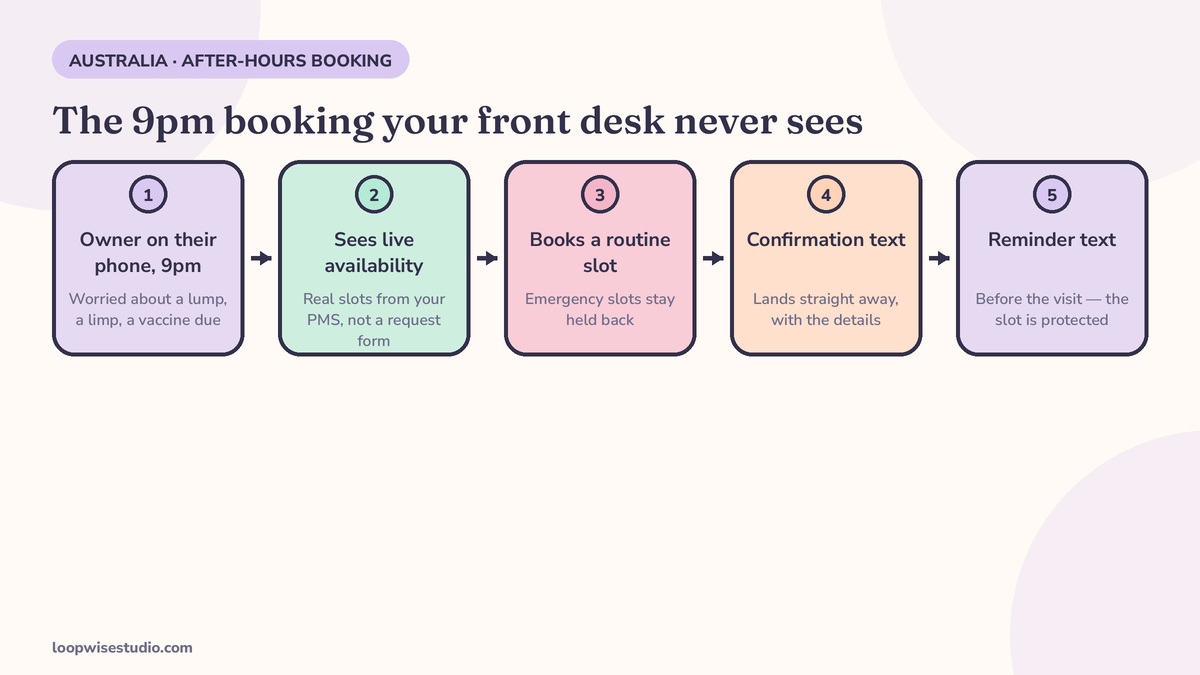
After hours — where the booking page sends emergencies versus routine bookings
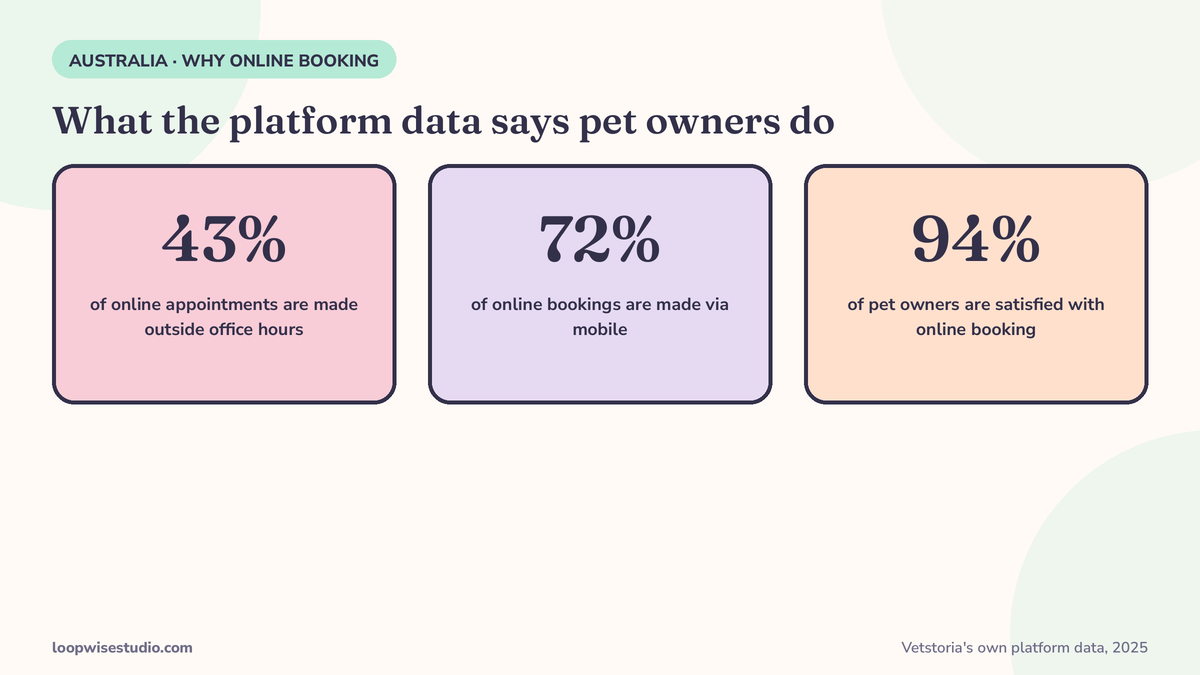
Here is the number that should shape this whole page. Vetstoria reports from its own platform data (2025) that 43% of online appointments are made outside office hours, and 72% are booked via mobile. Treat those as what they are — one platform’s figures, not an industry census — but the direction is hard to argue with: a large share of your booking demand arrives when your phones are off, from a phone in someone’s hand.
So the booking page has a split job after hours:
| What arrives at 9pm | What the page should do |
|---|---|
| Routine: booster due, skin check, nail clip, recheck | Offer live slots for the coming days and book it on the spot |
| Worrying: vomiting, not eating, limping since this afternoon | Offer the first morning slot, and show your urgent-care advice clearly |
| Emergency: breathing trouble, collapse, toxin, severe bleeding | Do not offer tomorrow’s diary. Direct them to your clinic’s emergency arrangement or the nearest 24-hour hospital, in plain words, at the top |
That third row matters most. An online booking page that cheerfully offers a collapsed dog a slot at 10:40 tomorrow is worse than no booking page. The emergency path has to be unmissable, and it has to be written before the routine path, not under it.
Get this right and the after-hours page does two things at once: it captures the routine demand your competitors’ voicemail loses, and it routes the true emergencies to help faster than a phone queue would.
If you’re ready to see what this would look like on your own clinic’s website, get a free audit — we’ll map your current booking path and show you where the after-hours demand is leaking.
Built for a phone, not a desktop — because that’s where the booking happens
Vetstoria’s platform data puts 72% of online appointments booked via mobile. Again, that’s one platform’s number, not a census — but any clinic owner who has watched the waiting room knows it’s directionally true. Owners book from the couch, the dog park and the car outside school pickup.
So judge your booking page the way your clients meet it: on a phone, one-handed, possibly holding a lead. That means the service list has to be short and plain (“Dog vaccination,” not internal codes), the calendar has to be tappable without pinching, and the whole booking has to finish in under a minute without creating an account. Every extra field — account sign-up, password, a form that resets when the phone rings — is a leak in the exact moment you paid to capture.
It also means the page has to work at the speed of worry. A client booking a recheck is patient. A client whose cat hasn’t eaten in two days is not. The booking flow that serves both is the same one: pick the pet’s problem in plain words, see real times, book, get the text. Anything slower sends them back to Google to find a clinic whose page answers faster — and Vetstoria reports 94% of pet owners satisfied with online booking, which tells you the clients who get through a good flow don’t want to go back to phone tag.
Bookings are only half of it — the confirmation and reminder texts that protect the slot
A booked slot is not an attended slot. The booking page fills the diary; the texts protect it.
The sequence is simple, and it runs on SMS — in Australia, text is the channel pet owners actually read:
- Confirmation, immediately. “You’re booked: Bella with Dr. Nguyen, Tue 14 Oct, 9:20am at [Clinic]. Reply C to confirm or R to reschedule.”
- Reminder, the day before. Same details, same reply options. A reschedule by text frees the slot while there’s still time to refill it.
- Recall texts, months later. Vaccinations and parasite prevention run on cycles. When a booster falls due, a text with a booking link brings the owner back without a receptionist working a call list.
Copy-paste starter set — adapt the wording, keep the structure:
Confirmation: Hi [Name], [Pet] is booked at [Clinic] on [Day Date] at [Time] with [Vet]. Please arrive 5 mins early. Reply R if you need to move it.
Day-before reminder: Reminder: [Pet]’s appointment is tomorrow [Time] at [Clinic]. Reply C to confirm, R to reschedule.
Booster recall: Hi [Name], [Pet]’s vaccination is due this month. Book here: [link] — [Clinic]
One Australian wrinkle worth knowing: if your texts go out under your clinic’s name as the sender ID, that name needs to be registered — since 1 July 2026, unregistered sender IDs are replaced with the word “Unverified” on the patient’s phone. Our guide to text message appointment reminders for Australian dental clinics explains the register in full; the same rule applies to your reminders and recalls.
And because the diary only stays healthy if pets show up, pair the booking page with the attendance system in our guide to reducing no-shows at a veterinary clinic — deposits, reminder timing and what to do about repeat offenders.
What it costs in Australia — the three routes compared
No Australian source publishes a neat price list for “a vet clinic booking website,” so be suspicious of anyone who quotes you one from a blog post — including us. What we can do is lay out the three routes honestly. (For the general maths of website-plus-booking pricing, our veterinary clinic website and booking cost guide breaks down the line items.)
| Route | What you get | What to check before you sign |
|---|---|---|
| PMS add-on / booking platform | Booking module bolted onto your PMS, vendor’s booking page | Monthly platform fee, per-booking charges, whether the page lives on your domain or theirs |
| DIY website builder + booking widget | You build and maintain the site; widget handles slots | Your time, widget limits on appointment types and rules, who fixes it when it breaks |
| Done-for-you booking website | Your own website, built for you, synced to your PMS, reminders configured | One-off build cost, what’s included (rules, texts, emergency routing), ongoing care and who owns the site |
The questions that separate a good quote from a cheap one: Does it sync with my PMS in real time? Can it hold emergency slots back? Who writes and loads the reminder texts? Does the booking live on my domain? What happens to my bookings if I leave?
How to choose — and what to ask any provider
Run this checklist against any option, ours included:
- ☐ Books into my existing PMS (name yours: RXWorks, ezyVet, Ascend, Vision VPM, OpenVPMS) — not a separate diary
- ☐ Emergency slots can be hidden from online booking
- ☐ Appointment types carry different lengths and vet assignments
- ☐ New-client bookings can be paused without closing existing-client booking
- ☐ Confirmation and reminder texts are included, written, and tested
- ☐ The emergency path after hours is written down and unmissable
- ☐ The booking page is on my domain, and I own the website
- ☐ Sender ID registration for my reminder texts is handled
A provider who can’t answer those eight in plain language is selling you a widget, not a booking system.
Summary
An online booking website for an Australian vet clinic earns its keep three ways: it sells your real availability around the clock, it protects the clinical day with rules you set once, and it defends the diary with texts after the booking is made. The PMS stays. The phone stops being the only door.
Want the version built for your clinic — your PMS, your vets, your emergency arrangements? Get a free audit and we’ll show you exactly what your booking page should do, before you spend anything on building it.
FAQs
Does online booking replace my practice management system?
No. The booking website sits on top of your PMS and syncs with it — RXWorks, ezyVet, Ascend, Vision VPM and OpenVPMS are the common Australian systems. Your team keeps working in the diary they know; the website just feeds it bookings.
Can I stop online booking from filling my emergency slots?
Yes — that’s a standard booking rule. You hold a buffer of slots back from the website, visible only to staff, so a genuine urgent case can still be seen the same day. Online clients see the routine availability only.
What happens when someone tries to book an emergency online at night?
Your page should never offer a next-day slot to a true emergency. A well-built booking page screens for red-flag problems and directs those owners straight to your emergency arrangement or the nearest 24-hour hospital, while still booking routine appointments for the morning.
Do I need to change my phone number or how clients contact us?
No. The website takes over the booking work your phones currently carry. Clients who prefer to call still can — they just stop having to, which is the point: Vetstoria’s platform data says 43% of online appointments are made outside office hours, when there is nobody to answer.
What do the reminder texts need to comply with in Australia?
Two things. Under the Spam Act, appointment reminders about an existing booking sit on different ground from marketing messages — keep reminders factual, and treat recalls and promotions as messages that need consent and a working opt-out. And since 1 July 2026, a branded sender ID must be registered on ACMA’s SMS Sender ID Register, or it is replaced with “Unverified” on the client’s phone.
How long does it take to set up?
The booking rules, PMS connection and reminder texts are a configuration job measured in days-to-weeks once your appointment types and vets are mapped, not a months-long software project. The slow part is usually deciding your rules — slot lengths, emergency buffer, new-client policy — which is a one-off conversation with the clinic owner.