Text Message Appointment Reminders for Dental Clinics in Australia
Dental reminder texts in Australia: check your sender ID against ACMA's register, then run the 48-hour two-way sequence that protects your diary.
Since 1 July 2026, an Australian dental clinic can only send reminder texts under its practice name if that sender ID is registered on ACMA’s SMS Sender ID Register — unregistered names are replaced with “Unverified” on patients’ phones. A working dental reminder setup is a confirmation at booking, a two-way text 48 hours before, and one on the morning of the appointment.
Most clinics reading this already send reminder texts. That’s not the problem. The problem is what those texts look like when they arrive — and whether the sequence behind them actually protects the diary, or just notifies patients on the way to an empty chair.
This page puts the two halves together for the first time: the register check every practice should run this week, and the reminder system that belongs behind it. It sits inside the wider attendance picture we cover in our pillar guide to reducing no-shows at a med spa and clinic — the mechanics here are the dental, Australian version.
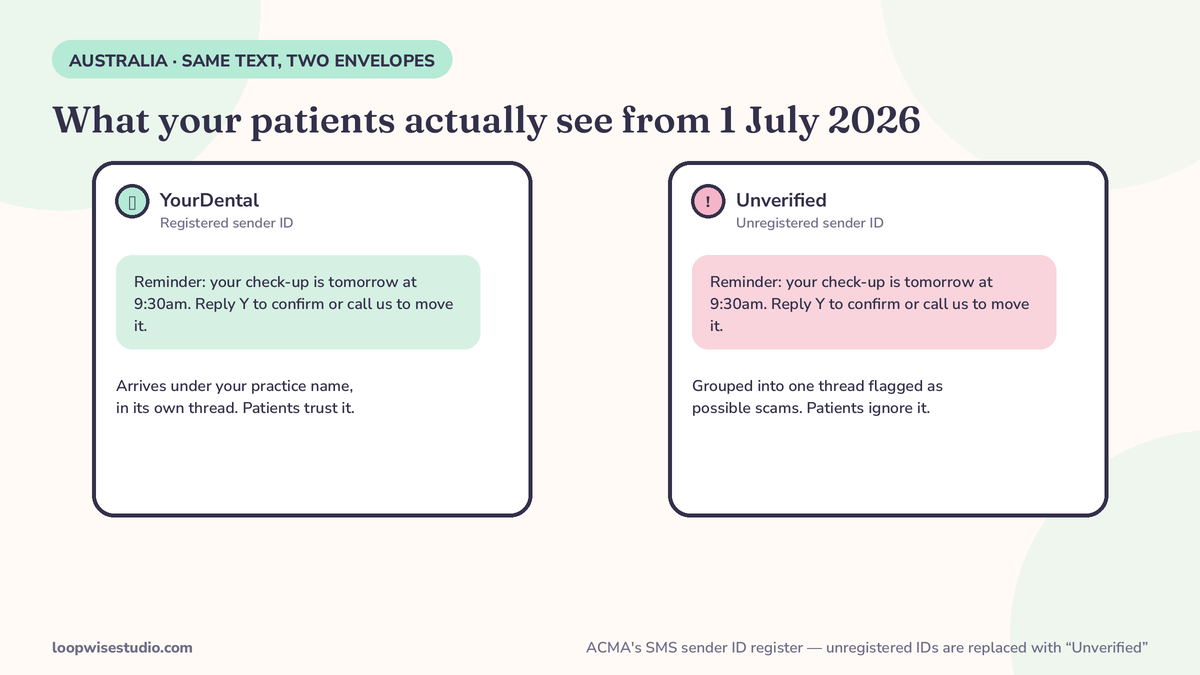
First, check your sender name — the 1 July 2026 register change and the 2-minute self-test
Do this before anything else on this page. It takes two minutes.
- Book yourself a test appointment, or trigger a test reminder from your practice software.
- Look at the text on your own phone. Does it arrive under your practice name — or under “Unverified”?
- If it says “Unverified,” your sender ID is not registered, and every patient is seeing the same thing.
Here is what changed. ACMA’s own guidance for businesses states: “From 1 July 2026, businesses or organisations can only send SMS and MMS with a sender ID if it is registered.” And if messages are sent with an unregistered sender ID, “the sender ID is replaced with the word ‘Unverified’.” Those messages are then grouped together in a single “Unverified” thread on the patient’s phone — a thread ACMA describes as indicating the messages may be scams.
Read that again from the patient’s side. Your carefully timed reminder lands in a bucket labelled as a possible scam, mixed in with every other unregistered sender. It doesn’t matter how good your sequence is if the envelope says don’t trust this.
Note what the rule is not: ACMA’s wording is replacement and grouping. Your texts are not, as a general rule, “blocked” — they arrive disfigured. That is quite bad enough.
What the register actually requires — per provider, with an ABN
The mechanics, as ACMA sets them out:
- Registration runs through your SMS providers. You register the sender ID with each provider that sends texts for you — your practice-software vendor, your messaging gateway, both if you use both. Registering with one does not cover the other.
- You need an ABN. Registration is tied to your entity; ACMA provides a path for entities without one, but most practices will simply use theirs.
- Numbers are out of scope; names are not. The register bites on branded sender IDs — “SmileDental” — not on texts sent from an ordinary mobile number. If your reminders come from a standard number, this specific rule doesn’t change anything for you (the Timely help centre makes exactly this point for its own customers). If they come from your practice name, it changes everything.
- The Spam Act still applies alongside. Consent, sender identification and a working unsubscribe for commercial messages did not go away on 1 July 2026. The register sits on top of them.
If you use more than one system that texts patients — practice software plus a recall tool plus a marketing platform — each one is a separate registration conversation. Make the list before you make the calls.
And if the self-test shows your name displaying correctly, you’re not quite done: send the test from each system, not just the main one. Practices regularly discover that the practice software was registered months ago while the recall tool — sending the messages patients act on most — still goes out unregistered. The register is per provider and per sender, which means your compliance is only as strong as the least-configured tool in the stack. One test per system, once, and a note in your practice procedures to repeat it whenever you change software or add a messaging tool.
What your patients actually see — the same text, two very different envelopes
Picture the reminder arriving twice. In the first version it lands as a message from your practice name, in the thread where your previous reminders live, next to your other messages. The patient recognises it before they read a word.
In the second version — the unregistered one — ACMA says the sender ID is replaced with “Unverified,” and the message is grouped into a single thread with every other unregistered sender’s messages, in a thread that indicates the messages may be scams. Your reminder about Thursday’s hygiene appointment now sits between a fake parcel notification and a bank that isn’t theirs.
Patients don’t analyse this. They feel it. A text in the scam bucket gets the scam treatment: ignored, deleted, or opened with suspicion three days late. That’s why this article starts with the register rather than the sequence — the best-written reminder in Australia loses to a two-word sender name.
There’s a second, quieter cost. Reception can’t tell from your software dashboard that anything is wrong. The system reports “reminder sent.” It was. It just arrived wearing a warning label. The only diagnostic is the self-test above: look at your own phone.
Reminder or recall? The Spam Act line every dental clinic should understand
One small Australian recall vendor, RecallQ, raises a distinction nobody else in this space explains — and every dental clinic should know it, because dentistry runs on recalls.
A reminder is about an appointment that already exists. ACMA’s position, as RecallQ summarises it, is that appointment reminders are generally not spam — the patient booked, asked (implicitly or explicitly) to be reminded, and the message is factual: date, time, place, how to reschedule.
A recall is an invitation to book something new: “Your six-month check-up is due.” That is a commercial message. It needs the patient’s consent, clear identification of your practice, and a working opt-out — “Reply STOP to opt out” is the standard line, and RecallQ builds it into its templates for exactly this reason.
The practical rule for your templates:
| Message | Type | Must include |
|---|---|---|
| “Your appointment is tomorrow at 2:30pm” | Reminder | Date, time, location, reply-to-reschedule |
| “Your check-up is due — book here” | Recall (commercial) | Consent on file, practice identification, STOP opt-out |
| “20% off whitening this month” | Marketing (commercial) | Same as recall — and it never rides inside a reminder |
Where the line gets grey — a recall dressed up as a reminder — get advice for your practice rather than guessing. The cost of guessing wrong is measured in Spam Act complaints, not in diary gaps.
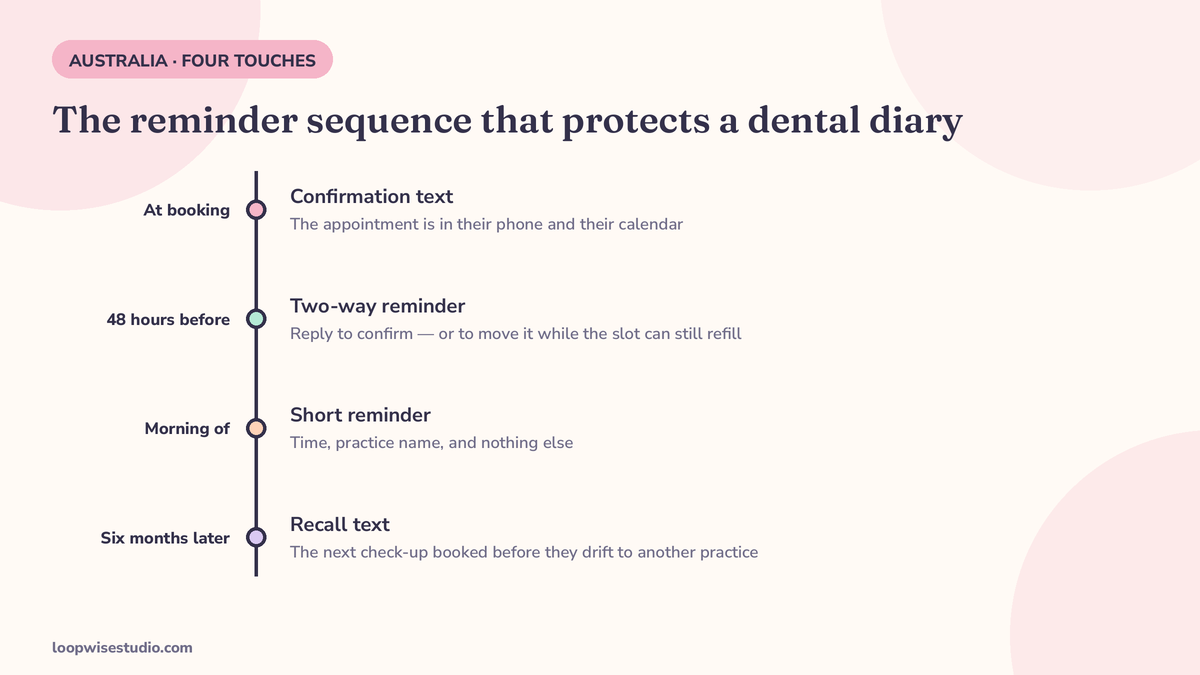
The reminder sequence that protects a dental diary — with the actual copy
With the envelope fixed, here is the sequence. Four touches, each with a job:
Touch 1 — Confirmation, at booking. Sent the moment the appointment is made, even if it’s six months out.
Hi [Name], you’re booked at [Practice] on [Day Date] at [Time] with [Dentist/Hygienist]. We’ll text a reminder before the day. Reply R anytime to reschedule.
Touch 2 — Two-way reminder, 48 hours before. This is the money text. It asks a question, and the answer routes the slot.
Hi [Name], reminder: [Practice], [Day Date] at [Time]. Reply YES to confirm or R to reschedule — [Practice]
A YES locks the chair. An R frees it with 48 hours to refill. Silence triggers Touch 3 — and a phone call from reception for long appointments (implants, ortho, anything over an hour), because a silent patient with a two-hour booking is a risk worth a human voice.
Touch 3 — Morning of. Short, factual, no new asks.
Today at [Time]: [Practice], [Street Address]. See you then — [Practice]
Touch 4 — Recall, at six months. A commercial message, with consent and opt-out, sent when the next check-up or hygiene visit falls due.
Hi [Name], your 6-month check-up at [Practice] is due. Book here: [link]. Reply STOP to opt out.
Longer appointments deserve an earlier Touch 2 — 72 hours for implant and ortho sessions — because a freed two-hour slot needs more time to refill than a freed twenty-minute scale and clean. Tune the timing to the appointment length, not to a vendor’s default.
If building this sequence inside your current software sounds like another job nobody has time for, that’s precisely what a done-for-you setup is for — get a free audit and we’ll map the sequence onto your diary and register your sender ID as part of it.
Why two-way beats one-way — a reply turns a dead slot into a refillable one
A one-way reminder is a notification. A two-way reminder is a sorting machine.
When a patient replies R at the 48-hour mark, three things happen that a notification can never do: the slot is freed while other patients still want it, the patient is rebooked on the spot by reply instead of drifting to another practice, and your waitlist gets a text — “A [Time] slot has opened on [Day]. Reply YES to take it” — that can refill the chair the same afternoon.
This is also why the reminder system belongs connected to your booking page rather than bolted onto it. The reschedule reply, the waitlist offer and the recall link all need somewhere real to point. Practices that already run missed call text back for dental practices will recognise the pattern: every automated message should end in a booking, not a dead end. And for a reminder system purpose-built for smaller practices, see our guide to text message appointment reminders for small dental clinics.
A note on the numbers you’ll see quoted elsewhere: Australian SMS vendors publish figures like “reminders cut no-shows by 20–40%” without naming a study behind them. We don’t repeat numbers we can’t trace. What we can tell you is how to get your own: count failed-to-attends per hundred appointments for a month before the sequence starts, and again two months after. That number — your number — is the only one worth putting in a business case.
A week in the diary — how the four touches actually run
Monday, 9:00am. The system sends Touch 2 for Wednesday’s list. Mrs. Chen replies R to her implant review — the slot frees immediately, and because it’s a long appointment flagged for a 72-hour window, it was actually sent Friday, so the waitlist text has already gone out: “A [Time] appointment has opened on [Day]. Reply YES to take it.” By 9:20 it is refilled.
Tuesday, 8:00am. Touch 3 goes to today’s patients — short, factual, nothing to reply to except directions. One patient texts back that they’re running ten minutes late; reception sees it in the same thread and warns the dentist before the patient arrives.
Thursday, 4:00pm. A hygiene patient hasn’t replied to Touch 2 and hasn’t answered the follow-up call. That silence is information: reception rings once more, and when there’s still nothing, the slot is offered to the waitlist before the day ends rather than discovered empty on Friday.
Once a month, Touch 4 runs for everyone whose six-month recall falls due next month — consent on file, practice name registered, STOP line in place.
Nobody on your team “ran the reminders” that week. They handled the exceptions — which is exactly the division of labour you want: the system carries the routine, your people carry the judgement.
What it should cost — and what to ask an SMS provider
Reminder texts are a per-message cost, and the honest answer to “what does it cost” is: your volume decides. A practice sending confirmations, 48-hour reminders and morning texts across, say, 300 appointments a month is sending roughly 900 messages. At the per-message rates Australian providers publish, that is a modest monthly line item — far below the value of one filled implant consult. Ask any provider, including us, these five questions:
- Do you send from a branded sender ID, a shared number, or my own number — and if it’s my name, who registers it?
- Is two-way reply handling included, and what happens automatically when a patient replies R?
- Can reminder timing vary by appointment length?
- Are recall messages separated from reminders, with consent and STOP handled properly?
- What does a month actually cost at my appointment volume — in writing?
If a provider can’t answer question 1 in one sentence, they haven’t dealt with the register, and your patients will find out before you do.
The same lesson travels — reminders only work when the system behind them does
Dentistry isn’t the only place this plays out. Clinics in the UAE run the same confirmation-and-reminder discipline over WhatsApp, as our breakdown of how UAE clinics reduce no-shows with WhatsApp shows — different channel, same rules: confirm at booking, remind with enough time to refill, and never let a message arrive from a name the patient can’t trust.
Summary
Check the name your texts arrive under — if it says “Unverified,” fix the registration before you touch anything else. Then run the sequence: confirmation, 48-hour two-way reminder, morning-of text, six-month recall with consent and opt-out. Reminders protect appointments; replies protect the diary.
Ready to have both halves done properly for your practice? Get a free audit — we’ll check your sender ID, map the four-touch sequence onto your appointment types, and show you what it costs at your real volume.
FAQs
My reminders come from a phone number, not our practice name. Does the register affect me?
No — the SMS Sender ID Register applies to branded sender IDs (your practice name shown as the sender). Texts sent from an ordinary mobile number sit outside its scope. The Spam Act rules on consent, identification and opt-out still apply to commercial messages either way.
Are my reminder texts being blocked if the sender ID isn’t registered?
Not as a general rule. ACMA’s stated consequence is that the sender ID is replaced with the word “Unverified” and the messages are grouped into a single thread that indicates they may be scams. That is damaging enough — patients may never open the thread — but it is replacement, not blocking.
How do I register our sender ID?
Through each SMS provider that sends for you — your practice software vendor and any separate messaging or recall tool. Registration is tied to your ABN and you authorise each provider to send using your ID. If you send through two systems, you register with both.
Is a recall text the same as a reminder text under the Spam Act?
No. A reminder concerns an existing appointment and is generally not treated as spam. A recall invites the patient to book something new, which makes it a commercial message: it needs consent, clear practice identification and a working opt-out such as “Reply STOP.” Keep the two template types separate.
How far ahead should the main reminder go?
48 hours is the workhorse: close enough that the patient can act on it, far enough that a reschedule frees a slot you can refill. For long appointments (implants, ortho, extended hygiene), 72 hours is safer. A short morning-of text then carries the day itself.
Can I just send more reminders instead of making them two-way?
More one-way texts mostly train patients to ignore you. The value sits in the reply: a confirmation tells you the chair is safe, and a reschedule 48 hours out gives you a slot you can offer to your waitlist. One two-way text outperforms three notifications.