WhatsApp Appointment Reminders for Clinics in the UK
WhatsApp appointment reminders for UK clinics: the full sequence, copy-ready templates, UK GDPR basics, and done-for-you setup on the diary you already use.
WhatsApp appointment reminders for a UK clinic are automated messages — a confirmation when the patient books, a reminder with Confirm and Reschedule buttons before the visit, and a follow-up afterwards — sent on the app your patients already check all day, instead of phone calls they ignore and texts they skim past. This guide gives you the exact sequence, copy-ready templates in plain UK English, the UK GDPR position in plain language, and what it costs to run. If your clinic’s reminders currently depend on a receptionist finding time to send them, this is the upgrade, written out in full.
One thing this guide will not do is promise you a percentage. You will see plenty of pages claiming reminders cut no-shows by a specific figure, usually with no source behind the number. No honest supplier can know your clinic’s figure in advance — it depends on your patients, your treatments and how bad the problem is today. One vendor in this space, Ivosights, puts it well as a matter of policy: “No percentage promised up front — the same clinic, measured.” That is the right approach. Measure your no-show rate now, install a proper sequence, and measure it again.
Why UK clinics are switching reminders to WhatsApp
Most private clinics in the UK remind patients the way they always have: a phone call from reception, an email, or an SMS from the practice system. Each of those has a problem that has got worse, not better.
Phone calls from unknown numbers are now treated as spam by default. Patients let them ring out, and your receptionist leaves a voicemail that may never be played. Email lands in an inbox the patient checks twice a day, under a hundred other messages. SMS works, but it is a dead end: the patient reads it, means to reply, cannot easily act on it, and the moment passes.
WhatsApp is where UK patients actually talk. It is the default messenger for most adults in the UK — family groups, school groups, community groups all live there — and a message from your clinic arrives in the same place, with your clinic’s name and profile attached, and buttons the patient can tap. A reminder the patient can act on in two taps, without phoning reception, is a fundamentally different thing from a reminder they can only read.
There is a second, quieter reason: replies. A reminder invites a response. On WhatsApp, that response lands in a shared inbox your team can see and own. By phone, it becomes a callback list. By SMS, it often goes nowhere useful. Whatever channel you remind on, someone has to handle the patient who replies “I can’t make that time” — and that handling is where freed slots are won or lost. The wider system behind this is covered in our guide to reducing no-shows at a med spa and other appointment-based clinics, which looks at the causes of no-shows, not just the messages.
The reminder sequence that actually reduces no-shows
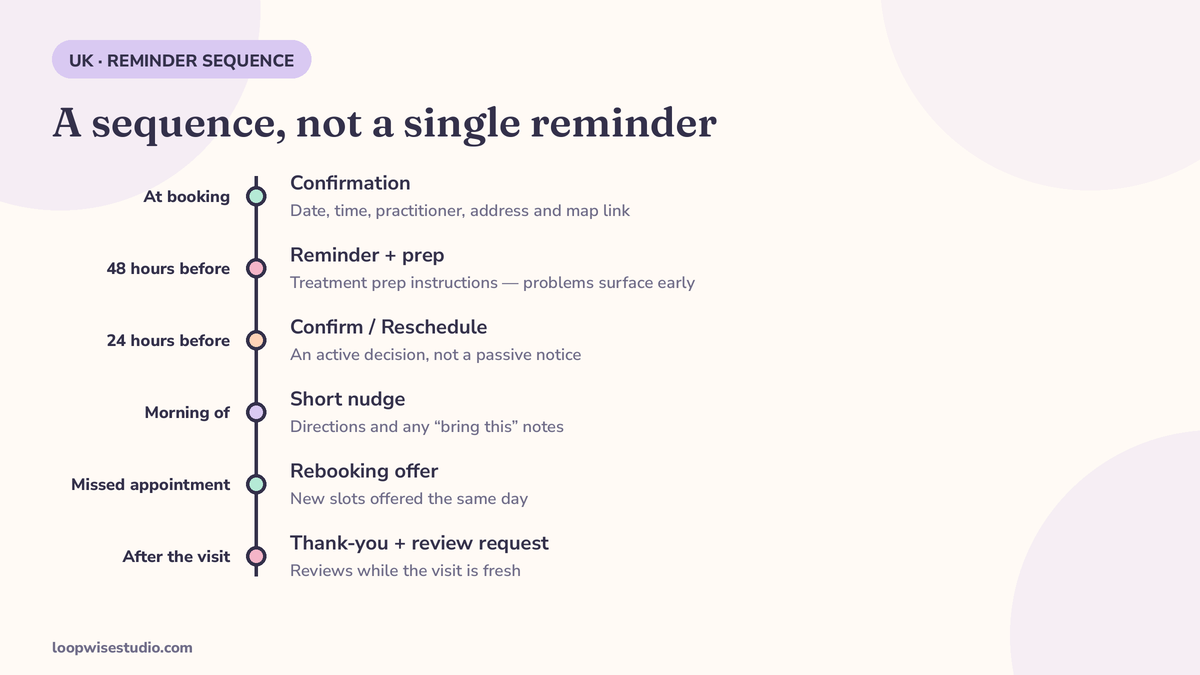
A single reminder the day before is the setup most clinics have, and it is the weakest useful version. It arrives too late for the patient to rearrange their life, and too early for the patient who will forget again by tomorrow. A sequence works because each message has a different job.
| When | Message | Its job |
|---|---|---|
| At booking | Confirmation with date, time, practitioner, address and map link | Lock the appointment into the patient’s mind and phone |
| 48 hours before | Reminder with prep instructions for the specific treatment | Surface problems early, while the slot can still be refilled |
| 24 hours before | Reminder with Confirm / Reschedule buttons | Get an active decision — a confirmed patient, or a slot freed in time to offer to someone else |
| Morning of the appointment | Short nudge with directions and any “bring this” notes | Catch the patient before their day fills up |
| After a missed appointment | Polite message offering new slots, sent the same day | Recover the booking while the patient still feels awkward about missing it |
| After the visit | Thank-you and a Google review request | Reviews while the experience is fresh, without your team having to remember to ask |
Two points in that table do most of the work.
The confirmation must be active, not passive. There is a real difference between a message that says “your appointment is tomorrow” and one that asks the patient to tap Confirm or Reschedule. The tap is a small commitment, and it gives you data: a patient who confirmed is very likely coming; a patient who has not responded to two reminders is a slot you should protect, with a call or a waitlist offer.
Rescheduling must be easier than not showing up. If changing an appointment needs a phone call during opening hours, patients facing a clash will often just not arrive. One tap to reschedule — offered new slots right there in the chat — turns a silent no-show into an empty slot you knew about a day early, which is a slot you can fill.
Copy-ready WhatsApp reminder templates for UK clinics
Here is the full set. Replace the brackets with your clinic’s details. Keep them short — every template below can be read on a lock screen — and keep the patient’s treatment described the way your clinic already describes it publicly.
Booking confirmation
Hi [First name], your [treatment] appointment at [Clinic name] is booked for [day, date] at [time] with [practitioner]. We’re at [address] — here’s a map: [link]. Need to change it? Just reply here and we’ll sort it.
48 hours before — with prep
Hi [First name], looking forward to seeing you on [day] at [time] for your [treatment]. A quick note before you come: [prep instruction — e.g. please avoid active skincare products for 48 hours before your appointment]. Any questions, reply here.
24 hours before — the important one
Hi [First name], a reminder of your [treatment] appointment tomorrow, [date] at [time]. Please tap Confirm if we’ll see you, or Reschedule if you need a different time. [Confirm] [Reschedule]
Morning of the appointment
Morning [First name] — your [treatment] is today at [time]. We’re at [address], and the nearest parking is [parking detail]. See you soon. Running late? Reply here and let us know.
After a missed appointment — same day
Hi [First name], we missed you today at [time]. These things happen — would you like to rebook? The next available appointments are [slot 1] and [slot 2]. Reply with the one that suits you and we’ll book it straight away.
After the visit — review request
Thanks for coming in today, [First name]. If you were happy with your visit, a short Google review really does help a small clinic like ours: [review link]. Thank you.
A few working rules for templates. Use the patient’s first name and the real treatment and time — generic messages get generic attention. Send from your clinic’s number with your clinic’s name and logo on the profile, so the patient knows exactly who is messaging. And write the cancellation terms once, in the confirmation, in plain words — not in legal language in a footer nobody reads.
Reminders are only half of it: rescheduling and the waitlist
Here is the part most reminder setups miss. The value of a reminder sequence is not mainly that patients remember. It is that you find out early who is not coming.
When a patient taps Reschedule at the 24-hour reminder, two good things happen. They keep their booking — moved, not lost — and their original slot becomes free with a day’s notice. That is enough notice to offer the slot to your waitlist: an automated message to the patients who asked to be told about cancellations, first reply takes it.
Set up that way, the sequence stops being a cost of running the diary and starts behaving like a small booking engine: reminders confirm most patients, catch the ones who need to move, and refill most of the gaps from your own waitlist before they become empty chair time.
To see why this matters in money terms, use your own numbers rather than anyone’s statistic. This example is illustrative only: if a clinic sees twenty patients a week and three do not show up, that is 15% of the week’s appointments producing nothing — the same simple arithmetic used in clinic guidance from practice-software firm Clynevia. Put your own average treatment value on those three slots and you have your monthly figure. For most private clinics, recovering even one or two of those slots a week covers the running cost of the whole reminder system — but do the sum with your diary, not with a number from a sales page.
To see what that sum looks like for your clinic, using your real no-show count, get a free audit — we go through your current reminder process with you and show you where slots are leaking.
Deposits and cancellation policies inside the flow
For short, low-value appointments, reminders and an active confirmation are usually enough. For long or high-value slots — a two-hour implant consultation, a lengthy aesthetic treatment, a Saturday morning block — a reminder alone does not protect you, because the patient loses nothing by not arriving.
This is where a deposit or card hold belongs, and the reminder flow is the right place to carry it:
- At booking: the deposit request goes out with the terms — how much, what it is taken off, and the cancellation window (“free rescheduling up to 48 hours before; deposits are kept for later changes”). Stated once, in the confirmation message, in plain English.
- At the 24-hour reminder: one line is enough — “Your deposit of [£ amount] is held against this appointment.” It reminds the patient there is something at stake without sounding like a threat.
- For repeat offenders: clinics reasonably apply deposits selectively. A patient who has missed twice can be asked for a deposit on future bookings while everyone else books freely. Your system should let you apply the rule per patient, not as a blanket policy that puts off good patients.
None of this needs to be harsh. The clinics that use deposits well describe them as protecting scarce practitioner time, and most patients accept that readily when it is explained before they book, rather than discovered afterwards.
Are WhatsApp reminders legal for UK clinics? UK GDPR, in plain English
Short answer: yes, when they are set up properly. Appointment reminders are part of providing the service the patient booked — they are not marketing. But “properly” has some specific content under UK GDPR and the Privacy and Electronic Communications Regulations (PECR), and it is worth getting right once.
Get and record consent for the channel. When a patient books, ask whether they are happy to receive appointment messages on WhatsApp, and record that yes (or no) against their record. A patient who says no gets reminded another way. That record is what makes the whole setup defensible.
Use approved templates for automated messages. Messages sent through the WhatsApp Business Platform outside an open conversation window use pre-approved templates. That is a feature, not a nuisance: it keeps your reminder wording consistent and stops anyone sending an ill-judged message in a hurry.
Keep clinical detail out of the messages. A reminder can name the appointment and the clinic. It should not contain diagnoses, results, treatment notes or anything a patient would not want visible on a lock screen. Clinical information stays in your clinical systems, where it belongs.
Respect opt-outs immediately. A patient who replies STOP, or asks not to be messaged on WhatsApp, comes off WhatsApp reminders at once — and stays off. The system must enforce that automatically, not rely on reception remembering.
Know who can see the inbox. Patient conversations should be visible to the staff who need them, under their own logins — not on a personal phone belonging to whoever is on reception that day, and definitely not on a phone that leaves the business when an employee does.
One UK-specific point: do not confuse your private clinic with NHS reminder systems. Patients ignore a great many NHS texts precisely because they are frequent, generic and come from an unidentified sender. A private clinic’s reminder — from a named clinic, about a specific appointment the patient chose and may have paid a deposit on — is a different message entirely, and patients treat it differently.
WhatsApp Business app vs the WhatsApp Business Platform: what a clinic actually needs
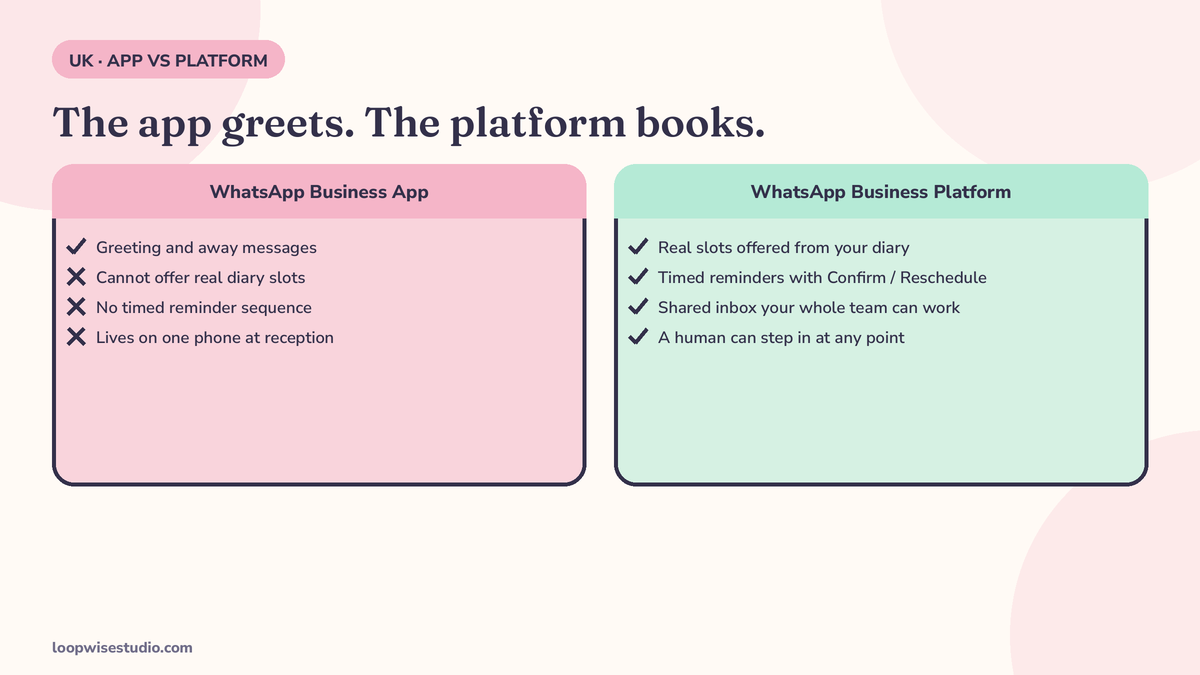
This is the point where clinics most often stall, because the free option looks almost good enough.
The WhatsApp Business app is the free app on a phone. It can send a greeting message and an away message, hold a catalogue, and let one person (or a couple, carefully) chat with patients. What it cannot do is run a timed reminder sequence from your diary, send approved template messages at scale, connect Confirm and Reschedule buttons to your bookings, or give a whole team one shared, auditable inbox. If a receptionist is copying appointments out of a diary into WhatsApp by hand at 6pm, that is not a reminder system — it is overtime.
The WhatsApp Business Platform (often called the API) is the version built for automation. Reminders fire from your diary, templates are approved and consistent, buttons work, replies land in a shared inbox with a named owner, and opt-outs are enforced by the system rather than by memory. This is what a clinic running more than a handful of appointments a day actually needs, and it is what we set up.
There is no third, hidden cost surprise here: the Platform charges per conversation under Meta’s pricing model, which your provider should explain in plain English before you sign anything, with an estimate based on your appointment volume. A supplier who cannot explain what your messages will cost is not ready to set up your reminders.
What it costs: the honest picture in £
We are not going to print a price list in an article, because the honest number depends on your appointment volume, your diary and how much of this you want managed for you. But you can — and should — compare the three real options on the same basis.
| Option | What you actually pay | What you get |
|---|---|---|
| Receptionist sends reminders manually | The hours it takes, every week, forever — plus the reminders that do not get sent on busy days | Inconsistent reminders, no confirmation data, no waitlist fill |
| A DIY reminder tool | A monthly software fee, plus Meta conversation charges, plus your own time to configure templates, connect the diary and fix what breaks | A working sequence, if you set it up well and someone in the clinic owns it |
| Done-for-you setup and management | A setup fee agreed in advance, plus a running charge covering platform, messages and management | The sequence built on your diary, templates written and approved, replies handled by your team in a shared inbox, and someone accountable when something needs changing |
Two things to notice. First, the manual option is not free — it is paid for in staff time and in the slots that stay empty when reminders slip. Second, the break-even for either paid option is low: work out what one recovered appointment a week is worth in your clinic (again, your figures, not ours) and compare it with the running cost you are quoted. The full purchase picture, including the website side, is broken down in our guide to how much a website with online booking costs for a clinic.
What we would talk you out of: paying for an enterprise patient-engagement platform built for hospital groups, or signing a long contract before you have seen the sequence work on your own diary. Start with reminders, measure your no-show rate, and add deposits, waitlist fill and rebooking messages once the basics are earning their keep.
How Loopwise sets it up on the diary you already use
You do not need to change your practice software to do this. The reminder layer is built around your existing diary and your existing number. Here is the process, step by step.
- We review your current process. How patients book, how they are reminded today, your no-show rate if you know it, and which treatments and slots hurt most when they are missed.
- We agree the sequence and the words. The messages above, adjusted to your clinic’s voice, your treatments and your cancellation policy — approved by you before anything is sent to a real patient.
- We connect the diary and register the templates. Your diary (Fresha, Pabau, Dentally or whichever you run) drives the timings; the templates go through WhatsApp approval; your number is set up on the Platform.
- We test with your team. A test week on internal numbers and a small set of real appointments, so reception can see exactly how replies, reschedules and opt-outs behave.
- We go live, then measure. No-show rate, confirmation rate and slots refilled from the waitlist — reviewed with you after the first month, so the system is judged on your diary, not on promises.
This reminder layer is one part of a bigger system. The same setup powers the booking flow described in our page on a WhatsApp booking system for aesthetic clinics in Dubai — different market, same machinery: book, confirm, remind, reschedule and review, all inside the conversation the patient already started.
Frequently asked questions
Will patients mind getting reminders on WhatsApp?
In practice, patients mind being phoned by an unknown number and chased by voicemail far more. A short message from your clinic’s named profile, about an appointment they booked, with a button to confirm or move it, reads as good service — and every patient can opt out at any point and be reminded another way.
Does it work with Fresha, Pabau or Dentally?
In most cases, yes. The reminder sequence is driven by appointment data, and it can be layered onto the diary systems UK clinics commonly use, rather than replacing them. Where a direct connection is not available, there are still workable routes — that is one of the first things we check in an audit, before you commit to anything.
What happens if a patient replies with a clinical question?
The reminder system does not answer clinical questions, ever. A reply of that kind is flagged to a named member of your team in the shared inbox, and a person responds — exactly as they would if the patient had phoned. Automated messages cover timings, directions and rescheduling. Anything clinical stays with clinicians.
Can we use our existing clinic number?
Usually, yes — and you should. Your number is on your Google profile, your website and your patients’ phones. It is set up properly on the Business Platform as part of the process, rather than you being asked to adopt a new number and reprint everything.
We already send reminders by text. Is WhatsApp really different?
The message content can be the same. The difference is what surrounds it: patients see your clinic’s name and profile rather than an anonymous sender, they can confirm or reschedule by tapping a button instead of phoning, and their reply lands in an inbox your whole team can act on. If your current texts already get high confirmation rates, keep them — we would tell you that in the audit rather than sell you a change you do not need.
Stop losing slots to reminders that never got sent
Most clinic no-shows are not patients being careless. They are a reminder that was never sent because reception was busy, a patient who could not face phoning to reschedule, and a slot nobody knew was empty until it was too late to fill. All three are process problems, and process problems can be fixed once, properly, and then left to run.
Start with an honest check of what you have now: get a free audit of your current reminder process. We will look at how your patients are booked and reminded today, tell you honestly whether a WhatsApp sequence would pay for itself in your clinic, and — if it would — exactly what it would take to set up on the diary you already use.