WhatsApp Automation for Dental Clinics in the UK
WhatsApp automation for UK dental clinics: answers enquiries fast, books real diary slots, sends reminders and recalls patients, set up and run for you.
WhatsApp automation for a UK dental clinic means one system on your practice WhatsApp number that does four jobs: it answers new enquiries straight away, books patients into real slots in your diary, sends confirmations and reminders, and recalls patients who are due. Not a chatbot bolted onto your website. Not a reviews tool. The whole journey, from the first message to the patient sitting in the chair, set up and run for you.
Most UK practices already use WhatsApp somewhere. Usually it lives on a phone at reception, answered when someone has a spare minute, and silent at exactly the moments patients write most — evenings, lunch hours, and the gaps between surgeries. Automation is what turns that phone into a system.
What WhatsApp automation actually means for a UK dental practice
Strip away the marketing and there are four jobs:
- Answer. A new patient messages at 8.40pm asking about Invisalign. They get a proper reply in seconds — what the treatment involves at a general level, what a consultation looks like, and an offer of real appointment slots. Not a greeting message that says you are closed.
- Book. The patient picks a slot from your actual diary. The appointment lands in your practice software, the phone stops ringing about it, and nobody has to retype anything.
- Remind. Confirmation at booking, a reminder with Confirm or Reschedule buttons before the visit, and a polite follow-up if the patient does not show.
- Bring back. Check-up and hygiene recalls go out when patients are due, review requests go out after treatment, and cancelled slots get offered to your waiting list.
Here is the honest state of the UK market: most tools sold as “WhatsApp automation” for dentists do one of those four jobs. Review platforms handle job four and stop. Website chatbots handle job one and then hand the request to your receptionist to finish by phone. CRMs collect enquiries from six channels and leave your team to work the list. Each one is a decent tool. None of them is the system. The gap is the joined-up version — which is what this page describes and what Loopwise builds.
If you want the reminder part on its own explained in full, start with our guide to WhatsApp appointment reminders for clinics in the UK. This page covers the wider system it sits inside.
The patient journeys that matter
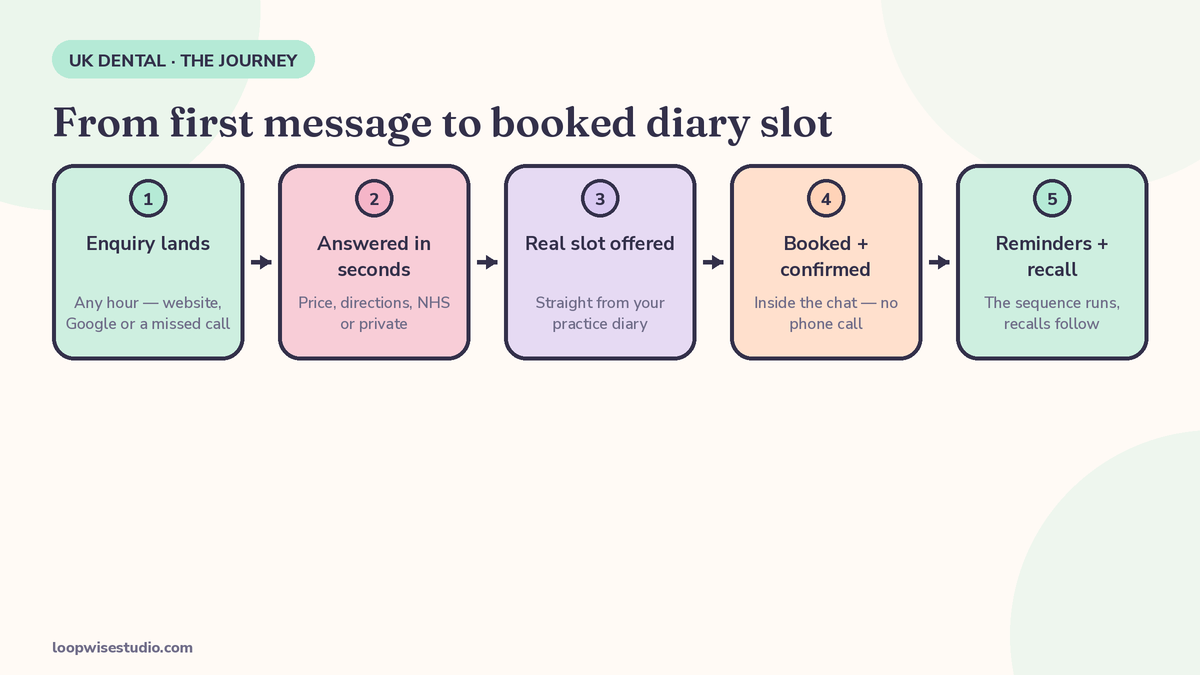
Automation earns its money on a handful of repeat journeys. These are the ones worth building first.
The new private enquiry
Private treatments — implants, Invisalign, whitening, composite bonding — are researched in the evening and usually messaged to more than one practice. The journey: enquiry answered in seconds, a short qualifying exchange (which treatment, which tooth or area in general terms, any deadline like a wedding), then real consultation slots offered from the diary, a deposit taken for longer appointments where your policy asks for one, and a confirmation the moment they book. Speed is the whole game. The first practice to answer properly usually gets the consultation.
The NHS check-up recall
Different patient, different message. This person is not shopping around; they are due, and they need a nudge and an easy way to book. The recall goes out at the due date, offers hygiene and examination slots, and — covered in the next section — stays honest about availability. If they reply that they cannot find a time, the conversation goes to a human, not a loop.
The hygiene recall
Hygiene patients drift quietly. A recall message with two or three real slots converts better than a letter, and costs a fraction of one. Patients who do not respond to the first recall get one follow-up, then they are left alone — pestering your own patient list is how numbers get blocked.
The emergency request
Toothache at 10pm is the message every practice dreads and every patient remembers. The automated reply has one job here: triage wording, not treatment. It asks the right questions, recognises the red flags listed in the safety section below, and either books the first emergency slot or points the patient to NHS 111 and 999 where the symptoms demand it. It never, ever diagnoses.
The post-treatment review request
Two hours after an appointment, while the experience is fresh: a thank-you, a check that everything feels fine, and — if the patient is happy — a one-tap link to your Google review page. Unhappy replies go to a named human, not to Google. This is the one journey the review-only tools do well; in a full system it is a small part of a bigger machine.
NHS and private patients need different messages
This is where generic tools, mostly built for the US or India, fall over. A UK practice runs two businesses under one roof, and they need different conversations.
Availability honesty. If your NHS list is effectively full or your next NHS check-up slot is months out, your messages must say so plainly and offer the real options: join the recall list, check back, or ask about private alternatives without pressure. An automated message that cheerfully implies an NHS appointment is available next week, when it is not, creates complaints your reception team did not earn.
Out-of-hours signposting. When an NHS patient messages at night with an urgent problem, the correct automated answer names NHS 111 for urgent advice and 999 for emergencies. That wording is not a courtesy; it is safety-netting, and it should be in the template, not improvised.
Plan members. Denplan and practice-plan patients have their own rhythm: plan check-ups and hygiene visits included, recalls on the plan cycle, and messages that recognise they are members. Treating a plan patient like a cold enquiry wastes the loyalty the plan was bought for.
Deposits for long private appointments. A two-hour implant appointment that fails to attend is a serious hole in a diary. Deposits for long private slots are normal UK practice; the automated flow should ask for them the same way your receptionist would — politely, with the failed-to-attend (FTA) policy stated in plain words before the patient books, not discovered afterwards.
Advertising rules. Review requests and recall offers sit under the GDC’s advertising standards like everything else you publish. No pressure, no claims you cannot back up, no incentives for reviews. Automation does not change the rules; it just means the rules have to be built into the templates once, properly, instead of depending on who is holding the phone.
How it connects to your diary
“Integrates with your software” is the most abused phrase in dental technology. Here is what the connection has to do, whichever practice system you run — Dentally, Software of Excellence, or another major platform:
- Read real availability. Slots offered to a patient must be slots that actually exist, for the right clinician, room, and appointment length. An automation that offers a 20-minute slot for a 60-minute treatment creates the worst kind of work: unpicking bookings.
- Write the booking back. When a patient books on WhatsApp, the appointment appears in the diary with the patient’s details, the treatment type, and the source marked. No copy-typing from a chat window.
- Move with changes. If the practice moves an appointment, the reminders follow the new time. If the patient reschedules in the chat, the diary updates and the old slot is released.
- Keep clinical detail out of the chat. The diary holds the record. WhatsApp holds logistics: times, directions, preparation instructions you have approved. More on this in the compliance section.
Ask any vendor — including us — to show you this working on a real diary, not a screenshot of a dashboard. Loopwise builds the automation against the diary you already use; you do not change practice software to get it.
One more connection matters. The phone still rings, and it still gets missed during surgery hours. Calls and messages are the same problem wearing two coats, which is why we pair this system with missed call text back for dental practices — a missed call gets an instant text that starts the same WhatsApp journey.
The reminder and recall sequences, with templates
Sequences beat single messages. Below is the appointment sequence we set up as standard, written in the voice of a normal UK practice. Adapt the wording; keep the structure.
| When | Message | Patient can |
|---|---|---|
| At booking | Confirmation with date, time, clinician, address, and what to bring | Add to calendar, ask a question |
| 24 hours before | Reminder with Confirm / Reschedule buttons | Confirm, or reschedule and free the slot early |
| Morning of the visit | Short nudge with directions and any preparation notes | Reply if running late |
| 15 minutes after a missed appointment | Polite message offering new slots | Rebook without having to phone and apologise |
| 2 hours after the visit | Thank-you, aftercare reminder, review link if they are happy | Leave a review or raise a problem privately |
The templates themselves are short on purpose:
Confirmation
Hi Sarah, you’re booked with Dr Ahmed on Tuesday 14 October at 10.30am for your check-up at Bright Street Dental. Reply to this message if you need anything before then.
24-hour reminder
Hi Sarah, a reminder of your appointment tomorrow at 10.30am. Tap Confirm if you’re still coming, or Reschedule and we’ll show you other times.
After a missed appointment
Hi Sarah, we missed you today at 10.30am. No lecture — these slots go fast, so here are the next few times available if you’d like to rebook.
Recall at due date
Hi James, you’re due for your check-up and hygiene visit. Here are the next appointments with your usual hygienist — pick one and we’ll confirm straight away.
Notice what is not in any of them: clinical detail, treatment results, prices quoted as promises, or medical advice. Logistics only. That is a design decision, and it is the right one.
If your evenings are where enquiries pile up, this sequence works alongside an out-of-hours setup — the same journeys, running while the practice is shut, are covered in our guide to after hours WhatsApp booking for clinics in the UK.
GDPR and PECR, in plain English
Most vendor pages give you a “GDPR compliant” badge and nothing else. Here is the part that actually matters to a practice principal, in plain terms. This is general information about how the system is designed, not legal advice for your practice.
Service messages and marketing messages are different things. A reminder about an appointment the patient already has, or a recall for a check-up they are due as your patient, is part of the service you are providing. A message offering a whitening deal to everyone who has ever enquired is marketing. Under UK GDPR and PECR, the two sit on different lawful ground, and marketing messages need consent you can point to. A well-built system keeps the two apart: different lists, different templates, different rules.
Opt-outs are permanent and instant. Every campaign-style message carries a clear opt-out, and opting out stops that kind of message for good — a patient who opts out of marketing can still get their appointment reminders if they want them. The system honours it automatically, not when someone remembers to update a spreadsheet.
What never goes in a message. No diagnoses, no treatment results, no attachments with clinical content, no photographs. If a patient sends a photo asking “does this look normal?”, the reply does not judge it — it books them in or escalates to a clinician. This is partly a safety rule and partly a data rule: WhatsApp chats are not your clinical record.
Templates and the 24-hour window. On the WhatsApp Business Platform, proactive messages outside a conversation use pre-approved templates, and once a patient replies you have a service window to talk freely. Your system should be built on approved templates from day one, on your own number, under a data processing agreement (DPA) with whoever runs it for you — Loopwise signs one as your processor, and your practice stays the controller of your patient data.
Midway check: if your current setup is a phone at reception and good intentions, get a free audit and we will map which of your patient journeys are leaking — enquiries, reminders, or recalls — and tell you honestly which parts need a system and which parts your team handles fine.
Safety boundaries: what the system must never do
Dentistry is a clinical business, and automation has to know its edges.
- Red-flag symptoms go to a human, fast. Spreading swelling, difficulty breathing or swallowing, uncontrolled bleeding, or trauma: the reply tells the patient to call 999 or go to A&E, and flags the conversation for the practice. Not a booking flow.
- Urgent but not emergency: NHS 111 wording goes into the out-of-hours reply, so a patient in pain at midnight gets a safe route, not silence.
- No fees quoted as fact before an examination. The system can share your published price guide as a guide. It cannot tell a patient what their treatment will cost — only an examination can.
- No judging photographs. Ever. The answer to a photo is an appointment or a clinician, not an opinion.
These boundaries are also why the system hands over to named humans at defined points rather than trying to hold every conversation. Patients accept automation happily for booking and reminders. They want a person for worry.
What it costs in the UK
The published UK prices, as they stand on vendor pages in October 2026:
| Route | Published pricing | What you actually get |
|---|---|---|
| Dental CRM (Flossly) | £49/mo Lite, £99/mo CRM, £189/mo Pro, as published on flossly.ai | A CRM your team works in; tiers headline SMS allowances (200–500 included) |
| AI chatbot (ClinicConvo) | From US$75/mo, billed in US dollars, on its UK page | An answering agent; booking requests passed to reception, not into the diary |
| Review/recall service (SuiteGrowth) | Price not published on the page (demo-led) | Done-for-you reviews, recalls, and waitlist fills on your existing list |
| DIY chatbot build | Platform fees plus Meta’s per-conversation charges, plus your time | Whatever you build and maintain yourself |
Two honest warnings. First, WhatsApp messaging on the Business Platform carries Meta conversation charges on top of any software or service fee — any quote that does not mention them is incomplete. Second, the cheapest line in the table is the one that does the least: an answering bot that hands everything to reception has not saved the phone calls, it has moved them.
A done-for-you system costs more than a £99 CRM subscription and less than the reception hours it replaces, and the only honest way to price it is against your practice: how many enquiries, which diary, which journeys. That is why Loopwise quotes a fixed price after a short discovery call instead of publishing a number that would be wrong for half the practices reading this.
Done-for-you vs DIY chatbot vs review-only tool
| Review-only tool | DIY chatbot | Done-for-you system (Loopwise) | |
|---|---|---|---|
| Answers new enquiries | No | Yes, if you build the flows | Yes |
| Books into your real diary | No | Only if you wire it up | Yes |
| Reminders + recalls | Recalls only | You write and maintain them | Written, sequenced, maintained |
| Post-visit reviews | Yes — its whole job | Manual | Built into the sequence |
| Who fixes it when it breaks | Vendor support queue | You | Us |
| Your time to set up | Low | High, and ongoing | A short intake call |
FAQs
Does WhatsApp automation replace my reception team?
No. It takes the repetitive work off them — first replies, bookings, reminders, recalls — so they can handle the conversations that need judgement. Practices that try to automate everything end up with unhappy patients; the handover points matter as much as the automation.
Will it work with Dentally or Software of Excellence?
The system is built around the diary you already run, including Dentally and Software of Excellence. The test to apply to any vendor is simple: the slots offered must be real, and the booking must land in the diary without your team retyping it. Ask to see that working before you sign anything.
Is WhatsApp allowed for NHS patient recalls?
Recalls and reminders for your own patients are service messages, and they are a normal part of running a practice — the rules that bite are around marketing messages, which need consent under PECR. Out-of-hours replies to NHS patients should also carry NHS 111 signposting for urgent problems. Keep clinical detail out of the messages either way.
Can patients opt out?
Yes, and they must be able to. Opt-outs are honoured automatically and permanently for campaign messages, and a patient can stop reminders too if they ask. A system that makes opting out hard will get your number reported and blocked, which helps nobody.
How long does it take to set up?
The diary connection and template approvals are the slow parts, not the writing. Expect the core journeys — answering, booking, reminders — live first, with recalls and review requests following once the message templates are approved and tested against your real diary.
Your patients are already messaging you. The only question is whether a system answers them, or a phone on a desk does, when someone gets a moment. Get a free audit and we will show you, from your own enquiry and diary patterns, which journeys are worth automating first — and which ones to leave exactly as they are.