Text Message Appointment Reminders for Small Dental Clinics
Text message appointment reminders for small dental clinics: the full sequence for a 1-3 chair practice, the exact messages, and replies handled for you.
Text message appointment reminders for small dental clinics are not a piece of software you buy and configure on a quiet afternoon. For a one to three chair practice, they are a sequence: a confirmation when the patient books, a reminder a week out, a confirm-or-reschedule message a day or two before, a short note the morning of the visit, a rescue text when someone does not show, and a hygiene recall six months later — all fired automatically, with every reply landing in front of a person who knows what to do with it. This page gives you that sequence exactly as we set it up for small practices, including the messages themselves.
If you run a large group practice with an IT person, this page is not for you. It is written for the owner who is also, some days, the front desk.
What “small” changes about reminders
Most reminder content is written for practices nothing like yours. It assumes a patient coordinator, a marketing tool stack, and a practice management system migration nobody at a three-chair practice has time for. One vendor’s dental texting page literally shows API code as the way to get started. That tells you who it was built for.
Small changes the math in three ways:
Volume is small, so every slot matters more. A big clinic can absorb three empty chairs in a day. For you, one missed hygiene appointment can be the margin on your morning. A reminder system that saves two slots a month has already earned its place — you do not need enterprise features to get there.
One person runs the desk. Your front desk is likely one person who is also answering the phone, checking patients in and out, and handling insurance questions. The system has to reduce that person’s work, not hand them a new inbox to babysit. Every automated step below is judged against that test.
You are not changing your practice management system. Whatever you schedule in now — Dentrix, Open Dental, Eaglesoft, or something simpler — stays. A reminder layer that demands a platform migration is the wrong product for a small clinic, however good its features look in a demo.
One more small-clinic fact: forgetting is the big enemy, not defiance. Research published in the Journal of Community Hospital Internal Medicine Perspectives (Alkomos et al., 2020) found forgetting to be the leading cause of missed appointments, at 36%. Patients booked six months ago and the day simply left their head. That is exactly the problem a timed text solves and a reminder call, made when your desk has a spare moment, often does not.
The full reminder sequence, in order
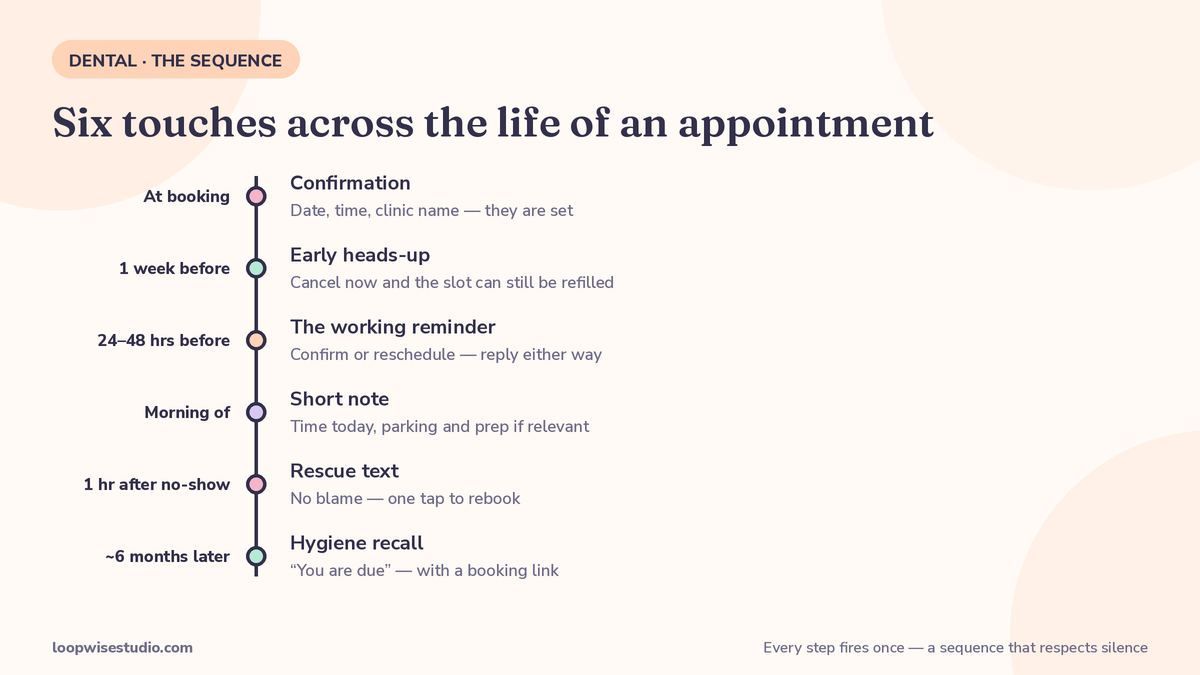
Here is the whole system as one table. Six touches across the life of an appointment, each with a job to do — and a clear rule for what happens on every kind of reply.
| When | Message purpose | If they confirm | If they reschedule or cancel | If no reply |
|---|---|---|---|---|
| At booking | Confirmation with date, time, and clinic name | Nothing needed — they are set | Rare at this stage; front desk calls | Nothing — too early to chase |
| 1 week before | Early heads-up: “next week, are we still on?” | Logged; no more messages until the next step | Slot released early, offered to the waitlist | Reminder step still fires |
| 24–48 hours before | The working reminder: confirm or reschedule, reply either way | Status updates in your schedule | Slot released with maximum refill time; waitlist text goes out | Morning-of message still fires |
| Morning of the visit | Short note: time today, parking/prep if relevant | Nothing needed | Too late to refill reliably — flag for front-desk call | Nothing more; do not stack texts |
| 1 hour after a no-show | Rescue text: no blame, one tap to rebook | New booking made on the spot | — | A second, final rescue after 2–3 days, then stop |
| ~6 months after a hygiene visit | Recall: “you are due” with a booking link | Booked from the message | — | One follow-up a week later, then back to the recall list |
Two things in that table matter more than the messages themselves.
First, confirmation changes the schedule, not just a note in a file. When a patient taps confirm, the appointment shows as confirmed where your team works. When they cancel at the 24–48 hour step, the slot is marked open the same hour — which is when it can still be filled. A cancellation you learn about the evening before is an asset. The same cancellation discovered at 9am is a hole.
Second, the sequence stops. No reply does not mean more texts. Each step fires once, and after the rescue attempt the patient goes back to the normal recall cycle. Practices get blocked and reported when they nag; a sequence that respects silence protects your number and your reputation.
Timing, for most small practices, is a preference question as much as a science question — and patients are not shy about theirs: in a Hanover Research study reported by ProSites, 80% of patients said they preferred text or email reminders over phone calls. The head-to-head evidence behind that preference is laid out in our comparison of SMS reminders vs phone calls for reducing dental no shows.
The messages themselves
Short, named, and human. Every message carries your clinic’s name, the patient’s first name, and one clear action. Here is the copy-ready set:
At booking:
Hi Sarah, you’re booked at Brightpath Dental with Dr. Lee on Tuesday Oct 27 at 10:30am for your cleaning. We’ll text a reminder before your visit. Reply STOP to end texts.
1 week before:
Hi Sarah, a heads-up from Brightpath Dental: your cleaning is next Tuesday Oct 27 at 10:30am. Still good? Reply YES to confirm or CHANGE if you need a new time.
24–48 hours before:
Hi Sarah, tomorrow (Tue Oct 27, 10:30am) at Brightpath Dental. Reply YES to confirm — or CHANGE and we’ll send new times. If we don’t hear back we’ll hold your slot until the morning.
Morning of:
Morning Sarah — see you at 10:30am today at Brightpath Dental. We’re on the second floor; parking is behind the building. Running late? Just reply here.
Rescue, 1 hour after a missed appointment:
Hi Sarah, we missed you at 10:30 today — no problem, it happens. Tap here to pick a new time this week or next: [booking link]. — Brightpath Dental
6-month recall:
Hi Sarah, it’s Brightpath Dental — you’re due for your next cleaning and checkup. Pick a time that suits you here: [booking link]. Want us to call instead? Just reply CALL.
Notice what none of these do: none asks the patient to phone the office during business hours to complete a simple task. Every job that can be finished inside the text is finished inside the text.
If setting up the sequence, writing the messages in your clinic’s voice, and wiring reply handling sounds like a project your desk does not have a free week for — it is exactly the kind of project we do. Get a free audit: we look at your current reminder setup (or the lack of one), show you which of the six steps you are missing, and quote one fixed price to build it on the system you already use.
When a patient replies something other than CONFIRM
Templates are the easy part. The question owners actually ask is: what happens when a patient replies with something real?
Replies fall into three groups, and each gets a different path:
“I need to move it.” The patient gets new times inside the same thread, or a booking link limited to your live availability. The old slot releases the moment they pick a new one. Nobody at your desk touches it unless they stall mid-thread.
“Quick question — does it hurt / is it covered / how long?” The message is flagged to your front desk with the patient’s name and appointment attached, and your person answers from the same thread when they are next at the desk. Anything touching pain, swelling, or a problem tooth skips the queue: it is marked urgent during opening hours, because that patient may need to be seen sooner, not reminded later.
Something automated should never answer. Cost disputes, complaints, clinical worries: the system hands the whole thread to a human and goes quiet. The rule is the same one we use everywhere — automation handles logistics, people handle everything else.
The result your front desk feels is not “more messages.” It is fewer phone calls about simple things, and a short daily list of threads that genuinely need a person, already sorted.
Filling the slot a reminder just freed
A confirm-or-reschedule step a day or two out does something a morning-of reminder call cannot: it hands you cancellations while there is still time to use them.
When a slot releases, a text goes to a short waitlist — patients who asked for sooner, hygiene patients due this month, people who could only do that day of the week. First reply takes it. Because the message goes out the moment the slot opens, small clinics fill a surprising share of would-be holes this way. The same instant-text reflex is what rescues a missed call, the system described in our page on missed call text back service for dental practices.
When a sequence still ends in a no-show, the rescue text goes out within the hour, while the patient is apologetic and near their phone. The fuller playbook for cutting the no-show rate itself is in our guide to how to reduce no shows at a med spa — most of it applies chair-for-chair to dental.
Consent, opt-outs, and texting rules in plain English
Automated texting to patients is normal and legal in the US when you do the basics right. The plain-English version for a small clinic:
- Get permission and keep a record of it. Patients agree to text reminders when they book — on your intake form, your booking page, or verbally with a note made. If you cannot show where a patient agreed, do not text them marketing messages; appointment reminders tied to a booking they made are the standard case your consent wording should cover.
- Honor STOP instantly and forever. One opt-out ends all automated texts to that number, automatically. No reply-to-confirm, no final message beyond the allowed confirmation.
- Identify yourself in every message. Your clinic’s name appears in each text, as in the templates above. Patients should never wonder who is texting them.
- US numbers need the registration done once. US carriers require businesses sending automated texts to register their messaging (the A2P 10DLC process) so messages are not filtered as spam. It is paperwork, not a project — but skipping it is why some clinics’ reminders silently stop arriving. Any setup we do includes it.
- Australian practices have a different register. Since 1 July 2026, branded sender IDs must be registered with ACMA, and an unregistered name is replaced with “Unverified” on the patient’s phone. The register and what it means for reminder copy are covered in our guide to dental reminder texts in Australia.
- Keep clinical detail out of the text. “Your cleaning at 10:30am” is fine. Treatment details, diagnoses, and results never go in a text message. Appointment logistics only.
None of this requires a compliance department. It requires the setup to be done once, properly.
Software vs done-for-you: what each route actually asks of you
The software route is real and works for some practices. Understand what it asks:
Buying reminder software means: choosing a platform (often one tied to a specific practice management system — some well-known tools only work with a single PMS), connecting it to your schedule, writing or approving every template, learning its inbox, and training your desk on reply handling. Budget a few hours to set up and a few weeks of checking before it runs itself. If your clinic has someone who enjoys that work, this route can be the cheapest in cash.
Done-for-you means: the sequence above is built on your existing system, messages written in your clinic’s voice, reply rules configured, waitlist and recall wired in, and your desk shown the one short daily list they will ever see. You approve the messages once. The cash cost is higher than a bare subscription; the time cost to your team is near zero, and somebody is accountable when a step stops firing.
Most small clinics we talk to have already bought the software once. It sits half-configured, sending a booking confirmation and nothing else, because the person who was going to finish it runs the front desk and her week filled up. That is not a software failure. It is a who-does-the-work failure — the one the second route fixes.
Frequently asked questions
How many reminders is too many?
For one appointment: a confirmation, an early heads-up, one working reminder 24–48 hours out, and a short morning note is the ceiling for most patients. After a no-show, two rescue attempts total. More than that reads as nagging and earns opt-outs, which cost you the recall channel too.
What about older patients who prefer a phone call?
They keep getting one. The sequence is per-patient: anyone who prefers calls is flagged, and your desk calls them the way they always have — the list is short precisely because most patients choose text. Ask at intake, record the preference once, and both groups are served the way they like.
Does this work if we do not change our practice management system?
Yes — that is the design point. The reminder layer reads your existing schedule and works alongside it. If a tool you are considering requires switching systems, that requirement alone is a reason to look again at a three-chair practice’s scale.
Can the messages go out in Spanish as well as English?
Yes. Templates are written per clinic, per language your patients actually use, and a patient’s language preference is set once and respected by every later message, including the recall.
What does it cost?
Bare software subscriptions in this market are priced per provider or per location and are the smaller half of the real cost — the larger half is your team’s setup time. Done-for-you setup is quoted as one fixed price on the audit, based on your current system and how much of the sequence already exists. There is no per-text surprise in how we price it.
We already send reminders and still get no-shows. What is different here?
Usually, what is missing is not a reminder but the steps around it: a confirm-or-reschedule message early enough to refill the slot, a waitlist that fires the moment a slot frees, and a rescue text within the hour after a no-show. One reminder on the morning of the visit warns you about an empty chair. The sequence gives you time to fill it.
Want to know which steps your clinic is missing? Get a free audit — send us nothing more than how you remind patients today, and we will map it against this sequence and give you a fixed price to complete it. If you are only missing one step, the audit will say that, and you can fix it yourself.