Square Appointments Alternatives for Barbershops With No-Shows
Square Appointments not fixing your barbershop no-shows? Fix four settings first, then compare the alternatives scored purely on no-show mechanics alone.
Square Appointments does not fix no-shows by itself, and that is the honest starting point. Its no-show protection is real — cards on file, cancellation policies, the option to require prepayment — but all of it only works if you switch it on, set the fees and enforce them. If your shop still loses chairs every week, do not buy an alternative yet. Run the four-setting audit below first: in many shops it closes most of the gap for free. If you have already done that and the no-shows keep coming, then switch — and judge the alternatives on no-show mechanics alone, which is how this page scores them.
Why Square Appointments doesn’t fix no-shows by itself
Start with what you actually have. As Rankite’s barbershop comparison puts it, Square’s free plan includes “a booking site, automated reminders, unlimited calendars and invoicing at $0, with Square taking only its standard processing fees.” That is a genuinely generous free tier — one reason so many shops start there. (Square’s paid tiers change over time and differ by location, so check the current tiers on Square’s own pricing page before budgeting; this article deliberately does not print tier prices that may be out of date by the time you read it.)
The catch is in what “no-show protection” means. On Square, protection is not an intelligence that works away in the background. It is a set of tools — card on file at booking, a cancellation policy with a fee, optional prepayment — that do nothing until a person configures them and then stands behind them at the counter. A shop that never enabled card capture has exactly as much protection as a paper diary.
Three more gaps matter in a barbershop specifically, all noted in the comparison research:
- Reminders are one-way. A client can be notified, but the easy two-way text conversation — reply to move the appointment instead of vanishing — is where rival tools put their no-show effort, and it is not Square’s strength.
- The backfill tools sit higher up. Waitlists and marketing live on Square’s paid tiers (Plus and above, per Rankite). A cancelled slot on the free plan just sits empty.
- Barbershop-shaped problems are not Square-shaped. The same research flags booth-rent collection, barber commission splits and walk-in queue management as “not its strengths” — and walk-ins are a barbershop’s natural backfill for a dead slot, if the queue is handled well.
None of this makes Square bad software. It makes it a payments-and-booking platform whose no-show work is manual — and manual work is exactly what a busy shop stops doing by week three.
The 4-setting audit: fix these on Square before you pay for anything else
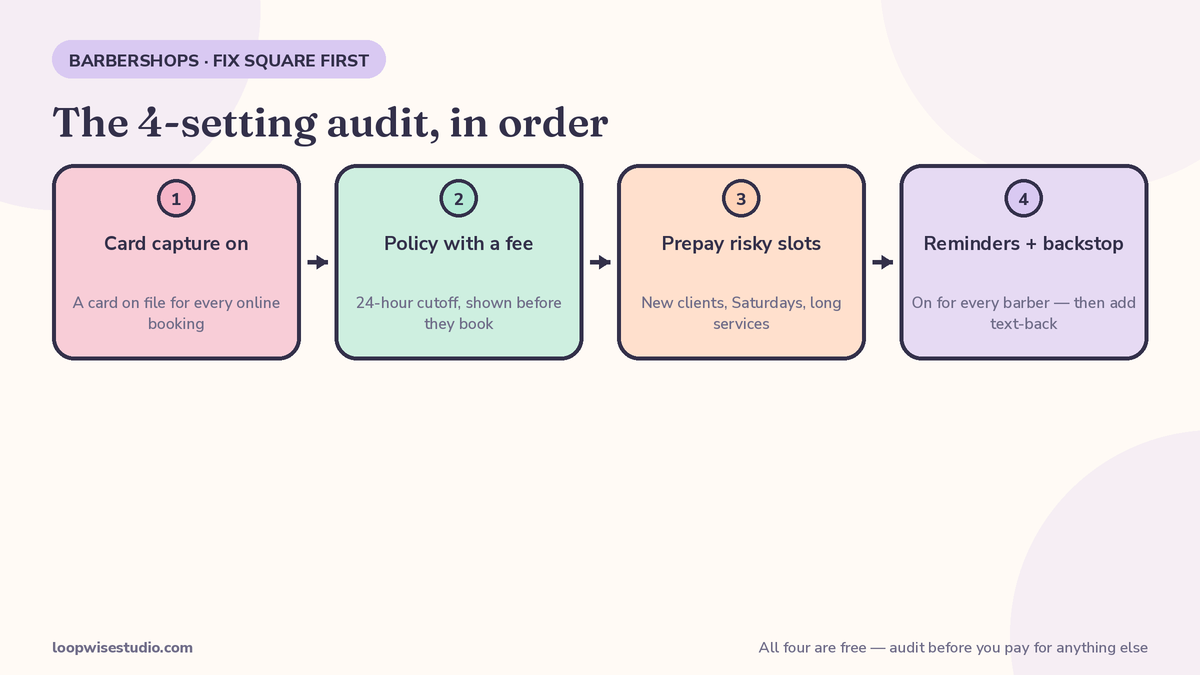
Work through these in order. Each one is free, and together they are the difference between “Square doesn’t stop no-shows” and “Square was never set up to.”
- Turn on card capture for online bookings. Require a card on file for appointments booked online. This is the single highest-value setting: a client with a card attached behaves differently from a client with nothing at stake. In Square’s settings this sits with your booking and payments options — if clients can complete a booking with no card and no commitment, that is your leak.
- Write a cancellation policy with an actual fee, and show it before they book. A policy that exists but is never displayed changes nothing. Set a cutoff (24 hours is the common shop standard) and a fee you would genuinely charge — then display both on the booking page, in plain words, before the client confirms.
- Require prepayment for the appointments that hurt most. You do not need to prepay every cut. New clients, Saturday peak slots, long services and anyone with a previous no-show: prepayment or a deposit for those bookings specifically. Square supports requiring prepayment — use it surgically, not as a blanket rule that scares off regulars.
- Check the reminder sequence is actually sending — and add the human backstop. Confirm reminders are on for every service and every barber’s calendar, not just the shop’s main one. Then accept the limit: Square will remind, but it will not notice a missed call from a new client at 7pm and text them a booking link. If after-hours and mid-cut missed calls are part of your leak, that is a layer to add (see the third option below), not a setting to find.
Do this audit and give it a month. Count no-shows before and after, per barber. If the number falls to a level your chairs can absorb, you just saved yourself a migration. If it does not move, your problem is structural — and now a switch is justified.
When Square is genuinely the wrong tool
Switching makes sense when the audit is done and one of these is true:
- Your shop runs on walk-ins and the queue is a whiteboard, a shout, or chaos. Queue-first tools handle the walk-in/appointment blend better than Square does.
- Booth renters eat their own no-shows. In a chair-rental shop, the shop’s policy is not the renter’s policy. If each barber needs their own deposit rules, reminders and client list, per-barber tools fit the economics better.
- Your cancellations die empty. If late cancellations are your main loss and nobody works a waitlist, you need automatic backfill offers — a feature set that sits on Square’s paid tiers or in tools built around it.
- Clients live in the text thread. If your regulars reschedule by messaging and your system cannot hold a two-way text conversation tied to the booking, every reschedule becomes phone tag or a silent no-show.
One more situation deserves honesty: if clients keep calling while every chair is busy and the phone rings out, part of your “no-show problem” is actually a missed-booking problem. That one has a specific fix — a missed call text back for salons and barbershops setup answers the call you could not, with a booking link, in seconds.
Not sure which side of the line your shop is on? Get a free audit — we will count your no-show pattern with you and say plainly whether it is a settings problem or a software problem.
The alternatives, scored on no-show mechanics only
Prices below are from Rankite’s barbershop comparison (checked October 2026) and will move — treat them as the shape of each deal, and confirm current pricing before you sign. The scoring ignores everything except the no-show fight: how the deposit works, whether a client can reschedule by replying to a text, whether a waitlist refills the gap, and whether reminders are included or an extra.
| Tool | Deposit / card model | Two-way reschedule by text | Waitlist backfill | Price shape (per Rankite, Oct 2026) |
|---|---|---|---|---|
| Booksy | Card policies + Boost-driven discovery; reminders always free, 2,000 marketing texts/mo included | Not its headline strength | Marketplace demand is its backfill | $29.99/mo + $20/mo per extra staff; 3-chair shop $69.99/mo before processing |
| Fresha | Card capture + cancellation fees | Two-way SMS rescheduling is a headline feature | Marketplace of new clients | $19.95/mo Independent; $14.95/mo per team member on Team; 20% marketplace commission on a new client’s first booking (min $6) |
| Squire | Built for barbershops; booking fees of $1–$3 passed to the client on some plans | Barbershop-focused flows | Shop-first platform | $30 Independent / $50 Pro / $150 Executive / $250 Titan; no per-barber fees |
| Vagaro | $30 base ($23.99 promo), +$10/mo per calendar up to 7 | Two-way texting available | Waitlist features by tier | Watch the calendar fees as you add chairs |
| Setmore | Free tier exists; card capture on paid plans | Two-way SMS rescheduling highlighted | Basic | Low-cost entry; check which tier holds the no-show tools |
| GlossGenius | Card-on-file and deposits, simple setup | Text-based client contact | Simple rather than deep | Solo-friendly pricing; confirm current tiers |
Read the table the way a barber should: the best no-show tool is the one whose deposit model your clients will accept and whose reschedule path is one reply, not a phone call. A cancelled slot refilled by a waitlist offer — the mechanics of which are covered step by step in our guide on how to fill cancelled appointments at a salon automatically — is worth more than any dashboard.
And a fair word for the incumbent: if your audit fixed Square and your remaining losses are small, staying put is a perfectly good answer. Every migration costs you a weekend and your regulars a new booking habit. Spend that only when the numbers say so.
What a no-show actually costs a shop
Do this arithmetic with your own prices — the comparisons online rarely bother, so here is the shape with clearly labelled assumptions. Take a chair doing 25 booked appointments a week at a $40 average ticket. At a 10% no-show rate, that chair loses 2.5 appointments — $100 a week, roughly $5,200 a year, per chair. A 3-chair shop at the same rate is looking at over $15,000 a year of empty-chair time, and that is before counting the walk-in you turned away because the book said full.
Now the honest other side: no system takes a shop to zero. Deposits, reminders and easy rescheduling cut the rate; they do not end human forgetfulness. Judge any tool — including anything we build — on whether it pays for itself at a realistic reduction in your rate, not on a promised percentage. Anyone quoting you a guaranteed no-show drop without asking your current rate is selling, not advising.
Booth renters: the no-show economics nobody scores
Roundups score software for “the shop” as if one business absorbs every loss. In a chair-rental shop that is not true, and it changes which tool is right.
When a booth renter’s client no-shows, the shop does not lose the ticket — the renter does, on top of chair rent that is due whether the chair was sat in or not. A renter doing 20 booked appointments a week who loses two to no-shows is out roughly $80 a week at a $40 average ticket: over $4,000 a year, straight off the income the rent comes out of. Meanwhile the shop’s own numbers look fine, because the till still took money from everyone else.
That is why shop-wide settings so often fail renters. The owner sets a cancellation policy that suits the shop; the renter whose regulars book by text needs their own deposit rule, their own reminder sequence and their own client list — because if they move chairs next year, that list is the business they take with them. It is also why Square’s weak spots land hardest in rental shops: commission splits and booth-rent collection were flagged in the comparison research as “not its strengths,” and a one-size reminder setup cannot express five barbers’ five different policies.
If you rent chairs, judge every option in this article as an individual, not as a shop. Your deposit model, your reminders, your list. The owner’s choice is a separate decision.
The third option: keep Square for payments, add the layer that does the no-show work
There is a reason the roundups never mention this path: nobody earns a commission when you stay.
If Square handles your till, your cards and your stock perfectly well, and the only broken part is bookings leaking around it — missed calls mid-cut, reminders nobody configured properly, no text-back, no waitlist working your cancellations — you can keep Square exactly where it is and build the booking and reminder layer on top: your own booking page, deposit rules set per service, a reminder sequence clients can reply to, and a missed-call text that catches the client who rang while your hands were busy.
That is the setup Loopwise builds for shops: the front layer that stops the leaks, without ripping out the payments system your accountant already understands. It suits shops that like Square, booth-rental shops where each barber needs their own booking link under one roof, and any shop whose real problem is the phone, not the till. Get a free audit and we will tell you whether the layer is enough for your shop or whether a full switch — like the route taken in our Vagaro alternative breakdown — is the better spend.
How to switch (or fix) without losing bookings: 5 steps
- Count first. Two weeks of honest numbers: no-shows and late cancels per barber, per day. That is your baseline and your proof later.
- Run the 4-setting audit above, whatever you decide next. A shop that cannot enforce a policy on Square will not enforce one anywhere.
- Pick on mechanics, not logos. Score your shortlist only on the table above: deposit model, reply-to-reschedule, waitlist backfill, reminder costs.
- Run both systems for two weeks. New bookings go to the new tool; existing bookings stay where they were made. Never cut over mid-week.
- Tell your regulars once, clearly. A single message with the new booking link, and the card-on-file ask explained as protecting their slot — regulars accept deposits from a shop they trust when the reason is plain.
FAQs
Is Square’s no-show protection free?
The tools are in the product — cards on file, cancellation policies, optional prepayment — and the free plan is generous. But protection is not automatic at any tier: it works only when you have enabled card capture, set a fee, and displayed the policy. Shops that skip the setup get no protection regardless of plan.
Can I charge a no-show fee fairly?
Yes, if the client agreed to it before the appointment. Display the policy and the fee at booking, take the card with consent, remind them before the cutoff, and waive it for genuine emergencies at your discretion. A fee that appears as a surprise charge after the fact is how shops lose regulars and win chargebacks.
Should booth renters use the shop’s system or their own?
Their own booking link, in most chair-rental setups. The renter carries their own no-show risk, sets their own deposit rules and keeps their own client list if they move chairs. A shop-wide system makes sense only when the shop genuinely shares clients and enforces one policy for everyone.
I have done the audit and still lose chairs. What is the best alternative?
If two-way text rescheduling and waitlist backfill are your gaps, Fresha and Booksy are the usual shortlist from the table above, with Squire the barbershop-native option. Score them on your own booking mix — marketplace commission matters only if marketplace clients become your regulars.
Will deposits put clients off booking?
A deposit on every booking can. A deposit on new clients, peak slots and long services rarely does, especially when the reason is stated plainly: it holds your chair. Start narrow, watch your booking rate for a month, and widen only if the numbers hold.
Can I keep Square and still get text-back and proper reminders?
Yes — that is the layer option described above. Square stays as your payments and till system; the booking page, reminder sequence and missed-call text-back sit in front of it. For many shops that is the cheapest fix, because the problem was never the till.