Acuity Scheduling Alternative for Clinics: Two Ways Out
Clinics outgrow Acuity when booking is all it does. Compare full practice platforms like Pabau with fixing your front door — website, reminders, follow-up.
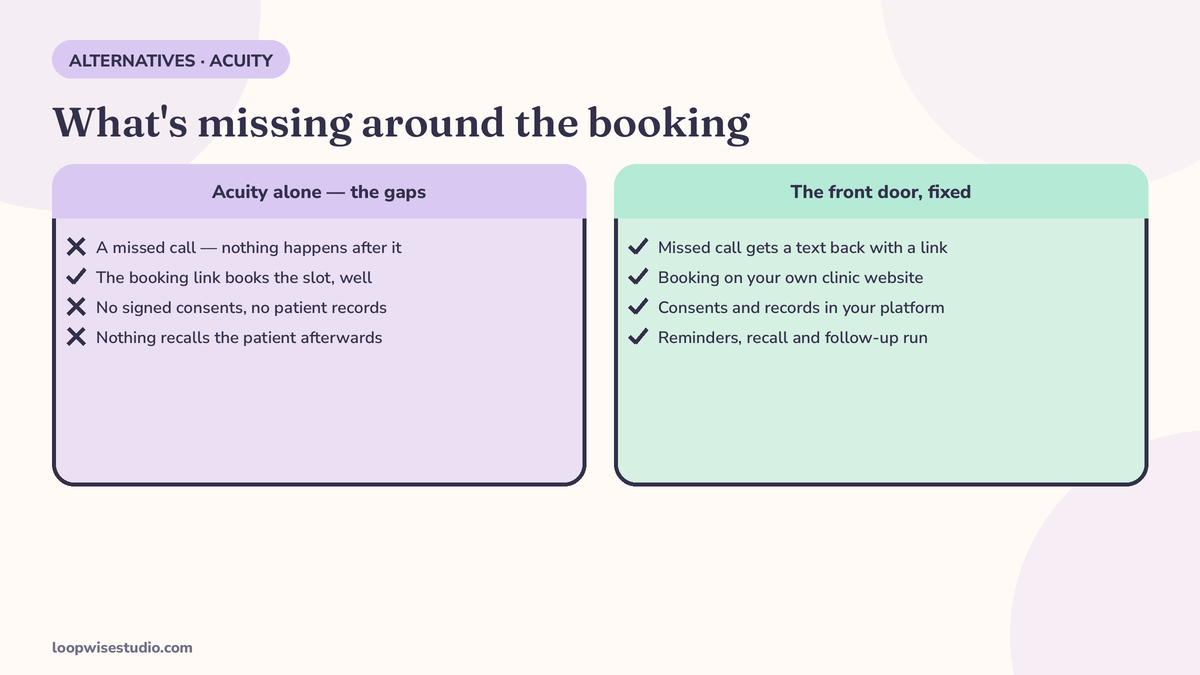
Clinics leaving Acuity Scheduling choose between two different things: a full practice platform — Pabau starts from $65/mo per practitioner, with patient records and digitally signed consents, per Pabau’s pricing — or fixing the front door instead, meaning your own website with booking, reminders and patient follow-up while your records stay where they are. Acuity books the appointment well. It has no digital-signature consents, no patient records and no messaging around the booking, per Pabau’s comparison — and for a clinic, the appointment is the one part that was never the whole job.
Most pages ranking for this search are generic scheduler roundups with the word “clinic” in the title, or one vendor’s list that ends at its own platform. This article separates the two real decisions — do you need a clinical system, or do you need a front door? — because clinics waste the most money confusing them.
Why clinics outgrow Acuity — it was only ever a diary
Acuity is a good scheduling tool. Solo practitioners and small wellness businesses run on it happily for years. Clinics hit its edges at specific, predictable points.
Consents cannot be signed. Per Pabau’s Acuity comparison, Acuity has intake forms but no digital-signature function — a clinic that needs signed consent gets forms from one tool and signatures from another system, at additional cost. For aesthetic and treatment-led clinics, the signed consent is not paperwork decoration; it is the legal record of the treatment.
There is no record behind the appointment. No medical history, allergies or treatment notes; no inventory; photos can be uploaded but there is no before-and-after photo management, per the same Pabau comparison. The diary knows when the patient is coming. It knows nothing about the patient.
Nothing happens around the booking. No missed-call capture when the phone rings out. No two-way text conversation with the patient. No review requests after the visit. No recall when a treatment cycle is due again. The booking link is the whole product, and everything before it (the enquiry, the missed call, the Instagram message) and after it (the reminder, the rebooking, the review) is somebody else’s job — usually your receptionist’s, done by hand.
The page is rented. Acuity lives inside Squarespace’s platform. Your booking page exists on their system, in their frame. That is fine for a diary. It is a thin foundation for the front door of a clinic that wants to be found on Google in its own name.
If those four gaps are not your gaps — if you are a solo practitioner whose patients all arrive by referral and book happily — Acuity may still be the right tool, and the honest advice is to stay. The fork below is for clinics who feel at least two of them.
The fork nobody offers you — replace the records system, or fix the front door
Every alternative list for this query quietly assumes you will rip out Acuity and adopt a bigger platform. That is one route. It is not the only one, and for many clinics it is the expensive answer to the wrong question.
Route A — a full practice platform. You move records, consents, photos, inventory and booking into one clinical system. This is the right move when your records genuinely live in spreadsheets, paper files, or your head — when the missing EMR is the problem, not the missing reminders. It is also a migration: data to move, staff to retrain, a per-practitioner bill that grows with your team.
Route B — fix the front door. Your records and clinical system stay exactly as they are. What changes is everything the patient touches before and after: your own website (found on Google, in your name), online booking connected to your diary, automatic reminders, missed-call text-back, rebooking and recall messages, and review requests — built and run for you. This is the right move when your clinical side works and your leaks are at the edges: calls missed, enquiries answered slowly, patients not rebooked.
The scoring in our roundup of the best booking software for a small aesthetic clinic owner-operator makes the same distinction: solo clinics usually need the front door fixed long before they need an enterprise records system.
The full-platform options, fairly — when Route A is right
Pabau is the platform the ranking lists are built around, and on clinic features it earns the attention: online booking plus full patient records, digital-signature consents, before-and-after photos, inventory and 150+ reports, per its own comparison pages. Pabau’s pricing starts from $65/mo per practitioner, per its pricing page — note that Pabau’s own roundup table elsewhere says $69/mo, a small inconsistency on Pabau’s own site; we use the $65 pricing-page figure, and you should confirm current pricing with them. Pabau’s own “falls short” honesty is worth copying: it concedes a learning curve and that it is overkill for a solo non-clinical practice. For a multi-practitioner aesthetic clinic with paper consents, it is a serious option.
Jane App and the Cliniko class are the allied-health platforms — physiotherapy, chiropractic, psychology and multi-disciplinary clinics — built around clinical notes and practitioner workflows. If your clinic’s day is treatment plans and case notes rather than aesthetic treatments, this class fits better than the med-spa platforms. Neither is a front door, though: both still expect your website and your follow-up to happen somewhere.
The generic schedulers ranking for this query — Cal.com (free for individuals, Teams $15 per user/mo), Calendly (Standard $10, Teams $16 per user/mo on annual billing), Setmore (free for up to 4 users and 200 appointments, paid from $5 per user/mo), SimplyBook.me ($8.25–$59.90/mo by tier) and Koalendar itself (Pro $6.99 per user/mo), all per Koalendar’s and Pabau’s 2026 roundups — are fine diaries. For a clinic they solve the same slice Acuity already solves. Swapping Acuity for one of them changes your subscription, not your gaps. If a simpler diary is genuinely all you want, our Calendly alternative page covers the reminder-first angle for clinics in that lighter class.
The front-door route — what “done for you” actually covers
Route B deserves the same specificity as the platform lists, so here is what a proper front door contains:
- Your own website, on your domain, with treatment pages that can rank on Google locally — not a booking link inside someone else’s platform
- Online booking connected to your existing diary, with deposits where no-shows hurt
- Automatic reminders by text and WhatsApp, timed to your treatment types, with one-tap reschedule
- Missed-call text-back, so the call you could not answer becomes a conversation instead of a lost patient
- Rebooking and recall, because a clinic’s diary is refilled by cycles — treatments due again, reviews due, plans due — not by hope
- Review requests sent to every patient after every visit (the same ask to everyone; no filtering, no incentives — that is both Google’s rule and the only version that lasts)
That is what Loopwise Studio builds for clinics and med spas: the website and the follow-up system, run for you, while your clinical records stay in whatever system already works. If you are weighing Route A against Route B and want the leaks in your current setup priced first, get a free audit — we will show you where bookings are actually escaping before you commit to either migration.
What the Acuity stack really costs once you bolt on the missing pieces
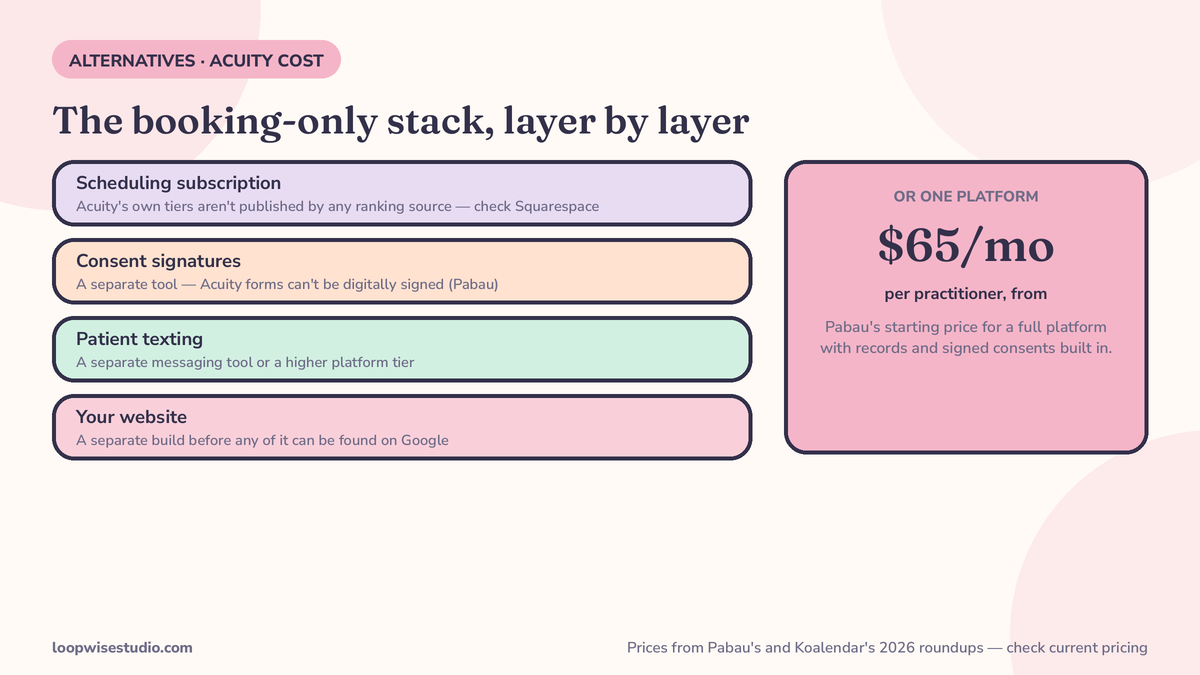
One number is missing from every article on this query, including the research behind this one: Acuity’s own current tier prices. No ranking source we reviewed states them, and we will not quote figures from memory. Check the current tiers on Squarespace’s Acuity pricing page and date-stamp what you find — prices in this market move.
What can be totalled honestly is the shape of the bill. A clinic on a booking-only tool typically ends up paying for:
| Layer | Why you add it | Sourced reference point |
|---|---|---|
| Scheduling subscription | The diary itself | Check current Acuity tiers on Squarespace |
| Consent signatures | Acuity forms cannot be signed (Pabau comparison) | A separate e-signature/forms tool, extra cost |
| Patient texting | Reminders, two-way replies, recall | A separate messaging tool or platform tier |
| Your website | To be found on Google at all | A Squarespace site or your own build |
Compare that stack against a full platform’s per-practitioner price (Pabau from $65/mo) and against Route B’s fixed build-and-run cost, and the decision stops being about headline subscription prices. It becomes: which layers do I actually need, and who runs them?
There is a second cost in the stack that never appears on an invoice: your team’s time administering it. Three or four separate tools means three or four logins, three or four support desks when something breaks before a clinic session, and a front desk stitching them together by hand — re-typing the patient from the diary into the texting tool, chasing the signature in a different inbox. Clinics routinely discover that the bolted-together stack costs more in receptionist hours than any single line on the table above. Count those hours when you compare routes; the platforms count on you not doing it. The same total-cost habit is what our website-with-online-booking cost guide applies to the website layer specifically.
A note for Canadian clinics — the wedge the big lists miss entirely
One comparison page in this market makes an argument none of the US lists touch: where your patient data lives, and in what language your patients book. Colib, a Canadian EMR, positions itself as the Acuity alternative for Canadian practices on exactly those grounds — fully bilingual English/French booking and forms, and data hosted in Canada, framed around PIPEDA and Quebec’s Loi 25.
Whether or not Colib is your answer, the questions are the right ones for any Canadian clinic weighing an alternative: Is the booking experience properly bilingual, or English with a translation skin? Where is patient data hosted, and under whose privacy law? A clinic in Montreal or Moncton asking those questions will find the generic roundups useless — they were not written for your jurisdiction. Treat data residency and language as first-class criteria, the way you would treat consent handling, because regulators and patients both do.
Ten questions to ask any alternative before you sign — copy this list
Take these into every demo, whichever route you are pricing. A vendor who answers them plainly is telling you who they are; so is one who does not.
- Can a patient sign a consent form inside this system, or do I need a second tool?
- Where do my patient records live, and can I export everything — notes, photos, history — if I leave?
- What happens when the phone rings and nobody answers? Show me, don’t describe it.
- Are reminders two-way? When a patient replies, whose screen does it land on?
- Does it run recall — patients due again in three or six months — or only reminders for bookings already made?
- Is there a review request after visits, sent to every patient, with no filtering?
- What is the twelve-month total for my exact practitioner count, including every add-on I will actually use?
- What does the booking page look like on Google — under my name and domain, or yours?
- Who sets this up: my front desk, on a weekend, or you?
- If I cancel in month thirteen, what do I walk away with?
Route A platforms answer the first two questions best. Route B answers questions three to six and ten best. Your clinic’s honest answers to the list will usually pick the route for you.
Migration notes — whichever route you take
- Export your client list, services and appointment types before you cancel anything; your own copy is the one you control
- Recreate intake forms in the new system and test the full patient journey on your phone, as a patient
- If you take Route A, schedule the move between treatment cycles, not mid-plan — records migrations and half-finished courses do not mix
- If you take Route B, nothing clinical moves at all; the changeover is the website and the booking link, which is precisely its advantage
- Tell patients once, by text, with the new link — and keep the old link redirecting or live for a fortnight
The short version
Acuity is a diary, and a good one. Clinics leave it when the work around the diary — signed consents, patient records, reminders, recalls, reviews, missed calls — becomes the job. If the records are the problem, buy a clinical platform like Pabau and budget the migration. If the leaks are the problem, keep your records and fix the front door. Not sure which problem you have? That is a measurable question, not a matter of taste — get a free audit and we will map your current booking flow and show you the gaps before you spend on either route.
FAQs
Is Acuity Scheduling good enough for a small clinic?
For booking alone, often yes — a solo practitioner with referral-fed demand can run on Acuity for years. Clinics outgrow it when they need signed consent forms (Acuity’s forms have no digital-signature function, per Pabau’s comparison), patient records behind the appointment, or automated reminders, recalls and review requests around the booking. The tool is not bad; the clinic’s needs get wider than a diary.
What is the best Acuity alternative for an aesthetic clinic?
If you need a full clinical system, Pabau is the name the comparison lists are built around — booking plus records, signed consents, before-and-after photos and inventory, from $65/mo per practitioner per its pricing page. If your records are fine and the problem is missed enquiries, no-shows and patients not rebooking, a front-door build — your own website with booking and follow-up — fixes the leak without a records migration.
How much does Acuity Scheduling cost now?
Check Squarespace’s current Acuity pricing page. The roundups we reviewed for this article (October 2026) did not publish Acuity’s tier prices, and this market reprices often enough that a figure quoted from memory would mislead you. What matters more than the tier price is the stack: add the consent-signature tool and the patient-texting tool a clinic typically bolts on, and compare totals, not headlines.
Can I keep my patient records and just replace the booking?
Yes — that is the front-door route. Your records stay in your current system; what changes is the website, the booking connection, reminders, missed-call text-back, recalls and review requests. For clinics whose clinical side works, it is the cheaper and calmer change, and it is the option the platform roundups never list because none of them sell it.
Does Acuity send appointment reminders?
Acuity handles the appointment itself, but the wider follow-up system clinics rely on — two-way patient texting, rebooking at the end of a treatment cycle, recall messages when the next course is due, and review requests after visits — sits outside a booking-only tool. Clinics either bolt on separate tools (with separate bills) or move to a platform or service where the follow-up is built in.
What should I check before migrating off Acuity?
Four things: that your client list and appointment history are exported and in your hands; that intake and consent needs are covered in the new setup (signed, if your treatments require it); that future appointments are re-entered before patients are told anything; and that the old booking link keeps working or redirecting for at least two weeks. The migration notes above give the full sequence.