Fill Cancelled Salon Appointments Automatically
Cancelled salon slot? Fill it automatically: an early-cancel reminder, a ranked waitlist, a 30-minute offer window and copy-ready texts that refill the chair.
To fill cancelled appointments at a salon automatically, you need three things working together: reminders that make clients cancel early instead of not showing up, a waitlist that knows who wants what, and an automatic offer that goes to the best-matched clients first — not to your whole list — with a short window to reply. The first person to say yes gets the slot, gets a confirmation, and the offer stops. No phone calls, no group text, no stylist refreshing a paper list between clients.
That system is what this guide builds, step by step, in plain language. It covers how to build a waitlist worth having, the ranking rule, the exact messages to send, what changes for barbershops, and — honestly — when automatic filling will not work for you.
Why cancelled slots stay empty
Most salons do not have a demand problem. They have a speed problem and a list problem.
A client cancels at 11am for a 2pm colour appointment. The slot is worth two hours of a senior stylist’s day. What happens next in most salons is: nothing fast. The receptionist is checking someone out. The stylist finds out at 1:45. Someone says “we should text the waitlist” — but the waitlist is three names on a sticky note, with no note of what service they want, which stylist they see, or whether they could even get there today.
By the time anyone acts, the only clients who could have filled the slot have made other plans.
The other half of the problem happens earlier. A client who cannot make her appointment often decides that morning — but telling the salon means finding the number, calling, and explaining. If it feels like work, she just does not show. A no-show gives you zero minutes to refill the chair. An early cancellation gives you hours. That is why the refill system starts before the cancellation, with reminders built to surface the cancellation while there is still time to sell the slot again. We cover that side in full in our guide to reducing no-shows at a med spa — the reminder logic is the same for a salon diary.
The system in one picture
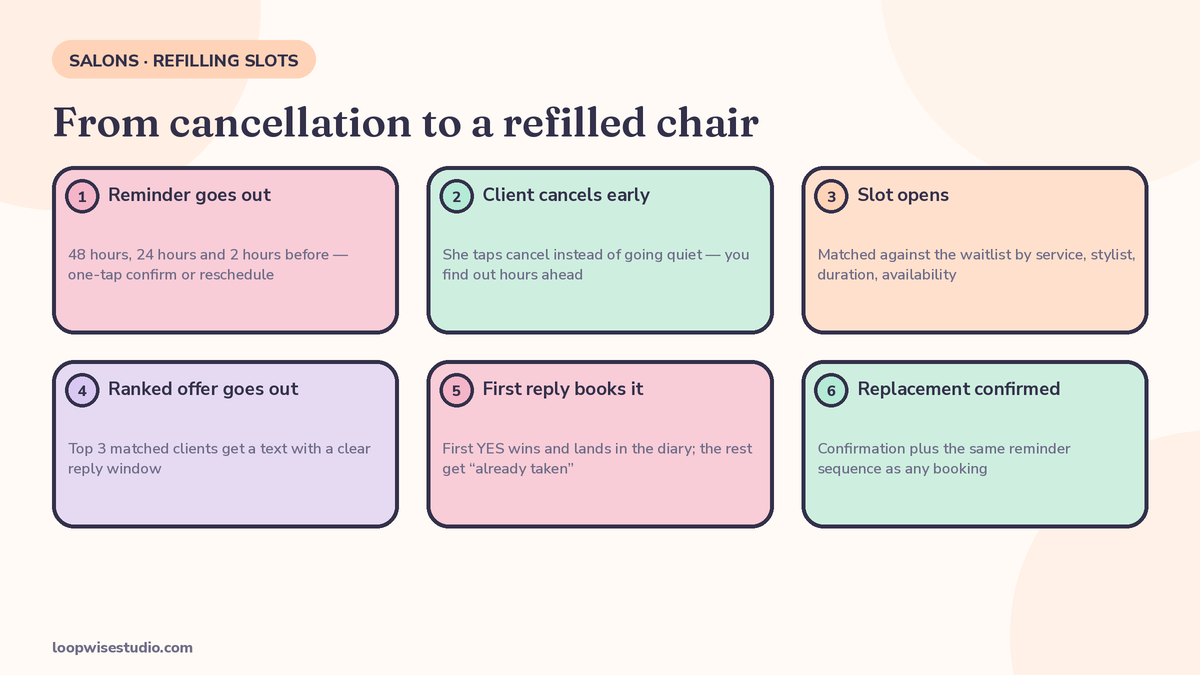
Here is the whole loop, start to finish:
| Step | What happens | Who does it |
|---|---|---|
| 1. Reminder goes out | Client gets a reminder 48 hours, 24 hours and 2 hours before, with one-tap confirm or reschedule | Automatic |
| 2. Client cancels early | She taps reschedule/cancel instead of going quiet — you find out hours ahead, not at the appointment time | Client |
| 3. Slot opens | The empty slot is matched against the waitlist by service, stylist, duration and availability | Automatic |
| 4. Ranked offer goes out | The top 3 matched clients get a text with a clear reply window | Automatic |
| 5. First reply books it | First “YES” wins, the booking lands in the diary, everyone else gets a short “already taken” message | Automatic |
| 6. Replacement is confirmed | The new client gets a confirmation and the same reminder sequence as any booking | Automatic |
One automation agency guide (Trigacy) walks through an example timeline on the same lines — cancellation at 2:00pm, matches found at 2:01, offers out at 2:02, accepted at 2:06, confirmed at 2:07. Your numbers will vary, but the order of events is the point: the whole refill can happen inside ten minutes, while a manual “call down the list” process is still on its first voicemail.
Step 1 — Build a waitlist that is worth having
The waitlist is the asset. A weak list is why automatic filling fails even when the software works.
Most salon waitlists fail in one of two ways. Either they are a name and a number with nothing else recorded — so every offer is a guess — or they are so hard to join that nobody bothers. You need both sides right: easy to join, and enough detail recorded to match properly.
Where clients should join
- On your booking page, when their time is full. “Saturday with Priya is booked out — join the waitlist and we’ll text you if a slot opens.” This is the highest-intent moment there is. The client already picked the service, the stylist and the day.
- At checkout, in the chair. “Your next slot in six weeks is tight — want me to put you on the list if something opens sooner?” Said out loud by the stylist, this fills your list with regulars, who are the easiest people to refill a slot with.
- On Instagram Stories. A story that says “Cancellation list for this week is open — reply LIST and your service” catches followers who tried to book and gave up. If enquiries already come in by phone, the same list grows from callers you could not fit in — which is why it pairs naturally with missed call text back for salons and barbershops: every “sorry, we’re full” caller becomes a waitlist member instead of a lost client.
- From your Google profile and website. Anyone who lands on your site, sees no suitable slot and leaves is a waitlist candidate you never met. One line and one button fixes that.
The five fields that matter
Record these for every person on the list. Nothing more is needed, and less than this makes matching guesswork:
| Field | Why it matters |
|---|---|
| Service wanted | A 30-minute slot cannot take a full balayage. Matching starts here. |
| Stylist preference (or “any”) | Some clients only come for one person. Others just want in. Know which. |
| Days and times that work | A client free only on Saturdays should never get a Tuesday 11am offer. |
| Flexible — yes or no | “Text me whenever anything opens” clients are gold for short-notice slots. |
| Notice needed | Some people need a day’s warning. Some can be there in an hour. This decides who gets short-notice offers. |
One more habit worth building: clean the list monthly. Remove people who have not replied to three offers in a row, and ask the rest once if they still want to be on it. A list of 40 people who reply beats a list of 400 who ignore you — and a list that gets ignored stops being read at all.
Step 2 — Make cancellations happen early
A refill system fed only by no-shows will starve. Your job is to convert silent no-shows into early cancellations.
The lever is the reminder sequence. Salon software vendor SalonBiz, citing research indexed on PubMed, states that automated reminders reduce no-show rates by 29% to 40% across service-based businesses. Treat that as a directional figure for reminders generally, not a promise for your salon — but the mechanism is sound and simple: a reminder with an easy way out gets used. A reminder that just says “see you Tuesday” does not.
Send three:
- 48 hours before — the planning reminder. This is where most reschedules happen, while the client is still organising her week. Include a one-tap reschedule link.
- 24 hours before — the decision reminder. Ask for a straight confirm or reschedule. This is the message that surfaces tomorrow’s cancellation today.
- 2 hours before — the short nudge. Too late to refill most slots, but it catches the last-minute “I can’t make it” in time to offer the slot to someone nearby or flexible.
Keep the cancellation policy next to the reminder, in plain words. People cancel earlier when they know the rule before they are breaking it:
“Running late or can’t make it? Tap reschedule in this message — no charge if you move your appointment more than 24 hours ahead. Appointments cancelled inside 24 hours are charged 50%.”
That wording does two jobs. It tells clients the easy way out exists, and it makes the early tap feel normal rather than rude.
If your reminders are firmer for UK clients — for example if your diary runs on a booking system for UK salons with WhatsApp reminders — the sequence is identical. Only the channel changes.
Step 3 — Rank the offers, don’t blast the list
This is the decision that separates a system clients like from one they block.
The blast approach exists: one free waitlist app (Appointify) works by texting your whole waitlist the moment an opening is entered, first reply wins. It is simple, and for a tiny list it can work. But text 80 people about a slot only five of them could use, three times a week, and within a month most of them have stopped reading your messages — including the ones that mattered.
Ranked offers work the other way, and it is how the refill tool NoShow Rescue describes its own system: offers go out in ranked order and stop the moment someone accepts. No spraying the whole list.
You do not need complicated maths to rank. One published DIY workflow (a production n8n build shared on dev.to) uses a scoring rule any owner can copy on paper:
| Match factor | Points |
|---|---|
| Service matches the open slot | 50 |
| Client flagged “flexible — text me anytime” | 20 |
| Your priority score for this client (regular, reliable, high value) | 0–10 |
Add a hard filter before the scoring: the slot has to fit. Duration long enough for the service, the right stylist (or “any stylist” clients), and enough notice for that client. A perfect score means nothing if she needs two hours’ warning and the appointment is in 40 minutes.
Then send in waves:
- Wave 1: top 3 matches only. Give them a 30-minute window — say so in the message. Three is a deliberate cap; the dev.to build’s own lesson from running it live was that offering to five at once ended with two people replying yes and one of them having to be told the slot was gone.
- Wave 2: if nobody claims it inside the window, the next 3–5 matches get the offer.
- Wave 3: if the slot is still open and time is getting short, open it to the flexible group — the “any time, any stylist” clients.
Stop the moment someone confirms. Everyone who replied too late gets one short, decent message (template below), not silence.
The exact messages to send
Copy these and put your salon’s name, service names and tone in. Short beats clever — the client is deciding in seconds.
First offer (Wave 1):
Hi [Name], it’s [Salon]. A [service] slot with [Stylist] just opened today at [time] — you were near the top of our waitlist for it. Want it? Reply YES in the next 30 minutes and it’s yours. No reply needed if you can’t make it.
Already taken (sent to anyone who replies after the slot is filled):
You’re quick — that one has just been taken. You’re still near the top of the list for [service], and you’ll get first offer on the next opening. Thanks for replying so fast.
Second wave (to the next group, if Wave 1 did not claim it):
Hi [Name], [Salon] here. We still have a [service] opening today at [time] with [Stylist]. Reply YES if you can make it — first reply gets it booked in.
Under 2 hours to go (short-notice version — send only to “flexible / nearby” clients):
Short notice, [Name] — [Stylist] has a gap at [time] today for a [service]. You’d need to be here by [time]. Reply YES and we’ll have everything ready.
Deposit request on a refilled slot (for long or high-value services):
Booked in — [service] with [Stylist], today at [time]. Because it’s a long appointment, we hold it with a [amount] deposit: [payment link]. Pay within 30 minutes and the slot is locked in as yours.
Two rules across all of them: name the service, stylist and time in every message (vague offers get vague replies), and always say what happens next. The client should never have to ask “so am I booked?”
If the size of this setup is the part putting you off — list, rules, templates, diary connection — that is exactly the build we do for salon owners. Get a free audit and we will map your current cancellations against this system and tell you honestly whether your diary is busy enough for it to pay.
What changes for barbershops and short services
Every waitlist guide writes for salons and spas and forgets barbershops exist. That is a miss, because barbershops are where this system works fastest.
A haircut or beard trim is a short service with same-day demand. A cancelled 30-minute slot at noon can realistically be filled by 12:20, because the pool of people who can use it is bigger: nearby workers on lunch, regulars who walk in anyway, anyone on the list flagged flexible. The offer window shrinks too — 10 to 15 minutes is plenty when the service is short and the client is close.
Two adjustments make it work in a shop:
- Lead with speed, not the calendar. Your message is “chair open at 1pm, first reply sits in it” — closer to a queue call than an appointment offer.
- Feed the list from walk-ins you turn away. A busy Saturday where you turn away six walk-ins is six waitlist members for next Saturday. One text at the door — “full today, want first call when a chair opens?” — builds the list from people already standing in your shop.
What does not change: rank, do not blast, and stop the moment the chair is claimed. A barbershop list gets spammed to death even faster than a salon list, because the offers are more frequent.
When automatic filling will not work
Honest limits, because a system sold without them will disappoint you:
- Your waitlist is tiny. Fewer than about 15–20 active, replying names and there is often nobody to offer to. Fix the pool first (Step 1) for a month, then switch the automation on.
- Your diary is not actually full. Refill systems recover demand you already have. If chairs sit empty on ordinary days, the problem is bookings coming in, not cancellations going out.
- The service needs a consultation or patch test first. Colour corrections, first-time chemical services and anything with a required test cannot be handed to a waitlist stranger at two hours’ notice. Refill those slots from existing, already-tested clients only, or use the gap for shorter services.
- You are in a low-demand area with long travel times. If most clients drive 30 minutes to reach you, sub-two-hour offers will rarely land. Weight your list toward day-ahead cancellations instead.
None of these make the system useless — they change which version of it you should run.
The numbers to watch
You cannot tell whether this is working by feel. Watch four numbers, once a week:
| Number | What it tells you |
|---|---|
| Cancellations surfaced early (24h+ ahead) | Whether your reminders are doing Step 2. More early cancellations is good news, not bad. |
| Fill rate | Share of cancelled prime-time slots that get rebooked. This is the headline number. |
| Time to fill | Minutes from cancellation to confirmed replacement. Under 30 minutes is a healthy system. |
| Recovered revenue per week | Value of refilled appointments. Compare it with what the software and setup cost you. |
Trigacy’s guide gives a simple illustrative example of the maths in the same spirit: 10 late cancellations a week at an $80 average ticket is $800 a week at risk, and refilling half of them is roughly $400 a week — about $20,000 over 50 weeks. That example is labelled illustrative in their guide, and yours depends on your ticket size and diary. Run it with your own numbers before you spend anything.
What it costs: tools, time, or done for you
There are three ways to run this:
- A waitlist-only tool. NoShow Rescue lists its plans at $29, $69 and $149 a month (as published on its site, checked October 2026 — verify current pricing before you buy). Appointify’s waitlist app is free. These handle the offer mechanics; the list-building, reminder setup and diary connection are still your job.
- Your booking software’s own features. Some platforms have waitlist or gap-filling add-ons. Cheapest if yours does — but check whether it ranks offers or just blasts, and whether it can start from a cancellation automatically rather than someone re-typing the opening into an app.
- Build it yourself. The dev.to workflow shows it can be done in n8n by a developer. If you are not a developer, that route means hiring one — at which point you are buying a done-for-you build anyway, just without the salon-specific templates and rules.
The honest trade-off is the same as everywhere in a salon: money for the tool, or hours from you or your front desk. The system itself is not complicated. Getting the list, the rules and the messages right, connected to the diary you already use, is the work.
Loopwise builds that whole loop — website and booking, reminder sequence, ranked waitlist and refill offers — as one system, set up for you. Get a free audit and we will look at how many prime-time slots your salon lost in the last month and show you, in numbers, what filling even half of them is worth before you decide anything.
Frequently asked questions
How many people should I offer a cancelled slot to at once?
Start with three. One published production workflow (shared on dev.to) caps offers at the top 3 matches after learning the hard way that offering to five produced two yes replies and one awkward “already taken.” Expand in waves if nobody claims it.
Will clients get annoyed by waitlist texts?
Not if the offers are ranked and relevant. Annoyance comes from blasting — texting everyone about slots that do not fit their service, stylist or availability. Offer only to matches, stop when the slot fills, and let people leave the list with one reply.
What if two clients reply yes at the same time?
The first confirmed reply gets the slot — the booking system timestamps it. The second person gets the “already taken” message immediately, while they are still in a booking mood, and stays at the top of the list for the next opening. Sent within a minute, that message keeps goodwill rather than costing it.
Does this work if my booking software has no waitlist feature?
Yes, in most cases. The waitlist can live in a simple connected tool or list, as long as offers, replies and the diary booking are joined up. What does not work is a list nobody maintains — that is the part to automate or hand to someone, not the part to leave on paper.
How is this different from just sending a cancellation post on Instagram Stories?
Stories reach whoever happens to be scrolling, including people who live an hour away or wanted a different stylist. A ranked waitlist reaches the specific clients who asked for that service, with that stylist, and said they could come at short notice — in order, with a reply window. Stories are a decent backup for a slot that two waves could not fill. They are a poor first move.
Do I need to take deposits on refilled appointments?
For long or high-value services, yes — a refilled colour appointment that no-shows is worse than an empty slot you knew about. Use your normal deposit rule, send the payment link in the confirmation message, and hold the slot only until the stated deadline. For short services, a confirmation and reminder are usually enough.