How to Reduce Front Desk Calls With Online Booking
Cut front desk calls with online booking: audit one week of calls, fix the 7 call types that fill the phone's day, and roll the changes out in two weeks.
You reduce front desk calls by moving the seven routine jobs the phone does all day — booking, moving, confirming, directions and prep, prices, forms, and running-late calls — onto your website, your booking page and your reminder messages. Almost none of those calls need a person. They happen because the phone is the easiest way for a patient to get the answer. Make the online route easier than dialling, one call type at a time, and the phone quiets down on its own — without a single patient feeling brushed off.
Here’s the full method: measure your own calls first, then fix them in the order that takes the least effort.
Why the phone is still busy (it’s not your front desk’s fault)
Patients aren’t stubborn about phoning. The numbers show the demand to self-serve is already there and the supply isn’t. A 2024 MGMA Stat poll of 318 practice leaders found that 73% said a quarter or fewer of their patients schedule digitally — and only 11% said a majority of their patients book online.
Read that again. In most practices, three quarters of patients or more still end up on the phone, not because they love hold music, but because the digital route is missing, buried, or stops halfway. A “Book” button that leads to a form which leads to “we’ll call you back” trains patients to skip the website entirely and just dial. Every call your front desk takes is a small review of your online booking setup — and most of them score it “easier to phone.”
That’s good news. It means the fix is mostly arrangement, not persuasion. You don’t have to change patient behaviour. You have to remove the reasons they call.
There’s a second problem hiding inside the first: the calls don’t arrive evenly. They bunch — first thing in the morning, over lunch, in the last hour before closing — which is exactly when the desk is also checking patients in, taking payments and dealing with the people physically in the room. A routine call answered at a quiet moment costs three minutes. The same call at 9:05am costs three minutes plus a queue, a flustered welcome for the patient at the desk, and a decent chance the next call goes unanswered. Call volume is the headline; call timing is why it hurts. Online fixes don’t bunch. A booking page takes fifty bookings at 9:05am as calmly as one.
It also means something else: every routine call answered by a human is a call that might not get answered at all when the desk is busy — and an unanswered call isn’t a neutral event. A missed new-patient call is often a booking that goes to the next clinic on the list, which is the leak we priced out in our article on how much revenue med spas lose from missed calls. Quieting the routine calls is also how you make sure the important ones get picked up.
Step one: the one-week call audit
Don’t guess which calls to fix. Count them. For one normal week, your front desk keeps a tally sheet by the phone — a paper grid is fine — and marks every call in one of seven types, with a rough time of day. It takes two seconds per call.
| Call type | What the patient actually needs | Tally |
|---|---|---|
| Book | A new appointment | |
| Move | To reschedule or cancel an existing one | |
| Confirm | Reassurance: “am I booked? what time?” | |
| Directions & prep | Address, parking, what to bring, how to prepare | |
| Price & cover | Cost, insurance, what’s included | |
| Forms & results | Paperwork, records, “did my results come in?” | |
| Running late / on the day | “I’m stuck in traffic”, a same-day problem |
At the end of the week, add one more column in your head for each type: could this have been done online, with the patient getting what they needed faster? For the first six types, the honest answer is almost always yes.
Two things this gives you that no borrowed statistic can. First, your own before-number — total calls, and roughly how many staff minutes they ate. Second, your order of attack: fix your biggest type first, not the one a blog post (including this one) assumes is biggest. Clinics differ. A dental practice drowns in Move and Confirm calls. A med spa gets Price and Book. Your tally tells you.
A few practical notes for running it. Keep the sheet stupidly simple — seven rows, tick marks, no stopwatch; if the audit itself becomes admin, the desk will quietly stop doing it by Wednesday. Mark the time roughly (morning / midday / evening is enough) because the timing pattern is half the diagnosis. Count voicemails and missed calls in the type they most likely were — a missed call during lunch from an existing patient is usually a Move or a Confirm. And run it for a full ordinary week, not your quietest one: a flattering baseline makes the improvement impossible to prove later, including to yourself. When the week ends, photograph the sheet. That photo is your before-picture, and it’s the most persuasive document in this whole process — far more than any figure in any article, this one included.
The 7 call types and the online fix for each
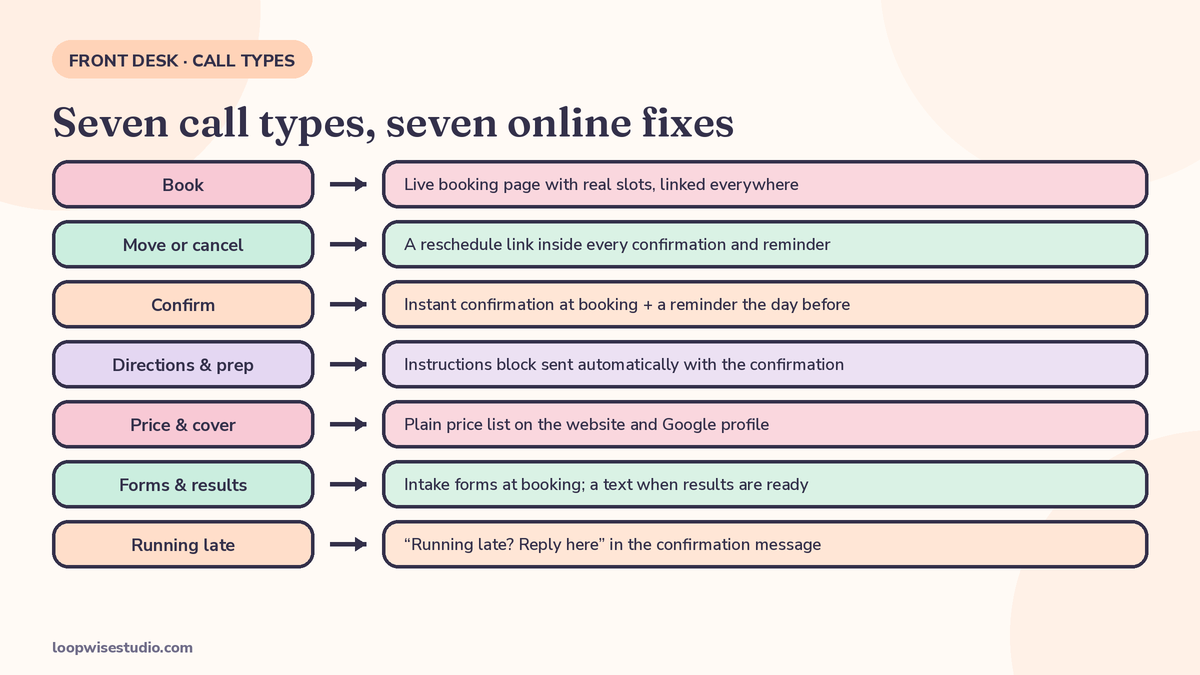
| # | Call type | The online fix | Who it frees |
|---|---|---|---|
| 1 | Book a new appointment | Real-time booking page with live slots, linked everywhere — Google profile, website header, Instagram, email signature | Front desk, all day |
| 2 | Move or cancel | A reschedule link inside every confirmation and reminder — the patient moves themselves | Front desk + the diary (freed slots go back on sale) |
| 3 | Confirm / “just checking” | Instant confirmation message at booking, plus a reminder the day before — nobody needs to ring to check | Front desk, mornings especially |
| 4 | Directions & prep | An instructions block sent automatically with the confirmation: address, parking, what to bring, prep steps | Front desk, and fewer late arrivals |
| 5 | Price & cover | A plain price list on the website and Google profile, with an FAQ entry for insurance and what’s included | Front desk, and better-qualified enquiries |
| 6 | Forms & results | Intake forms completed at booking, not at the desk; a results-ready text when results land | Front desk + the waiting room queue |
| 7 | Running late / on the day | Nothing online fixes traffic — but a confirmation message with a “running late? reply here” option keeps it a 10-second text, not a call | Whoever’s mid-treatment |
Notice what this table is really saying: calls 1–6 are the same job wearing different clothes. The patient has a question or a diary change, and the phone is the only tool you’ve given them for it. Give them the tool and the call never happens.
The rollout, in effort order
Do these in sequence over about two weeks. Each one is small; together they’re the system.
1. Make booking the easy default (days 1–2)
Put the booking link everywhere a patient might look: the Google Business Profile’s booking/appointment field, a button in your website header that survives on mobile, your Instagram bio and Book Now button, your email signature, the bottom of every receipt. The booking page itself must show live slots and confirm instantly — a request form is not booking, and patients can tell the difference.
2. Kill the Confirm and Move calls (days 3–5)
Switch on two messages: an instant confirmation the moment someone books, and a reminder before the appointment. Both carry a reschedule link. This pair quietly removes two of the seven call types at once, and it does a second job — reminders with an easy way out are also how you stop empty slots, as we cover in our guide to text message appointment reminders for small dental clinics. Write the messages once, in plain words, and let them run.
3. Answer it before they call (days 6–8)
Take your Directions & prep and Price & cover tallies and write the answers where patients look first: the confirmation message (address, parking, what to bring, prep), the website (price list, insurance FAQ), and the Google profile (photos of the entrance help more than you’d expect — half of “where are you?” calls are really “I can’t picture it”). Every answer published is a call that never rings.
4. Move intake off the phone (days 9–11)
Send intake and consent forms as part of the booking confirmation, to be completed before arrival. This ends the “do I need to fill anything in?” calls, shortens the check-in queue, and means day-of paperwork problems surface the day before, when there’s time to fix them.
5. Catch what’s left (days 12–14)
Some calls will still come — at lunch, mid-treatment, after closing. Set missed calls to trigger an automatic text with the booking link, so a call you couldn’t take still becomes a booking or a reply instead of a lost patient. And overnight, the same machinery keeps working after the desk goes home — the full overnight setup is in our guide to getting bookings while you sleep at a small clinic.
If your tally is already done and one type towers over the rest, you don’t have to guess the fix alone — get a free audit and we’ll walk your booking and phone setup with you and tell you which lever to pull first.
The WhatsApp version of all this (UK, UAE and Australia)
Everything above is written phone-first because that’s how the US content on this topic is shaped. If your clinic is in the UK, the UAE or Australia, a good share of your “calls” aren’t calls at all — they’re WhatsApp messages asking to book, move or confirm. The playbook is identical; the channel changes. The booking link goes in the WhatsApp profile and the chat’s quick replies. The instant confirmation and reminder arrive in the same thread the patient already uses. The reschedule link sits inside the reminder message, so a “can I move Thursday?” chat resolves itself without a member of staff typing anything. And the one-week audit counts message threads as well as calls — for many clinics the message column turns out to be the bigger one, and the quicker win.
What a realistic result looks like
One named case gives the shape of it. OneDoc reports that at Physio7, a physiotherapy practice using its platform, more than 50% of appointments are booked online — and that this saves the front office 5 to 10 minutes per appointment. That’s a vendor-reported case study, so treat it as one practice’s experience, not a promise. But notice why it’s believable: nothing about it requires patients to behave unusually. The bookings moved because the online route did the whole job.
Run the same maths on your own audit numbers. If your tally shows, say, 30 routine calls a day in the fixable types, and each one costs your desk even 3 minutes of talking, hold time and diary-typing, that’s an hour and a half a day — before you count the calls that came in while those were being answered. You don’t need to believe anyone’s industry figure. Your tally sheet is the figure.
What should stay roughly the same: your phone number, your welcome, and the calls that matter. The goal was never zero calls. It’s a phone that rings for reasons worth a human.
What changes for the front desk’s day
Worth saying plainly, because it’s what owners actually picture when they hear “fewer calls”: nobody’s job disappears. The day changes shape. The interruptions stop — and interruptions are the real cost of the phone, because every call breaks a check-in, a payment, a conversation with the patient standing right there. What’s left is the work that was always squeezed around the ringing: greeting people properly, recalls and rebooking conversations that actually grow the diary, chasing the reviews and referrals that bring the next patients in. Front desk teams in busy clinics are usually good at exactly that work. The phone just never lets them do it.
The calls you should never automate away
Keep a human first for:
- Urgent symptoms or a worried patient. They need a clinician’s judgement, not a link.
- Complaints. A frustrated caller handled by a script is a bad review with a head start.
- Complex cover and insurance cases. A wrong automated answer here costs real money and trust.
- New patients with a complicated history. The first conversation is care, not admin.
The system above is built to protect these calls, not replace them. Every routine call you remove is attention your team gets back for the patient in front of them and the caller who genuinely needs a person.
If you’d like a second pair of eyes on where your calls are coming from, get a free audit — we’ll look at your booking setup and phone flow and show you which of the seven types is costing you most, and what to fix first.
FAQs
How many calls will online booking actually remove?
It depends on your mix, which is why the audit comes first. In practices where booking is genuinely self-serve, the majority of Book, Move and Confirm calls disappear because those patients never need to ring. The OneDoc/Physio7 case — over 50% of appointments booked online — is a reasonable shape to aim at, not a guarantee.
Do older patients still want to book by phone?
Some do, and they should be able to. The audit usually shows the phone preference is smaller than assumed — many “phone patients” were website patients who hit a form or a dead end first. Keep the number prominent; just make it the second easiest route instead of the only working one.
Won’t patients just call anyway out of habit?
For a few weeks, some will. Habit fades fast when the alternative is visibly faster: front desk staff can help it along by ending routine calls with “you can also move it yourself next time — the link’s in your confirmation text.” Most patients switch themselves once they’ve used the booking page once.
We already have online booking, but the phone hasn’t quietened. Why?
Usually one of three reasons: the booking page takes requests instead of showing live slots, the link is buried (not on the Google profile, not in the header), or confirmations and reminders don’t carry a reschedule link, so Move and Confirm calls keep coming. All three show up in the audit within a week.
Should we stop publishing our phone number?
No. Hiding the number frustrates exactly the patients who most need a human, and it reads as a clinic that doesn’t want to be contacted. Reduce the reasons to call. The number stays.
What’s the cheapest first step if we can’t do all of this now?
The reschedule link in your reminders. It’s usually a setting you’re already paying for, it removes two call types (Move, and most Confirm calls), and it frees slots early enough to refill them. Then run the audit and follow your own numbers.