Online Booking Website for Nail Salons: What It Must Do
A booking website for a nail salon does more than a booking link: named techs, real durations, deposits, and a fill cycle that rebooks clients on time.
A nail salon booking website lets clients book a named technician, see real available slots, and pay a deposit online, any time of day. The nail-specific part is the fill cycle: a good page rebooks the next fill on a two-to-three-week cadence, before regrowth shows. A vendor booking link handles the booking; it does not do the website’s job of selling the work.
That distinction matters because most of what ranks for this search today is not a website at all. It is a booking page hosted by a software company, with your salon’s name on it. That page takes appointments. It does not show off your nail art properly, it does not explain your services the way you would, and when you leave the software, the page — and the clients who found you through it — stays behind.
This guide walks through what your own booking website needs to do, section by section, with the fill cycle as the spine. If you’d rather skip the reading and have someone look at your current setup, you can get a free audit — we check your booking page, your phone setup, and your reminders, and tell you plainly what is costing you bookings.
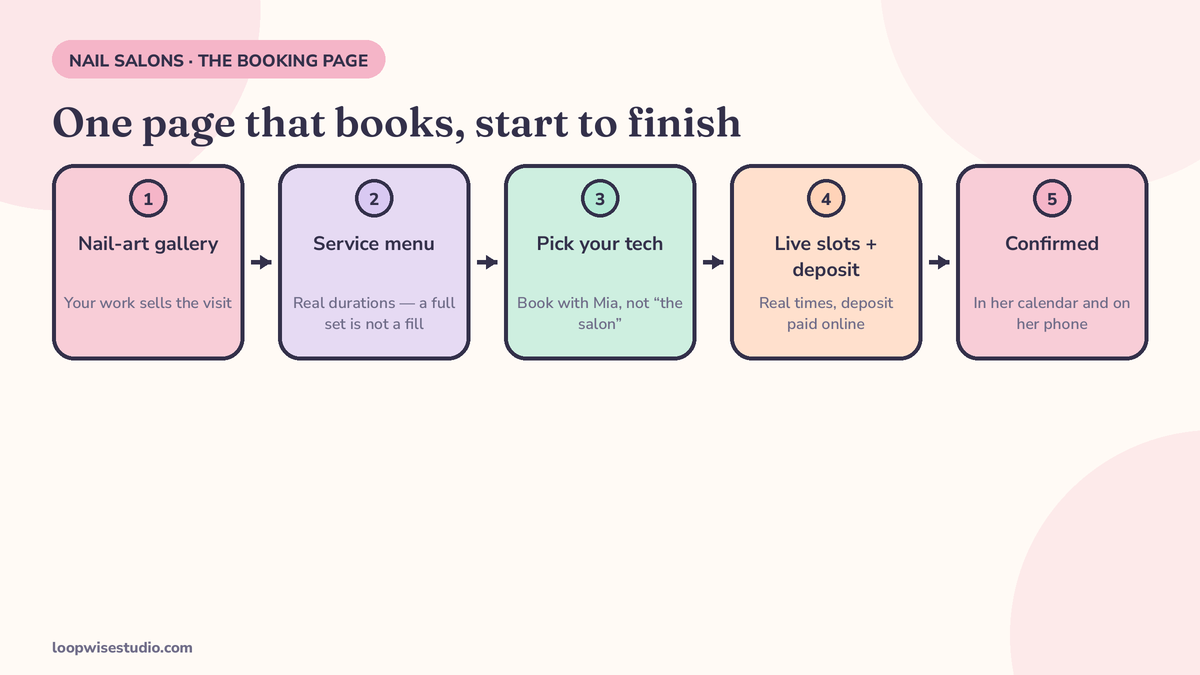
What clients must be able to do in under a minute
A client lands on your page from Instagram or Google, usually on her phone, usually with a specific set in mind. She needs four things, fast:
- Pick her technician. Nail clients are loyal to a tech, not to a salon. If she cannot book “with Mia,” she will message Mia on Instagram instead — or wait.
- See real slots. Not a request form. Not “we’ll confirm shortly.” Actual open times for that tech, that service, that day.
- Know how long it takes. A full set is not a fill is not a soak-off plus new set. If the page hides durations, she guesses — and guesses wrong.
- Pay a deposit and get instant confirmation. The booking should feel finished the moment she taps it, with the appointment in her calendar and a confirmation message on her phone.
If any of those four steps is missing, the page is a brochure with a phone number. And the phone number is where bookings go to die — a point we come back to below.
The nail-specific parts generic booking software gets wrong
Most booking tools were built for hair or general beauty and adapted. Nails have mechanics those tools flatten away:
Soak-off and removal time. A client rebooking “a fill” who actually needs a removal plus a new set will blow up your tech’s next two appointments. The booking page needs soak-off as a real, timed part of the service — either its own bookable item or built into the duration of the services that need it.
Full set vs fill durations. These are different appointments with different lengths and different prices. If the page books both as “acrylic appointment, 60 minutes,” your day runs late from the second client onwards.
Mani-pedi in one visit. SimplyBook.me, one of the few vendors that designs for nails specifically, builds a “book a manicure and pedicure together” flow into its nail salon page — one checkout, back-to-back slots. It is a small thing that generic tools make awkward, and clients feel the difference.
Buffers. Cleaning, photos of the finished set, a bathroom break. Five to ten minutes between appointments is the difference between a calm salon and a queue of annoyed clients checking their watches.
| Service | What the page must get right | What goes wrong when it doesn’t |
|---|---|---|
| Full set | True duration, deposit, tech choice | Day runs late; no-shows cost the most here |
| Fill / infill | Shorter duration, timed to the 2–3 week cycle | Booked as a full set; wasted chair time |
| Soak-off + new set | Removal time included in the slot | Next client waits; tech rushes the new set |
| Mani-pedi combo | One checkout, back-to-back booking | Client books two separate visits or gives up |
| Nail art add-on | Extra time priced and added to the slot | Art squeezed in free, running the day late |
Your work sells the booking: the gallery that ends in a button
Nail clients choose with their eyes. They screenshot sets on Instagram and bring them in as references. Your booking website should work the same way: a gallery of your techs’ actual work, organised by style — and every photo one tap away from booking that service with that tech.
This is the job a vendor booking page cannot do. A hosted booking link shows a service list. Your own website shows the almond set with the chrome finish that makes a client think “that one, this week,” and lets her book it before the thought cools.
It also settles the Instagram question. A lot of salons take bookings through DMs because that is where the photos are. The fix is not to abandon Instagram — it is to make every post and every bio link land on a gallery page that ends in a booking button, not a “DM to book” instruction. We wrote about that pattern for salons generally in our piece on turning Instagram followers into bookings.
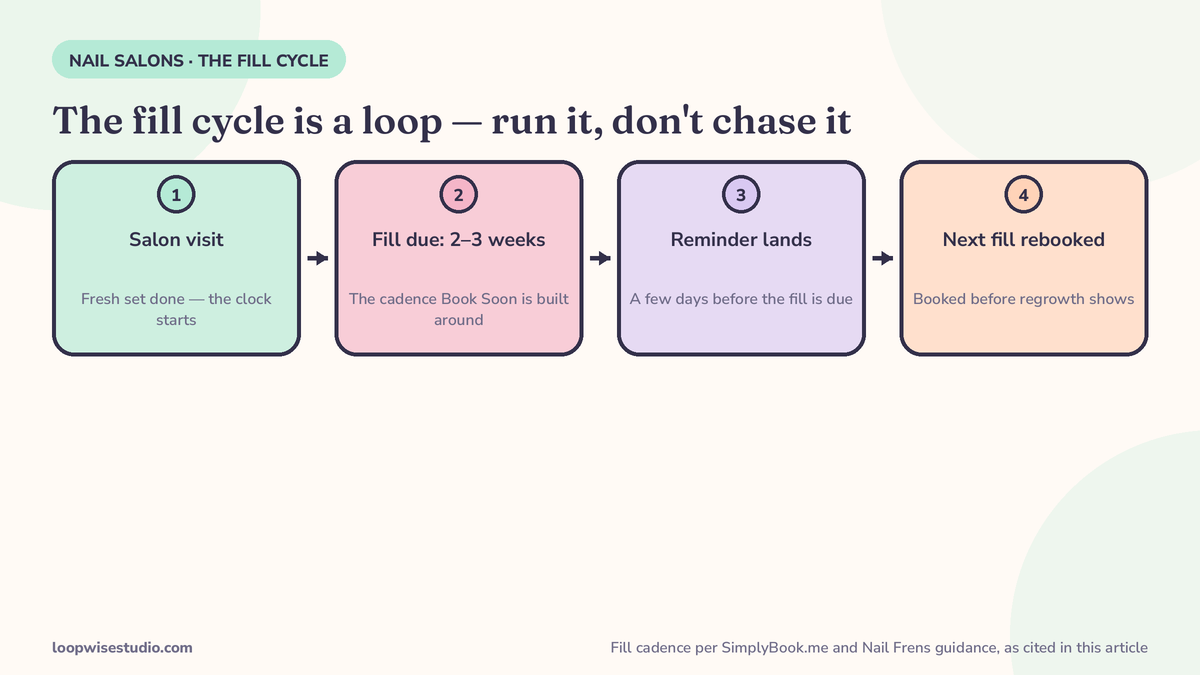
Built around the fill cycle: rebooking before the client leaves
Here is the number your whole booking website should be organised around: two to three weeks. That is the fill and refill cadence SimplyBook.me builds its “Book Soon” reminder feature around, and nail-tech education sources agree — Nail Frens’ maintenance guidance puts regular maintenance for enhancement and gel clients at around two to three weeks for many clients, varying with nail growth, product and lifestyle.
So the website’s job does not end at the first booking. It should:
- Offer the next fill at checkout — “same time in two weeks?” as a bookable option, not a hope.
- Send the reminder when the fill is due, not on a random marketing schedule. SimplyBook.me’s Book Soon does this by counting days from the last visit and nudging clients who have not rebooked, timed to the salon’s typical fill window.
- Make rebooking take one tap from the reminder, with the client’s usual tech and service already filled in.
A missed fill is not just a missed appointment. The set overgrows, the next visit becomes a longer removal plus a full set, and the client’s rhythm — and your predictable income — breaks. We go deeper on that in our guide to reminding nail clients to rebook their next fill.
Deposits that protect the long appointments
A 90-minute full set that no-shows is the most expensive empty chair in your salon. Deposits exist to protect exactly those slots.
What do salons actually charge? Function of Vex, a nail-tech education site that surveyed common practice among techs, puts the usual non-refundable deposit at $15–$25 flat, or 25–50% of the service price. DaySmart’s salon guide lands in a similar place: $25–$50 flat for new clients, or 20–50% of the service total, with deposits recommended for appointments over 90 minutes. Treat those as reported norms from industry sources, not rules — but the pattern is consistent:
- Short services (polish change, quick repair): card on file may be enough.
- Long services (full sets, detailed art, 90 minutes+): deposit at booking, every time.
- New clients: deposit regardless of service. They have no track record with you yet.
- Regulars in the fill cycle: many salons soften the deposit once a client has a history of showing up. That is a judgement call — but make it a policy, not a favour.
The deposit policy belongs on the booking page, in plain words, before the client pays — not sprung on her afterwards. And the cancellation terms next to it: how late she can move the appointment, and what happens to the deposit when she does.
Every door, one diary: the phone is part of the website
Your website can be perfect and still leak bookings — through the phone.
Nail techs work with their hands in water, in gloves, mid-service, for the length of a full appointment. There is often nobody whose job is answering. So the call about “can I get in Saturday?” rings out, and the client calls the salon down the street.
The fix that pairs with a booking website is missed call text back: when a call goes unanswered, the caller automatically gets a text within seconds, with a link to the same booking page — or, in fuller setups, a conversation that books her inside the thread. Same diary, same slots, no second system to check. We explain how it works for nail salons specifically in missed call text back for nail salons, and it is one of the cheapest leaks to close because it needs no behaviour change from your techs at all.
The principle is simple: website, Google profile, Instagram, and phone all land in one diary. Wherever the client knocks, the same door opens.
Marketplace page vs widget vs your own website
You have three real routes. Here is the honest comparison:
| Route | What you get | What it costs you | Who owns the client list |
|---|---|---|---|
| Marketplace booking page (e.g. a booking marketplace profile) | Discovery — new clients find you | Commission or fees on bookings; your profile sits next to competitors | The marketplace |
| Booking widget on a basic site | A booking calendar bolted onto a simple page | Monthly software fee; the page still cannot sell your work | You, mostly |
| Your own booking website | Gallery, services, deposits, fill rebooking and text-back built as one system | A build cost, then a modest monthly running cost | You, fully |
Marketplaces are not villains — discovery is real, and a new salon may need it. But a marketplace profile is rented ground. The question to ask of any route: if I leave, do my clients, my reviews and my search presence come with me? With your own website, the answer is yes.
For a sense of what the website route costs when it includes booking, deposits and reminders, our breakdown of what a website with online booking costs a clinic works through the same cost components — the maths is the same shape for a salon.
How a booking website comes together, step by step
If you go the own-website route, the build follows a predictable order. Knowing it helps you judge any quote you are given:
- The service menu is rebuilt with real durations. Every service gets its true length — soak-off included where it applies — and its deposit rule. This step decides whether the diary works; everything after it is decoration.
- Techs and their hours go in. Each technician’s services, days and breaks, so clients book a person, not a promise.
- The gallery is loaded with your real work, tagged by service and tech, so every photo leads to the right booking.
- Payments and deposits are connected, and the cancellation policy is written into the booking flow where clients see it before paying.
- Reminders are set: the confirmation, the pre-visit reminder, and the fill-due nudge on the two-to-three-week clock.
- The phone is connected — missed call text back switched on, pointing at the same booking page.
- Google and Instagram are pointed at it: the Google Business Profile booking link, the Instagram bio link, and the QR code at the desk for clients who still prefer to book from the chair.
Timelines vary with how much content you already have — a salon with good photos and a settled service menu moves far faster than one starting from zero. The honest test of any quote is not the price; it is whether steps 1, 5 and 6 are in it. A quote that skips the durations, the fill reminders or the phone is quoting you a prettier brochure, not a booking system.
What to check before you commit to any booking website
Copy this checklist and run any option — software, marketplace, or a built website — against it:
- Clients can book a named technician, not just “anyone”
- Full set, fill, and soak-off have separate, honest durations
- Deposits can be taken at booking, sized per service
- The next fill can be booked or triggered by a timed reminder
- A gallery of real work sits one tap from a booking button
- Reminders go out automatically (confirmation, before the visit, fill-due)
- A missed call turns into a text with a booking link
- You own the client list and can export it any time
- The cancellation policy shows before the client pays
- It works fast on a phone — that is where your clients are
If an option fails more than two of these, it is not a booking website. It is a calendar.
One booking website, built around the fill cycle: clients book their tech, pay a deposit, and get nudged back every two to three weeks. Missed calls turn into texts that land on the same page. That is the whole system — and it is the version where you own the client list. If you want a second pair of eyes on what you have now, get a free audit and we will tell you which of the ten checklist items your current setup is failing.
FAQs
Is a booking link from my software the same as a booking website?
No. A booking link is one page, hosted by the software company, that takes appointments. A booking website is your own site — your gallery, your service explanations, your policies — with booking built in. The link cannot sell your work, rank for your salon in search, or come with you if you switch software.
How long should a fill appointment be bookable in advance?
Far enough to hold the cycle. Since fills run on a two-to-three-week cadence, clients should be able to book at least four to six weeks out so the next two fills can be secured. SimplyBook.me’s Book Soon feature times its rebooking nudge to that same two-to-three-week window.
How much deposit should a nail salon take?
Reported norms from nail industry sources: $15–$25 flat or 25–50% of the service price (Function of Vex), with DaySmart recommending deposits especially for appointments over 90 minutes. Long full sets and new clients are the cases where a deposit matters most.
Can a booking website handle walk-ins too?
Walk-ins still walk in. What the website changes is everything around them: clients who would have phoned to ask about the wait can check and book a slot instead, and a missed walk-in enquiry call becomes a text conversation rather than a lost client.
What happens to my bookings if I switch from my current software?
That depends on the route. With a marketplace or hosted booking page, your presence lives on their platform. With your own website, the site, the domain, the gallery and the client list are yours — the booking engine behind it can change without your clients noticing.
Do I need an app as well?
No. Clients will not download an app for one salon. A fast mobile website with a booking button does the same job in the browser they already have open.