Online Booking System for Laser Hair Removal Clinics
A laser clinic booking system has to track prepaid sessions, patch tests and recalls — not just take appointments. Here is the full booking journey.
A booking system for a laser hair removal clinic must track prepaid course sessions, block treatment booking until a patch test is done, reserve the room and the device together, and recall each client when their next session is due. A generic salon calendar does none of that. It just takes appointments — and a laser course is not a series of appointments, it is one treatment sold once and delivered over months.
That difference is why laser clinics end up fighting their software. The diary says Tuesday at 2pm is free. It does not say that the client asking for it has four prepaid sessions left, no patch test on file, and a device that is already booked in the other room. Every one of those facts lives in somebody’s head or a spreadsheet, and every one of them causes a phone call, a double-booking or a quietly expiring course.
This page walks through the booking journey a laser clinic actually runs, the five jobs your system has to do, and what the software route costs as published — so you can judge any system, including one built for you, against the real shape of the work.
Why laser breaks a normal booking calendar
A haircut is sold, delivered and finished in one visit. A laser course is the opposite:
- It is sold as a course. The client pays up front for a set of sessions, then consumes them one at a time. Your system has to hold the balance — sessions bought, sessions used, sessions left — the way a bank holds money.
- It cannot start immediately. A patch test has to happen first, and the first full session can only be booked after it. A calendar that lets a new client book a full session online, untested, creates a wasted slot and an awkward conversation.
- It runs on an interval your clinicians set. Sessions are spaced according to your clinic’s protocol for the treatment area and the client — not whenever the client feels like it. Book too early and the session is wasted; too late and the course drags and results slip.
- It needs two resources at once. A session needs a practitioner and a room with the right device in it. Booking one without the other is a double-booking waiting to happen.
- It fails silently. If nobody recalls the client when a session falls due, she does not complain. She just never finishes the course — which is exactly the dropout problem covered in how to stop clients dropping out of laser packages.
Any booking system for a laser clinic has to be judged against those five facts, not against a feature list.
The booking journey, step by step — consult to top-up recall
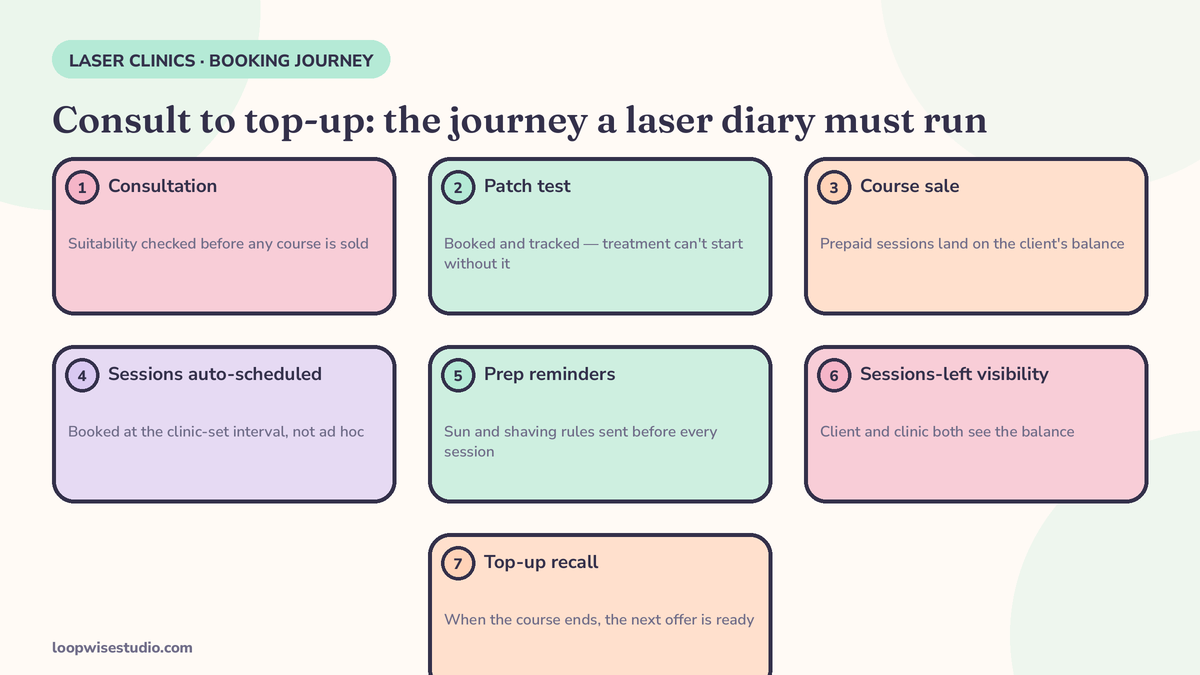
Here is the journey your system should run without your front desk touching it.
Step 1 — the consultation is booked online, and labelled as a consultation. Not a treatment slot. The booking page sells the consult as the first step, in plain language: what happens, how long it takes, what it costs or that it is free, and that treatment cannot be booked until after it. Clients who understand the path do not try to skip it.
Step 2 — the patch test is booked at the consultation, before the client leaves. The system records the patch test date and result against the client record. Until that record exists and is marked clear, the system does not offer full treatment sessions to that client. This one gate removes the most common laser booking error there is.
Step 3 — the course is sold and the balance is created. Six sessions, eight sessions — whatever your clinic sells — the purchase creates a sessions-left balance on the client’s record. Every future booking draws from it. The client can see it; your team can see it; nobody counts on fingers.
Step 4 — sessions are auto-scheduled at your clinic’s interval. When session one is booked, the system offers session two at the interval your clinicians have set for that treatment, and books the practitioner, the room and the device in one action. The client leaves knowing her whole course is in the diary — which is also the single best defence against dropout.
Step 5 — prep reminders go out before every session. Laser prep is not optional small print: shaving instructions, sun-exposure warnings, what to avoid beforehand. The reminder sequence carries the prep, timed to when she needs to act on it — not a generic “see you tomorrow” that she has learned to ignore.
Step 6 — the top-up recall fires when the course ends. A finished course is not a finished client. When the balance hits zero, or when your clinic’s maintenance interval arrives, the system recalls her for a top-up instead of leaving her to drift to whichever clinic advertises at her first.
| Stage | What the system does | What goes wrong without it |
|---|---|---|
| Consultation | Books and labels a consult, explains the path | Clients book treatments they cannot have yet |
| Patch test | Gates treatment booking until a clear test is on file | Wasted slots, turned-away clients |
| Course sale | Creates a sessions-left balance | Balances tracked in heads and spreadsheets |
| Scheduling | Books practitioner + room + device at the clinic-set interval | Double-booked devices, sessions booked too early |
| Each session | Sends laser-specific prep reminders | Unprepared clients, cancelled sessions |
| Course end | Recalls for top-up or maintenance | Finished clients quietly drift away |
The five jobs, in one checklist
When you compare systems, ignore the demo and test these five jobs. They are the ones Pabau’s roundup of laser hair removal studio software uses to describe what a laser platform has to handle — prepaid course tracking, patch-test alerts, automated regrowth recalls, online booking and payments in one place — and they are the right test, whoever you buy from:
- ☐ Prepaid session tracking — every client record shows sessions bought, used and left, updated automatically at each visit.
- ☐ Patch-test gating — treatment booking is blocked until a patch test is recorded as done and clear.
- ☐ Room and device booking — a session reserves the practitioner, the room and the machine together, so two clients can never be booked onto one device.
- ☐ Interval recalls — when a client’s next session falls due at your clinic’s set interval, she is contacted automatically, whether or not anyone at the desk remembered.
- ☐ Sessions-left visibility — the client sees her remaining balance in her confirmations and reminders, so the course always feels like something she owns and should finish.
Miss any one of these and the work does not disappear — it moves back onto your front desk, in phone calls and sticky notes.
What the software route costs, as published
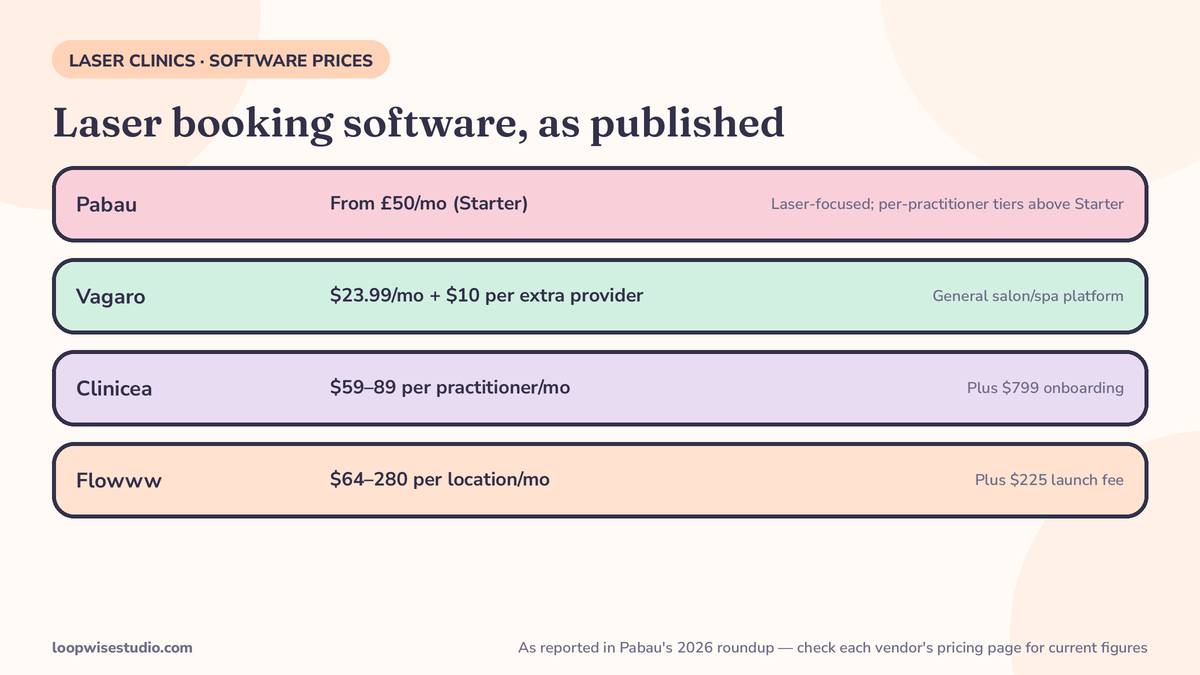
Most laser clinics start by buying clinic software and running the booking themselves. That is a legitimate route — these are capable platforms — so here is what the published pricing looks like. The figures below are as reported in Pabau’s 2026 roundup of laser hair removal studio software (Pabau is itself one of the vendors, so treat its roundup the way you would any vendor comparison, and check each platform’s own pricing page before you rely on a number):
| Platform | Pricing as reported by Pabau’s roundup | Notes |
|---|---|---|
| Pabau | From £50/mo (Starter) | Laser-focused: course tracking, patch-test alerts, recalls |
| Vagaro | $23.99/mo + $10 per additional provider | General salon/spa platform; course handling is the weaker fit |
| Clinicea | $59 / $69 / $89 per practitioner/mo + $799 onboarding | Clinic platform with per-practitioner pricing |
| Flowww | $64 / $128 / $280 per location/mo + $225 launch fee | Per-location pricing tiers |
Two things to notice. First, per-practitioner pricing climbs fast in a multi-operator clinic — a five-practitioner clinic on a per-head plan can pay more than a small clinic’s entire marketing budget. Second, the subscription is the smallest part of the real cost. The real cost is your team’s hours: building the course logic, setting the recall rules, fixing the bookings the system got wrong, and chasing the clients it forgot. Software rents you the tools. The system still has to be designed, and in most clinics it never quite is — which is why the diary looks fine in the demo and leaks within a quarter.
The same leak shows up at the front door, by the way. A laser consultation is a high-value enquiry, and if it arrives as a call nobody answers, no booking system downstream gets the chance to work. That is the gap missed call text back for med spas closes — the text that goes out in the first minute, carrying the consultation booking link.
If you would rather have the journey built and running than rent the parts, that is what Loopwise does: your own booking website with the course logic, patch-test gate and recalls set up for your clinic’s protocols. get a free audit and we will map your current booking path against the five jobs above.
The booking page itself — what a laser client needs to see before she pays
Software comparisons always skip the page the client actually touches. For laser, that page has to answer four questions or the client leaves to think about it — and “thinking about it” is where course sales go to die:
- “What happens first?” Consultation and patch test, explained as a normal, quick first step — not fine print.
- “How does the course work?” Sessions, spacing set by your clinicians after assessment, and how she will be reminded. No invented promises about how many sessions she personally will need — that is a clinical judgement, and your page should say the clinician confirms it at the consult.
- “What do I need to do before each session?” The prep, in plain words, repeated later in the reminder sequence.
- “What happens after I book?” Confirmation now, prep reminder before the session, next session already in the diary.
A page that answers those four, on the clinic’s own website, with the course balance and recalls running underneath it — that is the whole product. The same discipline applies to the rest of the treatment menu: the reminder ladder in how to remind Botox patients to rebook at 3 months runs on exactly the same machinery, just on a different clock.
Keep the system honest — where clinics get caught out
Two failure patterns show up again and again:
No-shows in the middle of a course. A missed session three is rarely defiance — it is a client whose reminder said nothing useful and whose next session was never firmly booked. Laser no-shows follow the same mechanics as the wider med spa problem in how to reduce no-shows at a med spa, with one addition: the sessions-left balance in every message, because a client who can see four paid sessions waiting behaves differently from one who has forgotten she paid.
Courses expiring quietly. If your terms give a course a lifespan, your system has to warn clients well before the balance dies — an expiry surprise converts a happy client into a refund argument. Automated due-date and expiry warnings are not upselling; they are basic fairness, and they happen to fill your diary.
Where laser bookings actually start — Google and Instagram, not your homepage
One more part of the journey software demos never show: the front door. Most laser clients do not arrive by typing in your web address. They find you on Google, or they land on your Instagram from a before-and-after post, and they decide in about a minute whether booking looks easy or like homework.
So the consultation booking has to live where they already are: a booking link on your Google Business Profile, a booking link in your Instagram bio and story replies, and the same link behind every “DM us to book” post — except the link does the booking instead of starting a message thread your team answers at midnight. A client who taps at 10pm should be able to hold a consultation slot at 10pm, with the confirmation and directions in her messages before she puts the phone down.
This is also where the patch-test gate earns its keep a second time. A booking path that begins with the consultation — clearly labelled, clearly explained — filters out the clients who wanted to skip straight to a full session, and it does so kindly, at midnight, without your team having to say no to anyone in person. By the time she meets your practitioner, she has already accepted the shape of the treatment: consult, patch test, course. Clients who arrive pre-sold on the process are the ones who finish their courses.
Judge the front door the same way you judge the diary: count the steps from “interested” to “consultation held.” If the answer is more than a few taps and one short form, the leak is not in your booking system at all — it is in front of it.
The short version
Judge any laser booking system on five jobs: prepaid session tracking, patch-test gating, room-and-device booking, interval recalls, and a sessions-left balance the client can see. Run the journey as one flow — consult, patch test, course, auto-scheduled sessions, prep reminders, top-up recall — and the diary stops depending on anyone’s memory.
Want that journey built on your own website, set to your clinic’s protocols? get a free audit — we will walk your current booking path and show you where courses leak.
FAQs
What makes a laser booking system different from normal salon software?
Three things: it tracks prepaid course balances instead of single appointments, it blocks treatment booking until a patch test is recorded, and it books the practitioner, room and device together. It also recalls clients when a session falls due at the clinic-set interval. A general salon calendar does none of these, which is why laser clinics end up tracking courses in spreadsheets alongside it.
Should a new client be able to book a full laser session online?
No — not before a consultation and patch test. Let her book the consultation online, instantly, at any hour. Then book the patch test at the consult, and only open full-session booking once a clear patch test is on her record. Anything else fills your diary with appointments you cannot deliver.
How far apart should laser sessions be booked?
That is a clinical decision your practitioners set per treatment area and client — published sources do not agree on a single spacing, and your system should not pretend otherwise. Set your clinic’s protocol as the default interval in the booking system, let clinicians adjust it per client, and have recalls fire off the due date that results.
What does laser clinic booking software cost?
As reported in Pabau’s 2026 roundup: Pabau from £50/mo, Vagaro $23.99/mo plus $10 per extra provider, Clinicea $59–$89 per practitioner/mo plus $799 onboarding, and Flowww $64–$280 per location/mo plus a $225 launch fee. Check each vendor’s own pricing page for current figures — and count your team’s setup and chasing hours as part of the real cost.
Can the system remind clients about laser prep automatically?
Yes, and it should. Prep reminders — shaving, sun exposure, what to avoid — belong inside the booking reminder sequence, timed for when the client needs to act, not in a leaflet from the consultation she has already lost. The same sequence should show her sessions-left balance.
What happens when a client finishes her course?
The system should recall her for a top-up or maintenance session when your clinic’s interval arrives, and warn her ahead of any course expiry date. A finished course is a warm client with a proven result — losing her to silence is the most expensive leak in the whole journey.