Missed Call Text Back for Home Service Companies in Canada
Missed call text back for home service companies in Canada: how it works under CASL (not the US TCPA), what it costs in CAD, bilingual English-French texts, and how the text ends in a booked job.
In Canada, missed call text back is an automatic text sent seconds after an unanswered call to your business line: it identifies your company, opens a two-way conversation, and — set up properly — ends with the job booked in your Jobber or Housecall Pro calendar. It runs under CASL, Canada’s anti-spam law, not the US TCPA rules most guides describe. Canadian providers publish it from $49 a month CAD after setup.
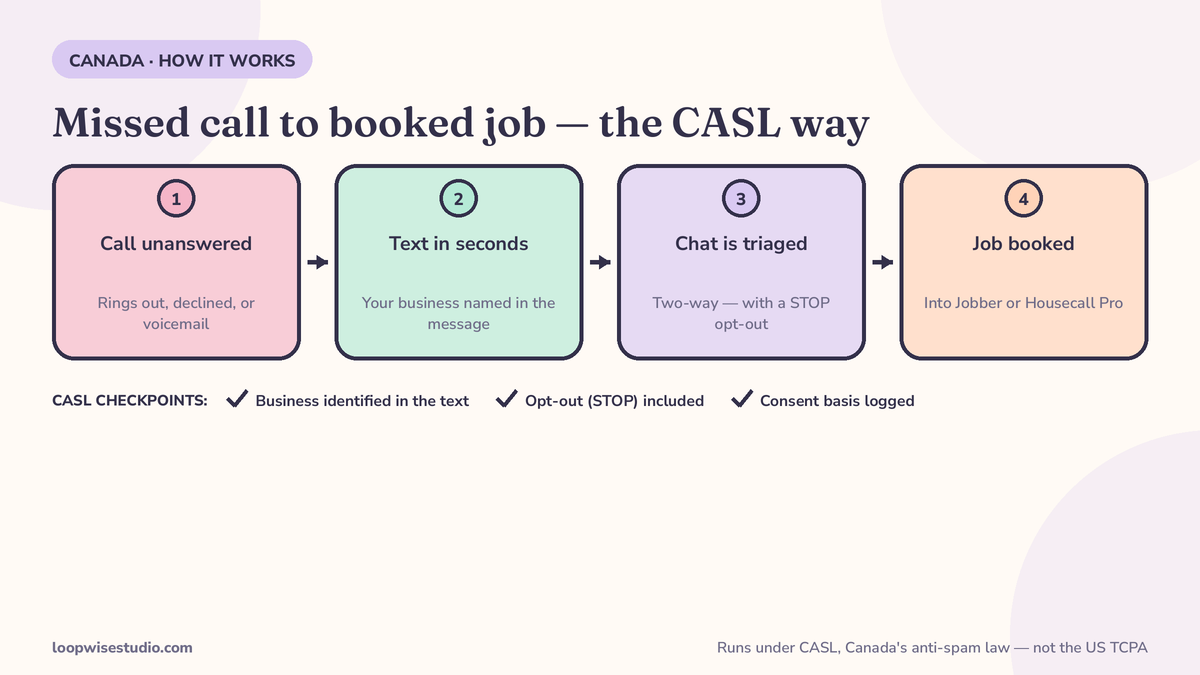
Below: how it works, CASL in plain English, a side-by-side of what American guides get wrong for Canadian shops, the three routes available in Canada with real CAD pricing, and copy-paste texts in English and French.
How it works, step by step
- A call goes unanswered. You’re under a house, on a roof, or it’s 9 p.m. The system watches your business line for calls that ring out, get declined, or land in voicemail.
- A text goes out within seconds from your business number — not minutes later, when the homeowner has already called the next company on the list.
- The conversation qualifies the job. Emergency or routine? What’s the problem, what’s the address, how urgent? The texts collect what you’d ask on the phone.
- The job gets booked into your calendar software — Jobber, Housecall Pro or ServiceTitan — or flagged for a callback if it’s genuinely complex.
- You get alerted with the full thread, so a human can step in wherever the conversation needs one.
Why the seconds matter: ServiceTitan and Housecall Pro platform reporting from 2025, cited by Automate Flow AI, puts missed inbound calls at 27–45% during business hours for home service businesses, rising in peak season — and Jobber’s 2025 consumer research, from the same source, found 96% of home service consumers say response time influences who they hire. The call you missed is rarely lost to a better company. It’s lost to a faster reply.
Is texting callers legal in Canada? CASL in plain English
Yes — if you run it the way CASL requires. This is the section almost nobody in the Canadian market publishes; exactly one provider in the current search results (Automate Flow AI, a BC vendor) explains it properly. Their plain-English summary of the three requirements:
- Identify the business. Every message says who is sending it. No anonymous “your appointment is confirmed”-style texts from a mystery number.
- Include a working opt-out, and honour it. Every sequence carries a “Reply STOP” instruction, and an opt-out actually stops the messages, inside CASL’s required timelines.
- Keep a documented consent basis. The practical basis for a text-back is the customer’s own action: they called your business about a job. That inbound call is the documented reason you’re messaging them — and you keep records of all three elements: who you messaged, what identified you, and what they did to start the conversation.
One more honest line: this is a plain-English summary of how providers describe their CASL setup, not legal advice. If you run heavy marketing campaigns by text — promotions, seasonal blasts to old customer lists — that is a different consent standard than replying to someone who just called you, and it’s worth a real conversation with a lawyer. The text-back after an inbound call is the well-trodden path; that’s why every template in this article includes the business name and the opt-out.
CASL vs the US rules: what American guides get wrong for Canadian shops
Most text-back content a Canadian owner finds is written for the United States — even by Vendasta, a Saskatoon company, whose missed-call guide frames legality entirely under the US TCPA and A2P 10DLC rules with Canada mentioned as coverage. The rules are not interchangeable:
| Question | US guides tell you (TCPA / 10DLC) | What applies in Canada (CASL) |
|---|---|---|
| Governing law | Telephone Consumer Protection Act; carrier 10DLC registration | Canada’s Anti-Spam Legislation |
| Consent frame | Prior express consent tiers; 10DLC campaign registration | Express or implied consent — an inbound call about a job is the documented basis providers rely on |
| Identification | Brand registration with carriers | The message itself must identify your business |
| Opt-out | STOP handling under carrier rules | A working unsubscribe mechanism in the message, honoured within CASL timelines, with records kept |
| Number registration | 10DLC registration for application-to-person texting (Allo charges a one-time $24 for US & Canada) | Canadian providers handle Canadian number registration as part of setup (RingBack Pro describes CASL consent rules plus Canadian number registration before its Canadian pilots start) |
If your setup instructions mention 10DLC campaigns and TCPA consent tiers as the compliance you need, you are reading an American manual. It may still work technically. It just isn’t the law you’re operating under.
Your three routes in Canada
Route 1 — Free phone features. iPhone Focus modes, Android auto-reply apps, and some carrier/VoIP features can send a basic auto-reply when you miss a call. Cost: nothing. Limits: one generic message, no conversation, no triage, no booking, and nobody compliant-checking the wording. Automate Flow AI’s guide calls this “do this today” — it’s right as a stopgap.
Route 2 — Your field service software’s built-ins. Jobber, Housecall Pro and ServiceTitan can send follow-ups around missed calls and jobs. This is the route most Canadian shops should examine first, because Jobber is a Canadian company headquartered in Edmonton and already runs a huge share of Canadian shops. The honest limitation, from Automate Flow AI’s own guide: if the replies land in an inbox nobody watches at 7 p.m., you’ve moved the missed call, not solved it. Somebody — or some system — has to work the thread.
Route 3 — A done-for-you system. A provider sets up the text-back on your existing number, writes the conversation flows, wires it into your Jobber or Housecall Pro, handles the CASL mechanics, and makes sure replies get worked. This is the route for owners whose real shortage is evenings, not software.
Canadian seasonality belongs in this decision: furnace season in October, freeze-thaw burst pipes in a prairie spring, AC calls in a July heat wave. The missed-call rate that sits at 27–45% in normal months (ServiceTitan and Housecall Pro platform reporting, 2025) climbs in exactly those peaks — which is when a route that depends on someone watching an inbox breaks first.
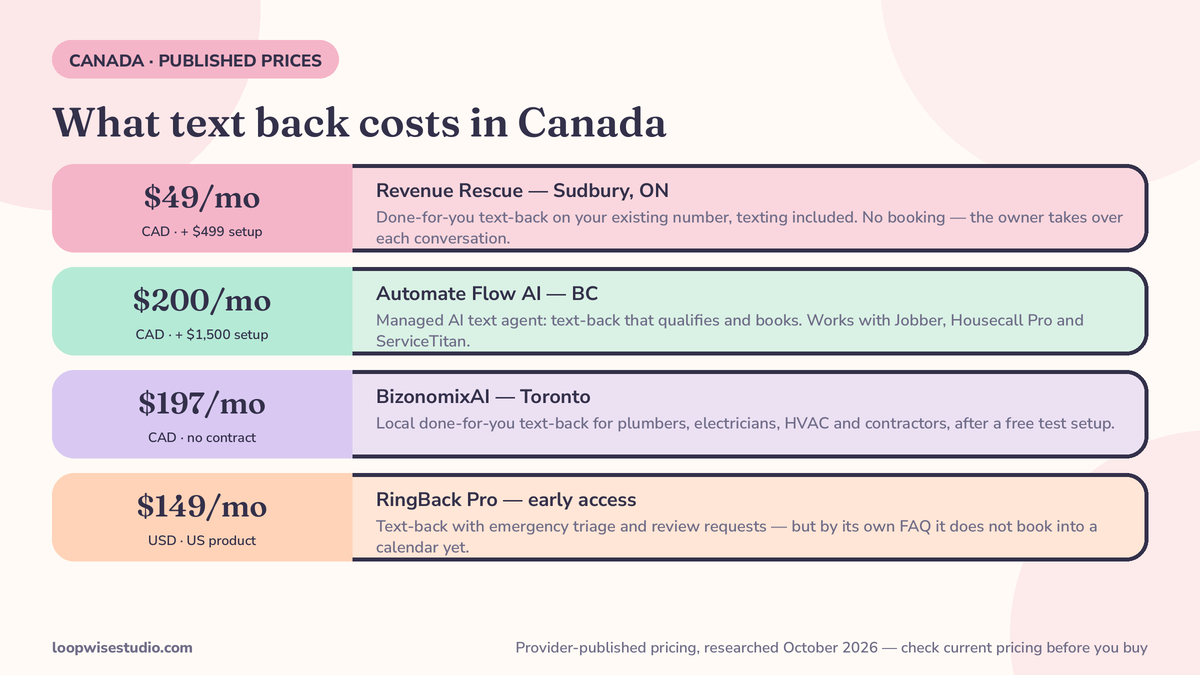
What it costs in Canada: the CAD comparison
These are provider-published prices as researched in October 2026 — check current pricing before you buy, and note which currency each is in.
| Provider | Price as published | What it is | What it doesn’t do |
|---|---|---|---|
| Revenue Rescue (Sudbury, ON) | $499 setup, then $49/mo CAD, texting costs included | Done-for-you text-back + after-hours capture + review requests, on your existing number | No booking — the owner takes over every conversation; one-city local provider |
| Automate Flow AI “June” (BC) | $200/mo CAD + $1,500 setup (setup waived for its first 3 founding clients; month-to-month; live in 14 days) | Managed AI text agent: text-back, qualifies and books, works with Jobber/Housecall Pro/ServiceTitan | No voice answering — text, web chat and email only, by its own FAQ |
| BizonomixAI (Toronto, via Kijiji) | $197/mo CAD after a free test setup, no contract | Local done-for-you text-back for plumbers, electricians, HVAC, contractors | Sold through a classified ad; thin public detail on scope |
| RingBack Pro (US, early access) | $149/mo USD | Text-back with emergency triage; review requests bundled | By its own FAQ, does not book into a calendar yet; Canadian pilots start only after CASL and number-registration setup |
The spread tells the story of the market: the cheapest transparent Canadian offer is $49 a month in Sudbury, the fullest-featured managed agent is $200 a month plus setup in BC, and the US product Canadians get marketed is $149 US and can’t book a job. Nobody on that list combines a website, online booking and text-back into one system built around your Jobber account — which is the gap in the final section.
Copy-paste texts, in English and French
Templates that follow the CASL pattern — business identified, opt-out included:
Business hours (EN):
Hi, this is [Company Name] — sorry we missed your call, we’re on a job. What do you need help with? Reply here and we’ll get you booked in. Reply STOP to end texts.
After hours (EN):
[Company Name] here — thanks for calling. Our office reopens at [time], but tell us what’s going on and we’ll reply first thing. If it’s an emergency (no heat, burst pipe, gas smell), say EMERGENCY and we’ll flag it now.
Emergency triage (EN):
Thanks — is anyone in danger, or is water/gas actively causing damage? If yes, call 911 for gas or safety risks, then reply YES here and we’ll get a tech moving.
Business hours (FR):
Bonjour, ici [Nom de l’entreprise] — désolé d’avoir manqué votre appel, nous sommes sur un chantier. De quoi avez-vous besoin? Répondez ici et nous vous réserverons. Répondez STOP pour ne plus recevoir de messages.
After hours (FR):
Ici [Nom de l’entreprise] — merci de votre appel. Le bureau rouvre à [heure], mais décrivez le problème et nous répondrons dès l’ouverture. En cas d’urgence (pas de chauffage, tuyau éclaté), écrivez URGENCE.
French support is close to unclaimed ground in this market: in the current search results, Allo is the only product that even mentions it (auto-replies in the customer’s language — English, French and Spanish) as a single feature line, and no guide publishes bilingual templates. For Quebec shops and bilingual markets in Ontario and New Brunswick, an English/French text-back isn’t a nice extra — half your missed calls may arrive in the other language, and a reply in the wrong one reads as a form letter.
What setup actually involves
Whichever route you choose, the setup list is the same five jobs, and it’s worth knowing them before a salesperson quotes you:
- Connect the trigger to your existing business number, so unanswered, declined and voicemail-bound calls all fire the text. Keep your number — Canadian providers set this up on the line customers already know.
- Write the three flows — business hours, after hours, emergency triage — in your company’s voice, in English and French if your market needs both.
- Build the CASL layer in from the start: business identification in every template, STOP handling tested, and the consent-basis log (who called, when, what was sent) recording automatically.
- Wire the booking end — the conversation has to be able to create a job in Jobber, Housecall Pro or ServiceTitan, or at minimum drop a fully-qualified job into the inbox your office actually works.
- Assign the thread owner for the hours the system can’t finish a conversation. Automate Flow AI advertises going live in 14 days for its managed route; a route-2 build inside your existing software can be faster, but only if someone owns steps 2 and 5 — which is the part that usually stalls a DIY attempt.
Test it the way a customer will: call your own line from a cell phone after hours, don’t answer, and read what arrives. If the text doesn’t name your business, offer an opt-out, and move toward a booking, it isn’t finished.
The part most services skip: the text has to end in a booked job
Grade the options above by one question: where does the conversation end? Revenue Rescue hands every reply to the owner. RingBack Pro, by its own admission, collects details and alerts you — booking is “not yet” available. The managed AI agent books, as one duty inside a general-purpose product. A text thread that ends in “someone will call you back” has recreated the voicemail problem with better spelling.
The Loopwise Studio version is built as one system: your website takes bookings online, a missed call triggers the text-back in seconds, the conversation qualifies the job and books it directly into your Jobber or Housecall Pro calendar, and CASL identification, opt-out and record-keeping are part of the setup — not an afterthought. It’s the same principle as online booking for veterinary clinics in Canada: the automation exists to land an appointment in the book, not to make the inbox look busy. For the US framing of the same system, see missed call text back for plumbers — but if you operate in Canada, build to CASL, not TCPA, and price it in CAD.
Ready to see what your missed calls are worth in a furnace-season month? Get a free audit — we’ll estimate your missed-call volume, show you the route that fits your shop, and map the setup on the software you already run.
Frequently asked questions
Is missed call text back legal in Canada?
Yes, when it’s run under CASL: the message identifies your business, includes a working opt-out that is honoured, and you keep a documented consent basis — for text-back, that’s the customer’s own inbound call about a job. Most guides describe the US TCPA instead; CASL is the law that applies to a Canadian business texting Canadian customers. This article is a plain-English summary, not legal advice.
How much does missed call text back cost in Canada?
From provider-published pricing (October 2026 — check current pricing): Revenue Rescue in Sudbury charges $499 setup then $49 a month CAD including texting costs; Automate Flow AI’s managed agent is $200 a month CAD plus a $1,500 setup; a Toronto provider advertises $197 a month CAD. A US early-access product Canadians may see, RingBack Pro, is $149 a month in US dollars and doesn’t yet book into a calendar.
Does it work with Jobber?
Yes — and Jobber matters in Canada: it’s a Canadian company headquartered in Edmonton and the platform a large share of Canadian home service shops already run. A text-back system can qualify the caller by text and book the job into your Jobber schedule, or route replies into the inbox your team already watches in Jobber, Housecall Pro or ServiceTitan. The same pattern is used in text reminder systems for clinics — the software triggers, the conversation books.
Can the texts be in French?
They should be, if any of your customers are French-speaking. Almost no provider in this market publishes bilingual templates — in current search results only Allo mentions English, French and Spanish auto-replies, as one feature line. A done-for-you setup can run both languages, detecting or asking the caller’s preference in the first reply.
What’s the difference between text back and an answering service?
An answering service has a person or voice AI pick up the call — typically per-minute or per-call billing, and for Canadian comparisons see how much a plumbing answering service costs for the US price structures those services use. Text back doesn’t answer; it texts the caller seconds after the missed call and books by conversation. It’s cheaper and leaves a written record, but it doesn’t talk a panicked caller through an emergency — some larger shops run both.
What happens when a customer replies STOP?
The opt-out must be honoured — that’s a core CASL requirement, along with identifying your business in every message and keeping records of the consent basis. Build the STOP handling into the system itself so it works at 11 p.m. exactly as it does at 11 a.m., without anyone in your office touching it.