Calendly Alternative With Text Reminders for Clinics
Need a Calendly alternative with text reminders for clinics? Calendly's texts are one-way. Compare reminder layers, clinic platforms and booking on your own site.
If you are looking for a Calendly alternative with text reminders for clinics, here is the short version: you may not need to ditch Calendly at all — but you do need to understand what its text reminders actually are. Calendly’s SMS reminders are one-way notifications, sent through paid Workflows, and according to Calendly’s own help documentation (as documented by Remindlo’s 2026 comparison of Calendly alternatives), replies from invitees are not delivered or monitored. A patient who texts back “running late” or “can I move Tuesday?” is texting into a void. For a meeting, that is a quirk. For a clinic, it is a no-show factory. This article lays out your three options: keep Calendly and add a proper two-way reminder layer, switch to a clinic platform, or put booking on your own website with reminders and text-back built in.
When Calendly is fine for a clinic — and the exact point it stops being fine
Calendly is genuinely good at what it was built for: letting two professionals find a time without email ping-pong. Plenty of clinics use it well for:
- Discovery and consultation calls with the owner or a treatment coordinator
- Vendor, rep and interview scheduling
- A first consult for a new service line, before volume justifies anything bigger
It stops being fine at a specific, recognisable moment: when the booking stops being a meeting and starts being an appointment. Appointments have properties meetings do not:
- A duration that depends on the treatment, not a fixed 30-minute block
- A provider and a room attached to the slot, not just a person
- Money at risk when the patient does not show — an empty hour in a treatment room is not a rescheduled Zoom call
- Things the patient must do before arriving: intake forms, consent, patch tests, pre-treatment instructions
- A next appointment that should be booked before the patient leaves the building or, failing that, prompted at the right interval afterwards
Calendly can approximate some of this with event types and routing forms. What it cannot do is the follow-up behaviour clinics actually run on — and the reminder gap is where it shows first.
What Calendly’s text reminders actually do (and don’t do)
Remindlo’s comparison is the only widely read page that documents Calendly’s SMS limits in detail, and it sources them to Calendly’s own help documentation. The limits, as documented there:
- SMS reminders run through Workflows, on paid plans only. There are no text reminders on the free tier, and texts are not available during the trial period.
- Texts are tied to Calendly-booked events. Appointments that arrive by phone, walk-in or your clinical system are outside the reminder flow unless someone adds them by hand.
- Patients must opt in to receive texts.
- The phone number field cannot be made required. A patient can book without leaving the one detail the reminder system needs.
- Replies are not delivered or monitored. The reminder is a notification, not a conversation. There is no inbox where a reply lands.
- Messages come from auto-assigned numbers, and some carriers outside the US may block messages.
Read that list as a clinician, not a scheduler. The two-way gap is the dangerous one. Patients treat every text as a conversation, because every other business text in their life is one. They reply to reschedule, to warn you they are stuck in traffic, to ask whether they should stop a medication before treatment. On Calendly, that reply goes nowhere — and the patient believes they told you. The slot dies, the patient feels ignored, and your front desk only finds out when the chair stays empty.
The second quiet problem is the optional phone field. If even a small share of patients book without a mobile number, your reminder system has holes exactly where you cannot see them.
What a clinic reminder system has to do that a meeting tool doesn’t
A clinic reminder is not a nudge. It is a small clinical workflow. At minimum, it has to:
- Be two-way. Confirm, reschedule and cancel must happen inside the message, and a human reply must reach a human (or at least a monitored inbox).
- Run on treatment timing. A hygiene recall, a 6-week review and a laser course do not share a reminder rhythm. The timing belongs to the treatment, not to a generic “24 hours before” default.
- Carry deposits for long slots. A two-hour appointment needs card-on-file or a deposit, with the policy stated in the reminder itself.
- Deliver intake before arrival. Forms and consent completed at the kitchen table the night before, not on a clipboard while the provider waits.
- Bring patients back. Recall and rebooking cycles — the reminder that fires six months later — are where clinics make their money, and they are the feature meeting tools were never designed around. Remindlo’s comparison raises recurring service reminders as the overlooked category, illustrating with MOTs and boiler services; the clinic version of that idea is the hygiene recall and the injectables cycle, and almost nobody writes about it.
- Live where the patient relationship lives. A booking link on Calendly’s domain builds Calendly’s asset, not yours. Your website, your number, your list.
That list is the yardstick for the options below. For a deeper look at how the sequence itself should run, see our guide to text message appointment reminders for small dental clinics — the timing and reply-handling apply to any small clinic, not just dental.
The reminder sequence clinics actually run
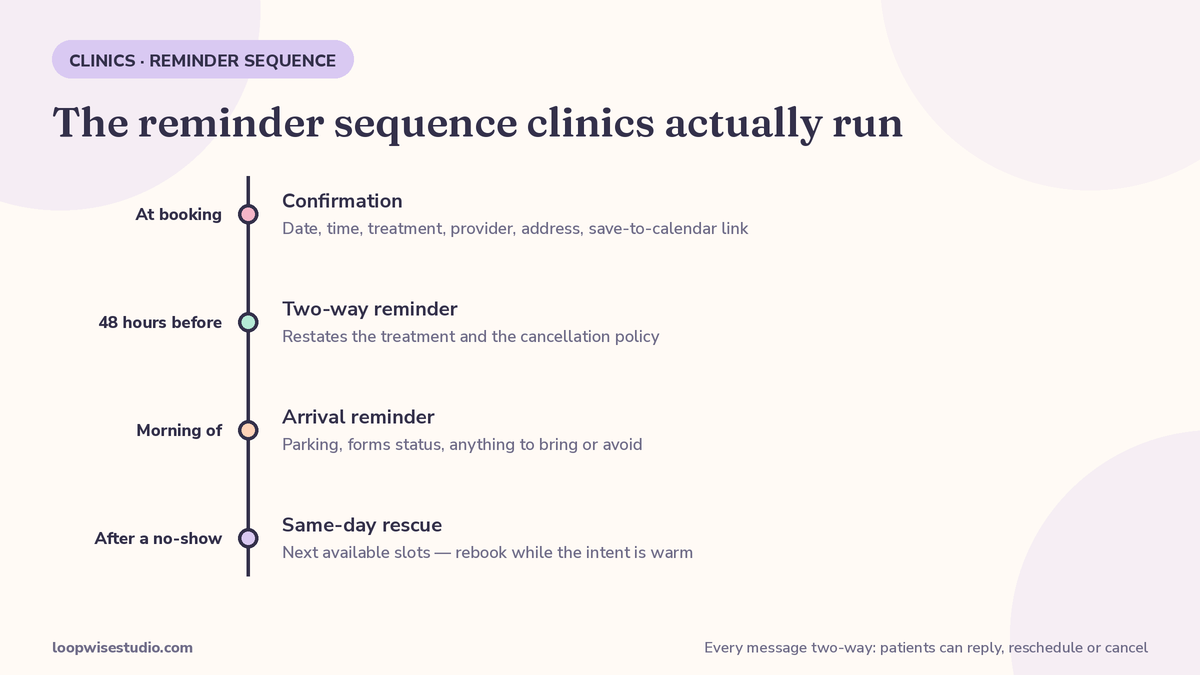
Whatever tool you choose, this is the shape of a working sequence. If your current setup cannot produce all four rows, that is the gap to fix.
| When | Message | What the patient can do in it |
|---|---|---|
| At booking | Confirmation with date, time, treatment, provider, address and a save-to-calendar link | Add it to their calendar; reply with questions |
| 48 hours before | Two-way reminder restating the treatment and the cancellation policy | Confirm, reschedule or cancel by reply |
| Morning of | Short reminder with arrival notes: parking, forms status, anything to bring or avoid | Confirm arrival; flag a delay and be seen doing it |
| After a no-show | Same-day rescue message with the next available slots | Rebook in one tap, while the intent is still warm |
Two details matter more than the wording. First, every message must accept a reply that somebody sees. Second, rescheduling must be easier than ghosting — a patient who can move an appointment in ten seconds rarely just disappears.
Clinics that prefer messaging apps over SMS in their market run the same sequence on WhatsApp instead; we walk through that version in our guide to WhatsApp appointment reminders for clinics in the UK. The channel changes. The two-way principle does not.
Your three options, compared
| Option | How it works | Cost shape (as sourced) | Who runs it | Who owns the patient data |
|---|---|---|---|---|
| Keep Calendly + add a reminder layer | A reminder tool (Remindlo, GoReminders, Apptoto, GReminders and similar) watches the calendar and sends two-way texts | Reminder-layer tools start low: Remindlo’s comparison (checked May 2026) lists GoReminders UK from £8/month, Remindlo paid plans from £19/month, Apptoto from $30/month, GReminders from $69/month — plus your Calendly subscription | You do. Another dashboard, another login for the front desk | Split between Calendly and the reminder tool |
| Switch to a clinic platform | Practice platforms built around the front desk (Weave, Solutionreach, NexHealth and similar) combine booking, two-way texting, reminders and recalls, usually synced to your practice system | Mostly quote-only: in Rankite’s 2026 medical scheduling roundup, nearly every clinic platform was “custom quote” (SimplePractice, at $29/month per clinician, was the exception). Review scores as stated there: Weave 4.6/5 on G2, NexHealth 4.8/5 | Your team, inside one system — but it is a migration, not an add-on | The platform, in a clinical system you may later leave |
| Booking on your own website, reminders built in and run for you | Booking lives on your domain; the reminder sequence, missed-call text-back and recall prompts are built around your treatments and managed for you | Fixed quote for the build, set after a discovery call; no per-seat scheduling fees, no reminder subscription to babysit | The studio — you approve the messages once and see bookings arrive | You. Your site, your list, your number |
The middle option deserves a fair word: if you are also unhappy with your practice system, a clinic platform is a serious contender and its two-way texting is the real thing. But most clinics searching this keyword are not shopping for a new practice system. They are shopping for reminders that answer back. Paying for a migration to solve a messaging problem is the expensive way round.
And if you are still deciding what sits at the centre of your setup, our roundup of the best booking software for a small aesthetic clinic owner-operator scores the main options from a solo operator’s point of view.
Not sure which of the three fits your clinic? Get a free audit — we will look at how your bookings and reminders actually flow today and tell you plainly which option is worth your money.
What a reminder layer can — and cannot — fix
The bolt-on option deserves an honest boundary, because it is the one most clinics try first.
A reminder layer connected to your calendar genuinely fixes the core complaint: patients get confirmations and reminders by text, the texts accept replies, reschedule requests land in an inbox somebody sees, and recalls can be scheduled on a cycle. For a clinic whose only problem is one-way Calendly notifications, that may be the whole answer, at the lowest cost of any option here.
What it does not fix is everything upstream and downstream of the reminder. The booking itself still lives on Calendly’s domain, under Calendly’s rules, with intake limited to booking-form questions. Deposits for long slots, per-treatment durations tied to providers and rooms, and a booking page that also sells the treatment — none of that arrives with a reminder subscription. And the layer is one more vendor in the middle: when a reminder fails, you now get to work out whether Calendly, the layer, or the carrier dropped it.
None of that makes the layer a bad buy. It means you should buy it for the problem it solves — two-way reminders — and not expect it to quietly become your booking system.
How to choose, in four questions
- Is Calendly holding meetings or appointments? Meetings — keep it, you are done. Appointments with money attached — the one-way reminder is a live problem.
- What happens today when a patient replies to a reminder? If the answer is “nothing” or “we don’t know,” fix that before anything else.
- Do you need the layer, or the whole platform? If your clinical system works, layer. Only migrate platforms for platform reasons.
- Who will run the extra tool in month three? A bolt-on subscription your front desk must check daily has a way of quietly stopping being checked. If nobody owns it, choose the option where somebody else does.
If you keep Calendly: squeeze more from it this week
Staying is a legitimate choice. Do these four things and you remove the worst of the gaps without spending anything:
- Ask for the mobile number like you mean it. You cannot make Calendly’s SMS phone field required — but you can add a clearly worded question to the booking form asking for the mobile number “for your appointment reminder,” and check new bookings for blanks each morning.
- Set your Workflow timings deliberately. Do not accept a single default reminder. Match the sequence table above as closely as Workflows allow: confirmation straight away, a reminder at 48 hours, one on the morning.
- Put a human fallback in the confirmation text. Since replies are not monitored, say so honestly in the message itself: “This number can’t receive replies — to change your appointment, call us on…” A patient who knows the rule does not text into the void.
- Chase the reply gap manually for high-value slots. For long or expensive appointments, a staff member glances at confirmations daily and calls the unconfirmed. It is labour, but it is cheaper than an empty two-hour slot — until the volume justifies automating it properly.
FAQ
Can Calendly send two-way text reminders?
No — not in the way a clinic needs. Calendly sends SMS reminders through paid Workflows, and as documented from Calendly’s own help pages, replies from invitees are not delivered or monitored. A patient cannot confirm, cancel or reschedule by replying, and your team will never see the reply at all. Two-way texting requires a reminder layer or a different system on top of, or instead of, Calendly.
Why do patients ignore Calendly reminders?
Usually they do not ignore them — they answer them. The message arrives, the patient replies “need to move to Thursday,” hears nothing back, and reasonably assumes the change was noted. The failure is silent on your side and loud on theirs. Add in bookings made without a mobile number (the phone field cannot be made required) and a share of patients never receive a text in the first place.
Do I need to ditch Calendly to fix my no-shows?
No. Calendly is fine at taking the booking. What needs replacing is the conversation after the booking: two-way confirmation, easy rescheduling, deposit prompts for long slots and a same-day rescue message after a no-show. You can add that as a layer over Calendly, or rebuild booking on your own website with the whole sequence built in. Either fixes the no-show mechanics without touching the parts of Calendly your team likes.
What should reminders cost a small clinic?
Dedicated reminder tools are cheap at the low end — from £8–£19 a month for the simpler services in Remindlo’s May 2026 comparison, up to around $69 a month for compliance-focused options, plus whatever you already pay Calendly per seat. Clinic platforms bundle reminders into quote-only contracts. A done-for-you setup is priced as a fixed build rather than a per-seat subscription. The real cost question is staff time: the cheapest tool is expensive if a receptionist still has to babysit it every day.
How long does switching or adding a layer take?
Adding a reminder layer over an existing Calendly setup is typically days, not weeks — connect the calendar, write the four messages, test with staff phones. Moving booking onto your own website takes longer, because the booking pages and reminder flows are built around your treatments, but it is measured in weeks and your Calendly links keep working throughout the changeover. A full clinic-platform migration is the long one: data, integrations and staff training, so only choose it for platform reasons.
The bottom line
Calendly is a good meeting tool doing an appointment job. Its texts notify; clinic reminders need to converse. Keep Calendly for consult calls if it serves you there — but put a two-way reminder system between your patients and your treatment rooms, whether that is a layer you run, or booking on your own site with the whole sequence run for you.
Want to know which way your clinic should go? Get a free audit and we will trace one real booking from first click to follow-up, and show you exactly where patients are falling out.