Booking System for Lash Artists: Deposits + Reminders
What a lash booking system actually needs: per-service deposits, a 48-hour reminder sequence, lash maps on file, and fill reminders at 2–3 weeks — honestly priced.
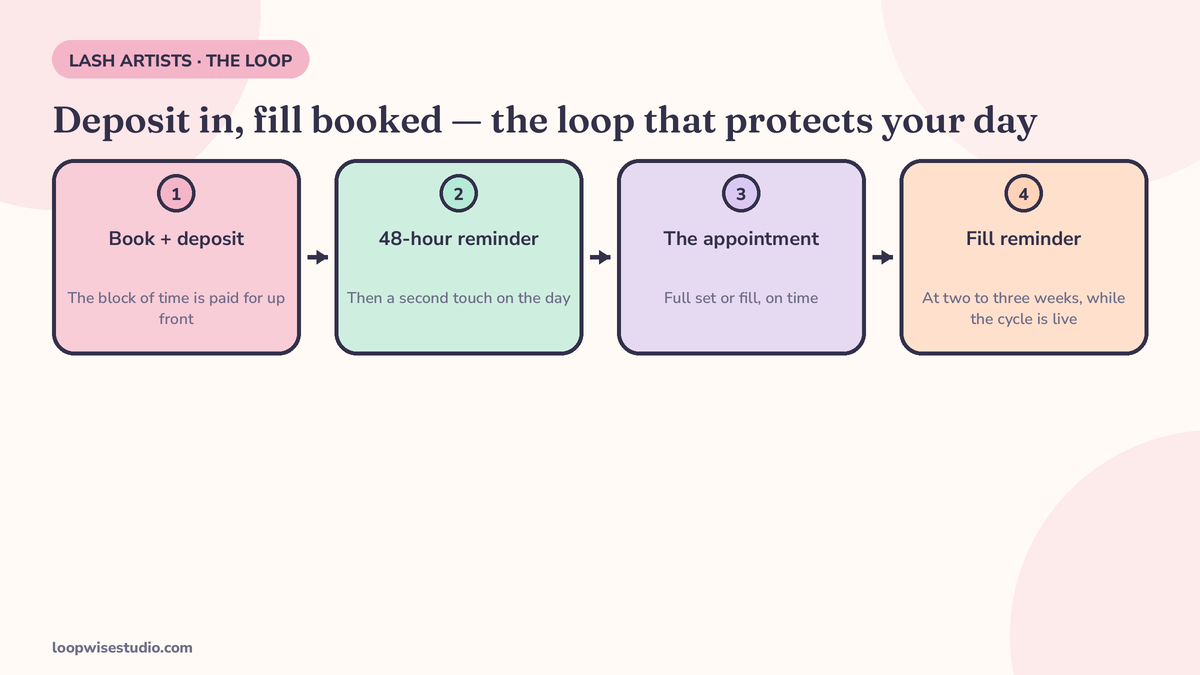
A lash booking system needs four things: per-service deposits on full sets and long fills, two reminder touches — about 48 hours before and a few hours before — client history with the lash map and adhesive on file, and a rebooking nudge when a client is due a fill at two to three weeks.
Most “best booking app for lash techs” lists judge software by how pretty the booking page looks. That is the wrong test for lashes. A full set takes two to three hours of your day and product you have already opened. A fill client comes back every two to three weeks, or she quietly becomes someone else’s client.
Lashing is a retention business wearing a service business’s clothes. Your booking system either protects the long blocks and keeps the fill cycle turning, or it is just a calendar with your name on it. Here is what the system needs, part by part — and what the software actually costs once you read the small print.
The four parts that protect your day (and the ones you can skip)
A working lash booking system is four parts:
- Deposits set per service — full sets and long fills carry a deposit; short appointments can run on card-on-file.
- A reminder sequence, not a reminder — a confirmation at booking, a touch about 48 hours out, and one a few hours before.
- Client history that builds itself — lash map, adhesive, curl, length, allergies, patch-test date, all on the client’s file.
- A fill-cycle nudge — an automatic message when a client is due at week two or three, before her lashes start looking sparse enough to shop around.
What you can skip as a solo artist: a full POS and inventory suite, multi-location tools, campaign funnels, and a branded app nobody will download. The lash software maker Rezzy makes the same call in its guide for lash artists — judge the system by whether it protects long appointments and the fill cadence, not by feature count.
Deposits — charge for the block of time, not the booking
A deposit is not a booking fee. It is the client putting money on two to three hours of your life.
Lash artists commonly charge $20–$30 flat, or 30%–50% of the service total, according to the lash supplier ThousandLashes’ booking policy guide. The pattern that works:
| Appointment | What to take | Why |
|---|---|---|
| Full set (new client) | Deposit, 30–50% of the set | Longest block, highest product cost, client has no track record with you |
| Full set (regular) | Deposit or card on file | Track record earns trust; the card still backs the policy |
| Fill (60–90 min) | Small flat deposit or card on file | Shorter block, but a missed fill wrecks the next appointment too |
| Removal / short service | Card on file | The policy matters more than the money at this length |
Two rules make deposits work instead of just existing. First, the deposit comes off the appointment price — the client sees it credited, not lost. Second, the forfeit rule is written where she books, not buried in an Instagram highlight: cancel inside your window and the deposit is gone.
Why the fuss? SuiteCal, a booking platform that compared lash apps in 2026, puts it plainly: a single no-show on a 90-minute lash appointment can cost $150 to $250 in lost income. That is the vendor’s own framing, not a study — but sit with the shape of it. One empty block can cost more than a year of booking software.
Deposits are also only half of the protection. The other half is what happens when someone cancels anyway — if no-shows are your main leak, our guide on how to reduce no-shows at a lash studio walks through the deposit ladder, the backfill routine, and the two-strike rule in detail.
The reminder sequence for a long appointment (with copy you can steal)
One reminder is a hope. A sequence is a system. The lash booking pages that get this right use two touches after the confirmation — one about 48 hours before, one a few hours before — because a client can fix a clash at 48 hours and can still fix her parking at 3 hours.
Copy-paste set, written for lashes:
At booking (confirmation):
You’re booked, [Name] 💛 Full set on [day, date] at [time]. Your $[amount] deposit is on file and comes off your total. Need to move it? Reply here up to 48 hours before and we’ll shift it once, free.
48 hours before:
Hi [Name], your lash appointment is [day] at [time]. Please come with clean lashes — no mascara or strip-lash glue — it gives you more lashing time. Reply YES to confirm, or tap here to reschedule: [link]
2–3 hours before:
See you at [time], [Name]! Your set takes about [duration], so please arrive on time — late arrivals shorten your lash time, not the price. Running late? Reply here.
The fill nudge (week 2–3 after the appointment):
Hi [Name], you’re coming up on week [2/3] since your set — that’s fill time, before they start looking sparse. Grab your slot here before the week fills up: [link]
Two details do the heavy lifting. The 48-hour message asks for a reply, which turns a broadcast into a commitment. And every message carries a reschedule link, because a client who can move her appointment in two taps does not need to ghost it.
One channel note: if most of your clients find you on Instagram, the leak is the DM conversation that never becomes a booking — no deposit, no reminders, no policy. The fix is boring and it works: booking link in your bio, and every DM enquiry gets the same reply — “I can hold that slot for you here: [link]”. Nail techs run the identical play for the same reason; the fill cycle is shared across both trades, which is why the system in our nail salon no-show guide looks so similar.
The fill cycle — where lash businesses actually make their money
A full set is an event. Fills are the income. A client on a two-to-three-week cycle books roughly twice as often as one who drifts to four or five weeks — and the drifting client is the one trying a new artist “just to see.”
The booking system should treat the fill as the default next step:
- Book the next fill before she leaves, or send the nudge automatically at week two (three for clients whose retention runs longer — your history file knows).
- Track retention per client. The map, adhesive, and curl notes are not admin; they are what makes her next set faster and her retention better, which is what makes her rebook with you instead of price-shopping.
- Watch for the missed fill. A client who skips a fill does not just lose a slot — the overgrowth means a longer removal and probably a full set next time, at full-set length. That is a bigger hole in a future week’s diary, and it is preventable with one message at the right week.
This is the part no general salon platform demos well, because it is specific to lashes: the rebooking nudge timed to the treatment cycle, not to a marketing calendar.
If you would rather not wire the deposits, sequences, and nudges together yourself, that setup is the work — get a free audit and we will map exactly what your current booking page is missing, in plain numbers, before you change anything.
Client history — the file that makes the next set faster
Every part above leans on the client record. The system has to keep, per client:
- Lash map and style (curl, length, diameter, mapping) so a fill starts where the last set ended
- Adhesive used, and any reaction notes or known allergies
- Patch-test date — one UK lash tool, Oviee, even checks patch-test validity at the moment of booking. Whether or not your software gates it, the date belongs on the file; a client whose patch test has lapsed should not be able to glide into a full set booking without a flag
- Deposit and attendance history — who has late-cancelled before, so the system (not your mood) decides who books deposit-free
This is unglamorous. It is also the difference between a booking page and a booking system: the page takes the appointment, the system remembers everything that makes the next one work.
The software, honestly priced
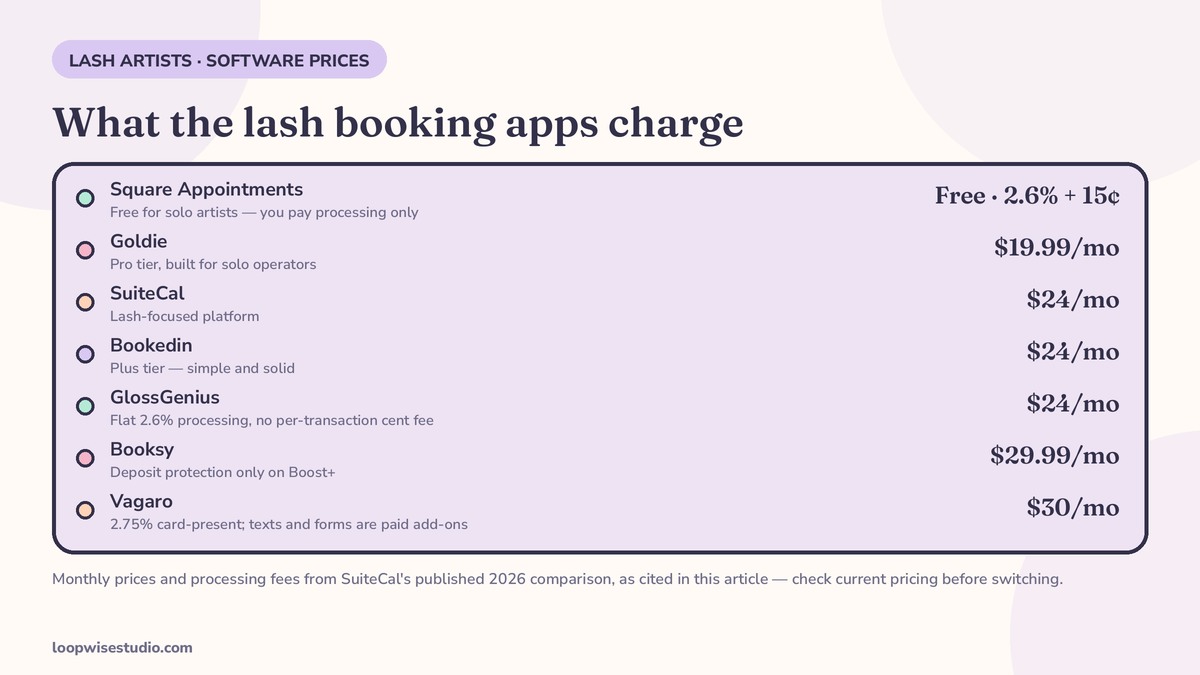
You do not need new software to run this system — most lash artists already pay for a tool that can do deposits and reminders. What you need to know is what each one really charges and where the catches sit. Prices below are from SuiteCal’s 2026 comparison of lash booking apps, checked against the vendors’ positioning on that page — treat them as a starting point and check current pricing before you switch anything.
| Tool | Solo price | The catch worth knowing |
|---|---|---|
| Square Appointments | Free for solo artists; card processing 2.6% + 15¢ | On a $200 set, processing is about $5.35 — no monthly fee at all |
| Goldie | Pro at $19.99/mo | Built for solo operators; keep an eye on what the free tier leaves out |
| SuiteCal | $24/mo | Lash-focused; the comparison above is its own page, so read it as a vendor’s |
| Bookedin | Plus at $24/mo | Simple and solid; fewer lash-specific touches |
| GlossGenius | $24/mo, 2.6% flat processing | Strong branding; processing is flat, so no per-transaction cent fee |
| Vagaro | $30/mo, 2.75% card-present | Texting, forms, and website features are separate paid add-ons — the real bill is higher |
| Booksy | $29.99/mo | Deposit and no-show protection only comes with Boost+ at $49.99/mo — the feature you came for is behind the pricier tier |
Read the table the way an owner should: the monthly fee is the small number. The real questions are whether deposit protection is included at your tier (Booksy is the cautionary tale), what processing takes from every set, and whether the reminder sequence can be timed the lash way instead of the salon-generic way.
And be fair to the tools: Vagaro, GlossGenius, and the rest are good software. If you are weighing a switch purely on fees, our breakdown of a Vagaro alternative for salons with no commission fees goes deeper on the commission side. The gap for most lash artists is not the app — it is that nobody ever set the app up as a system.
Setting the deposit per service, in practice
The table earlier gives the shape. Here is how the settings actually break down service by service, because “turn on deposits” is where most artists stop — and the defaults are salon-generic, not lash-shaped.
Full sets carry the full deposit, every time, for every client. This is your longest block and your highest product cost, and it is the appointment a waitlist cannot absorb at short notice. If any service in your menu justifies 50%, it is this one.
Fills are where judgement comes in. A standing client on a two-to-three-week rhythm has effectively prepaid you in loyalty; card-on-file respects that while keeping the policy armed. A fill for a client who has late-cancelled before goes back to a cash deposit — the system remembers, so the conversation never has to happen out loud.
Removals and short services rarely need a deposit at all. The block is short and refills easily. Card-on-file is enough, and skipping the deposit friction here keeps your shortest services bookable in one tap — which matters, because removals are often the first appointment a future full-set client ever books with you.
One setting to check whatever app you use: the deposit must be credited against the appointment total automatically, and the forfeit must trigger from the policy, not from you remembering to charge it on a bad day. If either step is manual, it will not survive your first busy month.
What no app sets up for you
Software sells you the switches. Somebody still has to flip them, in the right order, with your words:
- The deposit policy wording — how much, per service, and the forfeit rule written so clients accept it instead of arguing about it
- The sequence timing and copy — confirmation, 48 hours, a few hours before, and the week 2–3 fill nudge, in your voice
- The route from Instagram to booked — bio link, DM reply, deposit taken — instead of bookings living in your messages with nothing behind them
- A booking page of your own — most app booking pages sit on the app’s domain, under the app’s branding. Your own page keeps the client, the history, and the rebooking with you. (What that layer costs is the same question clinics ask — see how much a website with online booking costs for the full breakdown.)
Four parts: deposits per service, a real reminder sequence, history that builds itself, and a fill nudge at two to three weeks. Get those running — in whatever software you already pay for — and the diary starts protecting itself.
That is also exactly what we build for lash artists who do not want to spend their evenings in settings screens: your own booking page, deposits and sequences wired in, fill nudges running. Get a free audit and we will show you what your current setup is leaving open — no obligation, and the map is yours to keep either way.
FAQs
How much deposit should a lash artist charge? Common practice, per ThousandLashes’ policy guide for lash artists, is $20–$30 flat or 30%–50% of the service total. Full sets and new clients sit at the top of that range; short fills for regulars can run on card-on-file instead.
Which booking app is best for a solo lash artist? The free Square Appointments tier is hard to beat on price (you pay only processing, 2.6% + 15¢). Goldie ($19.99/mo) and SuiteCal ($24/mo) are built for solo operators. The deciding factor is not the brand — it is whether deposits, two-step reminders, and per-client history are included at your tier. Check current pricing before switching.
Why is Booksy’s deposit protection a problem? Because it is not in the base plan. Per SuiteCal’s comparison, Booksy’s deposit and no-show protection only comes with Boost+ at $49.99/mo, on top of the $29.99/mo base — so the feature most lash artists sign up for costs more than the headline price suggests.
Do I really need two reminders? For a two-to-three-hour appointment, yes. One reminder about 48 hours before catches clashes while there is still time to refill the slot; one a few hours before catches the day-of drift. A single day-before message leaves both gaps open.
What is a patch-test gate, and do I need one? It is a booking rule that checks a client’s patch test is still valid before letting her book certain services. The UK tool Oviee builds it in. Even without the gate, keeping the patch-test date on each client file — and flagging lapsed tests — is basic protection for you and the client.
Can I keep my current app and just fix the setup? Usually, yes. Deposits, reminder timings, and rebooking nudges are settings and copy, not new software. The exceptions are tier gates like Booksy’s — if the feature you need is locked behind a pricier plan, that is a pricing problem, not a setup problem.