Automatic Google Review Requests for Med Spas by Text
Automatic Google review requests for med spas by text: when to ask by treatment, the exact sequence, and the no-gating rules Google actually enforces.
Automatic Google review requests for med spas by text are a small automated system that runs after every appointment: the client gets a short text at the right moment for their treatment, with a direct link to your Google review page, one gentle reminder if they do not respond, and then nothing. Every client gets the same ask. Nobody on your front desk has to remember, and nobody gets screened out because they might not leave five stars.
That last part is where this page will differ from most of what ranks for this search, so it is worth saying early. Some vendors sell “negative feedback filtering” — quietly routing unhappy clients to a private form so only happy ones reach Google — and call it compliant. It is not, and the honest version of this system works better anyway. This page covers the timing, the exact texts, the rules, and what it should cost.
What an automatic review request system actually is
It has four parts, and none of them is an app your clients download:
- A trigger. Your booking system marks the appointment complete. That event — not a staff member’s memory — starts the sequence.
- A timed text. One message, sent from your business number, timed for the treatment the client had (the timing table is below — this is the part most pages skip).
- A direct link. The link opens your Google review form, not your Google listing, not your homepage. One tap to the star rating, signed in as the client.
- A response workflow. New reviews trigger an alert, and a reply goes out promptly — written so it never confirms what treatment the person had, or even that they were a client. More on that below.
Everything else people bundle into “reputation management” — dashboards, widgets, monthly reports — is optional. The four parts above are what produce reviews.
This system sits in the same post-visit chain as the rest of your follow-up. The reminders that get the client to show up are one sequence (we laid that out in our guide to how to reduce no-shows at a med spa); the review ask is the sequence that runs after a visit that went ahead. Same plumbing, different moment.
When the text should land: timing by treatment
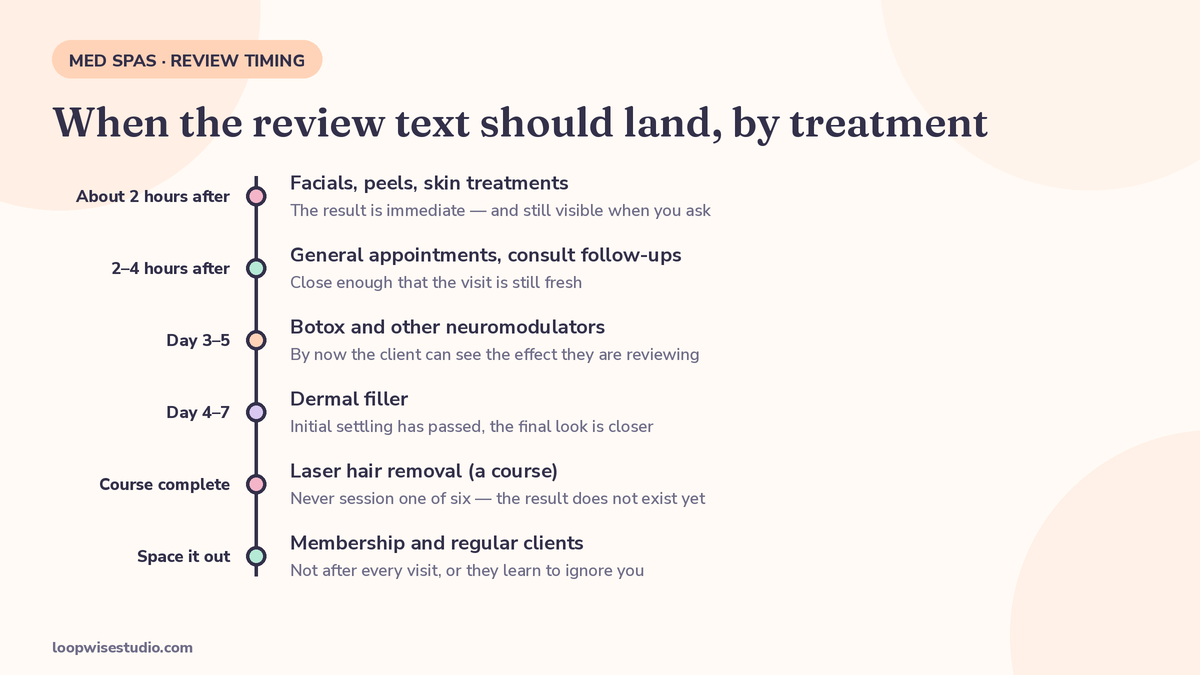
Timing is the whole game, and med spas have a complication other businesses do not: for some treatments, the client cannot judge the result on the day. Ask a filler client for a review in the car park and you are asking before the result exists. Ask a facial client three days later and the glow — and the feeling — has faded.
Here is the timing the specialist sources in this space actually use, assembled into one table. Spokk, a feedback platform for medical spas, asks about two hours after the visit by default, delays results-based treatments by a few days, and sends within a window of 8am to 9pm local time. TextSpot, an SMS platform, says an hour or two after the visit is ideal and response drops the longer you wait. NexioBit, a done-for-you agency in this market, uses what it describes as an optimal window of two to four hours after the patient leaves.
| Treatment | Send the ask | Why |
|---|---|---|
| Facial, peel, skin treatment | About 2 hours after the visit | The result is immediate and visible; the client is still pleased with how their skin looks and feels |
| General appointment, consultation follow-up | 2–4 hours after the visit | Inside the window NexioBit describes as optimal, and close enough that the visit is fresh |
| Botox and other neuromodulators | Day 3–5 | The result is not visible on day one; by day 3–5 the client can see the effect they are reviewing |
| Dermal filler | Day 4–7 | Initial settling has passed and the final look is closer to what they paid for |
| Laser hair removal (a course) | After the final session of the course, or a clear mid-course milestone | Reviewing session one of six asks them to judge a result that does not exist yet |
| Laser skin treatment with downtime | After the downtime has passed, typically a few days later | Asking while the client is red and peeling invites a review of the recovery, not the result |
| Membership or regular client | After a visit as normal — not every visit | Asking a monthly regular after every appointment trains them to ignore you; space it out |
Two rules apply to every row. First, the send window: keep texts inside daytime hours, roughly 8am to 9pm in the client’s time zone, as Spokk’s platform does by default. A review request at 10:40pm reads as needy, not professional. Second, the text never names the treatment. Phones light up on lock screens in front of partners, colleagues and family. “Thanks for visiting us today” is the whole message style — what they had done is their business.
The exact sequence, with copy you can use
Keep it to two touches. One ask, one reminder, then stop for good.
| Step | When | What happens |
|---|---|---|
| Ask | Timed per the table above | Text with the direct Google link |
| Reminder | About 2 days later, only if no review and no reply | One shorter text, same link |
| Stop | After the reminder | No third message. The client is added to a “recently asked” list so the next visit does not trigger a fresh round immediately |
TextSpot’s guidance is the same shape: ask within an hour or two where the treatment allows it, then one gentle follow-up a day or two later at most. Platforms that send three, four, five nudges are spending your number’s reputation — clients who feel chased reply STOP, and a STOP also kills your appointment reminders to that client if you run everything from the same system carelessly.
Copy-paste templates. Adapt the name, keep them short, keep the treatment out of it:
Same-day, facial or skin treatment:
Hi [Name], thanks for visiting [Spa] today. If you were happy with your visit, a Google review would mean a lot to our small team: [link]
Injectables, sent on day 4:
Hi [Name], checking in from [Spa] — we hope you’re loving what you see. If you have a minute, we’d really appreciate a Google review: [link]
End of a laser course:
Hi [Name], you’ve finished your course with us at [Spa] — thank you. If you’re happy with how it went, would you leave us a Google review? [link]
The one reminder, two days later:
Hi [Name], just floating this back up in case it got buried — here’s our Google review link if you’d still like to leave one: [link] No worries at all if not.
Membership regular (use sparingly):
Hi [Name], always good to see you at [Spa]. If you’d like to share your experience, our Google page is here: [link]
Not sure whether your current setup could even send these in the right order? That is exactly what a review-flow check covers. Get a free audit and we will map your post-visit messages — confirmation, reminders, review ask — and show you in plain language where the gaps are, with no obligation to buy anything.
The rules Google actually enforces: no incentives, no gating
This is the section most vendors soften. Here it is plainly, as the policy-honest sources in this market state it.
No incentives. No discount, no free add-on, no prize entry, no “10% off your next treatment for a review.” DentalBase, a dental automation vendor that documents these rules in detail, lists what Google prohibits: offering incentives such as discounts, gift cards or prizes; review gating; and fake or purchased reviews. TextSpot states the same two rules to its own customers: incentivising reviews violates platform policies, and gating or hiding negative reviews violates platform rules. The FTC’s position, as DentalBase summarises it, adds that you cannot solicit positive-only reviews or pay for undisclosed endorsements.
No gating. Gating means deciding who gets the Google link based on how happy they seem — a satisfaction survey first, five stars routed to Google, three stars routed to a private form. Spokk states it to its own med spa customers in one sentence: “Asking only happy clients is review gating, which Google does not allow,” which is why its system sends every client the same invitation whatever they rated.
So when a service page sells you “negative feedback filtering” as a feature — one ranking page in this market claims it catches the large majority of negative feedback before it goes public, while asserting the practice is fully permitted — understand what you are buying. Routing unhappy clients away from Google before they review is the textbook description of gating, whatever the sales page calls it. DentalBase states the penalty for these practices plainly: removal of your entire review history and potential suspension of your Google Business Profile. Years of legitimate reviews, gone, to protect a rating that then looks manufactured next to competitors with honest 4.6s and real critical reviews mixed in.
There is also a practical reason, not just a rules reason. Prospective clients read the critical reviews to judge how you respond. A profile of nothing but five stars and no replies reads as bought. A profile with a few three-star reviews, each answered calmly and helpfully, reads as a real, well-run spa.
What you can do instead, fully inside the rules:
- Send the identical ask to every client, triggered by the appointment, not by a staff member’s judgement of their mood.
- Make the text neutral. “If you were happy with your visit” is fine. “Leave us 5 stars!” is steering.
- Keep a private feedback route open alongside the Google link, not instead of it. Clients can always reply to your texts; if someone replies unhappy, your team handles it as customer service — quickly, personally, and without ever suggesting they should not also review you. Rescuing an unhappy client is good business. Blocking their path to Google is gating. The difference is who decides, and it has to be the client.
- Never have staff, family or agencies post reviews, and never buy them. This one still needs saying because it is still sold.
When the review is not five stars
Automation gets you the review. What you do next is manual, and it matters more.
Reply to every review, quickly. Set an alert so a new review is seen within the hour during opening times. A short, human reply within a day is the realistic standard.
Write replies like a stranger is reading them — because they are. Your audience is the next prospective client, not the reviewer. Two templates:
Positive:
Thank you for the kind words and for taking the time to write this — it genuinely helps people find us. We look forward to seeing you again.
Note what is not in that reply: the treatment, the date of their visit, any confirmation of what they had done. Med spas operate in a grey area of health privacy — reviews mention treatments publicly all the time, but your reply should never confirm patient details. Borrow the discipline the dental industry uses: their best guidance (Rework’s reputation library) is that a practice cannot confirm or deny that someone is a patient, even if the reviewer said it themselves. A reply that confirms nothing clinical is safe everywhere.
Critical:
I’m sorry your visit fell short of what you expected — that’s not the standard we hold ourselves to. I can’t discuss individual visits here, but I’d really like to hear more directly. Please call us on [number] and ask for [owner/manager name].
No argument, no public diagnosis of the problem, no offer of a free treatment in the reply (that reads as buying a revision of the review). Take it offline, fix what is fixable, and let the reply sit there showing future readers how you behave when something goes wrong.
Keep your booking software: bolting the review layer on
You probably do not need new booking software to do any of this. The review sequence needs two things from your existing system: a reliable “appointment completed” signal and the client’s mobile number with permission to text it. Boulevard, Mangomint, Vagaro and most others can supply at least the raw material — a daily list of completed appointments is enough to run the sequence on top.
That gives you three ways to buy this, with real market prices:
| Route | What you get | Sourced cost shape |
|---|---|---|
| Standalone review tool | The ask, the link, basic tracking — you set it up and maintain it | Spokk publishes from $149/month, or from $249/month for its healthcare plan with a BAA. TextSpot-style general SMS tools sit in a similar DIY band |
| Done-for-you review agency | System built for you on a general automation platform, plus response drafting and reports | NexioBit publishes $297/month standalone for med spas; it describes generic reputation platforms (Birdeye, Podium) at $300–$500/month |
| All-in-one add-on layer | Review asks as one part of a wider system — reminders, missed-call recovery, rebooking — on your current software | MedSpa Butler, an add-on retention layer for existing booking software, publishes $497 per location per month for its whole bundle |
The comparison that matters is not really the monthly figure. It is who notices when the Google link breaks, who adjusts the injectables timing when you add a new treatment, and who writes the reply when a two-star lands at 8pm. A tool leaves all three to your front desk. A done-for-you setup makes them someone else’s job. Loopwise builds this as part of the wider follow-up system — the same layer that recovers enquiries, which is why our page on missed call text back for med spas and this one describe two ends of one chain: win the booking, run the visit, earn the review, use the review to win the next booking.
One more option if your clients are mainly on WhatsApp rather than SMS — in the UK, UAE and similar markets the ask belongs there instead, and the rules on gating and incentives are exactly the same. We covered that version in our guide to how to get Google reviews on WhatsApp for a clinic.
The launch backlog: asking the last 90 days of clients
A new system only asks future clients. Your last 90 days of clients are sitting there unasked — and one agency in this market builds its whole launch around them, claiming a backlog campaign typically produces dozens of reviews in month one. The mechanic is sound; treat any specific number as a vendor claim, not a promise.
Done properly, a backlog campaign looks like this:
- Export clients from the last 90 days with a mobile number and a completed appointment.
- Check permission. Only text clients you have a legitimate basis to message — they booked with you and gave the number for appointment messages. When in doubt, leave them out.
- Send one text, the same neutral ask, to everyone on the list — including the ones you are not sure were thrilled. Cherry-picking the happy names from the list is the gating problem again, done by hand.
- Stagger it over a week or two rather than blasting everyone in an hour, and time each message by treatment the same way the table above does — a filler client from six weeks ago can be asked today, because their result is long settled.
- Send one reminder, then close the campaign. These clients did not sign up for a sequence.
Frequently asked questions
Is it legal to text clients asking for a Google review?
Yes, provided you have their number with permission to message them about their appointments, the message is honest and neutral, and you honour opt-outs. What is not allowed — by Google’s policies and, on incentives, the FTC’s rules as the compliance sources in this market summarise them — is paying for reviews in any form, and deciding who gets the link based on how happy they seem.
Does asking every client mean I will get more bad reviews?
You will get roughly the mix of reviews your service earns. BrightLocal’s Local Consumer Review Survey 2026, as cited by Spokk, found 97% of consumers read reviews for local businesses and 41% always do — those readers are weighing your responses as much as your stars. Most happy clients never review because nobody asked at the right moment; Spokk’s own platform data says 1 in 3 feedback responses click through to the Google review page when the ask is made properly. Asking everyone mainly surfaces the silent, satisfied majority.
What if my booking software cannot trigger the text automatically?
Use the daily export. Every mainstream booking system can show yesterday’s completed appointments. A done-for-you setup can work from that list while a deeper connection is arranged — the timing rules matter more than the plumbing being elegant.
Should the text come from the same number as my appointment reminders?
Ideally, yes — the client already recognises it and may have it saved. Keep the volumes sane, respect STOP across everything, and never let review asks crowd out operational messages. A client who opts out of everything because the review texts annoyed them costs you the reminder channel too.
Can I offer clients a small thank-you for reviewing, like a free upgrade?
No. That is an incentive, and it is the clearest breach on the list — DentalBase names discounts, gift cards and prizes explicitly, and the ban applies however small or well-meant the gift is. Thank them in your reply to the review instead. That is free, instant, and public in the best way.
How long until reviews start coming in?
The first asks go out with the first completed appointments, so the first reviews typically arrive within days of launch — faster if you run the 90-day backlog campaign. From there it is a steady flow tied to your appointment volume, not a spike. Any vendor promising a specific number of reviews in month one is guessing with your money.
What to do next
If your reviews are currently left to chance — a sign at reception, a staff member who asks when she remembers — the fix is a two-touch sequence, timed by treatment, sent to everyone, with the replies handled properly. It bolts onto the booking software you already have.
Get a free audit and we will look at your current post-visit follow-up — what goes out, when, and to whom — and show you exactly where the review asks are missing. If the honest answer is that a simple DIY tool covers you, the audit will say that too.