How to Get Google Reviews on WhatsApp for a Clinic
How to get Google reviews on WhatsApp for a clinic: ask every patient, one direct link, timing, copy-ready messages, and shortcuts that get reviews removed.
To get Google reviews on WhatsApp for your clinic, do this: set up your direct Google review link once, then send it to every patient on WhatsApp shortly after their visit — a short thank-you, the visit mentioned in plain terms, one tap to the review page, and an ask for an honest review. Send at most one gentle reminder, then stop. Ask everyone, not just the patients who seemed happy, offer nothing in return, and never route people to different places based on how they felt. That is the whole method, and it is fully within the rules. This guide covers the setup, the timing, the exact messages, the shortcuts that get reviews removed (including two that popular guides actively teach), and how to automate the flow so it runs off your diary instead of your receptionist’s memory.
Why it matters is simple. In BrightLocal’s Local Consumer Review Survey 2026 — as cited in Keaz’s guide to collecting reviews on WhatsApp — 97% of consumers said they read reviews for local businesses online, and 85% said positive reviews make them more likely to use a business (BrightLocal, panel of 1,002 US consumers, published February 2026). Your patients are happy to oblige, mostly. They just never get asked properly. Here is why, and what to do about each reason.
Why clinics get fewer reviews than they earn
The most useful diagnosis in the review guides comes from Repuva’s local-business guide, which lists five failure points between a happy customer and a published review. Applied to a clinic, they look like this:
- They meant to, then forgot. Repuva calls this the most common reason of all. The patient fully intended to leave a review, said so at reception, then got back to their day. Nothing reminded them. End of story.
- Nobody asked. The practitioner assumed reception would; reception was with the next patient. Asking lived in nobody’s job description.
- The ask came at the wrong moment. Mid-treatment, while a concern was still unresolved, or three days later when the visit had faded. Timing is a section below because it decides so much.
- It took too many taps. “Find us on Google and leave a review” means opening Maps, picking the right listing among similar names, scrolling, signing in. Every step loses people who genuinely wanted to help you.
- They did not know what to write. A blank box defeats people. Not because they have nothing to say — because nobody gave the moment a shape.
Every fix in this article maps to one of these five. The system below fixes all of them at once: the ask is automatic (fixes 1 and 2), timed to the visit (3), one tap to the right page (4), and the message itself quietly shows how small the task is (5).
The compliant way, in one paragraph
Ask every patient. Give them one direct link to your clinic’s Google review page — the same link for everyone. Ask for honesty, not for five stars. Offer nothing in exchange: no discount, no freebie, no entry into anything. Do not screen patients first, do not ask them to use certain words, and do not require the review to be written while they are in the building. Only message patients who opted in to WhatsApp contact, and keep anything clinical out of the message. Google’s own guidance, as the guides in this space consistently report it, allows sharing your review link in emails, chat interactions, receipts and WhatsApp messages — the channel is fine. It is the conditions above that keep you fine.
The two shortcuts that get reviews removed
Because some popular content teaches them, they are worth naming plainly:
Shortcut 1: only asking the happy ones. Some clinic template packs instruct staff to send the review request “only to patients who were happy with the visit.” That is review gating — selecting who gets asked based on expected sentiment — and it is prohibited, however warm it feels. The honest version also works better as a system: asking everyone removes the judgement call that makes staff quietly stop asking.
Shortcut 2: routing by rating. Some tools market “smart routing” that asks for a star rating first and sends people to different destinations depending on the score — happy patients to Google, unhappy ones to a private form. Same practice, extra software. If the destination depends on the rating, it is gating.
Both patterns risk the outcome Keaz’s policy summary states directly: incentivised or filtered review practices violate Google’s policies, and violations can lead to review removal or profile penalties. A clinic’s review profile is an asset built over years. Do not risk it to make this month’s graph prettier.
And the third, simplest one: no incentives, ever. As Keaz’s FAQ puts it, asking for honest reviews is permitted; buying or rewarding them is not. Repuva’s version is blunter: “never offer anything in return.”
Set it up once
Three pieces of setup, done a single time:
1. Your direct review link. From your Google Business Profile, get the short link that opens your review form directly — not your profile, not a search results page. Test it on your own phone, signed out if you can: it should land on the star screen in one tap.
2. A QR code at reception. Same link, printed, at the desk and in the treatment rooms. The QR catches the patient at peak goodwill, in the building. The WhatsApp message catches everyone else, later, which is most people.
3. The WhatsApp template. Save the request as a template or, once automated, as the post-visit step in your reminder flow. Written once, in your clinic’s voice, used identically for every patient — which is also what keeps it compliant. If your clinic already runs its confirmations and reminders on WhatsApp, this request belongs in that same thread, as the last step of the visit. Our guide to WhatsApp appointment reminders for clinics in the UK shows that flow end to end; the review request simply attaches to its final step.
Timing: by moment, not by memory
Manual systems fail here, because “ask at the right moment” cannot depend on a busy human noticing the moment. Two timing anchors from the guides that cover this properly:
- Same day, after the visit. ReviewBoost’s timing table for clinics and dental practices is blunt: ask the same day, after the appointment. The experience is fresh, the goodwill is real, and the message still feels connected to the visit.
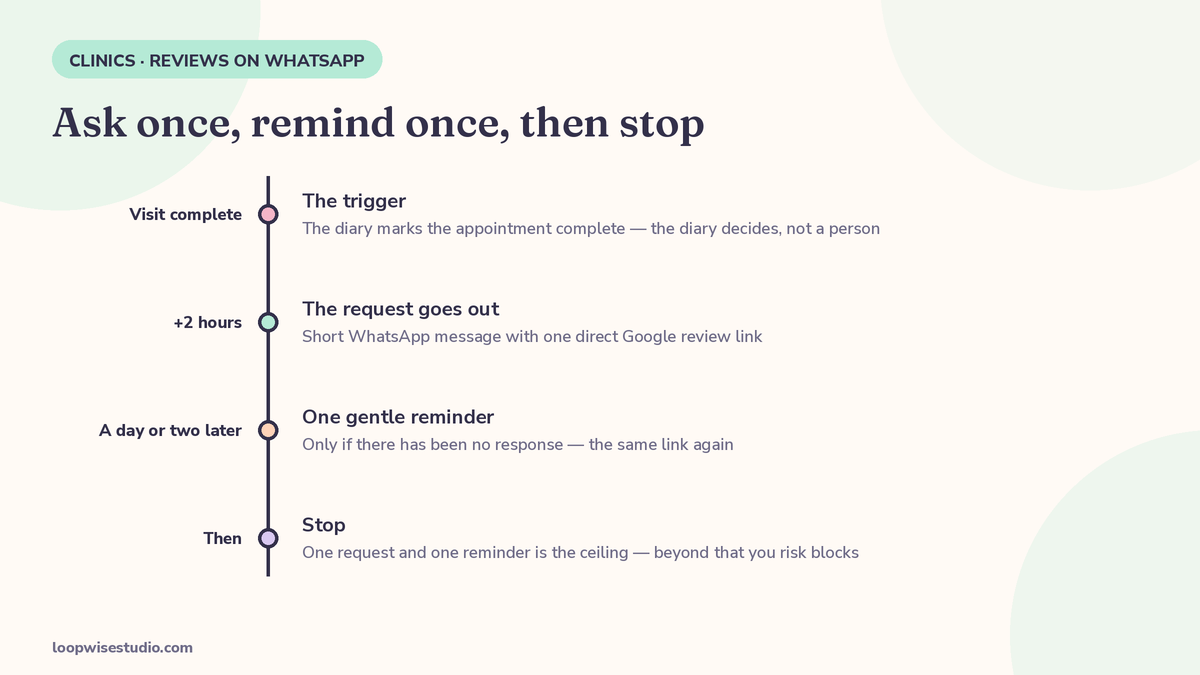
- A short automated sequence, then stop. The automated version that works for clinics: the visit is marked complete in the diary, the request goes out a couple of hours later on WhatsApp, one gentle reminder follows if there is no response, and then the sequence ends. Keaz’s guidance for WhatsApp review requests sets the same ceiling from the commerce side: one request per positive moment, and a single gentle reminder is the maximum — beyond that you risk blocks.
That automated shape — appointment completed, request at +2 hours, one reminder, stop — is the piece no manual guide gives you, and it is the difference between a review profile that grows every week and one that grows when someone at reception remembers. It also triggers identically for every patient, which is what keeps the practice clean: the diary decides, not a person’s read of who seemed happy.
Note the one deliberate exception: if a visit ended with a problem still open — a complaint, a complication, a billing dispute — a person handles that first. That is not gating; the review request still goes to them through the same flow once their issue is being dealt with. It is basic decency about sequencing, and it produces better outcomes than either suppressing the ask or firing it into an unresolved problem.
Already asking, but by hand and hit-and-miss? Get a free audit and we will look at your current review flow — where the ask happens, what it says, who it reaches — and show you the automated version on your existing diary.
The messages
Copy these and adjust the names. Short beats warm-but-long: the patient should be able to finish the whole task before their kettle boils.
Post-visit request (the main one):
“Hello [First name], thank you for visiting [Clinic name] today. If you have 30 seconds, we would really value an honest review of your visit — it helps other patients find us. Here is the link: [review link]. Thank you.”
The one reminder (only if no response, a day or two later):
“Hello [First name], a quick follow-up from [Clinic name] — if you meant to leave us a review after your visit, here is the link again: [review link]. No need if you are busy, and thank you either way.”
Reply when a review lands (public, on Google):
Reply to every review, good or bad, within a couple of days — treat 48 hours as the habit to build. For a positive one: thank them, name something specific from their review, no sales pitch, no request for anything else.
Replying to a negative review:
“Thank you for telling us this, [name]. We are sorry your visit fell short, and we would like to understand what happened. We have messaged you directly so we can put it right.”
Then actually message them directly, off the public thread, and put it right if you can. Never argue, never explain their own experience back to them, and never include anything about their treatment — a public reply is visible to everyone, including future patients deciding whether your clinic handles problems like adults.
What never goes in the request
- Clinical detail. No treatment specifics, no results, nothing sensitive. UpBlick’s clinic note is the rule: a clinic should avoid including sensitive medical details in the request. “Your visit today” is enough.
- The words “five stars.” Or “positive,” or “great.” Ask for an honest review; the rating is the patient’s business.
- Pre-screening questions. No “were you happy with your visit? Reply YES” step before the link. That is the gating pattern, even when it looks like customer care.
- Incentives of any size. No discount, gift, draw entry or free add-on attached to a review. None.
- A second reminder. One request, one reminder, stop. Keaz’s ceiling again: beyond that you risk blocks, and a blocked number damages the channel your reminders and bookings also run on.
A note on channel choice: Keaz’s own comparison puts email open rates at roughly 30–40% against WhatsApp messages typically read by 90%+ of recipients. The channel is not the hard part, though. A compliant, one-tap, well-timed request on any channel the patient actually reads beats a clever one they never see — WhatsApp simply happens to be where clinic patients already talk to you.
Track it
Measure three numbers monthly: requests sent, reviews published, and your average rating’s movement. If requests are high and reviews are low, the problem is the message or the timing, not the patients. If reviews arrive but the rating surprises you, that is information about the clinic, not the flow — act on it in the clinic, never by filtering the flow. That discipline is what makes the profile trustworthy to Google and to readers alike.
This flow is also the front end of a bigger system. Reviews bring the next patients in; those patients need the same care after their own visits. The text-message version of the automated ask is covered in automatic Google review requests for med spas by text, and the dental-specific version — where the same rules apply, with dentistry’s own timing quirks — is in how to get more Google reviews for a dental practice automatically.
Frequently asked questions
Is it actually allowed to ask for Google reviews on WhatsApp?
Yes. Asking is allowed, and the review link may be shared on WhatsApp — the guides summarising Google’s guidance list chat interactions, including WhatsApp messages, among the accepted places to share it. What is prohibited is the conditions some clinics attach: incentives, asking only selected patients, or routing people by rating. Ask everyone, offer nothing, send one link.
Can we offer a small discount or free treatment as a thank-you for a review?
No. Google prohibits incentivised reviews, and the stated penalties run from review removal to profile penalties. It does not matter that the offer is small or that everyone gets it. Never offer anything in return for a review.
Is it OK to check if a patient was happy before sending the link?
No — that is review gating, even dressed as good service. Ask every patient the same way and send everyone to the same review page. Handling an open complaint first, as a sequencing matter, is different: resolve it, then the same request goes out through the same flow.
How many times should we send the request?
Once, a couple of hours after the visit, plus one gentle reminder at most if there is no response. Then stop permanently for that visit. More messages risk the patient blocking your number, which endangers the reminder and booking messages that run on the same number.
What should the message say, exactly?
Thank them, refer to the visit in plain terms, give the direct link, ask for honesty. Keep it under a few lines, keep clinical detail out, and never mention stars. The templates above are ready to copy; the most important property they have is that every patient gets the same one.
Do we need the patient’s permission to message them on WhatsApp?
Yes — documented opt-in to WhatsApp contact is required before you message a patient, separate from email consent. Collect it as part of booking and check-in, keep the record, and honour opt-outs immediately. In practice this is collected once, alongside the consent for appointment reminders, which the patient is usually glad to give.
Reviews that arrive on their own
A clinic earns far more reviews than it receives. The gap is not gratitude — it is friction, timing and memory, on your side as much as the patient’s. Close it with a boring, reliable system: one link, set up once; a request that fires after every completed visit; one reminder; replies within two days; and rules you never break, especially the tempting ones.
If you want that flow wired into your diary so it runs without anyone remembering, get a free audit — we will review your current Google profile, your post-visit process and your WhatsApp setup, and show you exactly what the automated version looks like for your clinic.