WhatsApp Booking System for UK Plumbers: The Owner's Guide
For plumbing firm owners: how a WhatsApp booking system turns photo-and-postcode messages into booked jobs — triage, quotes, diary bookings, reminders and reviews.
This page is for plumbing firm owners — if you run a plumbing or heating business in the UK and your customers already message you on WhatsApp, this is about turning those messages into booked jobs automatically. (If you’re a homeowner looking for a plumber, this isn’t the page — try your local firms direct.)
A WhatsApp booking system for a UK plumbing firm turns the messages customers already send — a postcode and a photo of the problem — into booked jobs automatically: it triages emergencies, sends a quote or books a slot in your diary, confirms and reminds the customer, and asks for a review afterwards. It runs on Meta’s WhatsApp platform at £0.0159 per reminder message (rate card effective 1 October 2026), plus a platform or build fee.
You don’t need convincing that customers want to message you. They already do. The problem is what happens to those messages while you’re under a floor or up a ladder.
Your customers are already booking this way — by hand
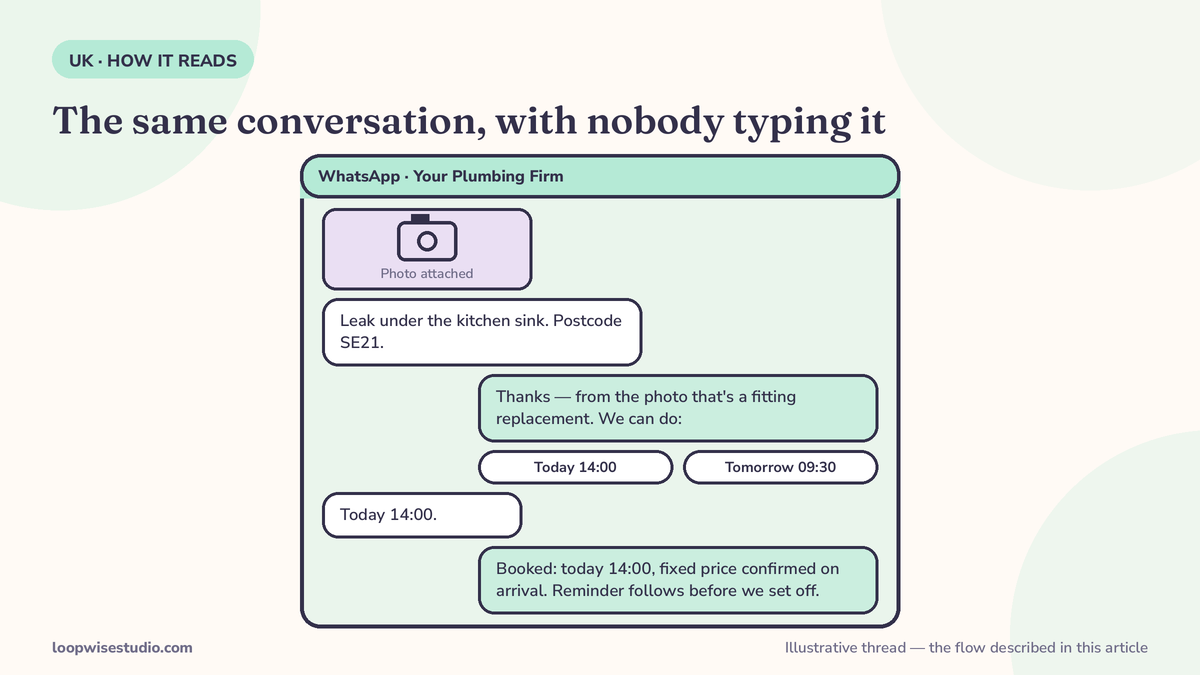
Look at how real UK plumbing firms present WhatsApp on their own websites. One London firm, Dulwich Plumber, tells customers: “Send your postcode and a photo on WhatsApp.” Then a human works through four steps: understand the problem, look at the photo, explain the rate, book a time.
That flow works — customers love it. But every step depends on a person stopping work to type. The photo sits unread for three hours. The quote goes out at 9pm. The customer, meanwhile, has messaged two other firms.
TM Hughes & Son, a multi-trade firm of 30+ years, lists WhatsApp as one of three contact channels — then a human still runs the whole conversation. This is the standard pattern across UK firms: WhatsApp exists, but it’s just another inbox somebody has to watch.
A booking system keeps the customer’s experience identical — postcode, photo, answer — and removes you from the middle of it.
What the system does, step by step
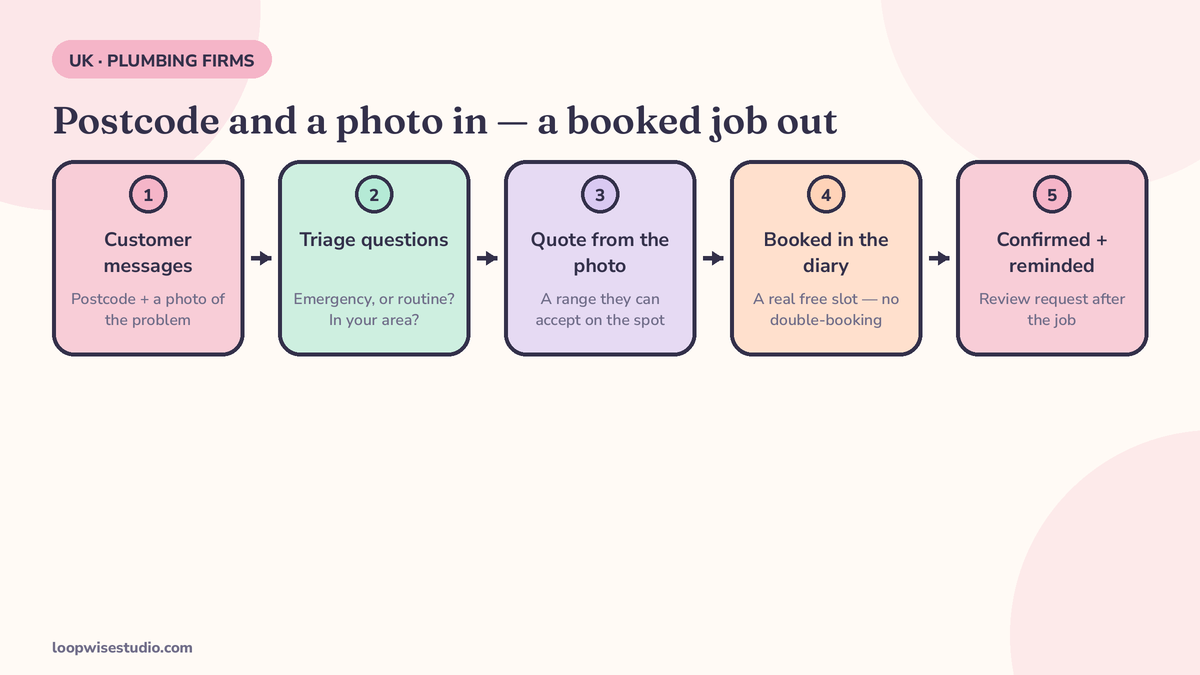
- The enquiry lands. A customer messages your WhatsApp number from your website, Google profile or the side of the van. No app for them to download, no portal login.
- It asks the right questions. Postcode first (are you in our area?), then the problem, then a photo or short video. This is the triage your office manager does in her head, written down once.
- Emergencies split from routine work — see the next section. This is the step generic booking software gets wrong.
- A quote or a slot. For standard jobs, the customer gets a price or a range. For everything else, they pick a real slot from your diary — not a “request” you still have to confirm later.
- It’s in the diary. Booked, with the address, the photos and the job notes attached. No double-booking, because the system only offers slots that are actually free.
- Confirmation and reminder go out automatically — confirmation instantly, a reminder before the visit. These are utility messages at £0.0159 each on Meta’s current UK rate card.
- After the job, a review request goes to the same thread, while the fixed boiler is still warm in the customer’s mind.
Compare that with the manual version: the same seven steps, done by you, at night, from memory.
The same job, two ways: manual vs automated
| Step | Manual (today) | With a booking system |
|---|---|---|
| Customer messages a photo | Sits unread until you check your phone | Logged instantly, with the postcode attached |
| Triage | You, between jobs | Automatic questions; emergencies flagged straight to you |
| Quote | Typed out at 9pm | Sent from your price rules, or the job is flagged for your quote |
| Booking | Back-and-forth “does Thursday work?” | Customer picks a real free slot; it’s in the diary |
| Confirmation | If you remember | Instant, every time |
| Reminder | Almost never | Automatic, before the visit |
| Review request | Almost never | Sent after the job closes |
Nothing in the right-hand column needs you to be a different business. It needs the messages you already exchange to happen on time, every time, without you typing them.
The photo is the quote’s best friend
The photo-first habit your customers already have is worth building around. A clear photo of the boiler plate, the leaking joint or the stopcock’s location lets you (or the system, following your rules) do three things before anyone leaves the yard: judge whether it’s a ten-minute fix or a parts job, give a price range the customer can accept on the spot, and put the right parts in the van. Firms like Dulwich Plumber run exactly this triage by hand today; the system just makes it happen at 7am on a Sunday too, and files the photo with the job so the attending engineer sees what the office saw.
Emergencies are different — and the system has to know it
A burst pipe at 9pm and a bathroom quote for next month cannot be handled the same way, and any system that treats them the same will lose you both.
The emergency flow: the customer’s message contains “leak”, “no heating”, “gas”, or they pick “emergency” from the first menu. Two things happen at once — the customer gets an immediate holding reply (“We’ve got your message, an engineer has been alerted, expect a call within X minutes”), and you get an instant alert on your phone. A human takes over. The automation’s job is speed and reassurance, not replacing the engineer on a gas job.
The routine flow: quotes, boiler services, bathroom work. No urgency, so the system does the whole thing — questions, photo, quote range, diary slot, confirmation — and you just see it appear in the diary.
Getting this split right is the difference between a booking system and a chatbot. It’s also where the money is: the after-hours emergency is the highest-value enquiry a plumbing firm gets, and it’s the one most likely to arrive when nobody’s watching the phone. The same principle drives the US version of this problem — missed call text back for plumbers — different channel, same leak.
The diary side: slots, areas, and not double-booking the van
The unglamorous half of the system is what makes it trustworthy:
- Real availability only. The system offers slots from your actual diary, with travel time between jobs. It never promises a customer a time you’re already booked.
- Service-area checks. The postcode question at the start filters out jobs you’d never drive to, before they take a slot.
- Job length by type. A boiler service and a bathroom first-visit don’t get the same slot length. Set them once; the system holds to it.
- Everything attached to the job. Photos, the customer’s messages, the quote they accepted — in the diary entry, not scattered across your personal WhatsApp.
The recurring money: last year’s jobs, rebooked automatically
The most profitable messages a heating firm sends aren’t to new customers. They’re to last year’s.
Every boiler you serviced and every landlord gas safety check you certified has a due date. A WhatsApp booking system works that list for you: when a service or certificate is coming due, the customer gets a message — “Your boiler service is due next month, here are three slots” — with booking built into the reply.
This is work you’ve already won once, at customers who already trust you, and most firms let it evaporate because nobody has time to ring round. It costs £0.0159 a message to ask.
Landlord work compounds it: one letting agent or landlord with twenty properties is twenty certificates a year, each with a legal due date and a tenant to coordinate. A system that tracks every due date, messages the tenant to arrange access and confirms the slot with you turns the most admin-heavy work you do into the most predictable.
What it costs to run — and what one job covers
Running costs, honestly stated: reminder and confirmation messages are utility messages at £0.0159 each on Meta’s UK rate card effective 1 October 2026. On top of that sits a platform fee if you rent software, or a build fee if the system is set up for you — the full breakdown of those layers is in our guide to how much WhatsApp automation costs a UK small business.
Now the other side of the ledger, as plain arithmetic rather than a statistic: Dulwich Plumber publishes a rate of £100 + VAT per hour (weekday daytime, no call-out fee) on its own website. That’s one firm’s price, not a UK average — but use your own rate and the shape holds. At £100 an hour, one saved booking a week is roughly £5,200 a year of work, and a month of reminder messages for an entire diary costs less than one hour of it. The system doesn’t need to work miracles to pay for itself; it needs to catch a handful of the enquiries you’re currently answering too late.
For a comparison point, firms weighing a human answering service against automation should see what a plumbing answering service really costs — per-minute billing adds up faster than most owners expect.
Setting it up — the checklist
What a firm needs in place before the first automated booking lands:
- A dedicated WhatsApp business number (not your personal mobile — see the FAQ below).
- Your diary connected, with job lengths set per job type and travel time between jobs.
- Your service area, by postcode, so out-of-area enquiries get a polite no instead of a slot.
- Your price rules for the standard jobs you’re happy to quote automatically — and a flag-list of jobs that always come to you first.
- Your emergency list: the words and job types that alert a human instantly, day or night.
- Your message wording, in your voice: the confirmation, the reminder, the review ask. Customers should read them and hear your firm, not a software company.
None of that is exotic. It’s the knowledge already in your head, written down once so the system can apply it at the speed customers expect.
Where this fits with your website
WhatsApp on its own is a channel. The bookings multiply when it connects to the rest: your website offers the slot, WhatsApp confirms and reminds, the review request closes the loop — the same pattern we build for clinics on our WhatsApp booking system for aesthetic clinics page and across the UK and Ireland. Customers find one consistent business, not three disconnected inboxes.
If you want this running on your firm — photo triage, emergency alerts, diary bookings, service reminders — get a free audit and we’ll map your current message flow and show you exactly where jobs are leaking out of it.
The short version
Your customers already try to book by WhatsApp: a postcode and a photo. A booking system automates what happens next — triage, quote, diary, reminder, review — splits emergencies to a human instantly, and rebooks last year’s services and certificates on schedule. Running cost is pennies per message; one booked job covers months of it.
FAQs
Do customers really book plumbers on WhatsApp?
Yes — UK firms already invite it on their own websites. Dulwich Plumber, a working London firm, tells customers to “send your postcode and a photo on WhatsApp” as its booking route. The behaviour exists; a booking system just automates the firm’s side of it.
What happens with a genuine emergency, like a gas leak or burst pipe?
The system recognises emergency keywords or the customer’s menu choice, sends them an immediate holding reply, and alerts you (or your on-call engineer) instantly so a human takes over. Automation handles the speed and the paperwork; it doesn’t try to handle the emergency itself. For gas smells, the reply should also tell the customer to call the National Gas Emergency Service on 0800 111 999.
Will it double-book my diary?
No — it only offers slots that are genuinely free in your diary, with the right job length and travel time built in. That’s the core difference between a booking system and a contact form: a form takes requests you still have to juggle; the system books real availability.
What does it cost to run?
Confirmations and reminders are utility messages at £0.0159 each on Meta’s UK rate card effective 1 October 2026 — a month of messages for a full diary typically costs a few pounds in Meta fees. On top sits either a platform fee (rental software) or a one-off build if it’s set up for you.
Can it rebook boiler services and gas safety checks?
Yes — that’s one of its best uses. The system tracks due dates from your job history and messages customers when a service or landlord certificate is due, with slots they can book by replying. It’s recurring work you’d otherwise have to chase by phone.
Do I need a new phone number?
You can use a dedicated business number for WhatsApp, which is usually cleaner — it keeps job messages off your personal phone and lets the system attach conversations to diary entries. Your existing number stays on the van and the website as the number customers call.
Ready to stop re-typing the same replies at 9pm? get a free audit and we’ll show you the flow built around your firm.