What Should Be on a Med Spa Website to Get More Bookings
The page-by-page spec for a med spa website that books: 7 pages, what goes on each one and in what order, the booking page spec, and a copy-paste checklist.
A med spa website that gets bookings has seven pages — Home, one page per treatment, Pricing, Providers, Booking, Reviews & FAQ, and Contact/Location — and each page has a specific job and a specific set of elements in a specific order. Most med spa websites have most of these pages; what they are missing is the element-level detail: the price signal next to the booking button, the proof beside the decision point, and a booking page that shows real slots, takes a deposit, and confirms instantly. This article is the spec. You can hand it to a designer, or use it to check the site you already have.
Two boundaries before we start. This article is about what goes on the pages. If your site gets visits and you want to work out where they are being lost, that is a diagnosis job, not a spec job. And what happens after someone books — the reminders, the follow-up, the recovery of people who went quiet — is a system that sits behind these pages; we cover it step by step in how to turn website visitors into booked appointments. Here, we build the pages that system plugs into.
The short answer: 7 pages, 2 tiers
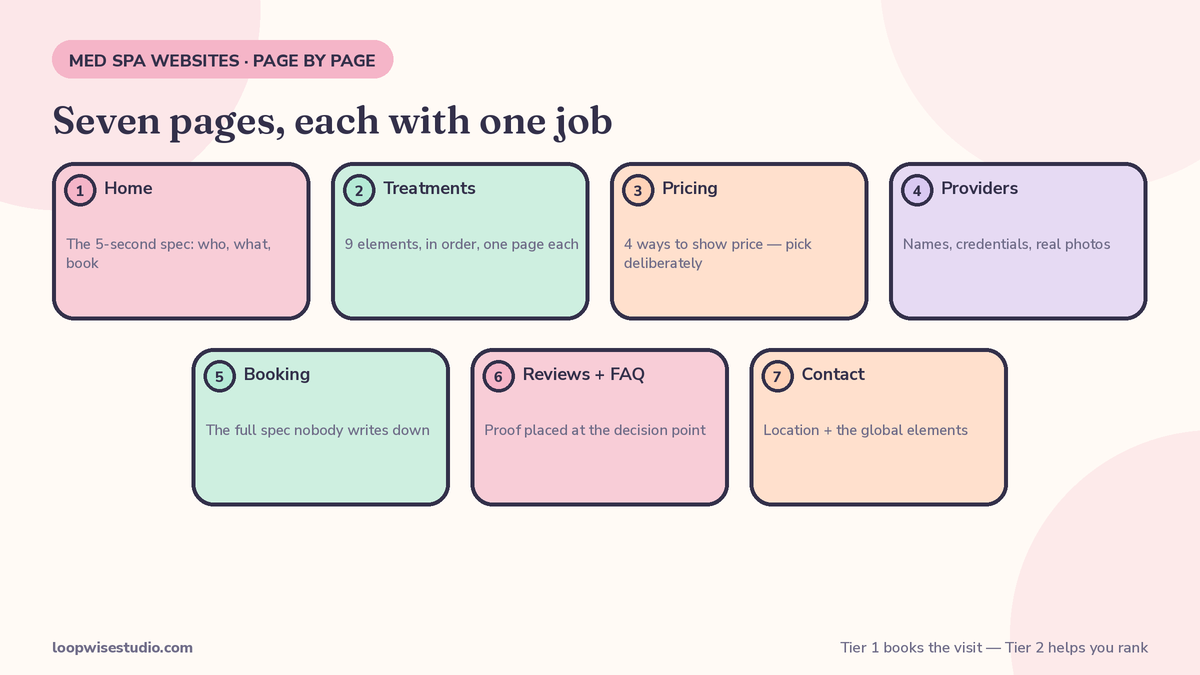
| Page | Its job | Must-have elements |
|---|---|---|
| Home | Route visitors to a treatment fast | Hero (treatment + city + one button), treatment tiles, trust strip, location + hours |
| Treatment (one per treatment) | Rank for that treatment and convert | Plain-language explainer, who it’s for/not for, downtime, price signal, consented proof, filtered booking button |
| Pricing | Remove the price objection | Starting prices or ranges, consultation fee + policy, membership/package prices, financing if offered |
| Providers | Make the people feel safe | Names, photos, credentials, medical director named, who performs what |
| Booking | Take the appointment | Real-time slots, short intake, deposit step, instant confirmation screen + message |
| Reviews & FAQ | Answer objections with proof | Real reviews, star rating, FAQs on pain, downtime, safety, results |
| Contact / Location | Get them there | Address, map, parking, hours, tappable phone, message button |
Everything on that table is Tier 1: what you need to book — the elements that turn a visitor into an appointment. There is a second tier, Tier 2: what helps you rank — a blog, treatment guides, gift-card and offers pages, extra location pages. Tier 2 brings more visitors to the door. It does nothing if the door does not open. We see med spas overspend on Tier 2 content while their booking page is a contact form; build Tier 1 completely first, in the order below, then add Tier 2.
Home page: the 5-second spec
Your homepage has one job: get the visitor to the right treatment page, or into booking, within seconds. It is a routing page, not a brochure. A stranger landing on it should be able to answer three questions in five seconds: Am I in the right place? Do they offer what I want? How do I book?
Hero (first screen). One headline that names the outcome and the place — “Laser hair removal in [City], from $79 a session” beats “Reveal your inner radiance” every time, because it tells the right visitor she is in the right place and the wrong visitor to leave. Under it: one button, “Book an appointment.” Not three buttons. Not a video tour. One button.
Treatment tiles. Immediately below the hero, your main treatments as tiles — photo, name, starting price, one tap to that treatment’s page. This is the routing mechanism. A visitor should never need your navigation menu to find a treatment.
Trust strip. One line, high on the page: your review rating and count, your medical director’s name or credential, and how long you have been operating — whatever of those you can honestly show. “4.9 stars from 600+ reviews · Medical director: Dr. [Name]” does more work on this page than any paragraph of brand copy.
Then: two or three consented before-and-after results, a short “how it works” (consult → treatment → aftercare in three lines), and location with hours. Everything else — your story, your philosophy — can live lower or on an About page. It is not banned; it is just not allowed ahead of the routing.
Treatment pages: the 9 elements, in order
One page per treatment. These are your money pages: they are what ranks for “Botox near me,” what your ads should land on, and where most booking decisions are actually made. Each one carries the same nine elements, in this order:
- Headline: the treatment, the benefit, the city. “Botox in [City]: soften lines in one 20-minute visit.”
- What it is, in two or three plain sentences. No clinical jargon in the first paragraph — your visitor is not a clinician.
- Who it is for — and who it is not for. Honesty here builds more trust than any superlative. “Not suitable during pregnancy; if you are under 25, start with a consultation” tells a visitor this page was written by people who will also be honest about her results.
- What the appointment feels like: how long it takes, what happens during it, pain level in plain words.
- Downtime and results: when they will see results, how long results last, how many sessions a typical course takes.
- Price signal: exact price, “from” price, or range — on this page, not hidden on the pricing page. See the pricing section below for the formats.
- Consented proof for this treatment: two or three before-and-afters of this treatment specifically, plus one short review quote from a client who had it.
- The practitioner: who performs it, with a photo and credential line. “Performed by Sarah, RN — 8 years in aesthetics.”
- The booking button: opens your booking flow with this treatment already selected. The visitor should never have to find their treatment again inside the booking system.
Miss any of elements 3–6 and the page asks the visitor to book on faith. That is the moment she opens a competitor’s tab.
Pricing page: the 4 ways to show price
Price silence is one of the most reliable booking-killers on med spa websites: a visitor who cannot find any number assumes the worst and leaves. You have four honest ways to show price, and each does something different to the enquiries you get:
| Format | What it looks like | What it does |
|---|---|---|
| Exact prices | “Laser hair removal, underarms: $89/session” | Maximum enquiries from price-ready buyers; you compete on the number |
| Starting-from | “Botox from $11/unit” | Answers the question while keeping room for assessment; the most common workable format |
| Ranges | “Full-face laser: $300–$450 depending on area” | Sets expectations honestly when the assessment genuinely decides |
| Consultation-fee only | “Consultation $50 — credited toward any treatment” | Filters for serious buyers; fewer enquiries, better qualified |
Whichever you choose, keep three rules. The treatment pages still need their own price signal — nobody should have to visit this page to learn anything. State the consultation policy in one sentence: what it costs and whether it comes off the treatment. And if you offer memberships, packages, or financing, they belong here with real numbers, because package buyers are your highest-value clients and they are comparing maths, not vibes.
Providers page: the trust elements
People book a person, not a business. This page exists to make your people feel safe to book with, and it needs: every provider’s real name and real photo (not stock); their credentials and training in plain language; who performs which treatments; and your medical director named, with their credential, in a visible place — not buried in a footer disclaimer. If a treatment is performed by a nurse or aesthetician under medical direction, say exactly that. Visitors comparing med spas are quietly checking whether the place is properly supervised; making them dig for it reads as having something to hide.
Short bios beat long ones: three or four lines per person — experience, specialty, one human detail. Link each provider from the treatment pages they perform (element 8 above) so the trust flows to the decision point.
Booking page: the full spec nobody writes
Every guide says “add online booking” and moves on. Here is the actual spec, because this page is where your bookings are won or lost:
Real-time slots, not a request form. The visitor picks an actual available time and leaves with an appointment. A “tell us your preferred time and we’ll call you” form is an enquiry wearing a booking page’s clothes — it converts worse and creates a phone chase for your front desk.
The treatment and provider preselected. Arriving from the Botox page means the flow opens on Botox, with the provider choice already sensible. Every selection the visitor has to repeat is a chance to abandon.
Short intake. Ask only what holds the slot: name, mobile number, and one optional notes field. Medical history, consent, and detailed intake belong after the booking, sent with the confirmation to be completed before the visit. A booking flow that opens with a health questionnaire will be abandoned by people who would happily have filled it in that evening.
A deposit step, used selectively. For long appointments, high-demand slots, and treatments with a no-show history, a small deposit or card hold, stated plainly before they confirm (“$50 deposit, comes off your treatment, refunded if you cancel 24h+ ahead”). Offered honestly, deposits do not scare off real clients — they scare off speculative bookings, which is the point.
A confirmation screen that closes the loop. The moment they finish, the screen says: what they booked, with whom, when, where you are, how to move it, and what happens next. Then the same details arrive by text or message within a minute. A booking that ends on a blank “thank you” leaves the client unsure it worked — and unsure clients double-book elsewhere. What that confirmation message should say, word for word, is covered in the system guide linked at the top; the page-level requirement is simply that it exists and is instant.
A fallback on the same page. Some visitors will not book online no matter what. Give them the tappable phone number and a message button right there — a captured enquiry beats a lost one. If you want this spec checked against the booking page you already have, get a free audit and we will mark it element by element.
Reviews & FAQ page: proof and objections
Your reviews should not live only here — ratings belong in the home page trust strip and quotes on treatment pages — but this page is the full proof library for the visitor who wants to dig. Real reviews, with your real star rating; if you embed a feed, keep it current, because reviews that stop two years ago raise the question you least want asked.
The FAQ half of the page answers the objections that stop bookings, in the visitor’s own words: Does it hurt? How much downtime, honestly? When will I see results? Is it safe, and who performs it? What if it doesn’t work for me? What does it cost, all-in? Write the answers the way your best practitioner explains them chairside — specific, calm, no hype. This page also quietly does legal work for you: honest answers about results varying and suitability are better protection than any disclaimer.
Contact/location page + the global elements
Contact pages are dull and decisive: a visitor checking your address at 9pm is deciding whether you are convenient enough to book tomorrow. Include the full address, a map, parking notes, opening hours, the tappable phone number, and the message button. Two locations means two pages — a visitor should never have to work out which address their appointment is at.
Then, the elements that belong on every page, not just these seven:
- Sticky mobile booking bar: the Book button (and call button) fixed at the bottom of the screen on phones, always visible.
- Click-to-call: every phone number on the site tappable.
- A chat or WhatsApp entry point for visitors who will message but will not call — one visible button, not a pop-up that ambushes them.
- Speed and mobile rules: pages must load fast on mobile data and be fully usable one-handed. On med spa sites, most visitors are on phones; design the mobile version first and let the desktop be the adaptation.
Before/after photos: done legally and honestly
Before-and-afters are your strongest proof and your biggest compliance risk, so the rules go in the spec, not in a footnote. Use only photos of your own clients, with written consent for website use — kept on file, and removed if consent is withdrawn. Never use stock photos presented as results, and never borrow images from a supplier or another clinic. Keep lighting, angle, and timing honest: label what the photo shows (“After 2 sessions, 6 weeks apart”). Add a short results-vary note near the gallery — results genuinely vary, and saying so makes the photos more believable, not less. If you operate somewhere with advertising rules for medical or aesthetic services, check your photos against them before publishing; a gallery is advertising, and it is the part of your site a regulator will look at first.
The copy-paste checklist
Tick these off against your live site:
- Home hero names a treatment/outcome + city, with one booking button
- Treatment tiles with starting prices, one tap to each treatment page
- Trust strip (rating, review count, medical director) near the top of Home
- One page per treatment, each with all 9 elements in order
- A price signal on every treatment page
- Pricing page with a stated format (exact / from / range / consultation-fee) and package prices
- Providers page: real names, photos, credentials; medical director named visibly
- Booking shows real-time slots, treatment preselected from treatment pages
- Booking intake is 3 fields or fewer to hold the slot; full intake sent after booking
- Deposit or card hold for long/high-demand appointments, terms stated before confirming
- Confirmation screen + instant confirmation message with reschedule route
- Reviews on Home and treatment pages, not only on the reviews page
- FAQ answers the six core objections (pain, downtime, results, safety, suitability, total cost)
- Contact page per location: address, map, parking, hours, tappable phone
- Sticky mobile booking bar + click-to-call + message button on every page
- Before/afters: own clients only, written consent on file, treatment and timing labelled
- Tier 2 (blog, guides, offers pages) only after every Tier 1 box above is ticked
If several boxes are empty, the question becomes what fixing them costs — our breakdown of how much a website with online booking costs a clinic sets out the market ranges honestly, and if you run a one-person practice, the solo version of this spec is in the website guide for a one-person aesthetic clinic. Or skip the self-assessment: get a free audit and we will go through this checklist against your site and send you the gaps in writing.
Frequently asked questions
Which page matters most for bookings?
The treatment pages, and it is not close. They are what visitors find in search, what your ads should land on, and where the book-or-leave decision happens. A med spa with a modest homepage and excellent treatment pages will out-book a med spa with a spectacular homepage and thin treatment pages every time.
Do I really need a separate page for every treatment?
Yes, if you want bookings from search and ads. One combined “Services” page cannot match a specific search, cannot carry a treatment-specific price, proof set, and practitioner, and cannot preselect the treatment in booking. Treatments you rarely sell can share a page; your top five to eight earners each get their own.
Should I put exact prices on my website?
Put some number on every treatment page — exact, from-price, or range. The format matters less than the presence. Total silence is the only option that reliably costs bookings, because visitors fill the gap with a worst-case guess. If your pricing needs assessment, price the consultation and say the fee comes off treatment.
Is a booking request form good enough instead of real-time booking?
It is better than nothing and worse than real booking. A request form leaves the visitor without an appointment and your front desk with a callback list; some of those people never get reached in time. If your current system only offers request forms, keep it for now but treat live slots as the next upgrade — and make sure enquiries get an instant reply in the meantime.
What about a blog — is it worth it for bookings?
A blog is Tier 2: it helps the right visitors find you, but it does not convert them. Publish content after Tier 1 is complete. One good treatment guide that ends at a strong treatment page is worth more than twenty posts pointing at a homepage and a contact form.
My med spa has one person — me. Do I still need all seven pages?
Yes, the seven pages stay; they just get shorter. A solo practitioner’s providers page is one person — which is fine, and often stronger, because clients book you. We wrote the solo-practice version of this in detail: the website for a one-person aesthetic clinic covers what to keep, what to cut, and how to handle booking when there is no front desk at all.