Tattoo Studio Website With Online Booking and Deposits
A tattoo studio website with online booking and deposit payment: artist pages, consult flow, deposits into your own Stripe, and the real commission maths.
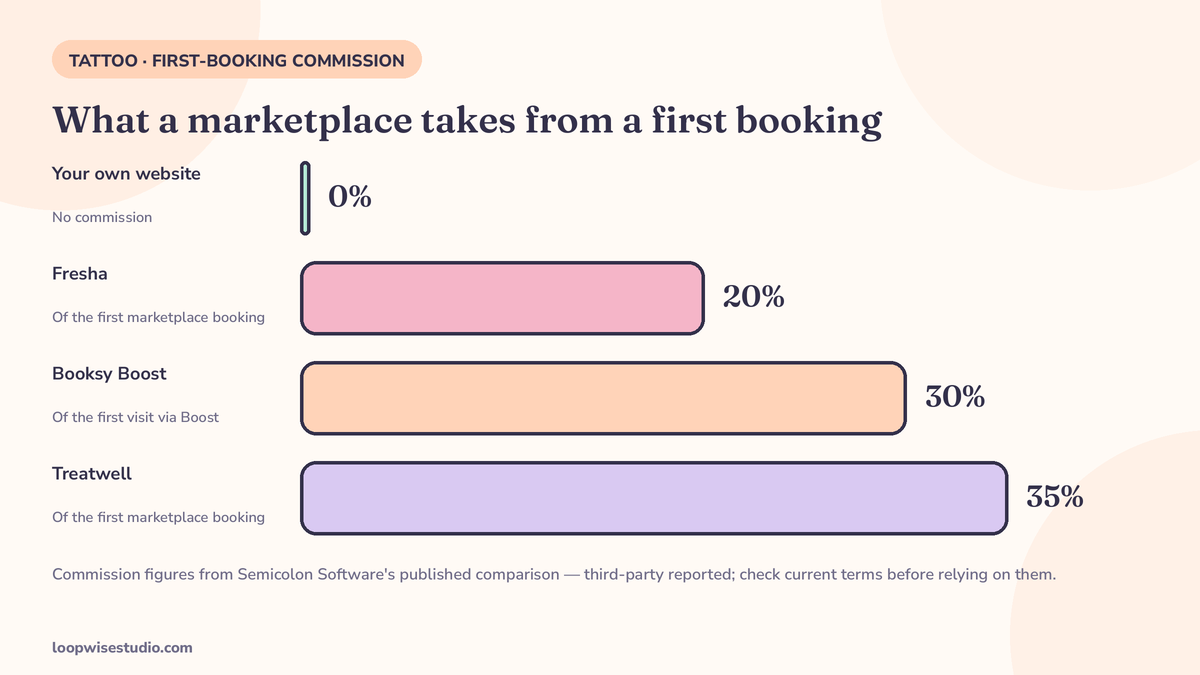
A tattoo studio website with online booking lets a client pick an artist, choose a consultation or a session, send reference photos, and pay a deposit in one flow — and the deposit lands in the studio’s own Stripe account, not a marketplace’s. Unlike a marketplace profile, the studio owns the site, the client list, and the follow-up, and pays no commission on the bookings the site takes. Studios that rent profiles instead typically pay a monthly subscription plus 20–35% of a new marketplace client’s first booking, per Semicolon Software’s published comparison of Fresha, Treatwell and Booksy.
That last part is the difference that matters. A marketplace profile is a listing you rent inside someone else’s shop window. Your website is your shop. Both can show your work and take a booking — but only one of them builds an asset you own, keeps the whole price of the work, and lets you run the reminders, waitlist, and review requests that decide whether the diary stays full.
This page covers what the site has to do, the booking flow step by step, the deposit and commission maths with its sources named, and an honest account of when a marketplace still earns its cut.
What clients go through now — the DM-and-transfer route, and where it leaks
Most studios do not have a booking system. They have a routine, and it goes like this — real studios publish this exact process on their own booking pages:
- The client messages on Instagram, or fills in a form: name, idea, placement, size.
- The artist replies when they can — after the session, after the drawing, sometimes days later.
- The client is asked for a deposit, often by bank transfer or a payment app, in a separate conversation.
- Only when the deposit lands does design work start, and the session get pencilled in.
- Reminders, if any, are manual. The waitlist, if any, is the artist’s memory.
Every arrow in that chain is a leak. The reply that comes two days late loses the client who messaged three studios. The deposit step — a separate conversation, a separate app — is where motivated clients quietly evaporate, because you asked them to do admin to give you money. And the whole history lives inside an Instagram account you do not own, on a platform that can throttle or suspend it.
None of this happens because artists are disorganised. It happens because the tools were built for hair salons and adapted badly. A tattoo booking is not a haircut booking: it starts with an idea, not a service menu.
Anatomy of the site — what each page has to do
Home page, with one honest signal on it: books open or closed. Tattoo clients are used to checking whether an artist is taking work. A site that says it plainly — books open, books closed, waitlist open — answers the first question every visitor has, and a waitlist capture turns “closed” from a dead end into a future booking.
Artist pages with real portfolios. One page per artist: their style, their healed work (not just fresh — clients who know, look for healed), their flash or custom focus, and their own booking link. A client books an artist, not a studio, and the site should be built that way.
A services page that explains the shapes of work. Custom, flash, cover-ups, consultations — with what each involves and what a deposit means for each. It does not need public prices for custom work; it needs to kill the uncertainty that stops people starting.
The booking page. Described in the next section — the heart of the site.
A policy page. Deposit terms, reschedule rule, age and ID requirements, stated once, in human language, linked from every booking confirmation. It is the page that makes the deposit enforceable without an argument — the system behind it is our guide to how to reduce tattoo appointment no-shows and cancellations.
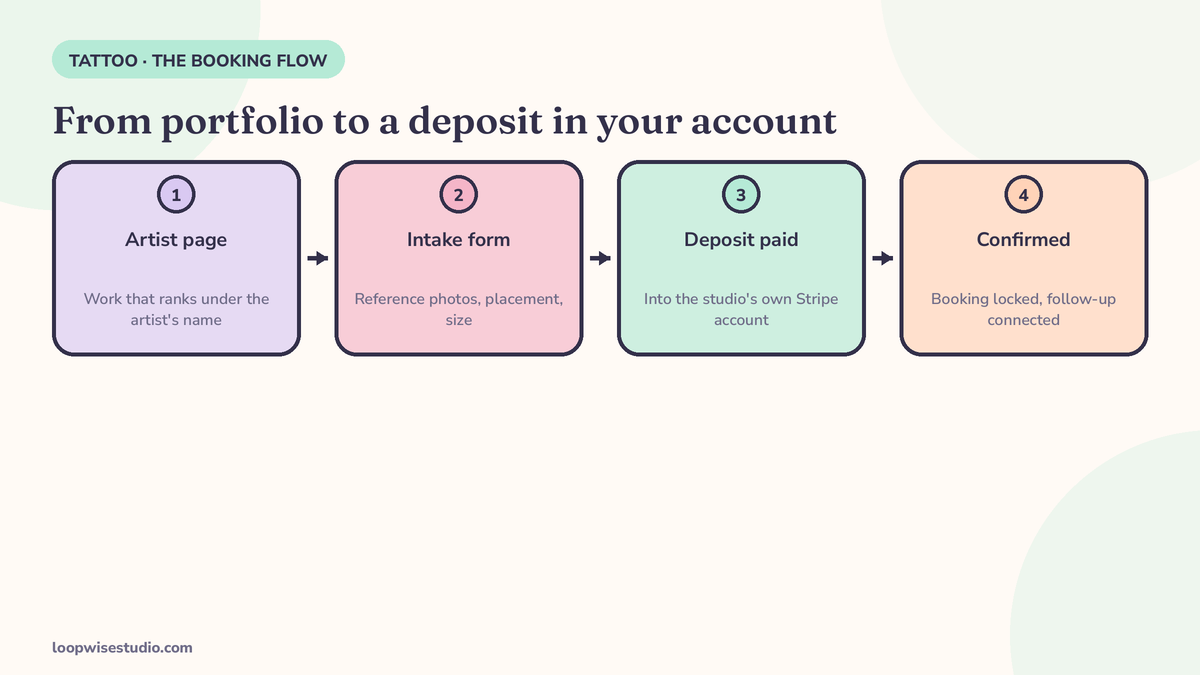
The booking flow, step by step — from portfolio to a deposit in your account
- Choose the artist. From their portfolio page, not a generic form.
- Choose the shape: consultation or session. Custom work starts with a consult — the flow should say so and book the consult, instead of forcing every client to pretend they are ready for a chair. Flash and repeat work can book the session directly.
- Intake in the flow. Placement, size, idea, reference photos uploaded there and then; style and budget where relevant; health and allergy notes where your consent process needs them. Every field the artist currently asks for across six DM messages, asked once.
- Deposit, in the same flow, into your own Stripe. The client pays the deposit by card without leaving the booking. No transfer to chase, no “I’ll send it tonight.”
- Confirmation with the policy attached. The booking lands in the artist’s calendar, the client gets the confirmation, the deposit terms they just acknowledged, and the reminder sequence starts.
That is the whole design. Five steps, no account for the client to create, no app to download, no marketplace in the middle taking a position between you and the person whose skin it is.
Deposits without the marketplace cut — the commission maths, sourced and labelled
The financial case rests on one question: what does a first booking cost you on each route?
The clearest published comparison comes from Semicolon Software, a UK builder of tattoo studio websites, which tabulates its own offer against the marketplaces. These are third-party figures from a vendor with a product to sell — treat them as reported, not gospel, and check each platform’s current pricing page before you make a decision on them.
| Route | Monthly cost (as reported) | Cost of a new client’s first booking |
|---|---|---|
| Your own website (Semicolon’s offer) | £39/mo hosting + maintenance after a one-off setup | No commission. Deposits via your own Stripe at Stripe’s standard UK fee (1.5% + 20p) |
| Fresha | £14.95 solo, or £9.95 per team member | 20% of the first marketplace booking (minimum £4) |
| Treatwell | Monthly cost not published, per the comparison | 35% of the first marketplace booking |
| Booksy | £40 + £5 per extra staff member | 30% of the first visit if the client came through Booksy Boost (minimum £5) |
| Get Ink (tattoo-specific platform) | £29 solo / £54.40 two artists | No commission; £1 processing per payment |
Read the middle column carefully, because it is how marketplaces actually make their money from studios. The subscription is the small number. The commission is charged on the first booking of every client the marketplace introduces — and a tattoo client is not a one-visit client. Custom work means a consult, two or three sessions, then the next piece, then their partner’s piece. Handing over 20–35% of the first booking is the price of the introduction. Whether that price is fair depends entirely on whether the marketplace actually introduced them — or whether they found your Instagram, your Google listing, your name from a friend, and the marketplace simply stood at the till.
On your own website, the client your reputation earned pays a deposit that costs you the card fee and nothing else. That is also the shape of the wider maths in our guide to how much a website with online booking costs — different trade, same rent-versus-own question.
What Google sees — your name, your town, your work
There is a quieter difference between a domain and a profile, and it compounds. When someone searches your studio’s name — or “tattoo [your town]”, or a style you specialise in — a marketplace profile, if it ranks at all, ranks as one listing among every other studio on the platform, on pages the platform controls. Your own website ranks as you: your artists’ portfolios indexed under your name, your town pages, your healed-work galleries.
That matters because name searches are the highest-intent searches a studio gets. The client who types your name has already decided; they are looking for how to book. Every route that makes them detour through a marketplace risks the commission on a client your reputation earned outright — and risks them finding, in the same results, the competitor whose listing sits one row down. An owned site also survives things a profile does not: a platform’s fee change, a delisted account, an algorithm that decides your town is no longer a priority. Your domain is the one address in your business that nobody can reprice.
After they book — the website is where the follow-up connects
A booking page that only books is half a system. The site your clients booked on is also where the machinery that protects the booking should live:
- The reminder sequence — confirmation, the long-lead check-in, 48–72 hours, day-of — fired from the booking itself, not from an artist’s memory.
- Consent and intake forms before the day, completed from a link in the reminder, so the client arrives with the paperwork done and the commitment made.
- The waitlist when books are full. Books closed should never mean enquiries lost. The waitlist captures them, and when a slot opens, the first name gets the text.
- Review requests after the heal, sent while the client is showing the piece to everyone they know — the moment your next booking is actually created.
A website package that stops at “site plus admin panel” gives you none of this. The website is the front door; these are the locks, the doorbell, and the person who notices when someone knocks. It is the same conversion logic any appointment business needs — our breakdown of how a website turns visitors into booked appointments covers the principles page by page.
If you can see the flow your studio needs but not the spare month to build it, get a free audit — we’ll walk your current booking route, count the leaks in it, and show you the site that fixes them.
Own the site or rent the profile? An honest comparison
| Your own website | Marketplace profile | Booking app (e.g. Ink Bookie, TattooBooking) | |
|---|---|---|---|
| Who owns the client list | You | The platform holds the relationship | Mostly you, inside their app |
| Commission on bookings | None | 20–35% of a new client’s first booking (as reported above) | None stated; TattooBooking charges clients a booking fee on card payments, amount not published |
| Deposit goes to | Your own Stripe | Platform’s payment flow | Your payment link (Square/Stripe/Zelle/Venmo, per Ink Bookie) |
| Portfolio lives on | Your domain | Their listing, beside your competitors | A link, not a website |
| Reminders | Yours to design | Their defaults | Ink Bookie: email at 1 week / 48h / 24h / 2h (vendor-stated) |
| If you leave | Site and list come with you | Reviews and ranking stay behind | Data export varies |
When a marketplace still earns its cut: if you are a new studio with no reputation and no audience, a marketplace’s discovery can be worth 20–35% of a first booking — it is advertising that only charges on results. Plenty of studios run the hybrid: marketplace for discovery, own website for everyone who already knows their name, with the site’s address on every profile, card, and aftercare sheet. What makes no sense is paying first-booking commission forever on clients your own work attracted.
The apps sit in between, and some are genuinely built by people who understand the trade — Ink Bookie, for instance, prices at $40 a month after a 30-day trial with no commission (vendor-published; check current pricing). But an app link is still not a website: it does not rank on Google under your name, it does not hold your portfolio on your domain, and your business still lives at an address someone else owns.
What it costs and how long it takes
Published reference points, all vendor-stated and worth verifying at source: Semicolon’s done-for-you tattoo website runs at £39 a month for hosting and maintenance after a one-off setup fee; Ink Bookie’s app is $40 a month after trial; Get Ink’s platform runs £29–£54.40 a month depending on artist count. A custom-built site with the booking flow, deposit payments, and follow-up system described here is a bigger build than any of those rentals — priced as a project, not a subscription, and quoted against your studio’s actual setup rather than a rate card.
On time: the build itself is measured in weeks, not months, and the part that decides the timeline is not the technology — it is the portfolio. Gather healed photos per artist and write the deposit policy once, and the rest moves fast. Your diary keeps running on the old route until the new one is ready; there is no gap week where nobody can book.
One more timing point worth knowing: studios usually feel the change in the first books-open cycle. The enquiries that used to arrive as a scatter of DMs start arriving as bookings with deposits already paid, and the artists’ admin shrinks to the conversations that actually need a human — design questions, placement judgement, the work only they can do.
Frequently asked questions
Do clients really pay deposits online, or will it put them off? Clients already pay deposits — they pay them awkwardly, by transfer, after a DM chase. Paying by card inside the booking is less friction, not more. The studios that struggle with deposits are the ones asking for them in a separate step, days later, when the excitement has cooled.
We get most enquiries through Instagram. Do we still need a website? Instagram is where they find you; it should not be where the booking happens. The pattern that works: the bio link points at the artist page on your site, and the booking, deposit, and reminders run from there. You keep the discovery, lose the admin, and own the client list if the account is ever throttled.
What about consultations — can the site book those separately? Yes, and for custom work it should. The flow offers a consultation as its own bookable step, with its own deposit or card-on-file rule, and the session booking follows from the consult. Forcing every enquiry into “book a tattoo” is a software habit, not how studios work.
Who owns the client data if we stop using the site? On your own website: you do — the list, the booking history, the deposit records live in your accounts (your Stripe, your calendar, your database). That is the structural difference from a marketplace, where the client relationship and the reviews stay with the platform when you leave.
Can the site handle books open / books closed per artist? Yes — each artist’s booking can be opened, closed, or set to waitlist-only independently. “Books closed, join the waitlist” is a feature of the site, not an apology on it, and the waitlist is what fills the chair when a cancellation lands.
We already use Fresha / Booksy. Do we have to leave it to have our own site? No. Plenty of studios keep a marketplace profile for discovery and run their direct bookings through their own website. The point is not loyalty to a route — it is that clients who already know your name should not cost you a first-booking commission to reach your own diary.
Your work is already the marketing. The portfolio sells, the healed photos prove it, the reputation closes. All the website has to do is stop the booking leaking out of DMs, transfers, and rented profiles — and take the deposit while the client is still excited.
get a free audit and we’ll show you the booking flow on your own artists and your own diary — what it would take, what it would cost, and what you’d stop paying in commission.