Missed Call Text Back for Veterinary Clinics
Missed call text back for veterinary clinics: an automatic text the moment a call goes unanswered, with an emergency split, a booking link and copy-ready messages.
Missed call text back sends an automatic text the moment a call to your clinic goes unanswered, so the caller can book online or get emergency directions instead of ringing the next clinic. One catch: PetDesk’s own help docs note the text only fires if the call reaches voicemail — a greeting that plays before voicemail can silently stop it.
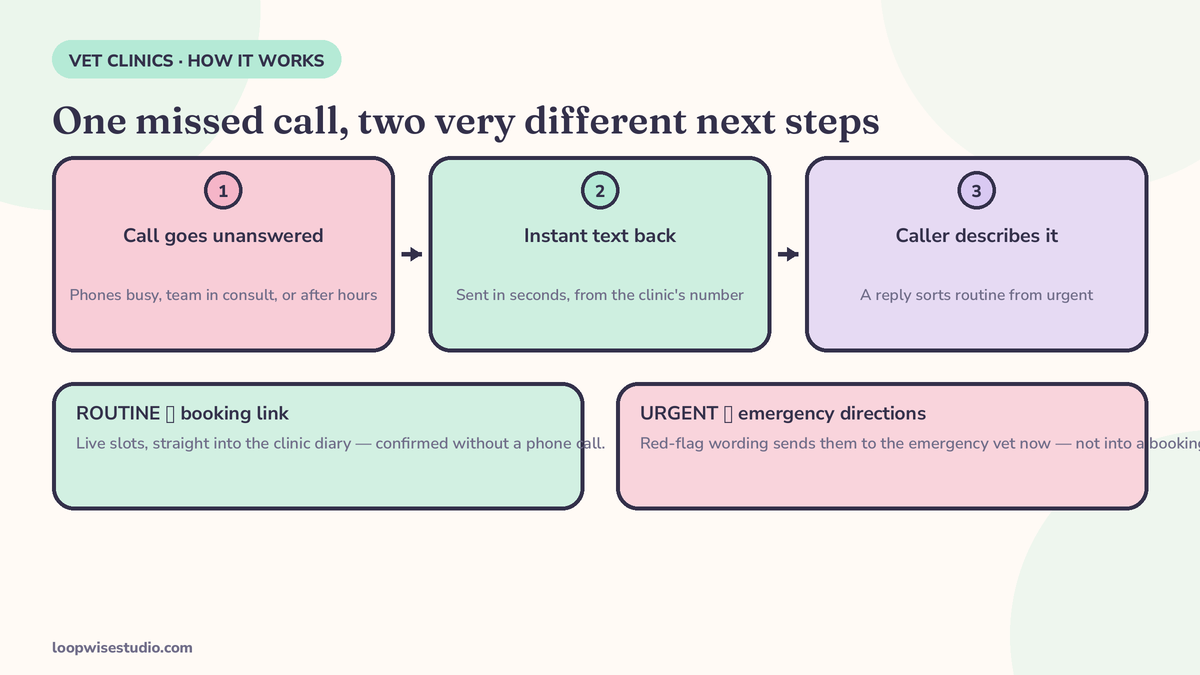
That is the whole idea. A client calls while your team is with a patient. Nobody picks up. Instead of a dead end, their phone buzzes with a text from your clinic within seconds, and the conversation continues by message — where it can actually end in a booked appointment.
This page explains how text-back works for a vet clinic specifically: why the first text has to split emergencies from routine requests, what the messages should say, and how it connects to a booking page instead of a callback queue.
Why vet clinics miss calls in a way salons never will
A salon misses a call because the stylist’s hands are in someone’s hair. Your clinic misses calls for a harder reason: the person who would answer is holding a frightened cat, restraining a dog for bloods, or talking a worried owner through post-op care.
Calls pile up at predictable moments:
- Mid-procedure blocks, when the whole team is in surgery or dentals and reception is covering the front desk alone.
- The lunch-hour rush, when owners on their break all call at once to book routine visits.
- The last hour before close, when every “he’s been off his food since yesterday” call lands together.
- After close, when the evening emergencies and next-day booking requests hit a dark phone line.
None of these are staffing failures you can roster away. They are the shape of the work. The fix is not more people answering phones — it is making sure a missed call starts a text conversation instead of ending the client’s attempt to reach you.
And the stakes of a dead end are measurable. A 2025 secret-shopper study of 5,053 US veterinary practices, published in JAVMA and cited by PupPilot, found that 8.2% of callers abandoned the call after more than five minutes on hold. Callers who give up on hold mostly do not leave a message and try again tomorrow. They call the clinic down the road.
The two kinds of missed vet call — and why one text can’t treat them the same
This is the part generic text-back tools get wrong, and it matters more in vet than in any other appointment business.
Lane 1: routine. Vaccinations, check-ups, nail trims, dental checks, prescription refills, “can I move Thursday’s appointment.” These callers need one thing: a fast way to book or ask. A booking link with live slots solves it completely.
Lane 2: urgent. “My dog ate a bar of chocolate.” “My cat is straining to urinate and crying.” “She’s been hit by a car.” These callers do not need a booking link. They need to be told, immediately and in plain words, to get to an emergency hospital or call your on-call vet — now, not after a text exchange.
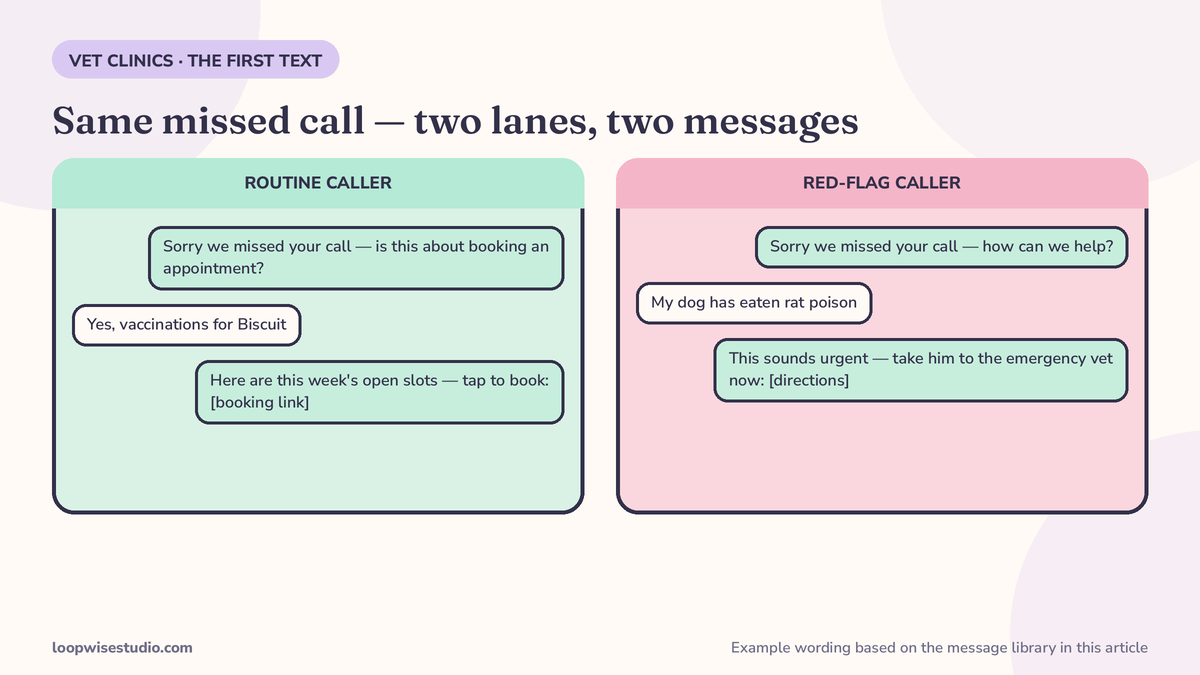
A single cheerful “Sorry we missed your call! Book here” text sent to both lanes is fine for lane 1 and dangerous for lane 2. The first text has to do the split in its opening lines: emergency wording first, booking link second. Every template in the library below is built that way.
How it works with the phone system and diary you already have
Text-back is a layer, not a replacement. You keep your number, your phone setup and your PIMS — Cornerstone, Neo, AVImark, eVetPractice, Shepherd, whichever you run. Three pieces get added:
- A trigger. When a call to your main number goes unanswered and reaches voicemail, the system sends the first text automatically. VetReach’s setup guide describes the connection options plainly: forward missed calls to the texting service, use a virtual number, or connect by API.
- A two-way inbox. Replies land in a shared inbox your team can see, so any staff member can pick up the conversation. PetDesk documents message lengths up to 600 characters including links — plenty for a booking link plus emergency wording.
- A booking page behind the link. The text leads to live appointment slots, not a “we’ll call you back” promise. More on that below.
The setup trap that silently switches text-back off
PetDesk’s Phones help centre documents a gotcha no other vendor mentions: if your phone system plays a “missed call announcement” before voicemail and the caller hangs up during it, no text is sent at all — the call has to actually reach voicemail for the trigger to fire.
So before anything goes live, audit your own phone tree: call your clinic from a mobile, let it ring out, and note exactly what a caller hears and where they land. If an announcement, a menu or a hunt group eats the call before voicemail, text-back will look installed and do nothing. This five-minute check is the difference between a system and a placebo.
The message library: five texts you can copy today
These are written for the two-lane rule: emergency line first where it matters, booking link always present for routine requests, pet’s name used whenever your records have it.
1. Busy desk, daytime
Hi, this is [Clinic Name] — sorry we missed your call, we’re with a patient. If this is an emergency, please call [ER hospital] on [number] now. For appointments, book here in under a minute: [booking link]. Or reply to this text and we’ll help.
2. After hours
Thanks for calling [Clinic Name] — we’re closed right now. Emergency? Contact [ER hospital] on [number] or our on-call vet on [number]. Need a routine appointment? Book online here: [booking link]. We open at [time] and reply to every message.
3. New client
Hi from [Clinic Name]! We missed your call. New pets are welcome — you can grab a first appointment here: [booking link]. Worried your pet needs to be seen urgently? Reply URGENT and tell us what’s happening, or call [ER number] for emergencies.
4. Prescription refill request
Hi [Name], thanks for your refill request for [Pet]. We’ve logged it — most refills are ready within [timeframe]. We’ll text you when it’s ready for pickup. If [Pet] is unwell or has run out of medication completely, reply here or call us on [number].
5. “We’re with a patient” short version
Sorry we missed you — the team is with a patient right now. Book anytime here: [booking link], or reply and we’ll get back to you today. Emergencies: [ER number].
Notice what none of them do: none asks the client to describe symptoms in detail over text, none gives any medical guidance, and none buries the emergency number under the booking link. Automation handles the routine; anything clinical goes straight to a human or an emergency service.
Where the text leads decides whether it books anyone
A text that says “reply to book” still ends with your team playing phone tag inside a texting inbox. It is better than voicemail. It is not a booking system.
The text should hand the client a page showing your real availability — the same thinking behind a booking system that cuts no-shows at your clinic — where they pick a slot, get an instant confirmation in the diary, and receive the reminder sequence that protects the appointment. The client’s part is finished in a minute. Your team’s part is zero.
That is also why this layer pairs naturally with after-hours answering and booking without an answering service: the same text-back and booking page that catch the 2pm overflow also catch the 9pm call, with the after-hours wording swapped in.
If you are not sure whether your current website is helping or quietly losing these clients, get a free audit — we’ll trace a missed call through your setup exactly the way a client experiences it.
Text-back vs AI receptionist vs answering service: the honest comparison
| Option | What it actually does | What it can’t do | Cost shape |
|---|---|---|---|
| Missed call text back + booking page | Texts every missed caller instantly, splits emergency wording from routine, links to live booking | Talk to a caller who insists on voice; give any medical advice | Texting tool or part of your booking setup — check current pricing per provider |
| AI voice receptionist | Answers calls with a voice agent, can book into some systems | Sound like your staff; handle a distressed owner the way a person would | Priced per clinic or per minute; PawAnswer lists tiers from $99–$599/mo in its SERP pricing — verify on the vendor’s site |
| Traditional answering service | A human operator takes a message and passes it on | Book into your diary, access your PIMS, triage on history (per PupPilot’s comparison) | $200–$800/mo (PupPilot’s published market range) |
| Phone-system bundle (PetDesk, CallHero type) | Text-back as one feature inside a full VoIP/PIMS-comms suite | Work as a light add-on — PetDesk requires both its Communications and Phones products for the feature | Full platform pricing; replaces your existing phones |
The pattern in the table: every rival treats text-back as a feature you get by adopting their platform. The alternative is text-back as a layer on what you already run — which is the same approach that works for missed call text back for med spas and other appointment businesses where the phone rings while everyone’s hands are busy.
What happens after the client replies
The first text is automatic. Everything after it is a design decision, and it is where cheap setups quietly fail. Three rules keep the conversation useful:
- An owner for every thread. During opening hours, the shared inbox needs a name on it — whoever is on reception owns new replies until they hand over. A text that arrives in 3 seconds and gets answered in 3 hours teaches clients that texting you is the same as voicemail, just typed.
- Templates for the top five replies, freedom for everything else. The library above covers the first message. Your team will settle on standard answers for “how much is a consultation,” “do you have anything Saturday” and “can I get his tablets today” within a week. Save those as one-tap replies; leave everything clinical to a human writing fresh.
- A hard stop for symptoms. If a reply describes something urgent, the conversation ends and a phone call begins. The inbox should make that escalation one tap, and the red-flag wording from the after-hours templates should live inside the daytime ones too — a client can text about a poisoning at 2pm just as easily as at 2am.
Myth vs fact
Myth: “Clients prefer a phone call.” Some do, and they can still call. Text-back doesn’t remove the phone — it rescues the calls the phone already missed. The client who gets a text was, by definition, not reached by voice.
Myth: “It’s an AI talking to our clients.” The first text is a fixed message your clinic wrote and approved, word for word. Replies are your team. Nothing in the system improvises, guesses, or advises.
Myth: “Our PIMS already does this.” Check what it actually does. Bundled text-back usually comes attached to a platform’s own phone system — PetDesk’s version needs both its Communications and Phones products before the feature exists. If your clinic kept its own phones, the feature you think you have may not be there. Call your own number at lunch and find out.
Count your missed calls before you buy anything
One week of evidence beats any sales pitch. Ask your phone provider for last month’s call log, or pull it from your system, and count three things: calls that rang out unanswered during opening hours, calls that arrived while the line was busy, and calls that came in after close. Then ring your own number once at your busiest hour and once after close, and experience exactly what those callers got.
Most owners find the daytime overflow is bigger than they guessed — because the front desk, quite reasonably, remembers the calls they answered. That count is also your baseline: once text-back is live, the number that matters is how many of those missed callers end up booked, which the booking page reports for free.
What to check before you switch it on
- Call your own number and let it ring out. Confirm the call reaches voicemail (the text-back trigger) and isn’t eaten by an announcement or menu.
- Decide your emergency wording with your vets. The red-flag line and the ER/on-call numbers must be yours, current, and reviewed.
- Put the booking link everywhere the text points. If the link lands on a page without live slots, you have rebuilt the callback queue with extra steps.
- Brief the team on the shared inbox. Every reply needs an owner during opening hours, or the fastest text-back in the world still ends in silence.
- Review the first two weeks of conversations. You will find call types you didn’t predict — add a template, adjust the split, tighten the wording.
Costs for the wider setup — website, booking and texting together — are covered in what a website with online booking costs for a veterinary clinic.
Frequently asked questions
Does missed call text back replace our phone system?
No. It sits on top of the number and phones you already have. The trigger is simply an unanswered call reaching voicemail. Platforms like PetDesk bundle text-back inside their own phone system, but a standalone layer does not require you to change providers.
What happens if the missed call is a real emergency?
The first text leads with emergency wording and your emergency hospital or on-call number, before any booking link. The system never asks for symptom details or offers guidance — it routes the caller to a human or an emergency service immediately, and the routine booking path is there for everyone else.
Will it work with our PIMS?
Text-back itself does not need PIMS access — it triggers off the phone call. The booking page behind the link is what writes appointments into a diary, and it can work alongside the PIMS you already run. The reply inbox is a shared team inbox, separate from your practice software.
Why didn’t our current text-back fire on a test call?
The most common cause is the one PetDesk documents in its own help centre: a greeting or announcement that plays before voicemail. If the caller hangs up during that announcement, the call never reaches voicemail and the text never sends. Audit the phone tree first — it is a five-minute fix once you know to look.
How fast does the text arrive?
VetReach’s setup guide states its texts arrive within 3 seconds of the missed call. The exact timing depends on the provider, but the point of the system is that it is effectively instant — fast enough that the client is still holding their phone.
Can clients just reply instead of using the booking link?
Yes. Replies land in a two-way texting inbox your team can answer from any computer. The booking link exists so routine appointments do not need a staff reply at all — clients who prefer to chat can, and clients who just want a slot can take one.
The short version
Your clinic misses calls because your team is busy doing the work clients pay for. Text-back accepts that reality: every missed call gets an instant text, emergencies get emergency wording, routine callers get a booking page with live slots, and nobody ends up shouting into voicemail.
Want to see how your clinic’s missed calls are handled today? get a free audit and we’ll map the gaps — phone tree, text-back trigger, booking page and all.