Switch From Fresha to Your Own Booking Website
How to switch from Fresha to your own booking website: export first, build and test your page, move every link, and stop paying the 20% fee.
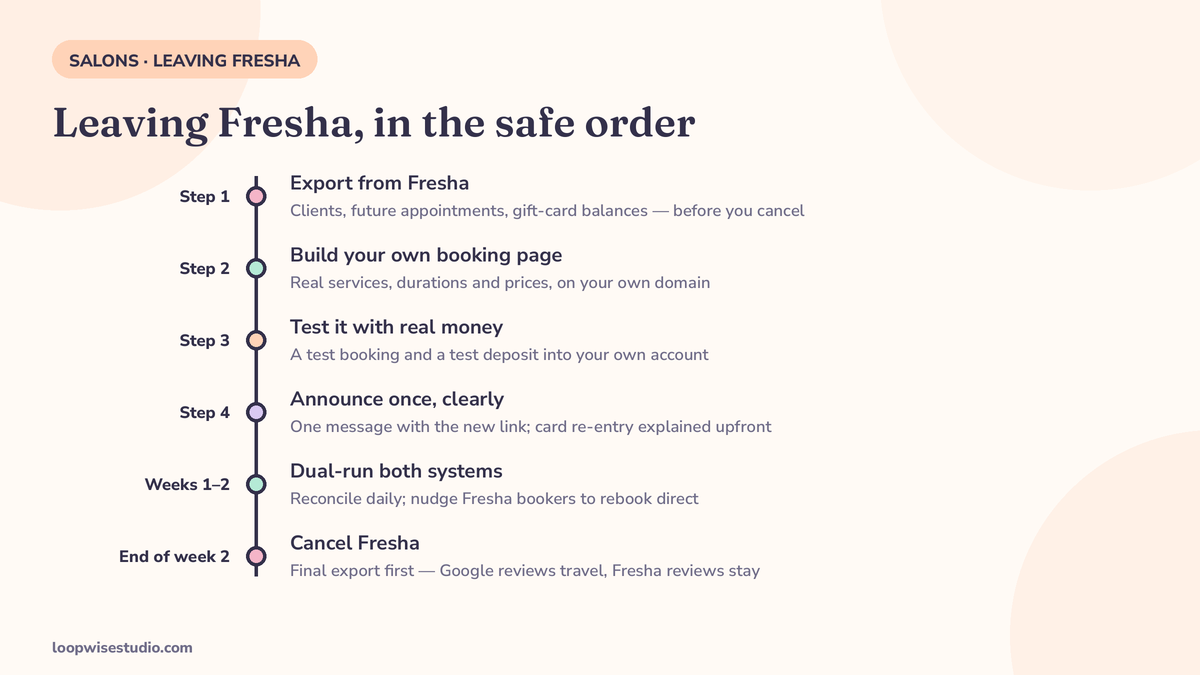
Yes — you can leave Fresha and keep your clients. Export your client list, future appointments and gift-card balances before you cancel, build and test a booking page on your own website (including a test payment into your own account), send clients one clear message with the new link, and keep Fresha live for about two weeks. You stop paying Fresha’s 20% new-client marketplace fee — minimum $6, per GlossGenius and Rezzy — on top of its subscription.
Search this question today and you’ll be offered a dozen “Fresha alternatives” — every one of which moves you to another rented platform, with another subscription and, on the marketplaces, another commission. Not one ranking page covers the destination you actually asked about: a booking system on your own website, on your own domain, where the client list is yours and no one takes a cut of a first visit. This page covers that switch, in the order that makes it safe.
What Fresha actually charges you now
The “Fresha is free” era is over. GlossGenius, Rezzy and Rankite all describe the same current model (check Fresha’s pricing page for the latest figures before you rely on any of this):
- Subscription: $19.95/month on the Individual/Independent plan, or $14.95/month per staff member on the Team plan.
- Marketplace new-client fee: 20% of the client’s first visit, minimum $6, when the client finds you through Fresha’s marketplace.
- Money from bookings runs through Fresha’s payments and pays out on Fresha’s schedule — the platform holds your cash between the appointment and the payout, a structural point Rezzy’s comparison makes central.
One warning about numbers you’ll meet elsewhere: a UK vendor page (Aestheticc) claims Fresha takes “20% commission on new clients, every booking, forever” and “up to 35%” on marketplace bookings. That is a single vendor’s claim, and it conflicts with the first-visit fee that GlossGenius, Rezzy and Rankite each document. We present it the way it deserves: as a competitor’s framing, not Fresha’s published fee. If the true number matters to your decision — it should — Fresha’s own pricing page is the arbiter, and your last few invoices will show you exactly what you’ve actually been charged.
Run the same numbers for a team on the per-staff plan and the subscription stops being pocket change: four bookable staff at $14.95 is $59.80 a month before a single marketplace fee — about $718 a year for the diary alone. Neither figure is outrageous. Both are simply invisible until someone adds them up, which is rather the point of this section.
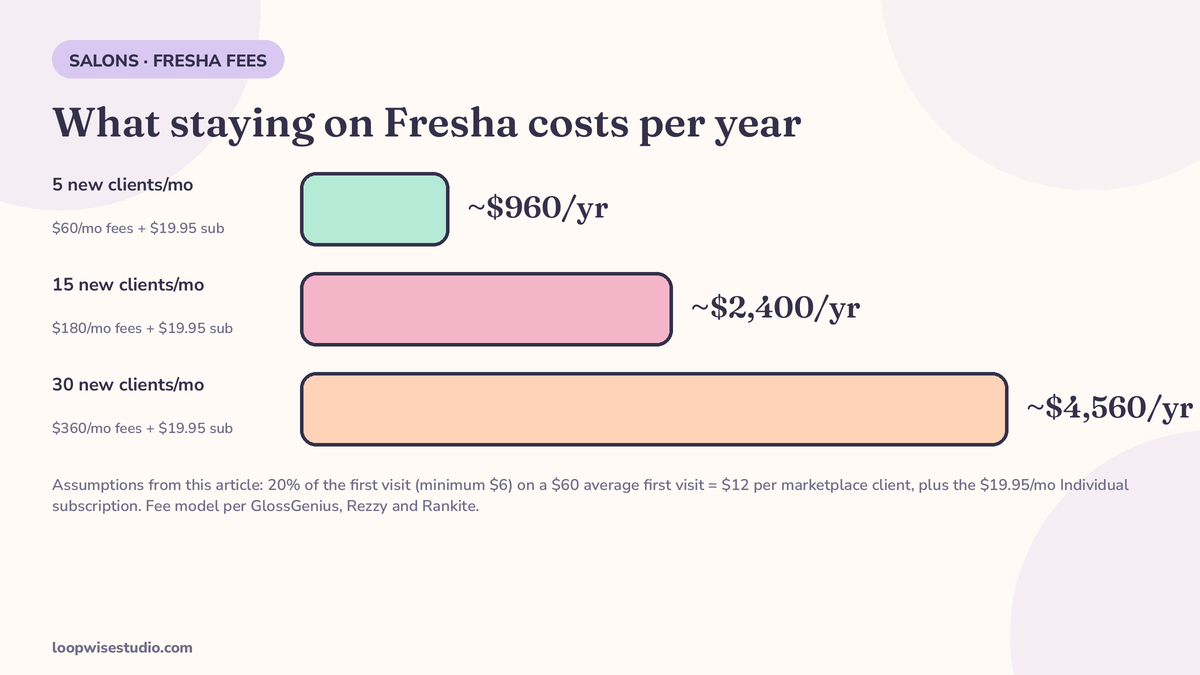
What staying adds up to. Assumptions: average first visit $60 (so the fee is $12 per marketplace client), Individual plan at $19.95/month.
| New marketplace clients / month | Marketplace fees | + Subscription | Annual total |
|---|---|---|---|
| 5 | $60/mo | $19.95 | ~$960/yr |
| 15 | $180/mo | $19.95 | ~$2,400/yr |
| 30 | $360/mo | $19.95 | ~$4,560/yr |
If Fresha’s marketplace genuinely brings you 30 new clients a month, that fee may be money well spent — discovery is the one thing the marketplace does that your own website has to earn. If most of those “marketplace” clients are regulars who’d have booked you anyway, you’re paying rent on your own relationships. The honest version of this calculation is the same one in our Fresha alternative with WhatsApp booking: know your marketplace-dependence number before you decide anything.
Own website vs another platform: the honest three-way
| Stay on Fresha | Switch to another platform | Your own booking website | |
|---|---|---|---|
| Commission on new clients | 20% of first visit (min $6) | Varies — Booksy Boost charges 30% of a new client’s first visit, per GlossGenius | None |
| Subscription | $19.95/mo, or $14.95 per staff member | Flat monthly (e.g. GlossGenius $24–$148/mo by tier) | Build cost, then hosting/maintenance |
| Who holds your money | Fresha pays out on its schedule | Platform-dependent; some pay to your own Stripe | Your own payment account |
| Client list | Exportable, but clients live inside Fresha’s marketplace | Exportable, lives inside that platform | Yours, on your domain |
| Discovery | Fresha marketplace sends new clients | Marketplace platforms do; pure software doesn’t | You earn it: Google profile, Instagram, referrals |
The general mechanics of any switch — export order, overlap discipline, message sequence — are covered in full in our guide to switching booking software without losing clients. Below is the Fresha-specific version.
Before you cancel: export everything
Cancel nothing until these are downloaded and checked. This is the step every ranking checklist agrees on — Rezzy’s five-step pre-switch list starts here — because exports are a courtesy extended to customers, and you are about to stop being one.
Copy-paste export checklist:
- Client list with mobile numbers and emails (mobile matters most — your announcement will go by text)
- All future appointments beyond your planned go-live date
- Gift-card balances by client
- Packages and memberships with sessions remaining
- Service menu with durations and prices
- A note of which clients had cards on file (these do not transfer anywhere — you re-collect at first booking)
One more record to take before you build anything: your marketplace-dependence number. From your Fresha reports, count how many genuinely new clients the marketplace sent you in the last 90 days, and set it against your total new-client count for the same period. If the marketplace supplied most of your new faces, the 20% fee is buying you something real, and the right move may be the hybrid in the FAQs — leave later, or leave partially. If it supplied a handful while your regulars and your Google and Instagram profiles did the heavy lifting, the fee is a tax on bookings you’d have won anyway, and this switch pays for itself quickly. Run your own 90 days; don’t borrow another salon’s answer.
Build your own booking page — and test it with real money
Your own booking page needs less than you think: services with correct durations, your diary, a deposit or card-on-file step for no-show protection, automatic confirmations and reminders, and a text or WhatsApp thread clients can reply to. What it must not be is untested. Follow the order Rezzy’s checklist uses for platform switches, pointed at your own site:
- Build the page with your real services, durations and prices.
- Connect your own payment account.
- Book a real test appointment from your phone and pay a test deposit into that account.
- Read the confirmation and the reminder exactly as a client receives them.
- Only then tell a single client it exists.
If the money lands in your account and the reminder reads well, the system works. If either fails, you’ve found the problem on a test booking worth a few dollars — instead of on the first real client who trusted the new page with their Saturday appointment and their card details. If you’d rather have that build and test done for you, get a free audit and we’ll scope your move off Fresha before you touch the cancel button.
Move the links: Google, Reserve with Google, Instagram
Clients don’t type your domain from memory. They tap the link they’ve always tapped. Swap every one of these the day your page goes live:
- Google Business Profile booking link — point it at your own booking page. This is also where Reserve with Google comes in: both Fresha and its alternatives feed Google’s booking buttons, as Goldie’s Fresha comparison notes, so expect the Google path to need a deliberate reset rather than assuming it follows you. Our walkthrough on how to add a booking link to your Google Business Profile covers the mechanics.
- Instagram bio link and any link-in-bio service behind it.
- Your website’s Book buttons — all of them.
- Facebook page button, email signatures, printed QR codes in the salon.
- Your Fresha profile — leave it live during the overlap (below), with new bookings nudged toward your own page wherever the profile allows.
Tell your clients once, clearly
Slotory’s branded-page guide puts the loyalty point in one line: “Clients are loyal to YOU, not to the booking platform.” The evidence for that is every salon that has ever moved house and kept its book. But loyalty needs a signpost. One clear announcement, sent by text or WhatsApp (and email if you have the list):
Hi [Name], it’s [Salon]. We’ve moved our booking to our own page: [link]. Same team, same prices — we’re just not on Fresha anymore. Your future appointments have moved over with you. First booking on the new page, it’ll ask for your card again to keep your slot safe. Any trouble, reply here and we’ll book you in.
Send it when your page is live and tested — not as a vague “coming soon.” Then send one last reminder before Fresha closes, aimed at anyone still holding the old link.
Run both for two weeks, then close Fresha properly
GlossGenius estimates a platform migration “typically takes one to two weeks,” and Rezzy advises keeping the old page live about a week after the new one launches. With your own website as the destination, run the full two weeks: Fresha stays bookable, your diary reconciles daily, and every Fresha booking gets a gentle push to rebook direct next time.
Your two weeks, week by week:
| Week 1 (your page live, Fresha still primary) | Week 2 (your page primary, Fresha winding down) | |
|---|---|---|
| Diary | Both live; reconcile at close daily; move any Fresha bookings across | Your page is the source of truth; Fresha checked each morning for strays |
| Clients | Announcement message sent; Google/Instagram links already point to your page | Last-call reminder to anyone still using the old link |
| Money | Test deposit verified in your account; deposits live on peak slots | Watch first real payouts land on your schedule, not Fresha’s |
| Fresha | Profile stays up; nudge Fresha bookers to rebook direct next visit | Final export, confirm no stranded appointments, then cancel |
When the overlap ends:
- Export one final time (any bookings or clients added during the overlap).
- Confirm no future appointments remain stranded in Fresha.
- Cancel the subscription.
- Check your Fresha profile’s afterlife — your reviews on Fresha stay on Fresha. Your Google reviews are the ones that travel with you, which is why the Google link swap above comes first.
Where does this leave you in the bigger alternatives picture? This page is one route out; the owner-operator booking software roundup lays out all the shapes, including staying on software but fixing only the follow-up layer.
After you cancel: your profile, your reviews, and the clients who only knew you on Fresha
Be clear-eyed about what stays behind, because none of it is a reason to stay — it’s a reason to leave in the right order.
Your Fresha reviews remain on Fresha. They were earned in a shop window you rented; the window gets re-let. What you carry with you is your Google rating, your Instagram, and your client list — the three assets that actually produce bookings once the marketplace stops sending strangers. This is why the export and the link swaps come before the cancellation, and why a salon planning to leave should spend its final Fresha months deliberately building Google reviews rather than Fresha ones.
The clients who only ever knew you through the marketplace are the honest cost of leaving. Some were never really yours — they searched “salon near me” inside an app, and they’ll do it again and land on whoever the app shows them next. You will not keep all of them, and no migration guide that promises otherwise is telling the truth. What you keep is everyone who came for you: the regulars, the referrals, the Instagram followers, the Google searchers. For most established salons that’s the overwhelming majority of the book — and it’s the part the 20% fee and the subscription were quietly taxing. If your book is genuinely mostly marketplace strangers, that’s a different situation: stay, and use the hybrid model in the FAQs below until your direct channels are strong enough to carry you.
The short version
Export first. Build and money-test your own booking page. Swap the Google and Instagram links the day it goes live. Send one clear message, run both systems for two weeks, then cancel. Your clients were never Fresha’s — they were following a link. Give them a better one.
If you want the export, build and link swap handled for you, get a free audit and we’ll map the whole move before you commit.
FAQs
Will I lose my clients if I leave Fresha?
No — provided you export your client list before cancelling and give clients a working new link. Clients are loyal to you, not the platform (as Slotory’s guide puts it). The losses in any switch happen when the old link dies before the new one is live, or when nobody tells the regulars. Export first, dual-run for about two weeks, and announce once the new page is tested.
How much does Fresha really charge now?
Two things, per GlossGenius, Rezzy and Rankite: a subscription — $19.95/month individual, or $14.95/month per staff member on the team plan — plus a marketplace fee of 20% of a new client’s first visit, minimum $6, for clients who find you through Fresha’s marketplace. Claims elsewhere of “20% on every booking forever” or “up to 35%” come from a single UK vendor page and conflict with the documented first-visit fee; check Fresha’s own pricing page and your invoices for what you actually pay.
What happens to my Fresha reviews when I leave?
They stay on Fresha — reviews are part of the platform profile, not exportable data. Your Google reviews are unaffected and they travel with your business, which is why repointing your Google Business Profile booking link to your own page is the first move on go-live day.
What happens to Reserve with Google when I switch?
Your Google booking presence is tied to the provider feeding it. Goldie’s comparison notes both Fresha and its rivals support Reserve with Google bookings, which means the connection doesn’t automatically follow you to your own website — plan to set up your Google Business Profile booking link to point at your own page as a deliberate step in the switch, and test it from a client’s phone.
How long does it take to switch from Fresha to my own website?
The migration itself runs about one to two weeks: export and build in the first days, a tested go-live, then roughly two weeks of running both while regulars move over. Rezzy’s pre-switch checklist can be done “in an afternoon”; the dual-running period is the part not to rush.
Can I keep Fresha just for new-client discovery?
Yes, and for some salons that’s the smart end-state: Fresha’s marketplace for discovery, your own page for everyone who already knows you. What you can’t do is assume the split happens by itself — regulars will keep booking wherever the link they saved points. Repoint your Google, Instagram and website links to your own page, and the marketplace fee goes back to being what it should be: a cost of genuinely new clients only.