Switch Booking Software Without Losing Clients
Switching salon booking software? Export first, test the new page, run both for a week, and use this message sequence so no regulars fall through.
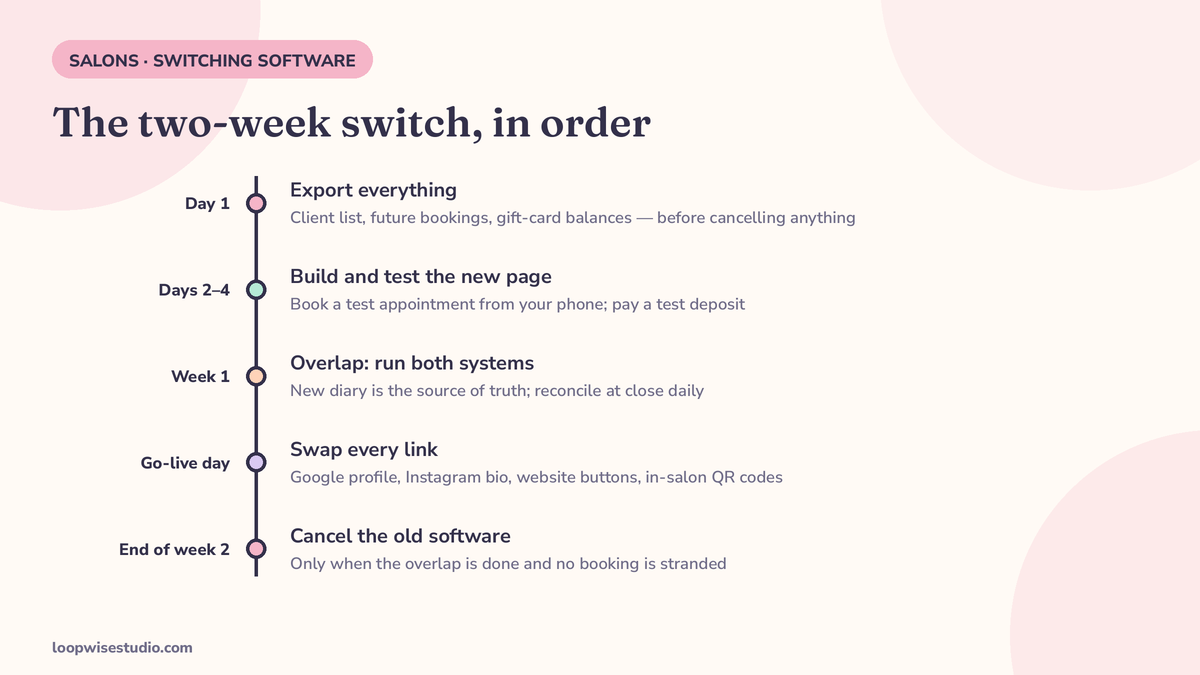
You don’t lose clients in the data import — you lose them when the old link dies, the new page isn’t tested, or regulars hear about the switch late. Export your full client list, including future bookings and gift-card balances, before cancelling anything, run both systems for one to two weeks, and repoint every link the day the new page goes live.
Every guide that ranks for this question is written by the software you’d be switching to. Mangomint’s guide ends at Mangomint’s checkout. Booksy’s page ends at Booksy. That doesn’t make their steps wrong — some of them are good — but it means nobody writes the version that works whichever direction you’re moving, including to a booking page on your own website. This is that version. It also won’t quote you a statistic about how many clients salons lose during a switch, because no independent one exists anywhere in this space. The checklist below is the authority instead.
The three moments clients actually get lost
Forget the import wizard. Clients disappear at three specific moments:
- The old link dies. A regular taps the bookmarked link, your Instagram bio, or the Google button they’ve always used, hits a dead or frozen page, and books whoever answers next.
- The new page was never tested. The first booking a real client attempts fails, demands an account be created before they can book, or sends no reminder — and they quietly go back to texting your personal phone, then drift.
- They hear about it late, or never. Nobody told them anything changed, their standing appointment looks “gone,” and the relationship takes the hit — not the software.
Every step in this guide exists to close one of those three gaps. For a worked example of the same sequence applied to one platform, see our dedicated guide on how to switch from Fresha to your own booking website. If it is Timely you are leaving, switching from Timely in New Zealand applies the same sequence to that platform’s export and reminders.
Before you touch anything: the export-first rule
Day one of any switch is export day — and nothing gets cancelled, downgraded or announced until the files are in your hands.
Rezzy’s switching guide makes the sharpest version of this point for Booksy: the self-serve CSV export on desktop doesn’t include everything, and the full export with contact details goes through the support team — so you start the request on day one, because you’re waiting on someone else’s queue. The same caution applies almost everywhere. For the platform-specific version of this discipline, see how it plays out for marketplace leavers in our guide to moving clients from Treatwell to your own booking system. Exports are easiest while you’re a paying customer in good standing. They get slower and less complete after you’ve cancelled.
Copy-paste pre-switch checklist — export or record all of this:
- Full client list: names, mobile numbers, email addresses, notes/preferences
- Future appointments: every booking past your go-live date, with service, staff, date, time
- Gift-card balances: who holds what, and the amounts — these are liabilities, not data trivia
- Memberships and prepaid packages: sessions remaining per client
- Service menu: names, durations, prices, staff assignments
- Staff schedules and time off already approved
- Cards on file: you will almost certainly NOT get these (see below) — note which clients had them, especially repeat no-show risks
- Your reviews: links and counts. Reviews live on Google and the platform’s page, not in your export
What usually does not transfer — and the workaround for each
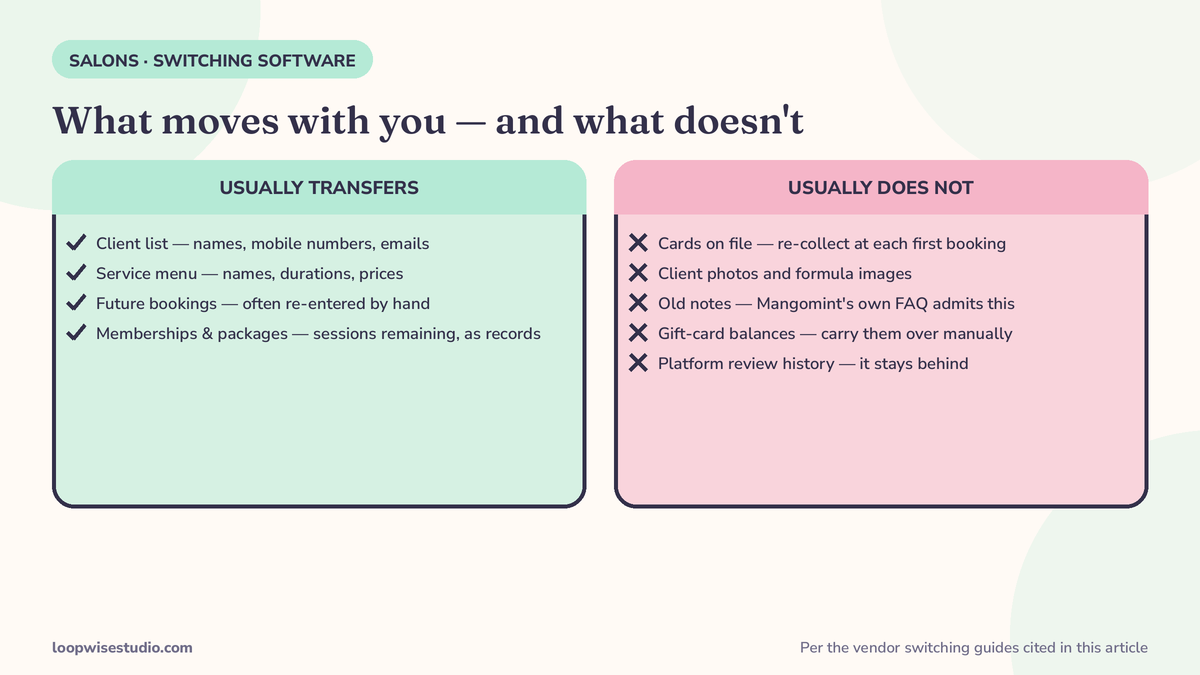
Mangomint’s own switching FAQ is the most honest sentence in this whole space: “some elements of client files may not transfer… like images, future appointments, and previous notes.” Build your plan around the full list:
| Doesn’t transfer | Workaround |
|---|---|
| Cards on file | They never move between processors. Re-collect them at each client’s first booking on the new system — say so in the launch message so it doesn’t feel like a surprise charge. |
| Future appointments (often) | Re-enter them manually into the new diary before go-live, and reconcile against the export daily during the overlap week. Tedious, non-negotiable. |
| Client photos / formula images | Download the ones that matter for regulars; re-upload or keep a shared folder per stylist. |
| Gift-card balances | Carry them as a spreadsheet and honour them manually until they’re spent, or issue equivalent credit on the new system on day one. |
| Review history on the platform | It stays behind. Your Google reviews are the ones that travel — which is why your Google booking link matters most in the swap below. |
Build it, then test it like a client
Set the new page up completely — real services, real durations, real prices, your own payment account connected — before any client hears a word. Then do what Rezzy’s guide insists on and almost nobody does: book a test appointment from your own phone, pay a test deposit, and read the confirmation and reminder that arrive as if you’d never seen your salon before.
Two things you’re testing for. First, friction: does booking force an account sign-up before the appointment is confirmed? Mangomint’s guide cites the Baymard Institute’s 2023 checkout research — forced account creation is the second most common cause of checkout abandonment, discouraging 25% of potential customers. If your new page does that to a regular in a hurry, moment #2 above is already happening. Second, the reminder: if the confirmation is confusing, that’s the message your clients will judge the switch by.
The overlap week: two diaries, one source of truth
Rezzy advises leaving the old profile up “a week or two” after the new page goes live; GlossGenius puts a full platform migration at one to two weeks. Run both — but run them under discipline, or the overlap creates the double-bookings it was meant to prevent:
- One diary is truth. From go-live, the new system is the source of truth. Any booking that lands on the old system gets moved across the same day, then blocked off.
- Daily reconciliation. Ten minutes at close: compare both diaries, move strays, check the next day’s appointments exist in both clients’ confirmations.
- All staff, one system. The fastest way a switch fails is one stylist quietly keeping the old app “just for my regulars.” WriteUpCafe’s generic setup guide states the rule plainly — everyone on one system — and it’s right. Two half-diaries is worse than either whole one.
- Don’t overlap into chaos. A switch wants a quiet week. Launching mid-December, or in the Black Friday rush, stacks your busiest diary on top of a learning curve — our Black Friday and holiday booking prep calendar shows why November and December are the months to have this already done.
Slick, a vendor that sells done-for-you migration, says salons on its service are “usually up and running in less than 2 days” with data imported in two working days — a vendor claim, but a useful reminder that the data move is the fast part. The overlap and the messaging are the real timeline.
This is also the stage where an outside pair of hands pays for itself. If you’d rather the export, rebuild and link swap were done for you while you cut hair, get a free audit and we’ll scope the switch before you commit to anything.
The client message sequence: heads-up, launch, last call
Mangomint’s guide includes one announcement email. One message is not a sequence. Regulars miss single messages; send three, short, in this order — and only start once the new page has passed your phone test.
1. Heads-up (3–5 days before go-live), text/WhatsApp:
Hi [Name], it’s [Salon]. We’re moving our booking to a new page on [date] — same team, same services, easier to book. I’ll send you the new link when it’s live. Nothing you need to do now.
2. Launch (go-live day), text/WhatsApp/email:
Our new booking page is live: [link]. Your future appointments have moved over with you. First time you book, it’ll ask for your card details again — that’s the new system keeping your slot safe, not an extra charge. Any problem, reply here.
3. Last call (end of the overlap, before the old page closes):
Quick reminder: our old booking page closes on [date]. Book here from now on: [link]. Already booked in? You’re all set — your appointment is in the new diary.
Note what the launch message does: it pre-empts the one friction point you know is coming (re-entering card details) and names it before the client hits it. That single sentence prevents most “is this a scam / why are you charging me” replies.
Repoint every link the day the new page goes live
The client list follows you; the links don’t move themselves. Swap these on go-live day, in this order:
- Google Business Profile booking link — this is the highest-traffic one and the easiest to forget
- Instagram bio link (and any link-in-bio page behind it)
- Your website’s Book buttons — every page, not just the homepage
- Facebook page booking button
- In-salon signage / QR codes and the link in your email signature
- The old platform profile itself — where the platform allows a note or final message, point it at the new link during the overlap
For the wider question of which destination all this effort should point at — another platform, or your own — the owner-operator booking software roundup compares the shapes honestly.
The three failure modes, and the fix for each
Even a well-run switch hits predictable turbulence. Name them in advance and each has a dull, reliable fix.
Failure mode 1: a double-booking during the overlap. Two diaries exist for a week or two; a client books the old one at 9am and nobody moves it before a second client books the same chair on the new one. Fix: the source-of-truth rule above, enforced daily. Bookings that land on the old system get moved the same day and the slot blocked — not “when someone gets to it.” The overlap is short precisely so this discipline is sustainable.
Failure mode 2: regulars keep booking on the old link for months. Someone saved the old link in a notes app in 2023 and will tap it forever. Fix: during the overlap, the old profile stays live but monitored — check it every morning, move anything that lands, and reply to that client personally with the new link (“saw you booked on the old page — I’ve moved you over, and here’s the page to use next time”). A personal redirect teaches faster than a mass announcement. After cancellation, accept the small residue: a client determined to find you will find you on Google, which is why that booking link gets swapped first.
Failure mode 3: staff quietly revert to the old app. One stylist finds the new diary slower and keeps “just their regulars” on the old system. Within a fortnight you have two half-true diaries and the reconciliation falls apart. Fix: the all-staff rule from day one, said out loud in a team conversation rather than discovered later — everyone books in the new system, problems with it get raised to the owner the day they appear, and the old app comes off the salon’s devices at go-live. Most “software problems” in week one are unfamiliarity, and unfamiliarity only ends by using it.
When to switch — and when not to
Mangomint’s timing advice is practical: launch after a day off, at the start of a month, or at the end of a payroll period, so hiccups land on a quiet diary. Add three rules of our own:
- Cancel the old subscription last, not first. Mangomint’s guide puts cancelling at step 8 of 8, “before you get charged for another month” — after the new system is live and the overlap has run. That order is the whole game.
- Avoid your busiest weeks and your busiest stylist’s fullest book. The switch costs attention; spend it when attention is cheap.
- Never switch in peak season. If it’s October, finish before November or wait for January.
The short version
Export everything first. Build and phone-test the new page. Run both systems for a week or two with one diary as truth. Send three short messages, not one. Swap every link on go-live day, and cancel the old subscription only when the overlap is done.
If you’d like that sequence run for you — export, rebuild, messages, link swap — get a free audit and we’ll map your switch step by step.
FAQs
Will I lose my client data when I switch booking software?
Not if you export before you cancel. Client lists, services and future bookings can be exported from most platforms — Booksy, for instance, offers a self-serve CSV on desktop plus a fuller export through its support team, per Rezzy’s guide. What you typically cannot take is cards on file, client images and old notes; Mangomint’s own FAQ admits images, future appointments and notes may not transfer. Export first, in full, while you’re still a paying customer.
How long does switching salon software take?
The data move itself can take an afternoon to two days. A safe full switch — export, build, test, one-to-two-week overlap, link swap, cancel — runs about two weeks start to finish. GlossGenius gives the same one-to-two-week range for a platform migration. The overlap week is not optional padding; it’s where double-bookings and lost regulars are prevented.
Do I need to close the salon for a day to switch?
No. Mangomint’s own FAQ answers this directly — you don’t need to close. Pick a launch day after a day off or at a quiet point in the week, re-enter future appointments in advance, and reconcile both diaries at close each day during the overlap.
What happens to my gift cards and memberships when I switch?
The balances don’t transfer automatically — they’re records, not portable data, in most systems. Export the balances before you switch, then either honour them manually against a spreadsheet until they’re spent or issue equivalent credit on the new system on day one. Either way, tell the holders: a client who thinks their gift card vanished is a client lost for a bookkeeping reason.
When is the best time to switch booking software?
A quiet week, ideally launching just after a day off, at the start of a month or the end of a payroll period (Mangomint’s advice, and it’s sound). Avoid peak season — don’t start a switch in November or December unless the old system is failing outright.
Should I tell clients before or after I switch?
Both. Send a short heads-up a few days before go-live, the launch message with the new link on the day, and a last-call reminder before the old page closes. Announce only after you’ve booked a test appointment on the new page yourself and read the confirmation a client will receive.