Move Clients From Treatwell to Your Own Booking System
How to move clients from Treatwell to your own booking system in six steps: export your list, move regulars first, announce it legally, then give notice.
Yes — you can take your clients when you leave Treatwell. Its partner terms allow ending the agreement with 30 days’ notice, and Treatwell’s own FAQ confirms your data remains your salon’s property after you cancel. Your reviews stay on Treatwell. Move regulars to your booking link before you leave, announce within ICO soft opt-in rules, and run both systems through the notice period.
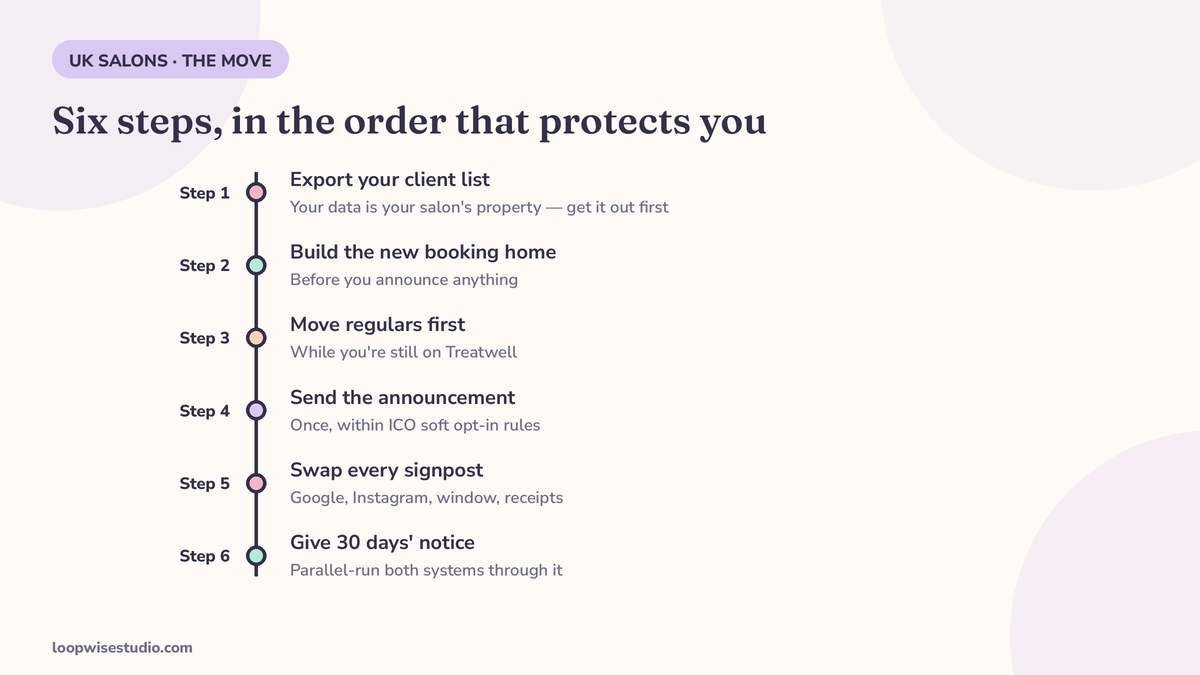
Most “switching” pages are about moving data into another vendor’s software. That’s the easy half, and honestly the less important half. The hard half is human: your clients have a habit — open the app, tap your name, book — and habits don’t migrate with a CSV file. This guide is the full sequence, in the order that protects you: data out first, new home built second, clients moved third, notice last.
If you haven’t decided on the destination yet, work through the routes in our Treatwell alternative comparison for UK salons first. The client-moving method below is the same whether you land on flat-fee software or a booking system on your own website.
What you can and can’t take with you
Owners conflate three separate things: the contract, the data, and the reputation. They have three different answers.
| Thing | Moves with you? |
|---|---|
| Client contact data (names, numbers, emails) | ✓ Yes — Treatwell’s FAQ: the data “is and remains the property of your establishment… even if you cancel your plan, you still own your data” |
| Future appointments in your diary | ✓ Yes — exportable/importable to your new system |
| Your Treatwell reviews | ✗ No — they live on your marketplace profile and stay there |
| Your marketplace profile and ranking | ✗ No — it closes with the account |
| Cards on file | ✗ No — card details never transfer between systems (Vagaro’s import documentation states this plainly); clients re-enter them |
| Clients’ booking habit | ⚠ Only if you move it deliberately — that’s steps 3–5 below |
Step 1 — Get your client list out, before anything else
Do this while you’re still a paying partner in good standing, not during a notice period.
- Check which Treatwell you’re on. The export route differs between Treatwell Connect (the web version) and Treatwell Pro (the app). Vagaro’s import documentation carries the warning that matters: it cannot currently transfer customer data from Treatwell Pro. If you’re on Pro, ask Treatwell directly how your data comes out, in what format — Treatwell’s pages confirm the data is yours but don’t spell out the export method, which is exactly why you ask before you need it.
- Ask for the full record, not just contacts. Names, phone numbers, emails, last visit date, service history, and future appointments. Last-visit dates matter for step 3.
- Fallback if export stalls: rebuild the list from your own records — your diary, your till receipts, your phone’s message history with regulars. It’s slower, and it’s another reason to start months before you intend to leave, not weeks.
The export request — copy, paste, send
Don’t leave this to a support chat. Send it as an email so the answer is in writing:
Subject: Client data export — [Salon name], account [ID if known]
Hi — we’re reviewing our booking setup and need a full export of our client data. Please confirm: (1) the data can be exported in full — names, phone numbers, emails, appointment history and future bookings; (2) the format (CSV or spreadsheet); (3) how long it takes; and (4) if we’re on Treatwell Pro, what the export route is, as we’ve seen third-party notes that Pro customer data can’t be transferred automatically. Thanks, [Name].
If the answer to (4) is bad news, you’ve learned it while there’s still time to rebuild the list by hand — which is the entire point of asking first.
Step 2 — Build the new home before you announce anything
Never send clients to a booking page that isn’t finished. The new home needs, as a minimum:
- Your full service list and prices, matching what they’re used to
- Every stylist’s real availability, synced with your diary
- Automated confirmation and reminder messages switched on and tested — book yourself in as a test client and live through the whole flow
- A short, memorable link you can say out loud and print on a card
This is the step vendors offer to do for you (Slick’s switching pitch is literally: send us your price list, we build the diary, we import your clients, we train you). If your destination is a booking system on your own website, this build is the done-for-you part — get a free audit if you want it scoped before you commit to a timeline.
Step 3 — Move your regulars first, while you’re still on Treatwell
This is the step everyone skips and the one that decides whether the move works.
Your regulars are rebooking anyway, and rebookings are 0% commission on Treatwell. So start the habit change in the chair, one client at a time, months before you leave:
The chair-side script: “Next time, skip the app — book me direct on this link. Same me, same chair, and I see your booking straight away. I’ll text it to you now so you’ve got it.”
Then actually text it, while they’re in front of you. What you’re building is a new default: your link in their phone, not the app on their home screen. Every regular who switches early is a client Treatwell can’t re-sell to a competitor — and one who won’t be surprised when you leave.
Step 4 — The announcement, and the permission rules that govern it
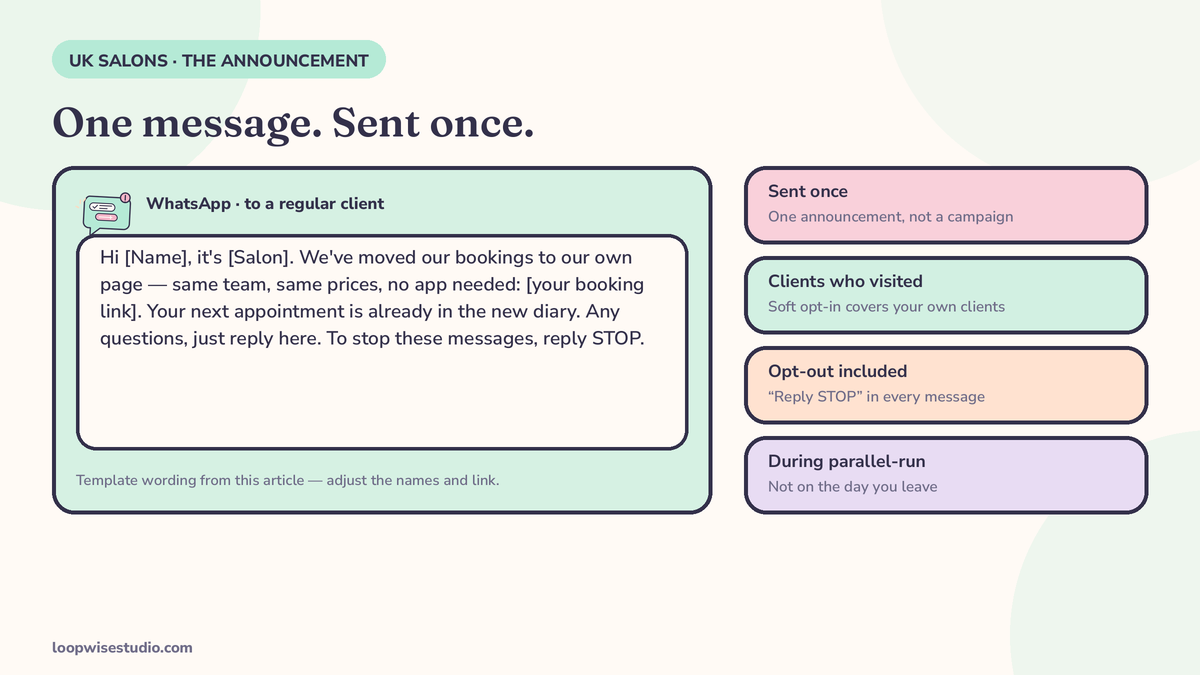
Having a client’s number in Treatwell does not mean you can text them anything you like. The lawful route for messaging existing clients about your move is the ICO’s soft opt-in: they gave you their details during a sale (or negotiations for one), the message is about your own similar services, and they were offered an opt-out when their details were collected and get one in every message (the soft opt-in conditions, as explained in Resoclinx’s UK fees guide). Stay inside those four walls and one announcement message to your own clients is defensible. Blast people who never booked, or keep marketing after an opt-out, and it isn’t.
The announcement message — copy, adjust, send once
Hi [Name], it’s [Salon]. We’ve moved our bookings to our own page — same team, same prices, no app needed: [your booking link]. Your next appointment is already in the new diary. Any questions, just reply here. To stop these messages, reply STOP.
WhatsApp version: identical wording works — keep it one message, not a campaign. Send it once, to clients who’ve actually visited, during the parallel-run window (step 6), not on the day you leave.
Step 5 — Swap every signpost
Clients find your old route in a dozen places. Work the checklist:
- ☐ Google Business Profile — booking link and website URL point to your own page
- ☐ Instagram and Facebook bios and booking buttons
- ☐ Your website, if you have one separate from the booking system
- ☐ In-salon: a QR code at the desk and in the mirror area, pointing at your link
- ☐ Receipts, aftercare cards, and the “book your next appointment” line your team says at the till
- ☐ Your own phone’s WhatsApp status and any saved message templates
The Google one matters most. Searchers who find your profile and follow a marketplace link are leaking back into the commission system you’ve just left.
Step 6 — Parallel-run, then give your 30 days’ notice
Run both systems together for at least a month. New bookings go to the new system; Treatwell stays live for stragglers and genuine new-client discovery. Watch where appointments actually land — when direct bookings clearly outnumber app bookings, you’re safe.
Then give notice. Treatwell’s partner terms allow ending the agreement for any reason with 30 days’ notice (per Beeviral’s read of the partner terms, September 2026 — check your own agreement, as terms can change, and get the notice acknowledged in writing). During the notice period, keep telling every app booker about the direct link. On the final day, your diary, your list and your habits should already be living in the new system; the account closure becomes paperwork.
The 365-day rule: why timing the move saves you commission twice
Treatwell’s partner terms define a “new” client — the 35% + VAT kind — to include anyone who was added to your list more than 365 days ago and hasn’t had a completed appointment in the last 365 days (Beeviral, from the partner terms). Read that as a migration warning: every lapsed client who drifts back to you through the app after a year away bills you 35% again, as if you’d never met.
Moving early shrinks that trap twice over. Regulars on your own link can’t re-trigger commission at all. And lapsed clients you win back yourself — a WhatsApp message to your own list costs pennies — arrive as direct bookings instead of marketplace “new” clients. The full fee picture, including how that 35% loads with VAT, is in our explainer on what Treatwell charges salons.
The win-back message itself, once you’re on your own system (same soft opt-in rules — your clients, opt-out included):
Hi [Name], it’s [Salon] — we’ve missed you. We’re booking on our own page now, and [Stylist]’s diary is open this week: [booking link]. No app needed, and your usual [service] is right there. Hope to see you soon. Reply STOP to opt out.
Before you leave: build your Google reviews while you still can
Your Treatwell reviews stay behind. Your Google reviews are yours forever — and they power the discovery you’ll need once the marketplace stops sending it.
So in the months before you leave, ask every happy client for a Google review, the honest way: the same ask to everyone, no incentives, no filtering unhappy clients into a private form — Google’s review policy prohibits all of that. An automatic post-appointment text with your Google link, sent identically to every client, is the compliant version of this; our guide to getting Google reviews on WhatsApp walks through the mechanics. A salon that leaves Treatwell with 150 fresh Google reviews barely notices the lost marketplace profile. A salon that leaves with none is starting discovery from zero.
The move on one timeline
| When | What happens |
|---|---|
| Months 1–3 before | Request the data export; build the new booking home; start the chair-side habit with regulars |
| Month before | Google review push while you still see marketplace clients daily; announcement message sent to your client list (soft opt-in, one send) |
| Final month | Parallel-run both systems; swap every signpost; watch where bookings land |
| Day 0 | Give Treatwell your 30 days’ notice |
| Notice period | Every app booker gets the direct link in person and by text; stragglers moved by hand |
| After closure | Diary, list, reviews and habits all live on your own system; win back lapsed clients to your own list |
What goes wrong when salons rush this
- Announcing before the new page works. One broken booking link in the announcement message and clients bounce back to the app — and now they’ve learned your new route is worse. Test the full flow yourself first (step 2 exists for this reason).
- Giving notice before the export. Your bargaining position and your support priority are both higher as a paying partner. Data first, notice last — never the other way round.
- Forgetting the cards. Cards on file never transfer. Tell clients in the announcement that they’ll add their card once on the new page; a surprise at checkout reads as a scam and costs you the booking.
- One message, sent once, to everyone including people who visited once in 2023. That’s how you collect complaints and opt-outs. Segment: regulars get the chair-side conversation, recent clients get the announcement, lapsed clients get a win-back later — each inside the soft opt-in rules.
- Treating closure day as the deadline. The move is done when bookings land in the new system by default, which should be true before the account closes. Closure is the paperwork at the end.
Or don’t leave: the hybrid end-state
Leaving isn’t mandatory. Plenty of salons run the end-state as a permanent hybrid: Treatwell kept only as a discovery shelf for genuine first-timers, everything else — rebookings, regulars, lapsed-client win-backs, reviews — running on their own system. The maths that decides it are simple: if your Treatwell bill is almost entirely new-client commission on clients who then become profitable regulars, the marketplace is earning its cut. If you’re paying it on people who would have found you on Google anyway, it isn’t. get a free audit and we’ll run that split against your actual diary.
Move in the right order — data, home, regulars, announcement, signposts, notice — and leaving Treatwell stops being a risk and becomes a diary entry.
FAQs
Can Treatwell stop me taking my client list when I leave?
No. Treatwell’s own pricing FAQ states the data is and remains the property of your establishment, even if you cancel. What it doesn’t publish is the export method — and if you’re on Treatwell Pro, third-party importers warn customer data can’t currently be transferred out automatically. Ask Treatwell for your export route, in writing, before you give notice.
How much notice do I have to give Treatwell?
30 days, for any reason, per Treatwell’s partner terms as read by Beeviral in September 2026. Treatwell’s pages don’t mention a minimum contract length. Check your own partner agreement before relying on this — terms change.
Do my Treatwell reviews move to my new system?
No. Reviews on your marketplace profile belong to that profile and stay there when you leave. (One vendor, Vagaro, offers to import reviews into its platform — that’s a move to another marketplace-style system, not to your own.) Build Google reviews before you leave; they’re the ones you keep.
Is it legal to text my Treatwell clients about my new booking link?
It can be, under the ICO’s soft opt-in: they must be your own clients who gave details during a sale, the message must be about your own similar services, and an opt-out must have been offered at collection and included in every message. One announcement to genuine clients, with a working opt-out, fits. Buying lists or blasting non-clients doesn’t.
How long should I run Treatwell and my new system together?
At least a month — long enough to watch real bookings land in both and to catch every client who still uses the old route. Give notice only once direct bookings clearly dominate and every signpost (Google profile, socials, in-salon QR) points at your own link.
What if my clients just keep using the app?
Some will, at first. That’s what the parallel run is for: every app booking during that window gets the chair-side script and the direct link by text. Habits change through repetition at the appointment, not through one announcement. And any regular who never switches still costs you 0% in repeat commission while you remain on Treatwell.