How to Reduce Client No-Shows as a Personal Trainer
Reduce client no-shows as a personal trainer: prepay at booking, a copy-ready text reminder sequence, one-tap rescheduling and pack rules that work.
Personal trainers cut no-shows fastest by taking payment when a client books, sending a reminder sequence — email the day before, a text about an hour before — and putting a one-tap reschedule link in every confirmation, so moving a session is easier than skipping it. A written 24-hour cancellation policy, shown at booking, with pack no-shows counted as a used session, does most of the rest.
If you train clients solo, you already know the shape of the problem. There is no front desk. There is no receptionist to chase people.
When a client doesn’t show, you lose the money, the hour, and usually the early alarm you set for them. And because you sell your own time, that hour can never be resold at 6:05am.
The good news: for a solo trainer, no-shows are mostly a booking-setup problem, not a client-quality problem. The booking-software guide published by Schedulera in October 2026 maps it to three causes — the client forgot, rescheduling was harder than skipping, or nothing was at stake. Every fix below attacks one of those three.
What one no-show actually costs you
Trainers rarely do this maths, because the loss arrives one quiet hour at a time. Do it once and the fixes below stop looking optional.
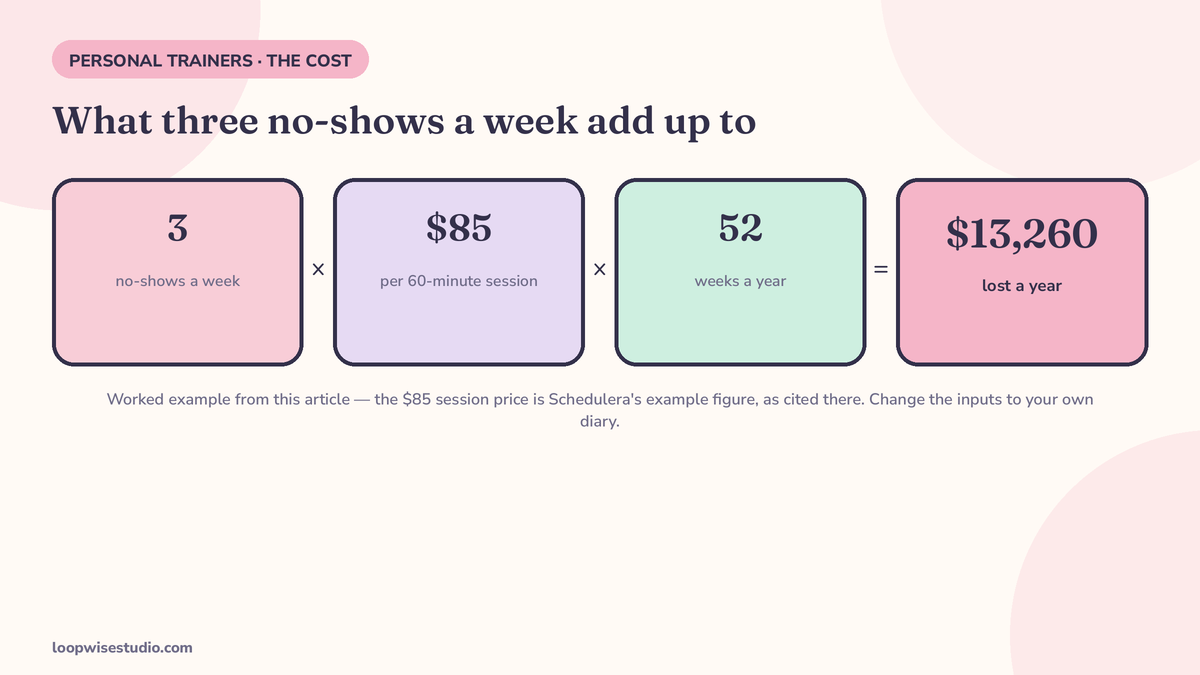
Worked example — assumptions stated, change them to your numbers. Say you run 20 sessions a week. Your 1:1 price is $85 for 60 minutes (the example price Schedulera uses in its own setup table). Say 3 clients a week no-show or cancel too late to refill.
| Sessions per week | 20 |
| No-shows / unusable late cancels per week | 3 |
| Price per session | $85 |
| Lost per week | $255 |
| Lost per year (× 52) | $13,260 |
That’s the direct loss. It doesn’t count the group sessions: a bootcamp seat is $20 a head at a capacity of 12 in the same example setup, so every empty spot in a full class is money a waitlisted client would have paid.
Run your own version before you change anything. Your price, your diary, your actual no-show count from the last month.
Why clients miss: it’s rarely disrespect
Schedulera’s cause list is worth taking seriously because each cause has a different fix:
- They forgot. Life is loud. A session booked nine days ago is competing with everything since.
- Rescheduling was harder than skipping. If moving a session means texting you, waiting for a reply, and negotiating a new time, ghosting is the path of least resistance.
- Nothing was at stake. An unpaid booking costs the client nothing to abandon.
There’s a fourth factor worth borrowing from Coachific, a coaching platform that writes about no-shows from the relationship side: tone. Their advice is to word every follow-up as if the client had a genuine emergency — because sometimes they did. Assume a serious reason first. You can enforce a policy and still sound like a human.
Myth vs fact. Myth: “My clients are just flaky.” Fact: the same clients show up reliably for anything they prepaid and got reminded about. Flakiness is usually a system wearing a disguise.
Fix 1 — Take payment at booking, so something is at stake
Payment at booking is the single biggest lever, because it removes the third cause entirely. A client who has paid — or who knows a session comes off their pack — treats the slot as theirs.
You don’t have to charge for everything. The setup Schedulera publishes for its own trainer accounts is a sensible shape:
| Session type | Length | Price | Setting |
|---|---|---|---|
| Intro session | 30 min | Free | No payment — keep the door open |
| 1:1 training | 60 min | $85 | Paid at booking |
| Bootcamp / small group | 45 min | $20 per seat | Paid at booking, capacity 12 |
| Quick question call | 15 min | Free | No payment |
Keep assessments and intro calls free — free sessions are how new clients arrive, and yes, they no-show at the worst rate; the fixes below carry them. But a regular’s Tuesday 7am should never be an unpaid promise.
One detail from Schedulera’s own disclosure worth copying: when a client cancels a card-paid session inside the rules, the refund happens automatically. Clients prepay more willingly when they know cancelling properly costs them nothing.
If setting this up on your own booking page sounds like a weekend you don’t have, get a free audit and we’ll map exactly what your current setup is missing.
Fix 2 — The reminder sequence, with the actual words
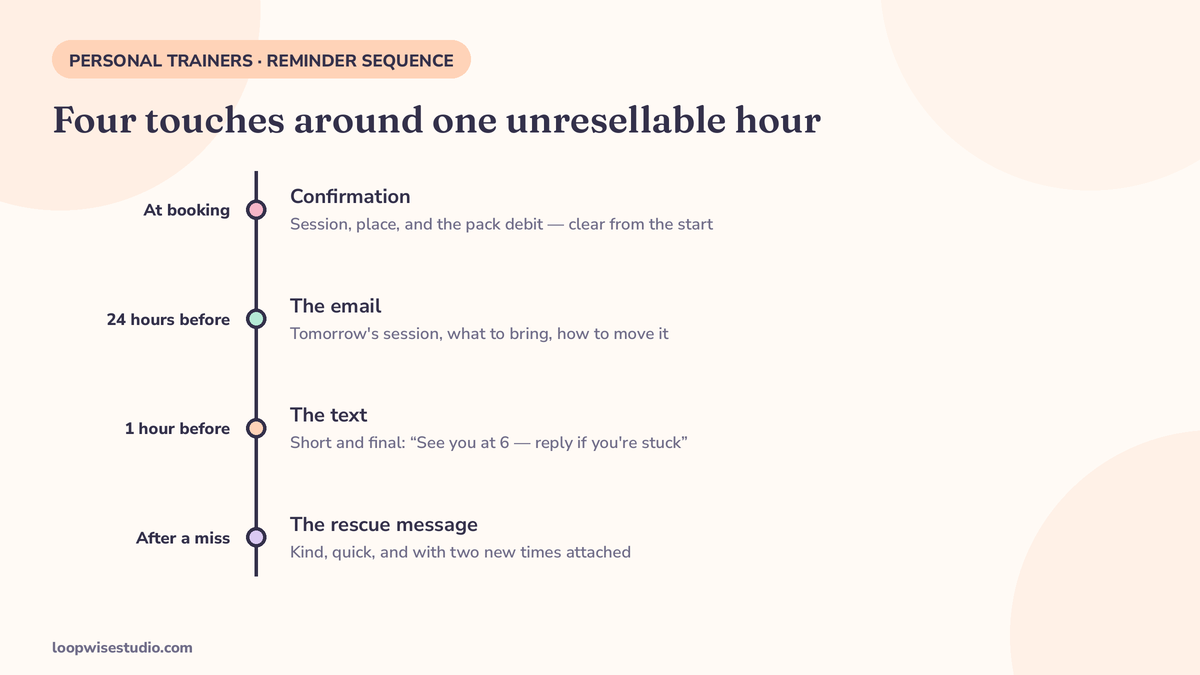
“Send reminders” is advice. A sequence with timings and copy is a system. This is the pattern the Schedulera guide describes — email the day before, text about an hour before — filled out into the full run:
| When | Channel | Job | Copy |
|---|---|---|---|
| At booking | Text or email | Confirm + set the reschedule route | “You’re booked: Tue 7:00am with Alex. Need to move it? Tap here — takes 10 seconds: [link]” |
| 24 hours before | The planning reminder | “Tomorrow, 7:00am — your session with Alex. Reply to this email or tap here to reschedule free of charge: [link]” | |
| ~1 hour before | Text | The one that saves the session | “See you at 7:00, Sam. Running late or can’t make it? Move it here so you don’t lose the session: [link]” |
| 15 min after a no-show | Text | The rescue | “Missed you this morning — hope everything’s OK. Want to grab a slot later this week? [link]” |
Copy these and change the names. Two things matter more than the wording: the reschedule link is in every single message, and the rescue message leads with concern, not a bill. Coachific’s make-up rule pairs well here — offer a make-up slot inside the same week for a first miss, and the client usually rebooks themselves.
Fix 3 — Make rescheduling take ten seconds
Every extra step between “I can’t make it” and a new time is a no-show factory. The client should be able to move a session from the confirmation message, without messaging you, without an account password hunt, without your reply.
Test it on your own phone: book yourself a session, then try to move it. Time it. If it takes more than about ten seconds and two taps, your clients aren’t skipping out of rudeness — they’re skipping because skipping is easier.
This is also why your booking page matters more than your reminder app. The same one-tap logic is what fills spots on the other side of the diary: when a group session frees up, a waitlist that refills cancelled spots automatically turns one client’s cancellation into another client’s booking instead of an empty hour.
Fix 4 — Give regulars a standing weekly slot
A standing slot — same day, same time, every week — removes the booking decision entirely. The client doesn’t re-decide each week whether to train; the session is simply in their calendar, like a class they attend.
Schedulera lists this as its own fix, and it suits training better than most appointment businesses: training is a habit product. Sell the habit, not the individual hour. Standing slots also make your diary predictable, which makes the remaining gaps visible early enough to fill.
Fix 5 — A cancellation policy clients actually read
A policy buried in terms and conditions protects nobody. It needs to be short, shown at booking, and repeated in the confirmation. Three wordings you can copy — pick the one that matches how you run your practice:
The standard 24-hour policy
“You can move or cancel free of charge up to 24 hours before your session. Later than that, the session is charged — or deducted from your pack.”
The pack rule
“If you don’t show and don’t reschedule in time, that session comes off your pack, the same as if you’d trained. It’s how I keep slots fair for everyone on the list.”
The first-offence grace
“Life happens. Your first late cancellation is on me — no charge, no session lost. After that, the 24-hour policy applies to keep things fair.”
Put the policy in three places: the booking page next to the button, the confirmation message, and a checkbox on your intake form. The point isn’t legal armour. It’s that a client who agreed to the rule in plain words rarely argues with it.
Fix 6 — Packs and no-shows: settle the “counts as used” rule
Most trainers sell blocks of sessions, and packs create a specific loophole: the client has already paid, so “payment at booking” feels done — but if a no-show doesn’t deduct a session, nothing is at stake again, and the pack quietly stretches forever.
Settle it in writing, up front:
- A no-show or too-late cancellation deducts one session from the pack.
- A reschedule inside the 24-hour window deducts nothing.
- Pack expiry dates still apply — and a reminder before expiry is a rebooking tool, not a threat: “You have 3 sessions left and they expire on the 30th — want me to hold your usual slots?”
Say it at the point of sale, not after the first missed session. Clients accept the rule when it’s part of the deal they bought. They resent it when it appears after the fact.
Selling packs also means your booking page has to handle balances and standing slots properly — that’s the core of what a booking website built for personal trainers needs to do, and it’s where generic schedulers start to creak.
Groups and bootcamps: let the waitlist absorb the cancellation
One-to-one sessions can’t be refilled at short notice. Group sessions can — if there’s a waitlist and it moves on its own.
When a bootcamp hits capacity, offer the waitlist spot at booking. When someone cancels, the first person on the list gets a text with a short window to claim the seat; if they don’t, it passes to the next. This is the same mechanic studios use for full classes — the Pilates booking system breakdown walks through claim windows and expiry in detail, and the logic transfers directly to a 12-person bootcamp.
Track your own rate for a month — there is no honest benchmark
You will see articles quoting a “normal” no-show rate for trainers. Treat them carefully: Schedulera’s own FAQ says plainly that there is no usable universal benchmark, because the rate varies too much with client base, prices, and how people book. That’s the honest answer.
So measure yours. For one month, log every session: booked, showed, rescheduled in time, no-showed. Then read the pattern, not just the total:
- By slot — early mornings and Friday evenings usually carry the damage.
- By session type — free intros will be your worst; judge them separately.
- By client — often it’s two or three people, and a direct conversation fixes what no system can.
A month of your own numbers tells you which fix to install first. It’s the same measurement-first approach behind the broader guide to reducing no-shows — the tactics travel across appointment businesses; the numbers have to be yours.
Doing it yourself vs having it set up for you
Everything above can be assembled from booking tools you configure yourself. That’s the honest DIY route, and if you have a free afternoon, the reminder sequence and policy wordings in this article will get you most of the way.
What trainers usually stall on isn’t knowing — it’s the plumbing: payment at booking, pack balances, standing slots, and the reminder sequence all have to agree with each other on one booking page. That’s the part we build. Loopwise Studio sets up booking pages and reminder systems for appointment businesses, so the system runs whether you’re mid-session or asleep.
One no-show a week is $4,420 a year at the example price. The fix is an afternoon of setup, once.
The short version: charge (or deduct) at booking, remind by email then text with a reschedule link in both, and put a short 24-hour policy where clients see it before they book. Measure your own rate for a month and fix the worst slot first.
Want your numbers run and the sequence built for your diary? get a free audit — we’ll look at your current booking setup and tell you exactly which of these fixes you’re missing.
FAQs
What is a normal no-show rate for a personal trainer?
There isn’t an honest universal number. Schedulera’s guide states this plainly in its FAQ: rates vary too much with client base, pricing, and booking method for someone else’s benchmark to help you. Track your own sessions for a month and use that as your baseline.
Should I charge for no-shows?
Charge for the behaviour you want less of: late cancellations and silent no-shows, inside a policy the client saw at booking. Keep rescheduling free and easy inside the window. Most trainers find the policy’s existence does more than its enforcement — prepaid clients with a clear rule mostly just show up or move properly.
Do my clients need to download an app or create an account?
They shouldn’t. Every extra step between wanting to move a session and moving it increases no-shows. Booking, rescheduling, and pack balances should work from a link in a text — no app install, no password.
Free intro sessions no-show constantly. Should I charge for them?
Charging kills the point of an intro. Instead, protect them with the system: instant confirmation, the 24-hour email, the one-hour text, and a kind rescue message with a rebook link. An intro that no-shows but rebooks from the rescue text is still a lead you kept.
Does taking payment upfront scare clients off?
It scares off the clients who weren’t going to show up. For committed clients, paying at booking is normal — it’s how classes, physios, and salons already work. Pair it with automatic refunds for proper cancellations and the objection mostly disappears.
Does this work for virtual training sessions?
Yes, and the reminder matters more, not less — there’s no drive to the gym forcing the decision. Send the session link inside the one-hour text so joining is one tap, and apply the same pack rule: a virtual no-show is still a used session.