Pilates Studio Booking Systems: Waitlists & Reminders
What a Pilates booking system must do: equipment-based capacity, waitlists that auto-promote, reminder sequences — plus 2026 platform prices compared.
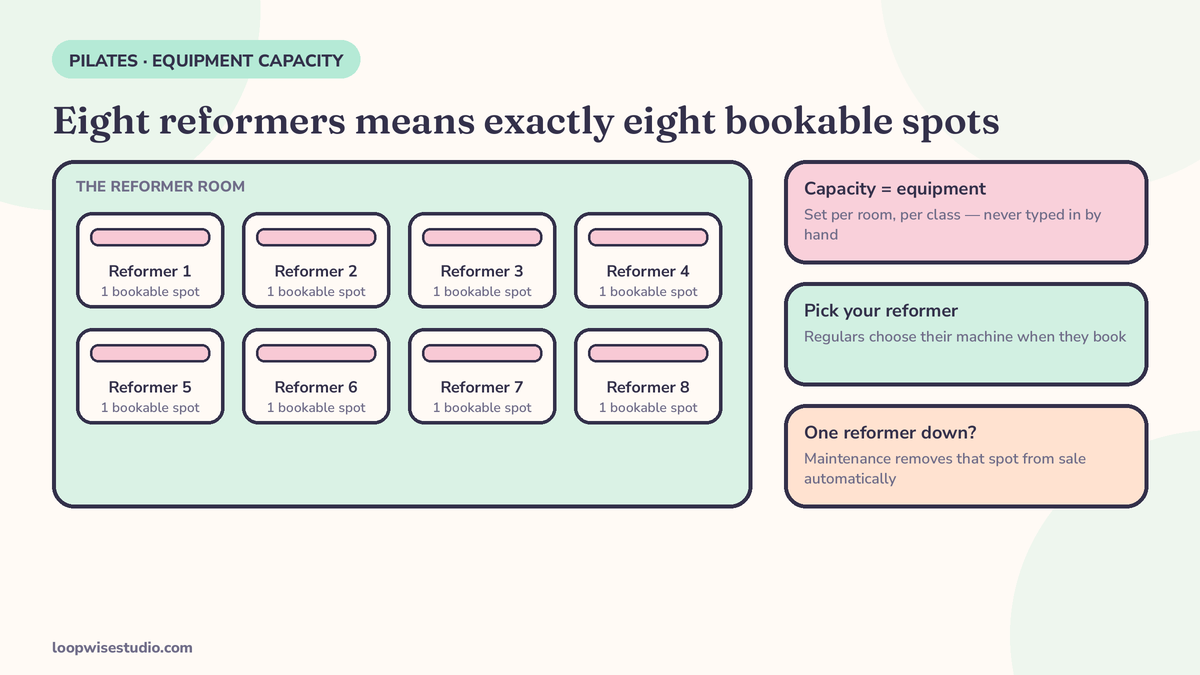
A Pilates booking system needs equipment-based capacity — eight reformers means exactly eight bookable spots, with clients able to pick their reformer — plus privates and classes in one diary, a waitlist that promotes the next client automatically when a spot opens, and text and email reminders tied to every booking. Published 2026 price bands for Pilates platforms run from about $39/month for starter tiers to $250+/month for multi-location setups, per WellnessLiving’s 2026 guide — check current pricing with the vendor before you budget.
Every one of those requirements exists because Pilates booking is not ordinary scheduling. Mindbody’s own education guide puts it well: a Pilates booking is the coordination of instructor, apparatus, room, and capacity at the same time — not a name in a calendar square.
Get that coordination wrong and the failures are expensive in a specific way: a class that looks half-empty on paper but has no bookable reformer, a private double-booked against a duet, a cancelled spot that never gets offered to the three people waiting for it. This page walks through what your system has to do, the mechanics the platform pages never explain, and what the main platforms actually charge.
Why Pilates booking is different: your capacity is equipment
A yoga studio counts heads. A Pilates studio counts machines.
Fit Viz Pro, a Pilates-native booking tool, states the rule plainly: eight reformers means exactly eight spots — and clients care which reformer they get. The regular in the Thursday 6pm class has a preferred machine, a preferred end of the room, sometimes a preferred spring setup. Spot selection isn’t a luxury feature; it’s how your regulars experience the class.
That one fact changes what “booking system” means for a studio:
- Capacity must be set per room, per class, from the equipment count — not typed in as a number someone can fat-finger.
- A reformer down for maintenance has to remove a spot from sale automatically.
- Privates, duets, and classes compete for the same machines, so they must live in one diary or they will collide.
The checklist: 6 things your booking system must do
Use this to judge any platform — including the one you already pay for.
| # | Requirement | Why it matters in a studio |
|---|---|---|
| 1 | Equipment-based capacity with spot selection | Eight reformers = eight spots; clients pick their machine |
| 2 | Privates, duets and classes in one diary | Stops a 1:1 being booked over a full class’s machines |
| 3 | Packs, intro series and memberships built in | Pilates sells in blocks; the system must track balances |
| 4 | Automatic waitlist promotion | A cancelled spot is offered, claimed and paid without staff |
| 5 | A real reminder sequence | Confirmation, day-before, and morning-of — not one email |
| 6 | Booking on your own website | No marketplace detour where your client sees rival studios |
Mindbody, WellnessLiving, and Fit Viz all claim most of this list. The differences are in the mechanics — which is exactly where the product pages go quiet.
Waitlists that actually fill reformers: the mechanics nobody explains
Every platform advertises “automatic waitlist promotion.” Almost none explains what should happen in the minutes after a cancellation. Here is the sequence to demand — and to configure, whichever tool you use:
- A spot opens. A client cancels Thursday 6pm, within the rules.
- The first waitlisted client gets the offer — by text, not email. Texts get read in minutes; the class is tomorrow.
- They get a claim window. Thirty minutes is a workable default for a next-day class; shorter for a same-day spot. The window is stated in the message.
- No claim? It falls through automatically. The offer moves to the next person in line. No staff member watches a list.
- Claimed means booked and charged — against a pack credit or a card — in the same tap. A claim that still needs payment leaks.
The message copy matters. Copy-ready versions:
Waitlist offer: “Good news — a reformer just opened in tomorrow’s 6pm class with Dana. It’s yours for the next 30 minutes: tap to claim it [link]. After that it goes to the next person on the list.”
Waitlist expired (sent to you, the owner, as a daily summary — not per event): “Thursday 6pm filled from the waitlist. 2 clients still waiting.”
Fairness rule worth stating to clients: the list is first-come, and the window is the same for everyone. The moment a waitlist feels rigged, regulars stop joining it — and a waitlist nobody trusts fills nothing. This same refill logic is what salons use when a colour appointment cancels; the automatic cancelled-appointment refill system runs on identical rails.
If you’re setting this up and the diary side is already handled by a platform you like, get a free audit — we’ll check whether your current waitlist is actually configured to promote, or just to collect names.
The reminder sequence for classes and privates
Classes and privates need different treatment. A class no-show wastes one reformer. A private no-show wastes the reformer, the room, and the instructor’s hour.
| When | Classes | Privates & duets |
|---|---|---|
| At booking | Confirmation text/email with add-to-calendar | Same, plus the cancellation window stated plainly |
| 48–24 hours before | Email or text reminder with reschedule link | Text reminder — this is the last free-cancel point, say so |
| Morning of / ~2 hours before | Short text: time, instructor, spot | Short text, and a reply prompt: “Reply YES to confirm” |
WellnessLiving’s published client journey uses a text two hours before class, with attendance logged on arrival — a reasonable anchor for the final touch. What matters is the staircase: the day-before message does the rescheduling (early enough for the waitlist to work), and the morning message just confirms. A single reminder 24 hours out, which is what most studios actually have, does neither job well.
Privates deserve the extra step because the cost of a no-show in a 1:1 is total — the whole hour is gone, and unlike a class, there is no waitlist deep enough to refill a private at two hours’ notice unless your system tries.
The staircase logic is borrowed from solo-practitioner businesses that solved it earlier: the reminder sequence personal trainers use runs confirmation, day-before email, hour-before text, each carrying a reschedule link — and it works for a studio for the same reason. Every reminder that arrives without a way to move the booking teaches clients that ghosting is the only lever they have.
What an empty reformer costs
Worked example — assumptions stated, adjust to your studio. Your room has 8 reformers. A class place sells at $35, or one credit from a pack bought at that value. One no-show in an otherwise full class:
- 1 of 8 spots empty = 12.5% of that class’s revenue, gone — $35.
- Run 20 classes a week with one no-show each: $700 a week, roughly $36,000 a year of reformers standing empty in rooms that were “full.”
The uncomfortable part: those classes showed as booked. From the diary’s point of view there is no problem to fix — which is why the waitlist and reminder mechanics above, not more marketing, are where the money is.
Run the same maths on your intro series and it sharpens further. An intro client who no-shows their second class rarely complains, rarely rebooks, and never converts to a pack — you lose the $35 and the whole future relationship behind it. Intro bookings deserve the private-session treatment from the reminder table above: the day-before text with the reschedule link, not the light class sequence. Studios that track no-shows by booking type — class, private, intro — almost always find the three rates are different problems wearing one name, and the fix for each sits in a different row of this article.
One diary, two booking types: running privates and classes side by side
Fit Viz names the requirement — privates, duets and 1:1s in the same calendar as classes — but nobody walks through what it demands day to day. This is where generic schedulers quietly break a studio:
- Different cancellation windows. A class place can be released 12 hours out and still refill from the waitlist. A private needs 24 hours, because refilling it means finding one specific client who wants that instructor, that hour, that apparatus. Your system has to hold two policies at once, and state each one on its own booking confirmation.
- Shared machines, separate money. A duet uses two reformers that a class also wants. If privates live in a separate tool — or worse, in a paper diary — the class will sell spots that a duet already owns. One diary isn’t tidiness; it’s the only thing standing between you and a client arriving to find their reformer in a class.
- Split payments on duets. Each partner pays or burns their own pack credit. If your system charges one person for both, you’ll spend Friday afternoons unwinding it.
- Substitute instructors. Teachers get sick. The booking belongs to the client, not the teacher — clients should get a message (“Dana is unwell; Thursday 6pm runs with Priya, same class, same spot”) and a no-penalty cancel option, automatically, not a phone tree.
If your current platform handles classes beautifully but treats privates as an afterthought bolted onto the same rules, this is the section to test it against before you test anything else.
The main platforms, compared on Pilates criteria
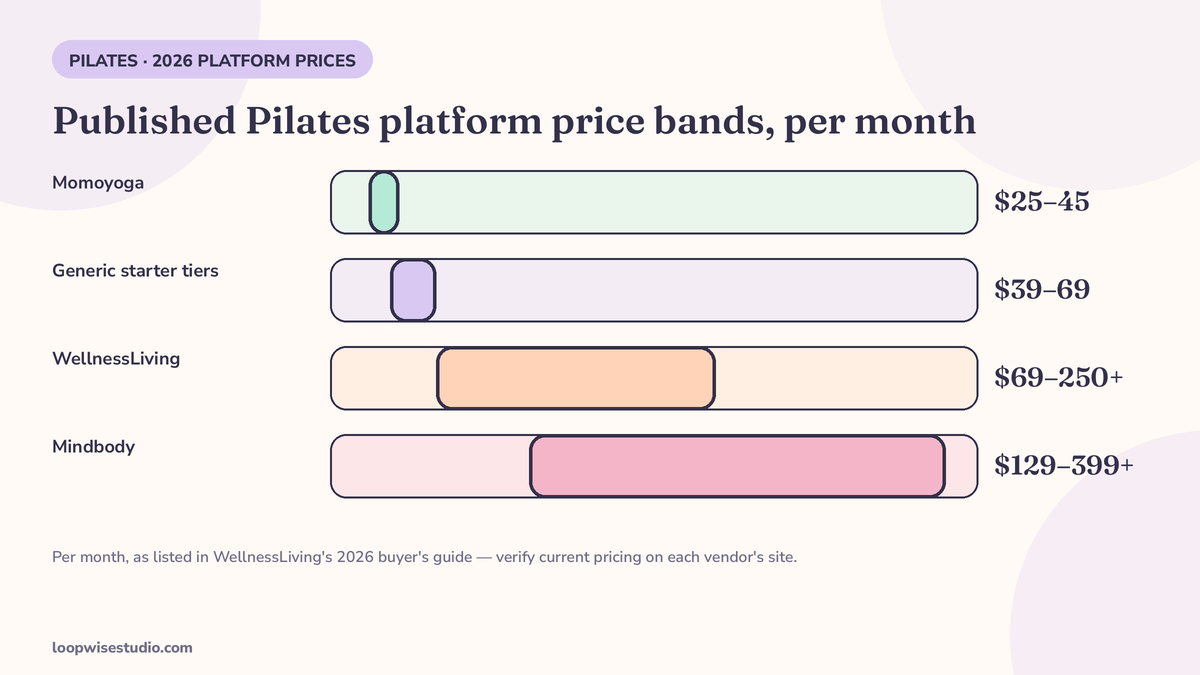
Prices below are as published in WellnessLiving’s 2026 buyer’s guide — a vendor’s compilation, so treat the bands as a starting map and verify current pricing on each platform’s own site before deciding. WellnessLiving lists generic studio-software tiers at Starter $39–69/month, Core $89–149, Professional $159–249, and Enterprise $250+.
| Platform | Published monthly range | Pilates notes |
|---|---|---|
| Momoyoga | $25–45 | Lightweight, popular with small studios; check waitlist promotion depth |
| WellnessLiving | $69–250+ | Publishes the fullest feature set: booking, memberships, payments, automations |
| Glofox | $110–270 | Class-first platform, strong app experience |
| Mindbody | $129–399+ | Deepest automation; its own guide concedes setup/configuration time as the trade-off |
| Fit Viz Pro | Free tier + Professional | Pilates-native: reformer spot selection, privates and packs in one calendar, no marketplace |
Be fair to the platforms: they are capable software, and for a multi-location studio the bigger names earn their price. The honest gaps are consistent across all of them — the booking front door sits on their pages or in their app rather than your website, the waitlist mechanics are defaults you must interrogate, and none of them sets itself up. Configuration is your evenings.
One more reading skill for the comparison pages themselves: notice who wrote them. Mindbody’s Pilates guide ranks Mindbody first; WellnessLiving’s comparison table scores WellnessLiving top; that is normal vendor behaviour, not a scandal — but it means the constraint lists are kindest to the author. Read every platform’s “limitations” section in a rival’s guide, then read its own page for what it doesn’t mention, and you’ll get closer to the truth on waitlists and spot selection than either page gives you alone.
Switching platforms — or keeping yours: the migration checklist
The fear that keeps studios on the wrong system is migration. Whether you’re switching platforms or keeping yours and adding a proper booking layer, audit these before anything moves:
- Pack and credit balances — every client’s remaining sessions, exported and spot-checked against a sample of real clients.
- Intro series in progress — clients mid-way through a 3-class intro must land in the new system with the series intact.
- Standing bookings — regulars’ recurring class spots and private slots, recreated before launch day.
- Client history — attendance and notes you actually use for programming and injuries.
- Waitlists — the names waiting for your full classes are an asset; they should move too.
Fit Viz advertises a 15-day cutover with migration included — a useful benchmark for how long a planned switch should take, whoever does it. What you should not accept is a cutover that loses pack balances. That’s the one error clients never forgive.
The done-for-you option: the same system on your own website
Everything in this article — equipment capacity, waitlist promotion, the reminder staircase, pack tracking — can be built as a booking layer on your studio’s own website, connected to the diary you already run.
That’s what Loopwise Studio does: we build the booking page, the waitlist flow, and the reminder sequence for appointment businesses, configured to your rooms and your rules, instead of you configuring a platform’s defaults. Your clients book on your site, under your name, and the system works the cancellations while you teach.
Your fullest classes are your most valuable hours. They deserve a waitlist that actually promotes.
The short version: judge any Pilates booking system on equipment-based capacity, one diary for classes and privates, waitlist promotion with a real claim window, and a two-step reminder sequence. The platforms sell you the features; the mechanics decide whether a cancelled reformer earns or sits empty.
Want your current setup checked against that list? get a free audit and we’ll tell you which mechanics your system has — and which it’s quietly missing.
FAQs
How much does Pilates booking software cost?
WellnessLiving’s 2026 guide puts Pilates platforms anywhere from about $25–45/month (Momoyoga) to $129–399+/month (Mindbody), with generic tiers running from $39–69 for starter plans to $250+ for multi-location setups. Prices change often — verify on the vendor’s pricing page before budgeting.
Can clients really pick their own reformer?
Yes — Pilates-native tools like Fit Viz Pro offer spot selection at checkout, so a client books “reformer 6 in Thursday 6pm” rather than a generic place. On general platforms, check carefully: many count capacity as a number without any spot choice.
How long should a waitlist claim window be?
Long enough to see a text and tap, short enough to reach the next person if not. Thirty minutes for a next-day class is a workable default; tighten it for same-day openings. The critical part is that expiry and fall-through happen automatically.
Do classes and privates really need separate reminder timing?
Yes. A class has a waitlist behind it, so the day-before reminder is the one that matters — it triggers reschedules early enough to refill. A private has no queue, so a morning-of confirmation reply is worth more. One sequence for both underserves each.
Do I have to switch platforms to fix my waitlist?
Usually not. Most established platforms can promote from a waitlist — the feature is often present but configured as a name-collector, or notifications go by email only. Fix the mechanics first; switch only if your platform can’t do equipment-based capacity or automatic fall-through.
How long does it take to move a studio to a new booking system?
Plan on roughly two weeks for a careful cutover — Fit Viz publishes a 15-day plan as its benchmark. The slow part isn’t the software; it’s verifying pack balances, intro series, and standing bookings before launch.