How to Get Bookings While You Sleep at a Small Clinic
Get bookings while you sleep with a 4-part overnight system: a booking page that finishes the job, instant replies, missed-call text-back and an 8am handover.
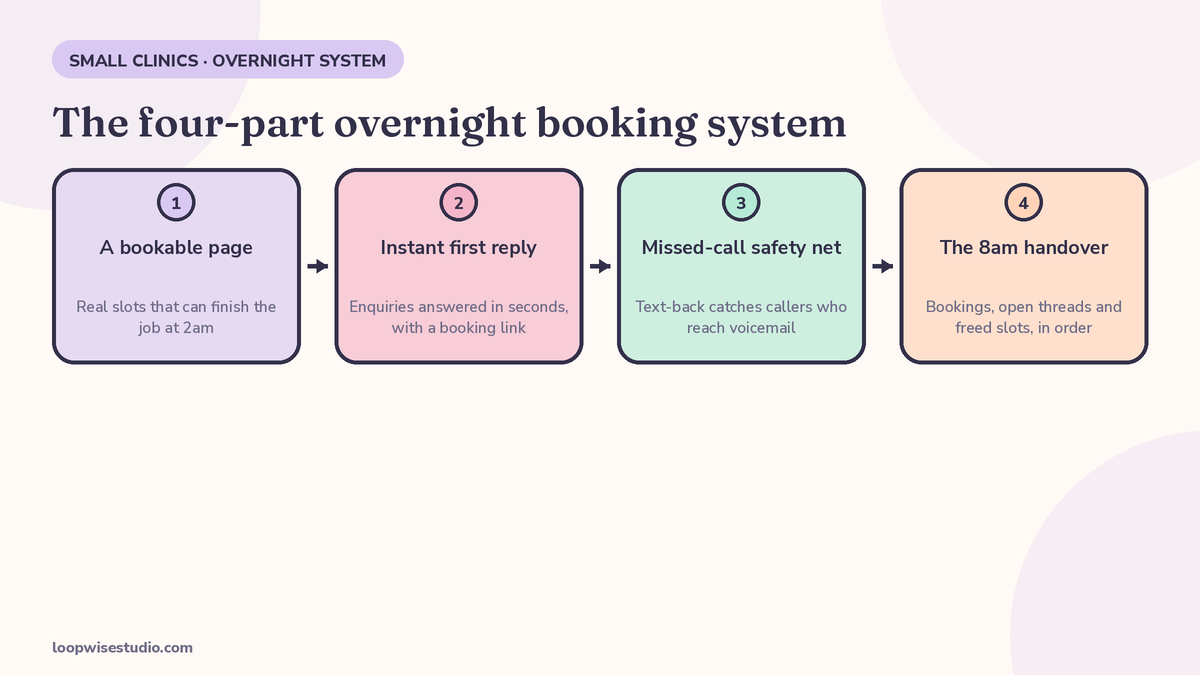
To get bookings while you sleep, your clinic needs four things working together overnight: a booking page that shows real slots and finishes the job without staff, an instant first reply on every channel, a missed-call safety net that texts callers back in seconds, and confirmations that hold the booking until morning. No night staff, no one answering at 2am. Most clinics already have one or two of these pieces. Bookings leak because the pieces don’t join up — a patient finds you at 9pm, hits one dead end, and books with whoever answers first tomorrow.
This guide builds the whole system, part by part, with the actual message wording you can copy.
Where tonight’s enquiries will actually come from
“After hours” isn’t one channel. A patient who decides at 10pm that their back pain, their skin, or their schedule can’t wait will reach you through whichever door they find first. Each door needs a different fix.
| Channel | What happens tonight | What it needs |
|---|---|---|
| Google profile (call button) | They tap call, get voicemail, hang up | Missed-call text-back (Part 3) |
| Google profile (website link) | They land on your site and look for a way to book | A booking page with real slots (Part 1) |
| Instagram DM | They ask a price or “do you have Saturday?” | Instant reply with a booking link (Part 2) |
| Website contact form | They write a message and wait — usually forever | Instant reply + a booking link in the same message (Part 2) |
| WhatsApp (UK/UAE/AU clinics) | They message the number on your profile | Instant reply that offers live slots (Part 2) |
| Existing patient’s phone call | They call to move tomorrow’s appointment | Confirmation messages with a self-reschedule link (Part 4) |
Two facts make this worth fixing. A GetApp survey reported by Reservio found 94% of clients are more likely to choose a provider that offers online booking. And over 40% of online bookings happen after hours, according to Zippia figures cited by Reservio. The demand is already arriving at night. The only question is whether your clinic can take it.
The overnight problem is also bigger than the overnight window. Clinics lose daytime enquiries the same way — a call during a busy treatment block, a DM answered three hours later. If you want the full picture of that leak, our guide on how to stop losing bookings after hours walks through the daytime side too.
Part 1 — a booking page that can finish the job at 2am
The booking page is the only part of the system that can complete a booking on its own, so it has to do the whole job a receptionist would do:
- Show real, live slots. Not a request form. A patient choosing between Thursday 10:00 and Thursday 14:30 books. A patient asked to “tell us your preferred time” waits for a reply that comes tomorrow — by which point they’ve often booked elsewhere.
- Keep the form to what booking needs. Name, phone number, treatment, practitioner if relevant. Insurance details, long intake questions and account creation belong after the slot is held, not before.
- Confirm instantly on screen and by message. The confirmation is what turns “I think I booked?” into a real appointment in their calendar and in yours.
- Offer a deposit or card hold where no-shows hurt. For high-value or first-time appointments, a small deposit filters out the casual bookings that fill your morning with gaps. Keep it optional per treatment type — a quick repeat visit doesn’t need the same friction as a £300 consultation.
Test it yourself tonight: open your own booking page on your phone, as a patient, and count the taps from landing to confirmed. If it’s more than about five, or if any step says “we’ll get back to you,” that’s the leak.
Part 2 — the instant first reply
Most overnight enquiries don’t start on the booking page. They start as a message: a DM, a form submission, a WhatsApp. The person isn’t ready to book cold — they have one question first. If that question gets an answer in ten seconds, the conversation continues. If it gets one at 9am, it usually doesn’t.
Set an automatic first reply on every messaging channel with three jobs: answer the most common question, offer the booking link, and set an honest expectation for anything that needs a human. Copy-ready wording:
Price question
Thanks for messaging [Clinic Name]. Our price list is here: [link]. If you’d like to book, you can see live availability and grab a slot here: [booking link] — it takes about a minute. Anything the list doesn’t cover, we’ll reply properly when we open at [time].
Availability question
Hi, thanks for getting in touch. You can see every free slot and book straight in here: [booking link]. If none of those times suit, reply here and we’ll check first thing when we open at [time].
Urgent or worried patient
Sorry you’re dealing with this tonight. This inbox isn’t monitored overnight, so if you’re in severe pain, have swelling that’s getting worse, or you’re worried something is seriously wrong, please call [out-of-hours number / local urgent care] now. For anything else, book here [booking link] or reply and we’ll pick it up at [time] when we open.
Three rules for these replies. First, they must contain the booking link — a friendly “we’ll reply tomorrow” with no link converts nobody. Second, they answer one question well rather than pretending to be a full receptionist. Third, anything clinical goes to a human in the morning, never to a script (more on that below).
Setting it up: the order to build the four parts
You don’t have to launch all four parts on the same day. Build them in this order — each one earns its keep on its own, and each one makes the next easier:
- Week one: the booking page. Everything else points at it, so it comes first. Real slots, short form, instant confirmation. If you already have online booking, spend the week fixing it instead — test it on your phone, count the taps, remove every “we’ll get back to you.”
- Week one, same sitting: confirmations and reminders. These are usually settings in the booking system you already have. Confirmation on booking, reminder the day before, reschedule link in both. Half an hour of work, permanent effect.
- Week two: the missed-call text-back. This needs your phone setup touched, which is why it isn’t first — but it’s the single highest-value message in the system, because it rescues the enquiry that currently leaves no trace at all.
- Week two: instant replies on your message channels. Write the three replies from Part 2 — price, availability, urgent — and set them on Instagram, your website form or chat, and WhatsApp if you use it. Copy, paste, adjust the times and links.
- From day one of the system being live: the 8am handover. Five minutes each morning, in the order below. This is the habit that tells you which part needs improving — if the same question keeps landing in the morning list, your auto-reply wording needs another line.
Owners often ask which part matters most if they can only do one. If your patients mostly find you on Google and call, it’s the text-back. If they mostly message, it’s the instant reply. If they mostly book online already but no-show, it’s the reminders. The handover week will tell you which one your clinic actually is.
Part 3 — the missed-call safety net
The quietest leak is the phone call. A patient finds your number on Google at 7:40pm, calls, gets voicemail, and does what most people do with voicemail now: hangs up and tries the next clinic on the list. You’ll never see that call in any report unless you go looking.
The fix is simple: every missed call gets an automatic text within seconds.
Sorry we missed your call — we’re closed for the day. You can book straight in here: [booking link], or reply to this text and we’ll pick it up when we open at [time].
That one message turns a dead end into a booking path, and it works while the phones are busy in the day too. It’s the same setup we describe in detail in our guide to missed call text-back for med spas — the mechanics are identical for any small clinic.
Not every clinic runs on SMS, though. If your patients live on WhatsApp, the overnight version of the same idea — instant WhatsApp reply, live slots, morning handover — is covered in our guide to after-hours WhatsApp booking for UK clinics.
Want to know how many of these calls you’re missing right now? Get a free audit and we’ll count them with you — most owners are surprised by the number.
Part 4 — confirmations that protect the booking overnight
A booking made at 11pm has to survive until the appointment. Two messages do that job:
- Instant confirmation the moment they book: treatment, date, time, address, and a reschedule link. This is also their proof — no “did it go through?” phone call in the morning.
- A reminder the day before (or 48 hours before for longer appointments) with the same reschedule link. The patient whose plans changed at 9pm reschedules themselves instead of quietly not showing up, and the freed slot goes back on sale overnight instead of being discovered empty at 9am.
That’s the whole overnight protection system. Nothing exotic — just no point in the chain where a patient has to wait for a human to keep moving.
What the morning looks like: the 8am handover
The system works overnight. Your job in the morning is a five-minute check, in this order:
- Overnight bookings. Who booked, for what, any deposits taken. These need nothing from you — just know they’re there.
- Threads that need a human. The replies that came back to the auto-messages: questions the scripts didn’t cover, anyone who said the slots don’t work, anything that sounds unhappy. Answer these first, before the phones start.
- Reschedules and freed slots. Anything that moved overnight, and any gap worth offering to a waitlist patient today.
- Anything clinical flagged in a message. A worried patient who waited rather than calling the urgent number. This jumps the queue, always.
Five minutes, before the first patient arrives. If the handover regularly takes longer, a part of the system is under-built — usually the auto-reply wording isn’t answering the question people actually ask.
What to automate — and what to never automate
Automate the logistics: availability, booking, confirming, reminding, rescheduling, directions, price lists. That’s the repetitive work a machine does better at 2am than a tired human does at 9am.
Never automate the judgement:
- Clinical questions. “Is this normal after my treatment?” gets a human. Always.
- Complaints. An unhappy patient who hits a script becomes an unhappy patient with a screenshot.
- Worried patients. The urgent template above exists to route them to real help fast, not to handle them.
- Anything involving a specific person’s care. Prices and slots are public facts. Treatment advice is not.
The line is easy to hold: if the answer is the same for everyone, automate it. If it depends on the person, it waits for morning.
What it costs, honestly
The alternatives to a system are people and subscriptions. An evening or night receptionist costs a wage for mostly idle hours. An answering service answers the phone but can’t see your diary, so it takes messages you’ll still have to action in the morning — the patient has a conversation, not a booking. AI receptionist tools sit in between, and messaging platforms add a monthly bill of their own — one med-spa newsletter priced typical messaging and webchat tooling at roughly $200–$400/month, before anyone has set it up properly.
A booking page plus instant replies plus missed-call text-back is a smaller build than any of those, and it’s the only option that finishes the booking at 2am instead of noting it down. What it should cost depends on your clinic’s setup — which is exactly what we check first. Get a free audit and we’ll map your overnight leaks and tell you plainly what the fix involves, before you spend anything.
Measure it in week one
You don’t need a dashboard. Count four numbers for the first week:
- Overnight enquiries — every DM, form, message and missed call between closing and opening.
- Overnight bookings — how many of those turned into confirmed appointments by morning.
- Reply time — it should be seconds on every channel. If one channel is still replying at 9am, that’s your gap.
- Morning saves — bookings you’d have lost: the missed calls that texted back, the reschedules that refilled a slot.
Compare week one’s overnight bookings against your usual. That’s the return, in appointments, with no borrowed statistics.
FAQs
Do I need a night receptionist or an AI receptionist instead?
For most 1–3 practitioner clinics, no. A night receptionist is a wage for mostly idle hours, and most AI receptionists still end at taking a message for complex enquiries. A bookable page, instant replies and missed-call text-back cover the large majority of overnight enquiries — the routine ones — for a fraction of the running cost.
Will patients actually book at 2am, or just browse?
Both happen, and both are fine. Reservio, citing Zippia, reports that over 40% of online bookings happen after hours — people book when they finally sit down and think about it, which is rarely during your opening hours. The browsers matter too: a patient who checked your slots at midnight and found nothing stops being your lead. One who found a slot books it or comes back.
What if someone messages with a medical emergency overnight?
Your auto-reply should say clearly that the inbox is not monitored overnight and point to your out-of-hours number or local urgent care. Never let a script try to triage. The urgent template in Part 2 above is written for exactly this.
I already have online booking. Why am I still losing overnight enquiries?
Because booking is usually only one of the four parts. Check the other three: do your DMs and forms get an instant reply with the booking link? Do missed calls get a text back? Do your confirmations include a reschedule link? A leak in any one of them quietly cancels the others.
Does this work for WhatsApp-first clinics, not just SMS?
Yes — the system is channel-shaped, not tool-shaped. The booking page, the instant first reply, the missed-call safety net and the morning handover work the same whether the messages arrive by SMS, WhatsApp or Instagram DM. Only the reply settings change.
How long does this take to set up?
The booking page and confirmation messages are typically the fast parts. The missed-call text-back and the channel replies depend on your current phone and messaging setup. The honest answer comes from looking at what you already have — that’s the first step of the free audit.