Automatic Google Review Requests for Vet Clinics by Text
Automatic Google review requests for veterinary clinics by text: the PIMS trigger, the +2 hour ask, when to never ask, and the Google rules your request must follow.
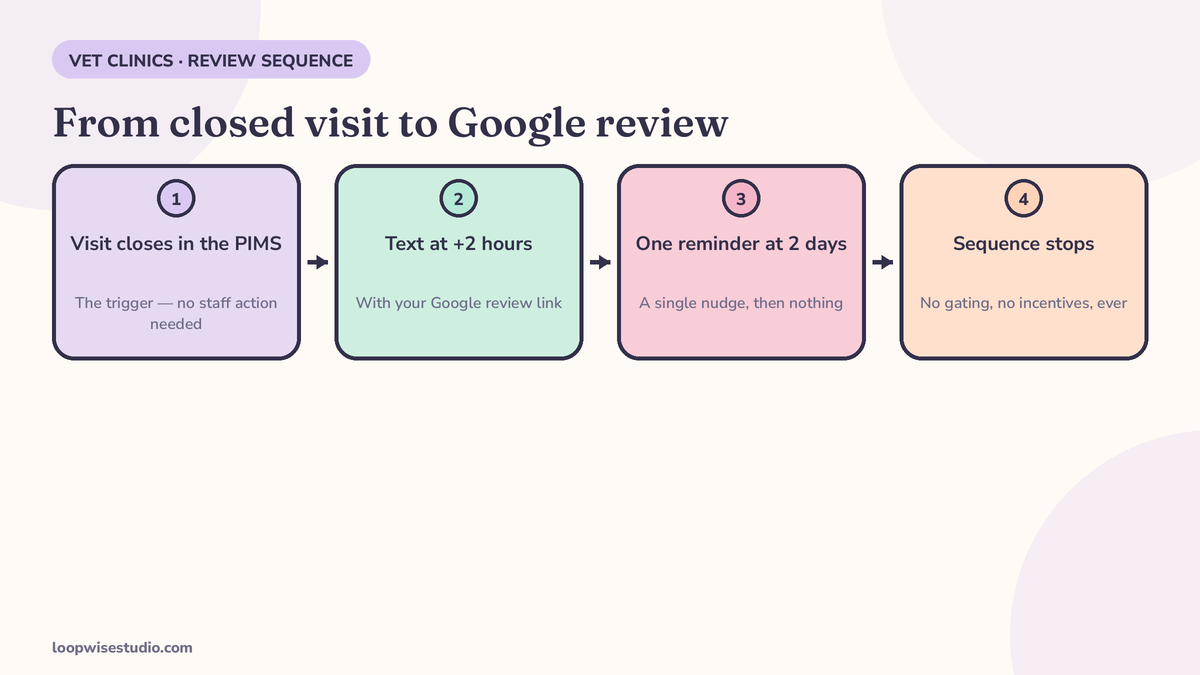
Automatic review requests work like this: when a visit closes in your practice system, a text goes out a couple of hours later with your Google review link. Swell sends its request 2 hours after the appointment, one reminder 2 days later, then stops. Ask every client identically — no incentives, no filters.
That last sentence is where most vet clinics’ review setups quietly go wrong, and this page will show you the honest version in full: the sequence with copy-ready texts, the timing by visit type, the visits that must never trigger a request, and the rules Google actually enforces.
The sequence, step by step
- The visit closes. Your PIMS marks the appointment complete. That event — not a staff member remembering — is the trigger. If a human has to remember to send the text, the system sends it to the clients they liked best and nobody else, which is a policy problem as well as a consistency problem (more on that below).
- Two hours later, the text goes out. The visit is fresh, the pet is home, and the relief or gratitude is still real. Swell publishes exactly this cadence for its clinic groups: request at +2 hours by text, one smart reminder at +2 days.
- One reminder, then stop. A single nudge catches the “meant to, got distracted” majority. A third message is nagging, and nagging pet owners by text buys you opt-outs, not reviews.
- Replies are answered by a named human. Automation sends the ask; people handle what comes back.
The copy — copy, paste, adjust the brackets
The ask (2 hours after the visit):
Hi [Name], thanks for bringing [Pet] in today. If you’ve got a minute, we’d love an honest review of your visit — it helps other local pet owners find us: [Google review link] — Team [Clinic Name]
The one reminder (2 days later, only if no review yet):
Hi [Name], quick nudge from [Clinic Name] — if [Pet]’s visit went well (or didn’t), your honest review helps us and other owners: [Google review link]. No worries if not!
Note the wording doing quiet work in both: honest review, of your visit. No star rating is named. No outcome is requested. The same text goes to every eligible client, word for word.
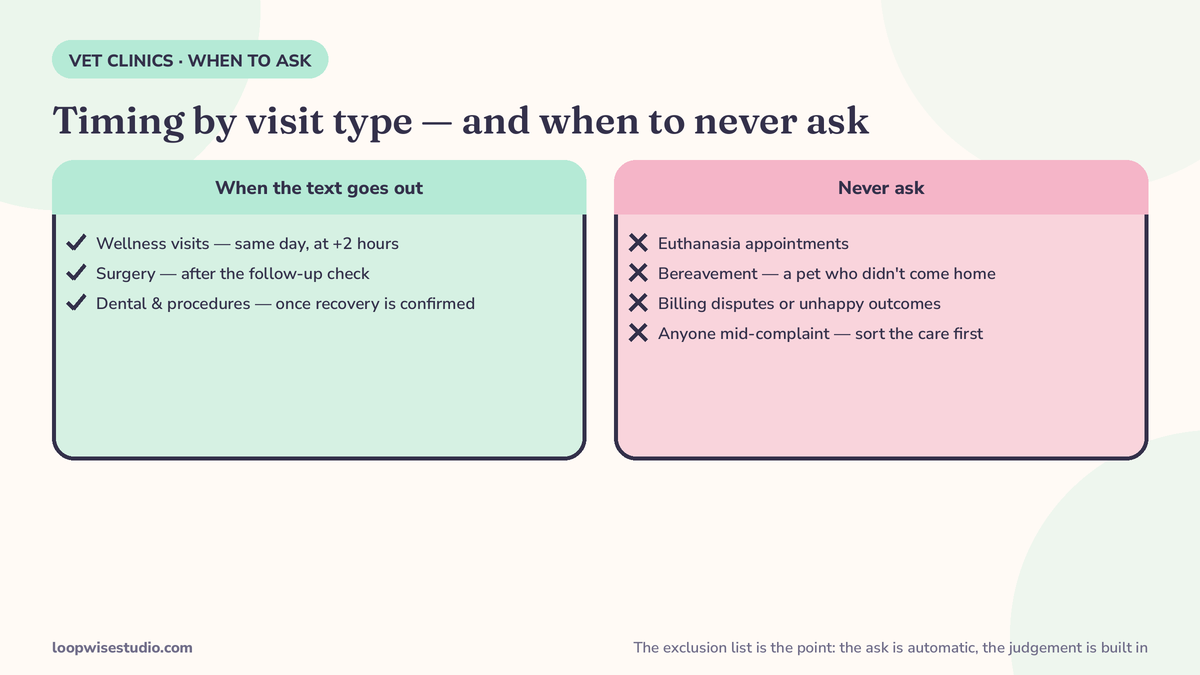
When to ask: timing by visit type
| Visit type | Send the ask | Why |
|---|---|---|
| Wellness / vaccine visit | Same day, ~2 hours after | Routine, relief is mild but fresh; the cadence Swell publishes fits as-is |
| Dental procedure | Next day | The pet is home and eating again; owners judge the visit by the morning after |
| Surgery follow-up | After the scheduled post-op check, not the surgery day | The story isn’t finished on day one — ask when the outcome is known and the bandage is off |
| New client first visit | Same day, ~2 hours after | First impressions are your highest-converting review moment; don’t let it cool |
| Sick visit with ongoing treatment | After the recheck confirms improvement | Asking mid-treatment, before anyone knows if it worked, helps no one |
The pattern: ask at the moment the visit’s story has an ending. Which leads directly to the list nobody else in this space publishes.
When to never ask: the exclusion list
Build these into the automation as hard exclusions, not judgement calls:
- Euthanasia and end-of-life visits. Never. Not softened, not delayed — never. A review request after a goodbye is the single most reputation-destroying text a clinic can send.
- A pet who died under care or was referred out in critical condition. The family’s story is grief, not feedback.
- Billing disputes. If the invoice is contested, the request waits until the dispute is resolved — and usually just doesn’t go.
- Complaints already in progress. If the client has raised a concern, a human handles it. An automated ask landing mid-complaint reads as either tone-deaf or manipulative.
- Emergency trauma with a bad outcome. Even if your team did everything right.
Every other completed visit gets the ask. That is the deal: an exclusion list for genuine harm, and complete even-handedness everywhere else. It is the same discipline behind getting more Google reviews for a dental practice automatically — the rules don’t change because the patients have fur.
The rules Google actually enforces — and what ranking advice gets wrong
Google’s review policies are not fine print; they decide whether your reviews stay up and whether your profile gets restricted. Three tactics visible in popular vet-marketing advice break them:
1. Asking for a specific rating. One widely shared vet-marketing guide’s recommended automated message asks clients to leave “a five star review of the service you received with us.” Soliciting a positive review is against Google’s policy on fake engagement. The compliant ask invites an honest review and names no rating.
2. Routing unhappy clients away from Google. A major reputation platform markets that it “routes private complaints to the right manager before they hit Google.” Private feedback is fine — as an extra channel offered to everyone. As a filter that decides who receives the Google link, it is review gating, and gating is prohibited. Every client gets the same direct link; what they write is their business.
3. Asking only when it went well. Some guides suggest asking after “a particularly positive visit,” or training reception to segue in only when they sense a happy client. That is selective solicitation — gating performed by a human instead of a filter. Ask after every eligible visit, with the same words, and let the ratings land where they land.
And the standing rule that sits under all three: never offer anything in exchange for a review — no discount, no gift, no entry into a draw, no free add-on. Not in the text, not at the desk, not on a poster. An incentive contaminates every review it touches, including the honest ones.
The good news hidden in all this strictness: the compliant system is also the one that works in volume. Ask everyone, ask promptly, ask once — and let the law of large numbers do what filters pretend to do. Clinics that want a second channel can run the same ask over WhatsApp where clients prefer it, as covered in how clinics get Google reviews on WhatsApp.
If you’d like your clinic’s current review setup checked against these rules, get a free audit — we’ll look at what your texts actually say, not what you meant them to say.
Replying: templates that protect confidentiality
Reviews are public and permanent, and a vet clinic replying to one is describing someone’s pet in front of the whole internet. Two templates, one rule: never confirm or deny any treatment detail in public.
Positive review:
Thank you, [Name] — we’re glad [Pet] is doing well. It’s a privilege to look after [him/her]. — Team [Clinic Name]
Warm, brief, no clinical specifics. (Only use the pet’s name if the reviewer used it first.)
Negative review:
[Name], we’re sorry your visit didn’t meet expectations — that’s never what we want for any pet or owner. We can’t discuss individual cases publicly, but we’d genuinely like to understand what happened. Please call us on [number] and ask for [practice manager]. — Team [Clinic Name]
Acknowledge, take it offline, name a human. Never argue the facts, never hint at the diagnosis, never explain what “really” happened — the reply is read by the next hundred owners deciding whether to trust you, and discretion is the loudest signal in it.
Setting it up on the systems you already run
The mechanics are deliberately boring — that is what makes them reliable:
- Get your direct review link. In Google Business Profile, the “ask for reviews” option gives you a short link that opens the review form directly. One link, no landing page, nothing in between — an intermediate page that asks “how was your visit?” before showing it is a filter, and filters are the thing you’re avoiding.
- Connect the trigger. Your PIMS appointment status — completed — is the event. Whether your setup sends the text from the PIMS itself, an integration, or a lightweight automation on top, the rule is identical: visit closes → wait 2 hours → check the exclusion list → send.
- Load the exclusion list as data, not memory. Appointment types for end-of-life care, and client records flagged for disputes or bereavement, must suppress the send automatically. If suppression depends on a receptionist remembering Mrs. Alvarez’s circumstances during a busy checkout, it will fail exactly when it matters most.
- Cap the frequency per client. A client with three pets in for boosters in one week gets one ask, not three. One request per client per visit period, one reminder, then silence until the next qualifying visit — and if they post a review, the sequence ends immediately.
- Route replies to a named inbox. The texts are two-way. Questions and unhappy replies land with a human the same day, in the open — a complaint answered well in private conversation is service recovery; the same complaint intercepted to keep it off Google is gating. The difference is whether everyone still got the link. Everyone did.
What a normal month looks like
There is no honest universal benchmark for how many reviews a clinic “should” get from this — the platforms’ numbers are their own marketing (Swell’s figures are covered below). What you can expect mechanically: most completed routine visits generate a request; a fraction of clients tap through; a smaller fraction write something. The compounding is in the asking, not the conversion rate: a clinic that asks every client, every week, accumulates reviews at a pace a clinic relying on memory and good moods never matches — because memory only asks the clients who already seemed delighted, which is both fewer reviews and a policy breach.
Two failure patterns to watch in the first month. If requests sent is far below visits completed, the trigger or exclusions are misfiring — check the data before blaming clients. And if reviews arrive but replies to them lag, fix the rota: an unanswered negative review sitting at the top of your profile is the one part of this system the whole town can see.
Why text, and not email or a card on the counter
| Channel | When it’s seen | The honest problem |
|---|---|---|
| Text after the visit | Within the hour, while the visit is still the day’s story | Only works if your client mobile numbers are current — a data tidy-up worth doing once |
| Email after the visit | Hours to days later, if opened at all | Arrives after the emotion has cooled and competes with a full inbox |
| Thank-you card / counter sign | At the desk, in the moment | Asks in person, which slides into selective asking — staff naturally offer it to the clients who seemed happy, and that is gating by hand |
| Link on receipts and discharge notes | Whenever paperwork is read, if ever | Passive and untracked: you never learn requests sent, so you can’t measure or fix the flow |
The discharge-paperwork link is worth keeping as a backup — ezyVet’s guide lists receipts and regular communications as sensible places for the short link. But the system’s engine is the timed text, because timing and even-handedness are the two things manual channels can’t guarantee. A card appears when a staff member remembers; a trigger fires for the 4:40pm client on the worst Friday of the year exactly as it does for the easy Tuesday one.
What to measure — honestly
Resist the vendor numbers. Swell reports its groups see 5x more reviews and a 4.92 average rating; those are a platform’s marketing figures for multi-location groups, not a promise for your clinic.
Measure your own two numbers in Google Business Profile: requests sent vs reviews posted (your real response rate), and rating trend over rolling 90 days. The first tells you if the system is running; the second tells you if the clinic is improving. Review count grows as a side effect of a diary that runs on time — which is why this system sits downstream of basics like missed call text back and reliable reminders.
Frequently asked questions
Is it legal — and allowed by Google — to text clients a review request?
Yes, provided you have a proper basis to text the client (they’re your client and haven’t opted out) and the request itself complies with Google’s rules: it must go to everyone equally, name no rating, offer nothing in return, and link straight to the review page with no satisfaction filter in between.
How soon after the visit should the text go out?
About 2 hours after the visit closes works well for routine appointments — that’s the cadence Swell publishes for its clinic groups. For dentals, next day. For surgery, after the post-op check. The moment the visit’s story has an ending is the moment to ask.
Can we send the request only to clients we know are happy?
No. That’s selective solicitation — gating done by hand — and it violates Google’s policy just as a software filter does. Ask every client with the same neutral wording, with narrow exclusions only for genuine harm: end-of-life visits, bereavement, disputes and complaints in progress.
Can we offer a small thank-you, like 10% off their next visit?
No. Any incentive — discounts, gifts, prize entries — in exchange for a review breaches Google’s policy and can get reviews removed. The only legitimate reward for a review is a thank-you in the reply.
What if we get a negative review from the automated ask?
Reply promptly with the offline template: acknowledge, don’t discuss the case publicly, name a person to call. An occasional honest negative among genuine reviews does less damage than a profile that smells filtered — and the even-handed ask is what produces the steady volume that puts it in proportion.
Does this work for a single independent clinic, or only groups?
The platforms market to groups, but the mechanics are simpler at one clinic: one PIMS trigger, one text, one reminder, one exclusion list. The setup work is in the trigger and the exclusions, not scale — the same build applies to UK practices on WhatsApp in WhatsApp reminders and booking for UK veterinary practices.
The short version
Trigger the ask off the visit closing, send it by text two hours later with one reminder at two days, and stop. Same neutral words to every client, a hard never-ask list for the visits that deserve silence, and no incentives or filters — ever.
Want the sequence built onto your clinic’s existing setup? get a free audit and we’ll check your trigger, your wording and your exclusions against the rules.