AI Receptionist vs Missed Call Text Back: Dental
AI receptionist vs missed call text back for dental practices: two different leaks, a decision rule based on your call pattern, and why most practices start with text.
Missed call text back and an AI receptionist fix different leaks: text back recovers a caller after the call has already been missed, while an AI receptionist answers live so the call is never missed in the first place. For most dental practices the right order is text back first — it is cheaper, can be live the same week, and catches the after-hours and overflow calls your front desk can’t — then voice AI only if your call pattern still justifies it.
That is, in fairness, roughly what the best page on this search result says too. Pinnacle Ai’s exact-match comparison lands on “you need both, text-back first.” Where this page differs is the evidence. The statistics on this search result are, without exception, vendor numbers with no source behind them — so this page will not borrow any of them. Instead you get a decision rule you can run on your own phone report, and costings built from published prices.
This comparison sits inside the wider platform question covered by the best booking software for a small aesthetic clinic owner-operator — but the phone choice comes first, because it decides what your booking software has to catch.
The two leaks are different, and the tools are not rivals
Practices talk about “missed calls” as one problem. It is two.
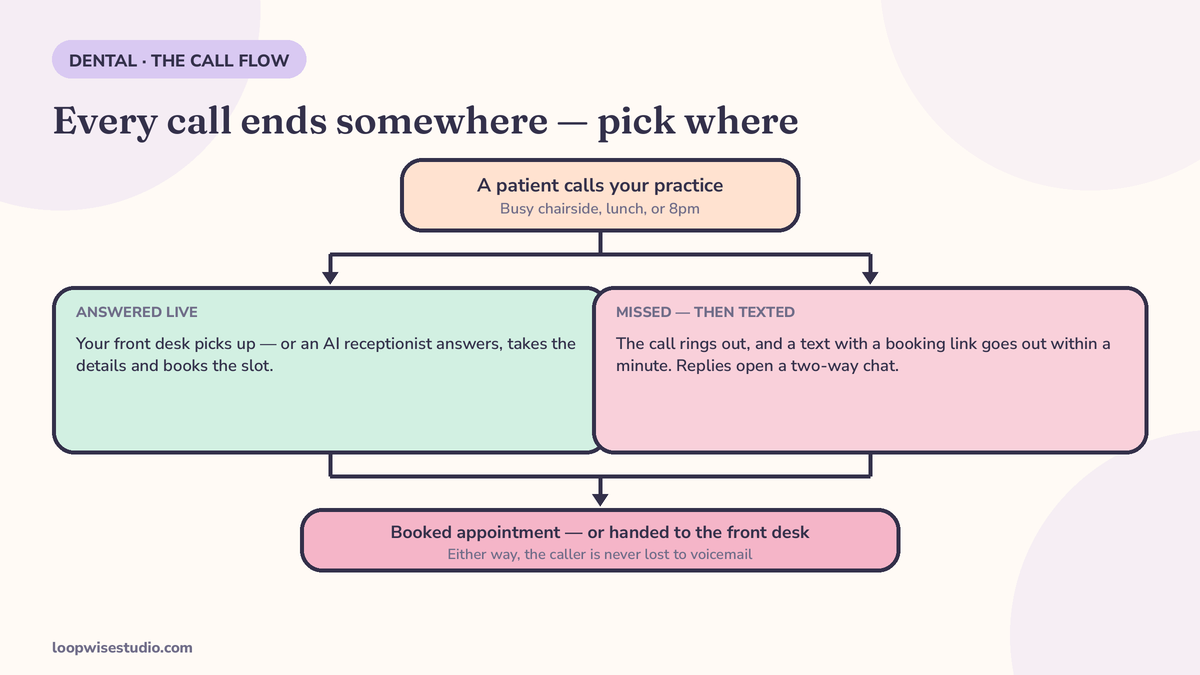
Leak one: the call nobody answered. Your front desk is checking a patient out, the other line is lit, or it is 7 p.m. and the practice is dark. The phone rings out. The caller hangs up and, in most cases, does not leave a message — they call the next practice on the list. Missed call text back exists for this leak. It does nothing until the call is already lost, then it moves fast.
Leak two: the call answered badly, or too slowly to help. A caller gets through but waits, gets a rushed answer, or reaches a voicemail box during lunch that nobody checks until three. An AI receptionist exists for this leak: it answers live, on the first ring, at any hour.
Once you see two leaks, the “versus” framing dissolves. Text back is a safety net. Voice AI is a goalkeeper. Asking which is better is like asking whether a net is better than a keeper — the answer depends on how the goals are going in.
What missed call text back does, what it costs, and where it stops
The flow is short enough to write on a sticky note:
- A call to your practice number goes unanswered.
- Within about a minute, the caller gets a text from that same number — the practice’s real number, not a shortcode they don’t recognise.
- The text carries your booking link and a straight offer to reply here instead.
- The patient books a real slot, or replies, and your front desk picks up the thread in one shared inbox.
On timing, the vendors agree even though their statistics don’t: Twig’s dental guide says the text should fire within 30 seconds; mConsent’s practice guide and NexaFlow’s say within 60 seconds. Treat those as what they are — vendor practice recommendations, not research — but the logic needs no study: the text has to land while the caller still has your name on their screen.
Cost shape. Text back is sold as a system, not by the minute. There is no meter running while a worried patient types slowly. That is the entire cost argument: your busiest, worst week for missed calls costs the same as your quietest.
Where it stops working. It cannot talk a nervous patient through a cracked tooth at midnight beyond getting them booked or escalated. It cannot answer a complex insurance question live. And it does nothing for the caller who did get through and had a poor experience. Those are leak-two problems.
This is the same mechanism as the standard missed call text back for dental practices — the question in this article is only whether you also need a voice in front of it.
What an AI receptionist does, what it costs, and where it stops
An AI receptionist answers the call itself, in a generated voice, using your practice’s name. It can typically greet, ask what the patient needs, offer times from a connected diary, book, and send details onward.
Cost shape. Voice AI is priced per minute, per call, or in monthly tiers — the clinic comparison prices this out in full in AI receptionist vs human receptionist: the clinic cost comparison, and the shape is consistent: entry tiers from around $99 a month, per-minute plans where your call volume sets the final bill. Price it at your minutes in a busy month, never at the starter tier.
Where it stops working. Three places, and only one is about the technology:
- Who the patient thinks they’re talking to. A text back is visibly a text. A voice AI answers as your practice. NexaFlow’s own dental guide puts the rule plainly: an AI should not pretend to be human. If your patients would feel misled hearing a generated voice use your practice’s name, that is not a settings problem — it is a reason to lead with text.
- The diary problem. The voice can only book what it can see. If it is not connected to your real diary, it takes messages with better manners — at voice prices.
- Compliance scope. Pinnacle’s comparison is unusually straight here: it states its own platform does not claim HIPAA compliance or a BAA, and it covers TCPA consent for texting patients. Copy that honesty into your own buying: ask any vendor, voice or text, what they claim, what they sign, and keep patient texts to scheduling and confirmations.
A note on the statistics you will find on other pages
You will read that dental practices miss 25% to 40% of calls, that text back converts 35% to 45% of them, that voicemail converts at about 12%, and that a new patient is worth $3,000 to $5,000. Those specific figures come from Twig’s solution page. They are that vendor’s own numbers, published with no external source, and its worked example — a quarter of a million dollars a year in lost lifetime value — is arithmetic built on those same unsourced inputs.
Other pages add their own: one vendor profile puts a $850 value on each unanswered new patient and a 35% missed-call rate, again with no methodology. Another cites “a 2025 study” for the claim that 62% of callers won’t try a second time — a study it does not name.
None of this means the underlying problem is invented. Your front desk does miss calls. It means the size of your problem is on your phone bill, not on a vendor’s blog. So here is the calculation, done the way it should be done — with your numbers.
The copy-paste asset: the decision worksheet, with one labelled example
Your monthly inbound calls (from your phone report):        ________
Share missed or sent to voicemail (same report):             ________
= Missed calls per month:                                    ________
Share of callers who are new patients (front desk's call):   ________
Your average first-year value of a new patient
  (from YOUR records — not a blog):                          ________
Share of texted callers you'd expect to book
  (pick a cautious figure and write it down):                ________
= Rough monthly value at stake:                              ________
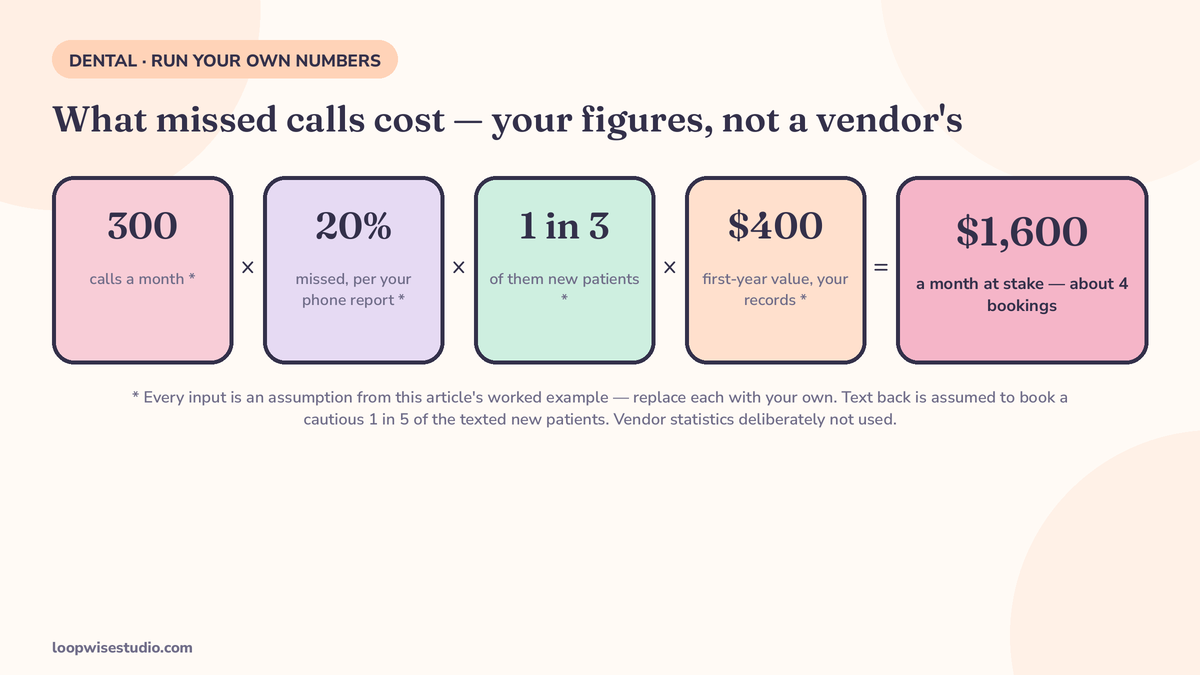
Worked example, every assumption labelled: a practice takes 300 calls a month (assumption), misses 20% of them on its own report (assumption), so 60 calls. If a third are new patients (assumption) at a $400 first-year value from that practice’s own records (assumption), and text back books a cautious 1 in 5 of the texted new patients (assumption), that is about 4 bookings and $1,600 a month at stake. Change any input and the answer changes — which is exactly why vendor versions, with their inputs hidden, are worthless. Run yours.
The decision rule: which one first, given your call pattern
Forget features. Answer four questions from last month’s phone report and your diary:
| Your pattern | Start with | Why |
|---|---|---|
| Missed calls cluster at lunch, check-out peaks, and after hours | Text back | The desk is fine; the leak is timing. A text catches every one of these callers. |
| Low total call volume, most patients book online already | Text back, maybe only that | There is not enough live-call work to justify a voice subscription and its per-minute maths. |
| High call volume all day, front desk losing chairside time to the phone | Voice AI trial, with text back underneath | Live answering is the leak now. Keep text back for the calls even the AI or the desk still misses. |
| A large share of calls are new patients comparing practices | Text back first, voice second | Speed of response wins the comparison shoppers; the text lands while they are still looking at your name. Voice can follow if volume proves out. |
| Patients are mostly older and phone-first, and dislike messaging | Voice AI, carefully tested | Channel fit beats price. Test the voice on your own ears, with your own treatment names, before a patient hears it. |
Notice that text back appears in every row. That is not bias — it is the shape of the tool. It is the cheaper, faster, lower-risk layer, and it stays useful even under a voice system, because no answering setup catches 100% of calls. Even CloudTalk’s dental AI roundup profiles a text-first dental product — instant missed-call text from the practice’s own number, two-way text conversation, books the appointment — and notes plainly that it does not answer live calls. The category exists. The roundups just bury it under the voices.
Still torn after the worksheet? get a free audit — send us the call pattern, not a form full of guesses, and we will tell you which leak is bigger at your practice.
If you end up with both: the one-inbox rule
The failure mode of running both tools badly is a patient experience nobody designed: the AI books them by voice, a text system confirms from a different number, a reminder arrives from a third, and your front desk can see none of it.
So one rule decides whether a two-tool setup works: every patient message lands in one inbox, on the practice’s own number, next to the booking record. If a vendor cannot show you that screen, you are not buying a system — you are buying a second and third subscription and a front desk that has to reconcile them.
This is the layer Loopwise builds: the text thread, the booking link and the reminders live together, and voice — if your call pattern ever justifies it — gets added to a diary and an inbox that already work, instead of replacing them. The salon version of the same architecture is set out in the text-first AI receptionist alternative for salons and spas.
The bottom line
Text back recovers the call you already lost. Voice AI tries to stop you losing it. Most dental practices should install the recovery first — it is cheaper, faster to live, honest about what it is, and it keeps working underneath any voice system you add later.
Run the worksheet. If your missed calls are worth real money on your own cautious assumptions, fix leak one this week. Then look at your live-call pattern with clear eyes and decide whether a voice earns its minutes.
If you want the worksheet run with you, on your actual phone report, get a free audit — we will do the arithmetic in the open and tell you if text back alone is enough.
FAQs
Which is cheaper for a dental practice, text back or an AI receptionist?
Text back, in almost every realistic case. It is priced as a system with no per-minute meter, while voice AI is priced per minute, per call, or in tiers that rise with volume — entry points sit around $99 a month, before a busy month’s minutes. The exact gap depends on your call volume, which is why the worksheet in this article uses your phone report rather than a headline price.
Can text back really book, or does it just start a chat?
Done properly, it books: the text carries your real booking link, tied to your live diary, so the patient picks a slot and gets a confirmation — no chat required. The chat is the fallback for patients whose problem doesn’t fit the link. If a provider’s text back only “starts a conversation” with no diary behind it, that is a messaging tool, not a booking system.
What do patients think of an AI voice answering as the practice?
It varies, and you should test it rather than guess. The honest framing: a text is visibly a message, while a voice AI answers in your practice’s name and voice-like presence. Industry guidance aimed at practices — NexaFlow’s dental guide is one example — says an AI should not pretend to be human. If your patients would feel misled, lead with text, whatever the cost table says.
Do we need consent before texting patients?
Yes — plan on it. TCPA consent applies to texting patients, and the responsible vendors say so in plain terms; Pinnacle’s comparison covers it directly. Keep texts to scheduling, confirmations and appointment-related replies, use the practice’s real number, and honour opt-outs. For the clinical side, ask any vendor claiming HIPAA coverage what exactly they sign — at least one major comparison vendor states openly that it does not claim HIPAA compliance or a BAA.
What if our front desk is already good?
Then your leak is almost certainly timing, not quality: lunch cover, check-out peaks, evenings, and the second line ringing while the first is live. That is the cheapest leak to fix, and text back is the fix aimed at it. A good front desk plus text back beats a voice robot replacing a good front desk — and your team keeps one inbox instead of refereeing two systems.
How fast can each option go live?
Text back is the faster install — the flow is a number, a text, a booking link and an inbox, and it can be live the same week. A voice AI needs diary integration, script and name testing, and a proper listen-through with your own treatment names before a patient hears it; any vendor rushing that step is telling you how much they value your patients’ first impression.