Automatic Google Review Requests for Plumbing Companies by Text
Automatic Google review requests for plumbing companies by text: when to ask by job type, the exact sequence, the Jobber trigger, and the Google rules that keep it safe.

An automatic Google review request for a plumbing company is a text that fires when a job is marked complete in your field service software. It carries your direct Google review link, goes to every completed job with the same wording, and stops after one follow-up. No incentives, no asking only the happy customers.
Everything below is the plumbing-specific version of that system: when to send it by job type, the exact sequence, copy-paste texts, the trigger setup in Jobber, Housecall Pro and ServiceTitan, and the Google rules applied to habits plumbers actually have.
Reviews decide who gets the 2 a.m. call
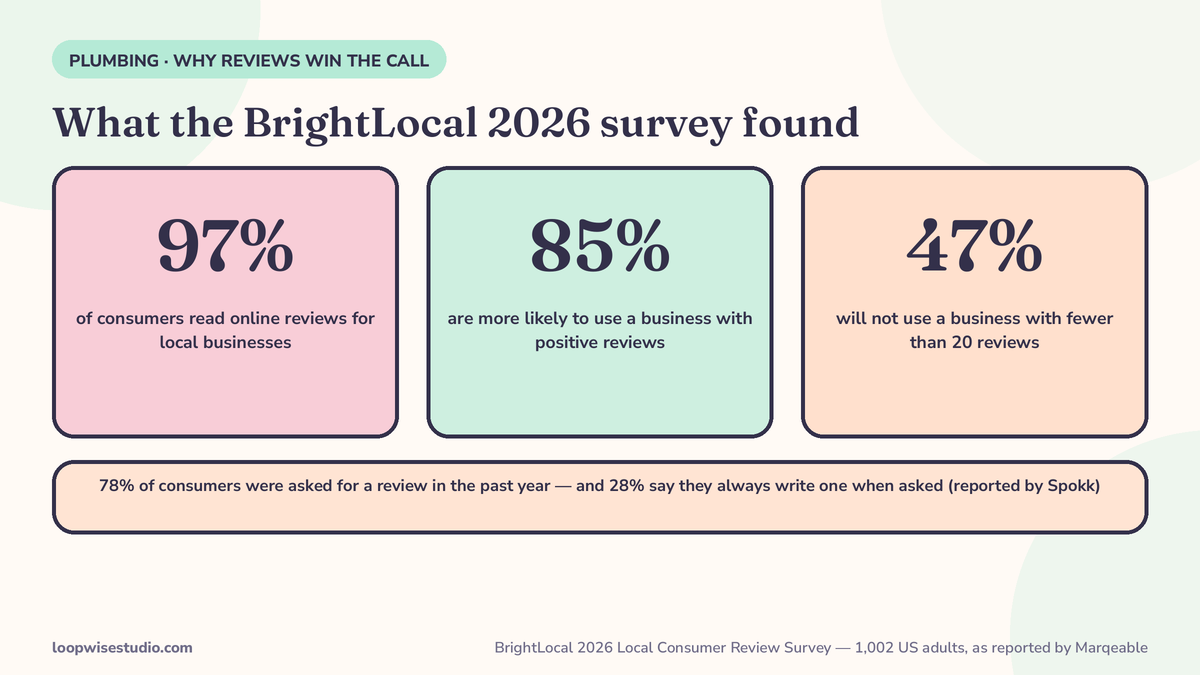
When a pipe bursts at night, the homeowner searches “emergency plumber near me” and taps one of the first results with a rating they trust. BrightLocal’s 2026 Local Consumer Review Survey (1,002 US adults, reported by Marqeable) found 97% of consumers read online reviews for local businesses, 85% are more likely to use a business with positive reviews, and 47% will not use a business with fewer than 20 reviews. A second BrightLocal figure, reported by Spokk, adds the part owners underestimate: 78% of consumers were asked for a review in the past year, and 28% say they always write one when asked.
Your competitors are not out-reviewing you because their work is better. They are asking, automatically, after every job. You are asking when the tech remembers, which means after the jobs that felt good — and that gap in discipline is also a policy problem, covered below.
When to ask, by job type — one rule does not fit plumbing
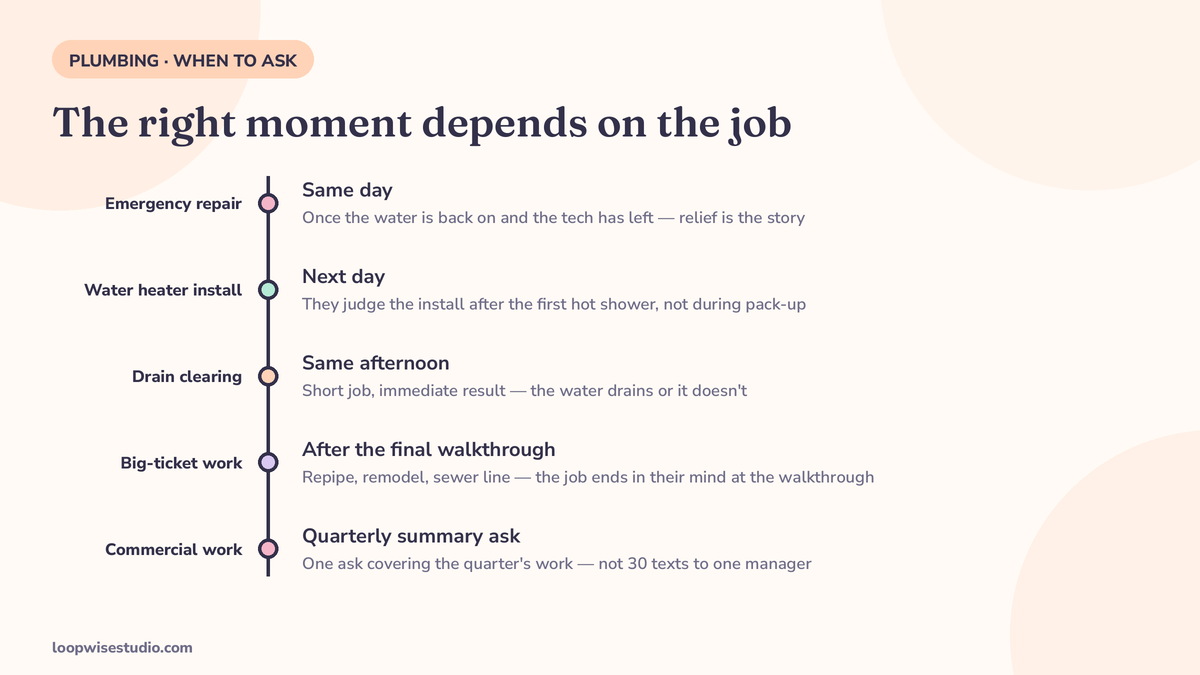
Most guides give you a single timing rule: within 2 hours, or within 24–48 hours. Plumbing jobs end in different emotional states, and the ask should land when the customer’s story about the job is finished.
| Job type | Send the text | Why that moment |
|---|---|---|
| Emergency repair (burst pipe, active leak, sewer backup) | Same day, once the water is back on and the tech has left | Relief is the story. Ask while they still feel rescued, not three days later when they’ve forgotten the panic |
| Water heater or major install | Next day | They judge the install after the first hot shower, not while your tech is packing up |
| Drain clearing / routine maintenance | Same afternoon | Short job, immediate result — the water drains or it doesn’t. Fresh is fine |
| Big-ticket work (repipe, remodel, sewer line) | After the final walkthrough | The job isn’t done in the customer’s mind until you’ve walked it with them and answered the last question |
| Commercial / property manager work | Quarterly summary ask, not per job | A manager with 30 units doesn’t want 30 texts. One ask covering the quarter’s work respects the relationship |
Two guardrails apply to every row: send at a reasonable hour (an 11 p.m. text about a 2 p.m. job helps nobody), and if the job ended in a dispute, a human handles it — the automated ask waits or doesn’t go.
The automatic sequence: trigger, text, one follow-up, stop
The system has four moving parts:
- Job closed. The tech marks the job complete in Jobber, Housecall Pro or ServiceTitan. That status change is the trigger — not a person remembering at the end of the week.
- Text goes out inside the job-type window from the table above, carrying your direct Google review link.
- One follow-up at 3–5 days, only if there’s no review and no reply. One. Marqeable’s automation flow caps it the same way: one text, then at most one email a few days later, then stop.
- Stop conditions are automatic. A review posted, a reply of any kind, or an opt-out ends the sequence for that customer.
That discipline matters for the same reason reducing front-desk calls with online booking matters: every manual step you remove is a step that stops depending on your busiest person’s memory.
Copy-paste texts for plumbing jobs
Emergency repair (same day):
Hi [Name], this is [Company] — glad we could get the water back on today. If you’ve got a minute, an honest review of the visit helps other homeowners find us: [Google review link]. Reply STOP to opt out.
Water heater install (next day):
Hi [Name], [Company] here — hope the hot water’s treating you well this morning. If the install went the way you expected, we’d appreciate a quick review: [Google review link]. Thanks for having us out.
Routine visit (same afternoon):
Thanks for choosing [Company], [Name]. Mind leaving us a short review of today’s visit? It takes about a minute: [Google review link]
The one follow-up (3–5 days later, no review yet):
Hi [Name], quick nudge from [Company] — if you meant to leave a review of your [job type] visit, here’s the link again: [Google review link]. No worries either way.
Read the wording closely. Every text asks for an honest review of the visit. None of them names a star rating, none of them conditions the ask on the customer being happy, and the same text goes to every customer whose job closed. That is deliberate, and the next sections explain why.
If your customers include homeowners who’d rather deal with you in writing than by phone, the review system pairs naturally with automatic review requests for HVAC companies by text if you run both trades — the mechanics are identical, only the job-type timing changes.
Setting the trigger in Jobber, Housecall Pro and ServiceTitan
You do not need new software. You need the job-closed event in the software you already run to fire the text.
Jobber (the setup most small plumbing shops run): Jobber’s job-completed status is your trigger. Connect it to your texting tool so closing a job queues the request inside the right window for that job type — emergency jobs same day, installs next morning. Jobber’s job types or tags are how you separate the two; tag the job when it’s booked, not when it closes. Set the follow-up as a second scheduled step at 3–5 days with a condition: skip if a review link click or any reply is recorded.
Housecall Pro: Same logic — the “finished” job event fires the first text. Housecall Pro shops usually already send post-job follow-ups manually; replace the manual habit with the same event so the ask no longer depends on the office remembering during dispatch chaos.
ServiceTitan: The completed booking/job status is the trigger. Larger shops should route replies into the same inbox the CSRs already watch, so a customer who answers the review text with a question gets a human, not silence.
Whichever platform: build the exclusion list into the automation, not into someone’s judgement. Open dispute, callback in progress, or a job flagged by the tech as “went badly, call them first” — those jobs get a phone call from a person, and the automated text never fires.
The rules, applied to plumbing habits
Google’s rules, as stated consistently across Marqeable, Spokk, HomeTrade AI and Socio AI’s guides: no incentives for reviews — no payment, discounts, or free goods or services tied to posting, editing or removing one. No selective solicitation — you cannot ask only some customers. No requesting specific content, including a staff member’s name. The FTC’s Consumer Review Rule, effective October 21, 2024, separately bans bought or fake reviews and incentives conditioned on sentiment, with civil penalties for knowing violations (via HomeTrade AI).
Now translate that into three habits plumbing companies actually have:
“Only ask after jobs that went well.” That is selective solicitation, even when it feels like common sense. GetMoreReviews’ own mistakes list makes the point from the other side: only asking after perfect jobs is listed as an error — ask after imperfect jobs too, and answer the criticism in public.
“Mention your tech by name.” Most plumbing shops actively encourage this. Google’s policy treats requesting specific content — a technician’s name included — as a violation (Spokk dates the staff-name clarification to an April 2026 policy update). Your text can thank the customer for having the company out. It cannot script what the review should say.
Gift cards and thank-you discounts tied to reviews. A gift card given to every customer as a thank-you is a business decision. A gift card offered for a review is an incentive, and it’s banned. Keep the two things completely separate — different message, different day, no link between them.
One more number for why this discipline pays: a GatherUp study of 23,000 locations, reported by Vendasta, found businesses that ask averaged 122 reviews per location versus 53 for those that did not ask. Asking everyone, automatically, is the whole advantage — which is why gating it away is both a policy risk and a waste.
Replying to the reviews plumbers actually get
Automation sends the ask. Humans write the replies — especially to these three, which every plumbing company eventually receives:
The price complaint (“$450 for 20 minutes of work”):
Thanks for the feedback, [Name]. You’re paying for the diagnosis, the stocked truck and a licensed tech at your door the same day — but we should have explained the price before starting, and we’re sorry that didn’t happen clearly. If you’d like us to walk through the invoice, call us at [number] and we’ll go line by line.
The emergency-fee complaint:
We hear you, [Name] — nobody budgets for a 2 a.m. burst pipe. Our after-hours rate covers the tech on call and the van ready to roll, and we quote it before we start. We’re sorry the night went the way it did, and we appreciate you calling us.
The mess complaint (“tracked mud through the house”):
That’s on us, [Name], and we’re sorry. Shoe covers and drop sheets are standard on every job — if that didn’t happen, we want to know which visit so we can fix it with the tech directly. Thank you for telling us.
Never argue about the facts in public, never offer anything in exchange for editing the review, and always move the detail offline. A calm reply to a 2-star review is read by every future customer deciding whether to trust you at 2 a.m. — which is exactly the mechanism behind getting more Google reviews for a dental practice automatically: the replies are part of the asset, not damage control.
Commercial work: the property-manager ask
GetMoreReviews is the only guide in this space that even mentions commercial reviews, and it never turns the idea into a system. If your shop services property managers, landlords or facility contracts, those reviews carry a different weight: one property manager’s review mentioning 40 units handled is a sales asset for every commercial bid you submit afterwards.
The mechanics differ from residential. Don’t fire a text per work order — a manager closing twelve tickets a month will mute you by the second week. Instead: one ask per quarter, timed just after a completed job at one of their properties, referencing the quarter’s work in general terms (“thanks for trusting us with your properties this spring”). Same rules — identical wording to every manager, no incentives, no name-the-tech requests. Residential jobs keep their per-job cadence; commercial relationships get the quarterly one. Configure both in the automation from day one, or the commercial side will quietly default to per-job and annoy exactly the customers worth the most.
What about email, QR codes and asking in person?
They’re supplements, not substitutes. An email follow-up at 3–4 days is Marqeable’s sanctioned second channel if the text went unanswered. A QR code on the invoice or the truck helps the customer who prefers to scan rather than tap a link. The tech mentioning the request at the door — “you’ll get a text from us later, it really does help” — lifts response because a human primed it. But the text is the only channel that is automatic, timed and identical for every job, which is why it carries the system. Everything else is a booster bolted onto it. If you already have a website taking bookings online, put the same review link there and on your Google profile, so every path a happy customer might take ends at the same review form.
How you’ll know it’s working
Track three numbers monthly: requests sent (should roughly equal completed jobs, minus exclusions), reviews published, and your review velocity versus the two competitors you actually lose calls to. If requests sent is far below completed jobs, the trigger or the exclusion list is broken. If requests are high but reviews are low, the timing windows are wrong for your job mix. The system is boring on purpose — the only excitement should be the count going up.
What done-for-you looks like
Loopwise Studio builds this system on the tools you already run: the job-type timing table configured in your Jobber, Housecall Pro or ServiceTitan account, the text sequence written for your job types, the exclusion list set up as hard rules, and reply monitoring so nothing sits unanswered. Your techs change nothing — they close jobs the way they already do, and the ask happens on its own. If missed calls are the bigger leak, the same thinking extends to missed call text back for plumbers, which catches the customer before they ever become a job.
Want to know how many reviews your completed jobs should already be producing? Get a free audit — we’ll count your monthly job volume, show you the gap against shops that ask automatically, and map exactly what we’d set up.
Frequently asked questions
How soon after a plumbing job should the review text go out?
It depends on the job. Emergency repairs: same day, once the water is back on. Installs like water heaters: next day, after the customer has lived with the result. Routine work: same afternoon. Big-ticket jobs: after the final walkthrough. The research consensus (Marqeable) is inside 24–48 hours as an outer bound — but a single rule wastes the emotional timing that makes each job type different.
Is it legal to offer a discount or gift card for a Google review?
No. Google bans incentives — payment, discounts, free goods or services — tied to posting, editing or removing a review, and the FTC’s Consumer Review Rule (effective October 21, 2024) bans incentives conditioned on sentiment. You can thank customers generally; you cannot connect the thank-you to the review.
Can I ask customers to mention their technician by name?
No. Google treats requesting specific content — including a staff member’s name — as a policy violation. Ask for an honest review of the visit and let customers write what they want.
What if the job went badly?
The customer still gets the same ask as everyone else — asking only after good jobs is selective solicitation. Jobs with an open dispute or an unresolved callback are the exception: a person calls first, and the automated text doesn’t fire until it’s settled. Then reply to whatever review comes in, calmly and in public.
How many follow-ups should I send?
One. Marqeable’s published flow is one text plus at most one follow-up message; Spokk’s guidance is one reminder. A Journal of Marketing study reported by Vendasta found a delayed reminder actually outperforms an immediate nag — which supports one patient follow-up at 3–5 days, then stop.
Does this work with Jobber?
Yes. Jobber’s job-completed status is the trigger: closing the job queues the text inside the window for that job type, with a second step at 3–5 days that skips automatically if the customer replied or reviewed. The same pattern works in Housecall Pro (finished job event) and ServiceTitan (completed booking status).