How to Add Online Booking to a Med Spa Website on Boulevard
Step-by-step: how to add online booking to a med spa website on Boulevard — service settings, the booking snippet, Book Now buttons, Google and Instagram booking.
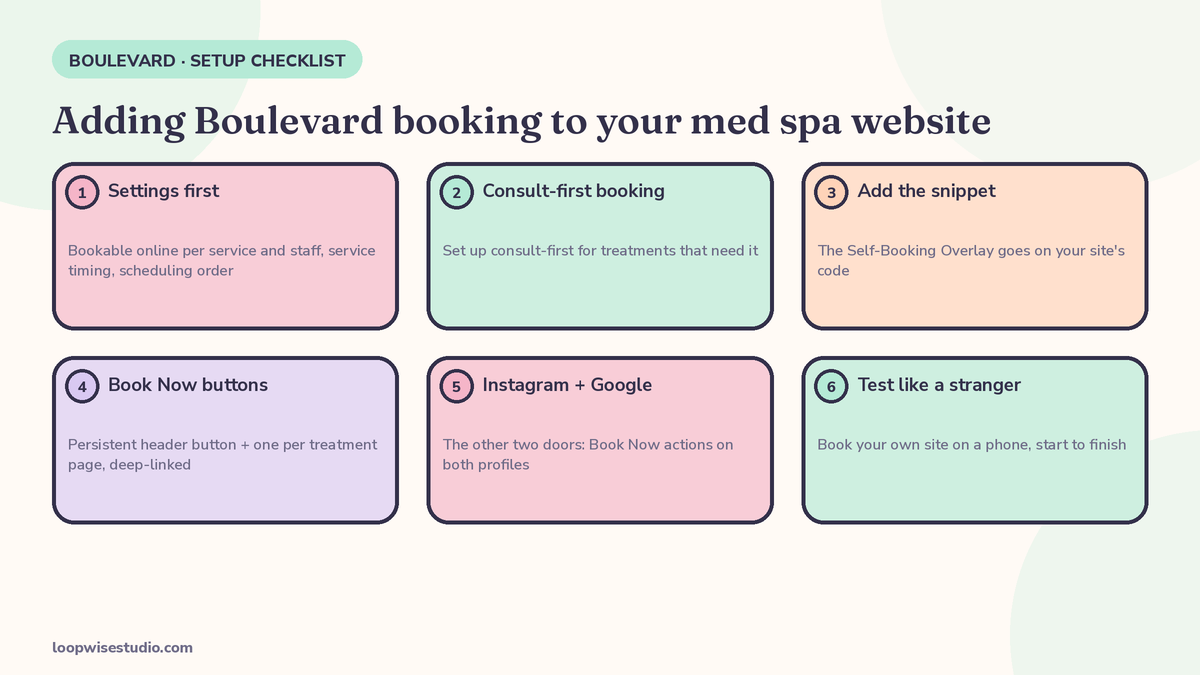
To add online booking to a med spa website on Boulevard, the work happens in this order: first set each service and staff member as bookable (or not) inside Boulevard and get the service timings right; then take the unique booking code snippet Boulevard provides for your location and add it to your website, which loads Boulevard’s Self-Booking Overlay on top of your pages; then put a persistent Book Now button in your header and a booking button on every treatment page; finally connect the same booking to Instagram and your Google profile, and test-book the whole thing on your phone like a stranger. Most guides start with the snippet. Start with the settings — the snippet is the easy 10%, and the settings decide whether the overlay helps you or embarrasses you.
Boulevard’s own blog puts the appeal plainly: the online booking widget embeds directly into WordPress, Squarespace, Wix and custom-built websites, and when a client clicks Book Now, the booking overlay glides over the page instead of redirecting them to a separate scheduling platform. That is the right experience. This tutorial gets you there properly.
Before you touch your website: the Boulevard settings that decide everything
Everything the overlay shows a client — which services appear, who they can book with, how long each appointment runs, which slots look free — is pulled from settings inside Boulevard. Configure these first, in this order:
- Bookable online, per service. In each service’s settings you can choose whether that service can be booked online. Off means hidden from self-booking; your team can still add it manually.
- Bookable online, per staff member. The same choice exists in individual staff settings. New hires and locums are the usual accidents here — someone bookable who should not be, or your best injector invisible online.
- Service timing. Boulevard’s service timing options cover duration, processing time, finishing time and transition time. These four numbers build your day. A facial with a 15-minute processing window lets a provider start another client; a transition time of zero is how double-bookings and a frazzled front desk happen.
- Scheduling order. Boulevard lets you control the order services run in when several are booked together in the self-booking overlay — so a consult happens before the treatment, not after.
- Restricted availability. You can restrict which appointments are available in the overlay: protect Saturday mornings for regulars, hold back same-day slots for phone bookings, keep some capacity out of the public calendar entirely.
Check your work: before moving on, open your service list and read it as a client would. Everything bookable online is now, effectively, a public promise. If a service should never be someone’s first appointment, it should not be sitting in the overlay waiting to be booked cold.
Step 1: Set up consult-first booking
Most med spas should not open the whole treatment menu to first-time online booking. The setup experienced med spa website designers describe is consultation-first:
- Make the consultation the bookable entry point for new clients: skin consult, treatment planning session, whatever you call it.
- For treatments that need a consult first, uncheck Bookable online on the treatment itself. It disappears from the self-booking screen, while staff can still book it by hand after the consult.
- For treatments that are safe to book directly (maintenance facials, repeat treatments for existing clients), leave them bookable — and say on the treatment page who they are for.
- Pair the button with a deposit or card on file for the slots that hurt when they empty, and put your cancellation and no-show policy in plain words right beside the booking button on the page. The install steps never mention this. It is the difference between bookings and kept bookings.
While you are deciding what goes on each page, our checklist of what should be on a med spa website to get more bookings covers the full page-by-page list — prices, provider bios, proof, and the booking button placement rules used below.
Step 2: Get your booking snippet and add it to your site
With the settings done, the website part is genuinely simple:
- In Boulevard, get the unique code snippet provided for your location. Boulevard supplies this snippet so your booking setup carries over to your website without rebuilding it.
- Add the snippet to your site’s code — typically in the site-wide header or through your builder’s “custom code / embed” setting, so it loads on every page.
- The snippet powers the Self-Booking Overlay: clicking any Book Now button or link opens the booking flow on top of the current page. No redirect, no separate scheduling site, no “where did the website go?” moment for the client.
- Run one location? One snippet. Multiple locations? Treat each location’s snippet and settings as its own job — timings and staff differ by site, and so will the overlay.
Boulevard confirms the Self-Booking Overlay works with WordPress, Squarespace, Wix, Shopify and Weebly, as well as sites that use custom code. A note if your site is custom-built (for example, an Astro site like ours): “custom code” support means it will work, but placement and behaviour are yours to verify — load it, then test on a real phone before you announce anything. Step 5 below is not optional for custom sites.
Step 3: Put Book Now where it earns
Boulevard’s own design guidance is blunt about the two biggest conversion mistakes: making clients hunt for pricing and booking, and burying the button. Follow its advice, plus the pattern good med spa sites use:
| Placement | Why it matters |
|---|---|
| Persistent header button, every page | The client decides “now” on random pages — reviews, a blog post, the pricing page. The button has to be there when the decision happens |
| One button per treatment page, deep-linked to that service | A client reading about laser hair removal should book laser hair removal, not land on a generic service list and have to find it again |
| Pricing visible near the button | Boulevard’s blog names hidden pricing as a top conversion mistake. A price next to the button removes the “I will just message them instead” exit |
| Mobile first | The overlay gliding over your page only helps if the button is thumb-reachable and the page loads fast on a phone — heavy unoptimised images are the other mistake Boulevard’s post calls out |
Check your work: pick any treatment page on your phone. Count the taps from landing to a chosen time slot. If it is more than three, something on the page is working against you.
Step 4: Add the other two doors — Instagram and Google
Your website is not the only place clients start. Boulevard booking can meet them at the other two:
- Instagram Book Now. Boulevard’s integrations setup lives in the Dashboard under Manage Business → Apps & Integrations. Installing the Instagram app there lets your profile’s Book Now button launch the same self-booking overlay — no DM tennis, no “link in bio” detour.
- Reserve with Google. Boulevard announced in 2024 that med spas can connect their Google Business Profile directly with Boulevard, so a client goes from searching to booking in a single click. Set it up on the profile, then search your own spa on Google and confirm the booking path works.
Same diary, same services, three doors. None of this works if Step 0 was sloppy — all three surfaces display the Bookable online and timing settings you configured, which is why the order in this tutorial matters.
Step 5: Test like a stranger
Nobody else in the Boulevard help ecosystem gives you this checklist. Run it before you tell a single client that online booking is live:
- On your phone, with Wi-Fi off, open your site and book a real appointment end to end
- Confirm the confirmation message arrives and states the right treatment, provider, time and address
- Book two services together and check the order is sensible (consult first)
- Try to book a treatment you set to consult-first — you should not be able to
- Check the slots the overlay offers against your real diary: are restricted times actually restricted?
- Check a service with processing time: does the day shape look like the day you run?
- Cancel your test booking and confirm the slot frees up
- Click Book Now from Instagram and from your Google profile — same overlay, same services
- Ask one honest friend to book without your help and watch where they hesitate
In the first week after launch, glance daily at what the overlay sold: which services, which slots, any pattern of abandoned bookings you can spot. A booking system you never look at drifts — services change, staff change, and the overlay keeps promising last month’s menu.
Where DIY breaks down
Three honest walls, so you can recognise them when you hit one:
Add-ons and custom overlays. If you use a custom online booking overlay, Boulevard’s own support guidance recommends your team review the developer documentation for add-on services before setting up add-on functionality, to avoid disrupting the client booking experience. When the vendor is pointing you at developer docs, the task has quietly changed jobs — from owner work to developer work.
Judgement calls dressed as settings. Consult-first configuration, deposit rules, how much availability to restrict: none of these have defaults worth trusting, and each one moves real money. Getting them wrong in either direction costs you — full treatment booking with no screening on one side, a strangled booking flow on the other.
The widget is not the page. Boulevard’s own blog concedes that conversion depends on pricing transparency, a persistent booking button, mobile layout and image weight. A flawless overlay on a page with no prices and stock photos converts like the page, not the widget. If, after this tutorial, bookings still are not coming, the honest next question is whether the problem is the booking tool at all — or the website around it. And if you reach the point where the frustration is not the widget but what Boulevard itself cannot do around the booking — the conversation after someone books, the follow-up when a call is missed — that is the question we work through in our guide to finding a Boulevard alternative for med spas that need text back. Different problem, different fix; finish this tutorial first.
If the barrier is budget rather than steps, our breakdown of how much a website with online booking costs a clinic shows the market ranges for having the website side built for you, so you can judge any quote.
If you would rather have the whole setup — settings, snippet, buttons, testing — done for you, get a free audit and we will check your current Boulevard and website setup first, then tell you exactly what we would do and what it would cost.
FAQ
Does Boulevard’s booking widget work on my website builder?
Very likely, yes. Boulevard states its Self-Booking Overlay works with WordPress, Squarespace, Wix, Shopify and Weebly, and with sites that use custom code. The snippet loads the overlay on top of your pages, so clients book without leaving your site. On custom-built sites, budget an hour for testing — placement and load order are yours to verify.
Can I hide some treatments from online booking?
Yes, and for most med spas you should. In each service’s settings, the Bookable online toggle decides whether that service appears in self-booking. Uncheck it and the service is hidden from clients online while staff can still book it manually. It is the setting that makes consult-first booking possible: consultation bookable by anyone, treatments opened up after the consult.
Do I need a developer to add Boulevard booking to my website?
For a standard builder site and the standard overlay, no — adding the snippet is within reach of a careful owner. You are more likely to need a developer for custom overlay changes, add-on services on a custom overlay (Boulevard routes that work through developer documentation), or a custom-built website where the snippet’s behaviour needs checking. The configuration thinking — what is bookable, timings, deposits — is owner work regardless of who pastes the code.
Why is my overlay showing the wrong times or gaps?
Almost always the service timing settings: duration, processing time, finishing time and transition time combine to build the slots the overlay offers. A zero transition time creates back-to-back bookings with no breathing room; a long processing time can hide slots you expected to sell. Check the four timing values on the affected service first, then the staff member’s availability and any restricted-availability rules you set.
Can clients also book from Google and Instagram?
Yes. Through Reserve with Google, your Google Business Profile can connect directly to Boulevard so clients book from the search result. On Instagram, installing the integration from Boulevard’s Dashboard (Manage Business → Apps & Integrations) makes your profile’s Book Now button launch the same self-booking overlay. Both surfaces show the same services and settings you configured for the website.
What should I check in the first week after switching online booking on?
Three things: that real bookings are landing in the right diaries (spot-check a few against the confirmation messages), which services the overlay is actually selling (it may not be the ones you expected), and whether any clients are reporting confusion — ask at the front desk. Also confirm your restricted times held and your consult-first services stayed hidden. Ten minutes a day for one week catches nearly every setup mistake while it is still cheap.
Done is better than perfect
A working overlay with sensible settings, tested on a phone, beats another month of “we should really switch on online booking.” Work the steps in order — settings, consult-first, snippet, buttons, the other doors, the stranger test — and your website starts taking bookings the way it should.
Stuck on a step, or suspect the page around the widget is the real problem? Get a free audit and we will go through your site and your Boulevard setup with you, and tell you honestly what we would fix first.